
Twotrees 500W Air Cooled Cooling Kit For CNC

Prevent overheating with the Twotrees 500W air-cooled heat dissipation kit — compatible with TTC6050, TTCH40, and Twotrees trimmer CNC engraving machines. Essential for prolonged, stable performance.

Twotrees TWC6050/TTCH40 CNC Cooling Fan Kit – Air-Cooled Heat Dissipation System for CNC Engraving Machines, Trimmers, and Spindles
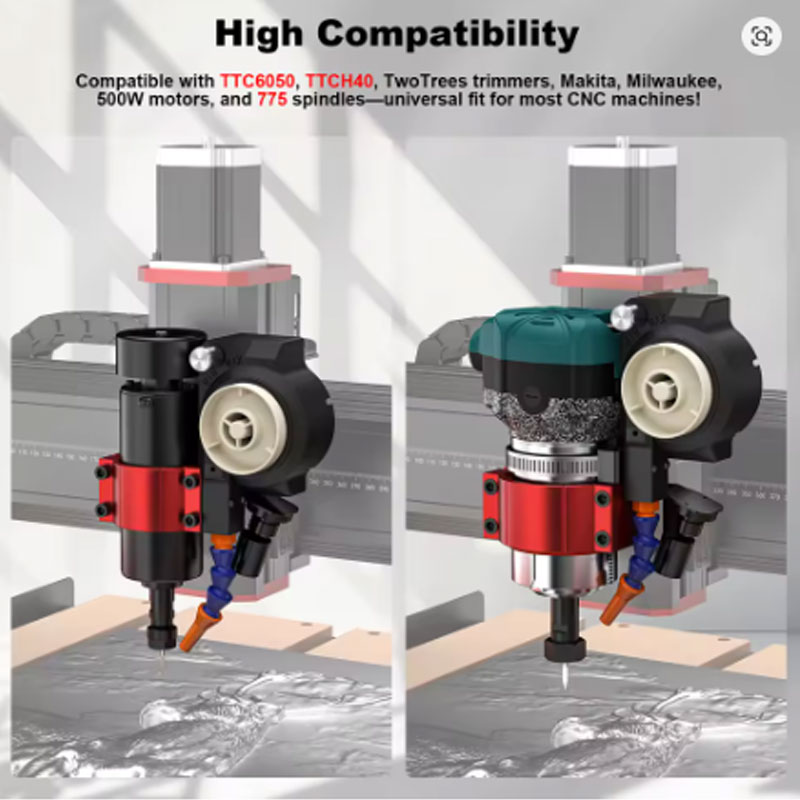
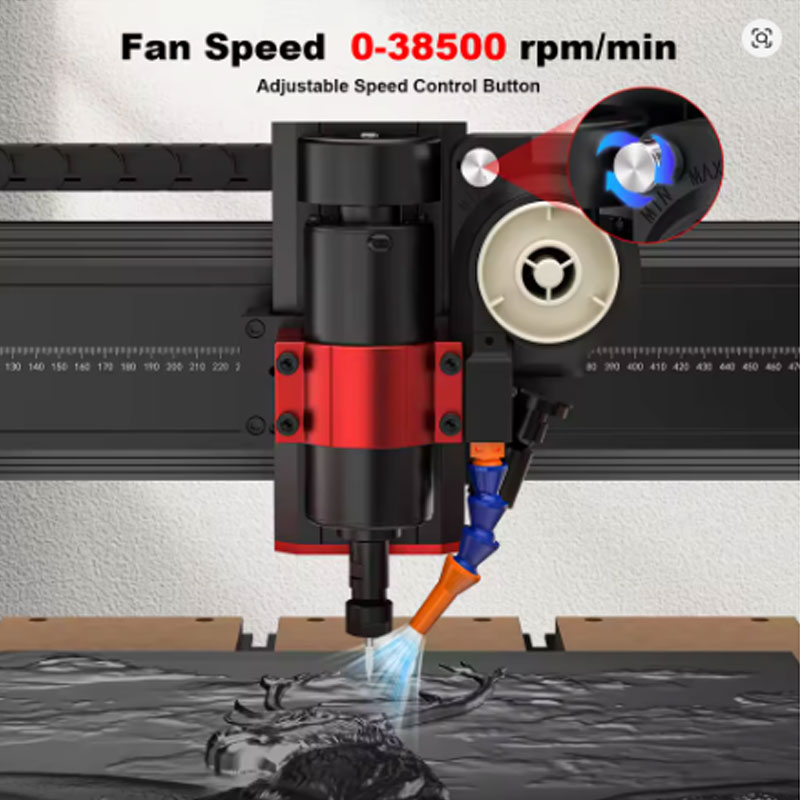
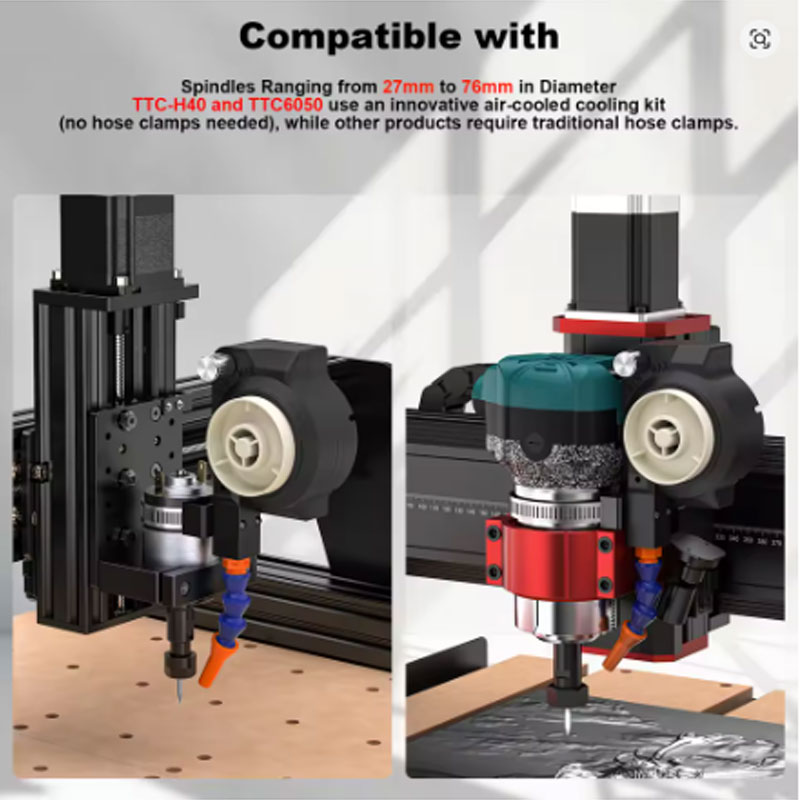
Upgrade your CNC engraving machine with the Twotrees CNC Cooling Fan Kit. Designed for TWC6050, TTCH40, and other CNC systems, this adjustable air-cooling kit blows cold air directly onto the cutting tool and workpiece to prevent overheating during metal and acrylic engraving. Fits spindles with diameters from 27mm to 76mm, making it compatible with TwoTrees trimmers, Makita trimmers, Milwaukee trimmers, 500W motors, and 775 motor spindles. The wind speed is adjustable via a knob, and the fan can be removed for handheld cleaning of your CNC work area. Reduce tool sticking, achieve smoother engraving surfaces, and extend tool life with this essential heat dissipation upgrade. Note: This kit reduces the X-axis engraving area by approximately 90mm on 6050 and H40 machines.
- Adjustable airflow – knob-controlled wind speed for cooling metal and acrylic cutting
- Wide compatibility – fits spindles 27mm to 76mm diameter
- Supports popular trimmers – TwoTrees, Makita, Milwaukee, 500W motors, 775 spindles
- Prevents tool sticking – reduces friction heat for cleaner engraving
- Removable for cleaning – use as handheld blower for CNC work area
Why Choose Twotrees CNC Air Cooling Kit
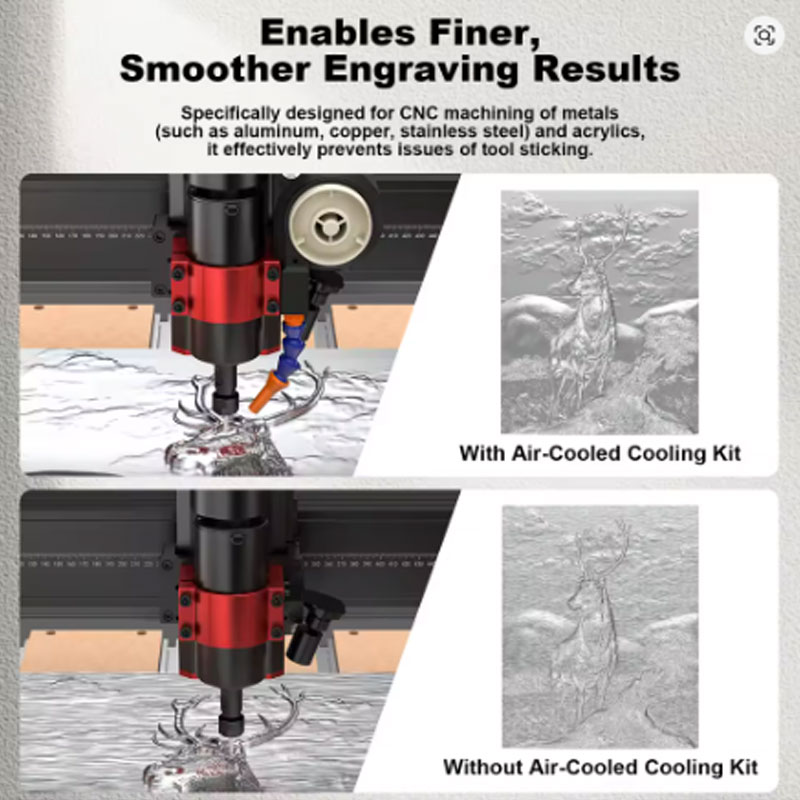
- Efficient Air-Cooled Heat Dissipation – Designed specifically for CNC machining of metals (aluminum, copper, stainless steel) and acrylic. High-speed cutting generates friction heat that causes material to stick to the tool, resulting in rough surfaces and tool damage. This kit continuously blows cold air directly at the tool and material interface to quickly reduce temperature.
- Adjustable Wind Speed Control – Includes a knob that lets you vary airflow intensity to match different materials and cutting conditions. Lower speeds for plastics and delicate materials, higher speeds for dense metals and deep cuts. You are in control of cooling intensity.
- Wide Diameter Compatibility – Adapts to spindles with diameters ranging from 27mm to 76mm (approximately 1.06 to 3 inches). Fits TwoTrees trimmers, Makita RT0700 series, Milwaukee M18 trimmer, 500W spindles, and 775 motor spindles. A single kit works across multiple machines.
- Dual Functionality – The fan unit can be removed from its mount and used as a handheld blower. Perfect for cleaning debris, dust, and chips from your CNC working environment between jobs.
- Prevents Tool Sticking and Improves Finish – By eliminating heat-induced material adhesion, this cooling system ensures a more delicate and smooth engraving effect. Tools last longer, surfaces require less post-processing, and you can cut at higher speeds without burning materials.
- TWC6050 and TTCH40 CNC Machines – Specifically designed for these TwoTrees models. Direct mount compatibility with minimal modification. Note: X-axis engraving area will be reduced by approximately 90mm when installed.
- TwoTrees Trimmers – Works with stock trimmers on TwoTrees CNC systems. The adjustable mount fits the trimmer body diameter securely.
- Makita and Milwaukee Trimmers – Compatible with Makita RT0700C, RT0701C and Milwaukee M18 compact router / trimmer bodies. Ideal for users who have upgraded their CNC spindles to these brands.
- 500W Spindles and 775 Motors – Fits standard 500W brushless spindles and 775 DC motor spindles commonly used on 3018, 3020, and similar desktop CNC machines.
- Metal and Acrylic Cutting – Essential for cutting aluminum, brass, copper, mild steel (light cuts), and acrylic. Prevents chip welding, tool gumming, and heat-related cracking in acrylic.
- Measure your spindle diameter before ordering – The kit fits diameters from 27mm to 76mm. Use calipers to measure your trimmer or spindle body. Most common sizes: TwoTrees trimmer ~65mm, Makita ~65-67mm, 775 motor ~52mm.
- Account for engraving area reduction – On TWC6050 and TTCH40 machines, the X-axis (left-right) travel reduces by approximately 90mm after installation. Plan your workpiece size accordingly. For other machines, measure the space around your spindle before mounting.
- Position the air nozzle close to the tool tip – For maximum cooling effectiveness, adjust the flexible nozzle (if included) or aim the airflow so it hits the cutting edge of the tool, not the side of the collet or the workpiece far from the cut.
- Adjust airflow for each material – Use lower airflow for acrylic and plastics (too much air can cause chattering or cooling that leads to cracking). Use higher airflow for aluminum and copper to clear chips and reduce heat.
- Remove and use as handheld blower – Detach the fan from the mount bracket to blow chips off your CNC table, out of T-slot tracks, or away from linear rails. Reattach before next cutting job.
Product Specifications
Packing List
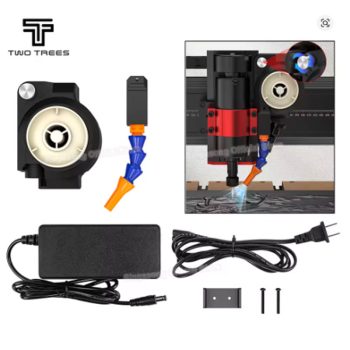
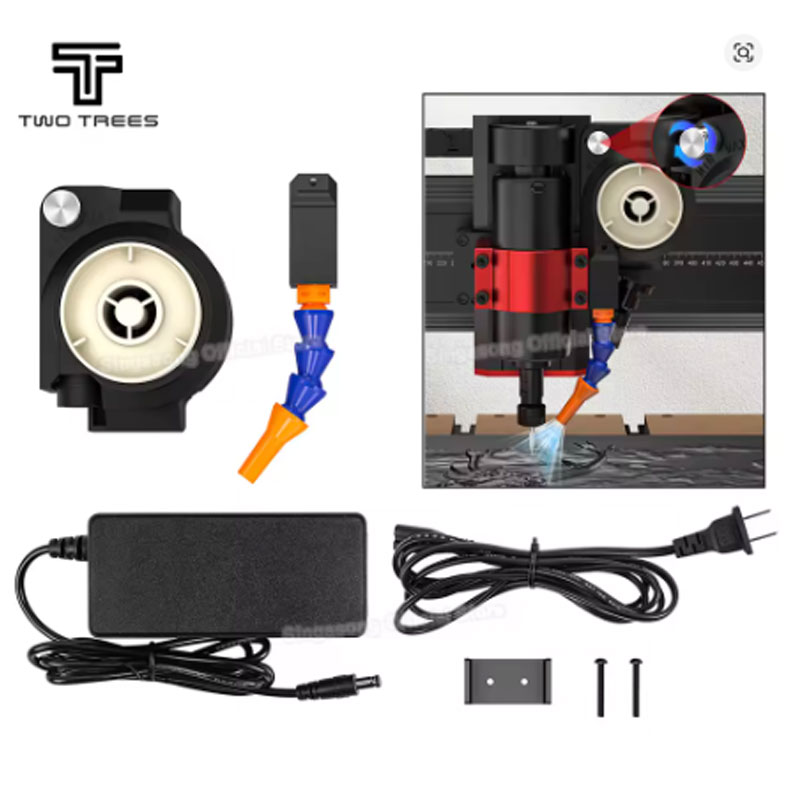
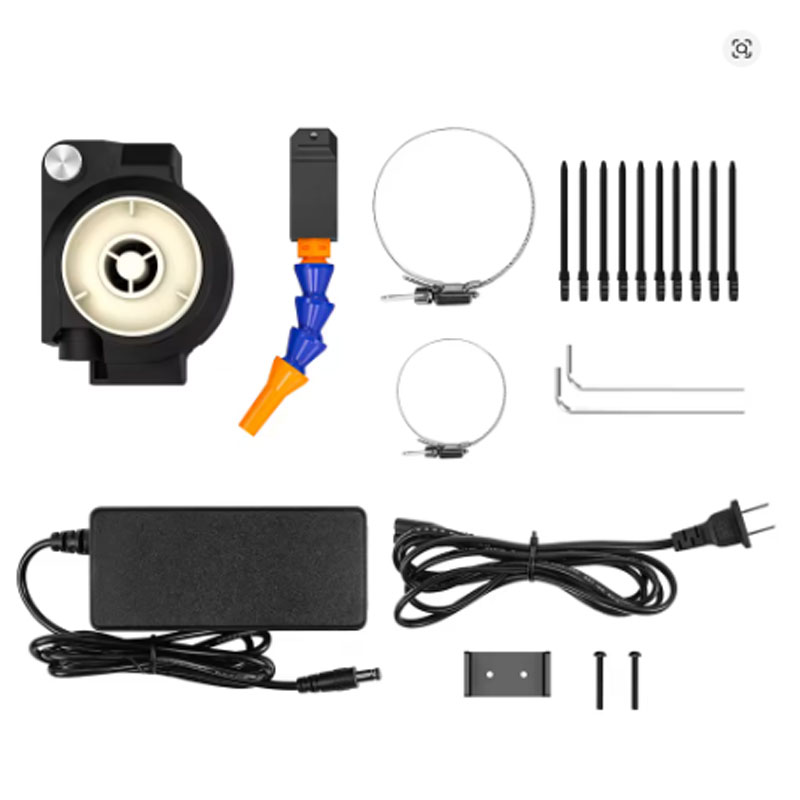
- 1 x Cooling Fan Unit (with adjustable speed knob and power cable)
- 1 x Adjustable Clamp Bracket (fits 27-76mm diameter spindles)
- 1 x Air Nozzle / Air Director (if included – directs airflow to tool tip)
- 1 x Mounting Hardware (screws, nuts, washers as needed)
- 1 x Power Adapter or Connector Wires (depending on version – verify with seller)
- Installation instructions (basic guidance – may be digital)
- Note: Power source (12V-24V) may need to be provided by user if not included – check your kit contents
Warnings and Safety Notes
- Disconnect power before installation – Always turn off and unplug your CNC machine before installing or adjusting the cooling fan kit. Prevent accidental spindle startup during installation.
- Check power requirements – Verify the fan’s voltage rating (typically 12V-24V DC) before connecting. Using incorrect voltage may damage the fan or create a fire hazard. If your CNC does not have an auxiliary 12V/24V output, you may need a separate power supply.
- Avoid directing airflow at electronics – Do not point the fan directly at your CNC controller board, power supply, or stepper drivers. Metal dust and chips blown by the fan could short-circuit sensitive electronics.
- Secure wiring away from moving parts – Route the fan’s power cable away from the spindle, belts, lead screws, and linear rails. Loose cables can become entangled, causing damage or injury.
- Use dust collection with this fan – This cooling fan will blow chips and dust into the air. Always use a vacuum or dust shoe to capture debris. Wear a dust mask and safety glasses.
- Noise level – High-speed fans generate significant noise. Use hearing protection if operating for extended periods in an enclosed space.
- Installation reduces work area – On TWC6050 and TTCH40 machines, the X-axis travel is reduced by approximately 90mm. Verify that your typical workpieces will still fit before installing. For other machines, measure the space around your spindle to ensure the fan does not hit the machine frame at extreme positions.
- Do not use for liquid cooling – This is an air-cooling system only. Do not attempt to direct water or coolant through the fan unit.
- Inspect for damage before each use – Check the fan blades, mounting bracket, and power cable for cracks, loose connections, or wear. Do not use if the fan makes grinding noises or vibrates excessively.
- Not for explosive dust – Do not use in environments with flammable metal dust (e.g., magnesium, titanium) or combustible wood dust in high concentration. Spark from fan motor could ignite dust cloud.
- Keep fingers away from fan blades – When the fan is operating, keep hands, tools, and loose clothing away from the intake and exhaust openings. Even low-voltage fans can cause injury.
Price: US $99.00 | US $12.00 off on US $89.00
Tax excluded: Added at checkout if applicable
Size options: EU plug, US plug, BR plug – select based on your local power outlet type
Color: Kit (black/gray as pictured)
Rating: 5 stars | 1,000+ sold from singasong Official Store
Compatible models: TWC6050, TTCH40, TwoTrees trimmers, Makita trimmers, Milwaukee trimmers, 500W motors, 775 motor spindles