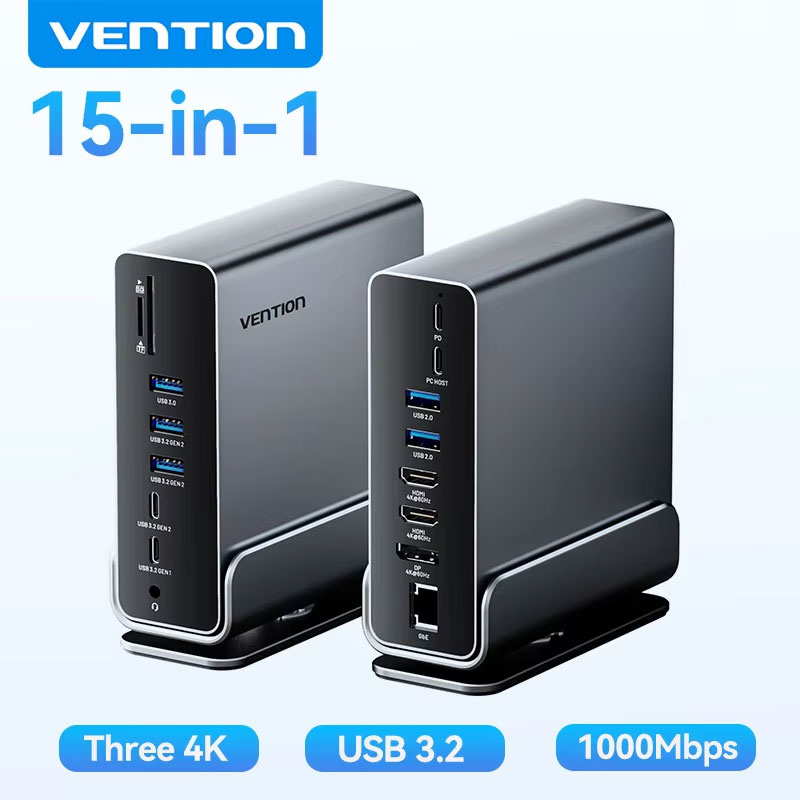





Vention 15-in-1 USB C docking station

Shop the Vention 15-in-1 USB C Docking Station. This 4K triple monitor hub offers 100W PD for MacBook and Windows laptops.

Vention 15-in-1 USB-C Triple Display Docking Station
Transform your laptop into a high-performance workstation with the Vention 15-in-1 USB-C Docking Station. Featuring triple 4K monitor support, blazing-fast 10Gbps data transfer, and robust 100W Power Delivery, this premium aluminum hub serves as the ultimate desktop organizer. With its space-saving vertical stand and universal compatibility, it provides all the connectivity you need for your MacBook, Windows, or Linux device.
- Connectivity: 15-in-1 expansion (HDMI, DP, USB 3.2, RJ45, SD/TF, 3.5mm Audio)
- Video Output: Triple Display Support (Up to 4K@60Hz via MST/SST modes)
- Data & Network: 10Gbps SuperSpeed transfer and Gigabit 1000Mbps Ethernet
- Power: 100W PD input for continuous, rapid laptop charging
Key Features
- 15-in-1 Comprehensive Hub: Instantly expands a single USB-C port into 15 essential interfaces, giving you complete desktop connectivity without the cable clutter.
- 4K Triple Display with MST: Extend your visual workspace across up to three external screens at once. Supports 4K@60Hz on macOS and 4K@30Hz on Windows utilizing MST and SST modes.
- SuperSpeed 10Gbps Transfer: Transfer massive files in seconds using the advanced USB 3.2 Gen 2 and USB-C 10Gbps ports, bypassing the bottlenecks of standard USB hubs.
- 100W Power Delivery: Features a dedicated 100W PD input port that ensures your host laptop remains fully and safely charged, even when utilizing multiple high-power peripherals.
- Efficient Aluminum Cooling & Stand: Housed in a durable, heat-dissipating aluminum alloy shell and includes a detachable U-shaped vertical stand to keep your desk organized and maximize thermal efficiency.
Compatibility & Best Use
- Universal OS Compatibility: Works flawlessly across a wide spectrum of operating systems including Windows, macOS, Linux, Chrome OS, iPadOS, and Android.
- Laptop & Tablet Ready: An essential companion for modern Type-C devices such as Apple MacBooks, iPads, HP, Dell, and Lenovo XPS laptops.
- Professional Workstations: The ideal setup for video editors, financial analysts, and remote workers who require multiple monitors, hardwired internet, and fast access to SD/TF cards (up to 90MB/s simultaneous read/write).
Installation Tips
- Verify Host Capabilities: To utilize the HDMI and DP video outputs, ensure your laptop’s USB-C port supports “DisplayPort Alt Mode” and Power Delivery.
- Display Settings: Windows users can enjoy full MST (Multi-Stream Transport) for extended distinct displays. Mac users should note that macOS typically supports SST (Single-Stream Transport), meaning external displays may mirror each other depending on the specific Apple Silicon chip.
- Power Adapter Usage: Connect your laptop’s original 100W PD charger into the dock’s PD port to guarantee stable operation when connecting multiple high-draw devices like external hard drives.
- Vertical Mounting: Slide the dock securely into the detachable U-shaped base to save desk space and allow for optimal 360-degree airflow around the aluminum chassis.
Product Specifications
| Brand Name | Vention |
|---|---|
| Total Ports | 15 Ports |
| Video Output | 2 x HDMI (4K@60Hz Max), 1 x DP (4K@60Hz Max) |
| Data Interfaces | USB 3.2 Gen 2 (10Gbps), USB 3.0, USB-C Gen 2 (10Gbps) |
| Networking & Audio | 1000Mbps Gigabit RJ45 / 3.5mm Audio Jack |
| Card Reader | SD / TF Slots (90MB/s, Simultaneous Use) |
| Charging | 100W PD Input |
| Certifications | CE, RoHS |
Packing List
- 1 x Vention 15-in-1 USB-C Docking Station
- 1 x Detachable U-Shaped Vertical Base (If base variant is selected)
- 1 x USB-C to USB-C Host Cable
- 1 x User Manual
Warnings & Safety Notes
- Normal Heat Dissipation: The aluminum alloy shell acts as a heat sink. It is completely normal for the device to feel warm during heavy use with multiple displays and high-speed data transfers. Do not cover the dock with cloth or paper.
- Power Supply Required: The dock draws power from the host to function. For heavy peripheral usage, it is strictly advised to plug a PD wall charger into the dock’s USB-C PD port to prevent unexpected disconnections.
- Display Limitations: Triple display output resolutions and refresh rates are highly dependent on your laptop’s GPU capabilities and DP Alt Mode version (DP 1.2 vs DP 1.4).