AlgoLaser Wireless Laser Engraving Camera Smart Visual Positioning for Engravers

See What You Engrave: The AlgoLaser Wireless Laser Engraving Camera Review
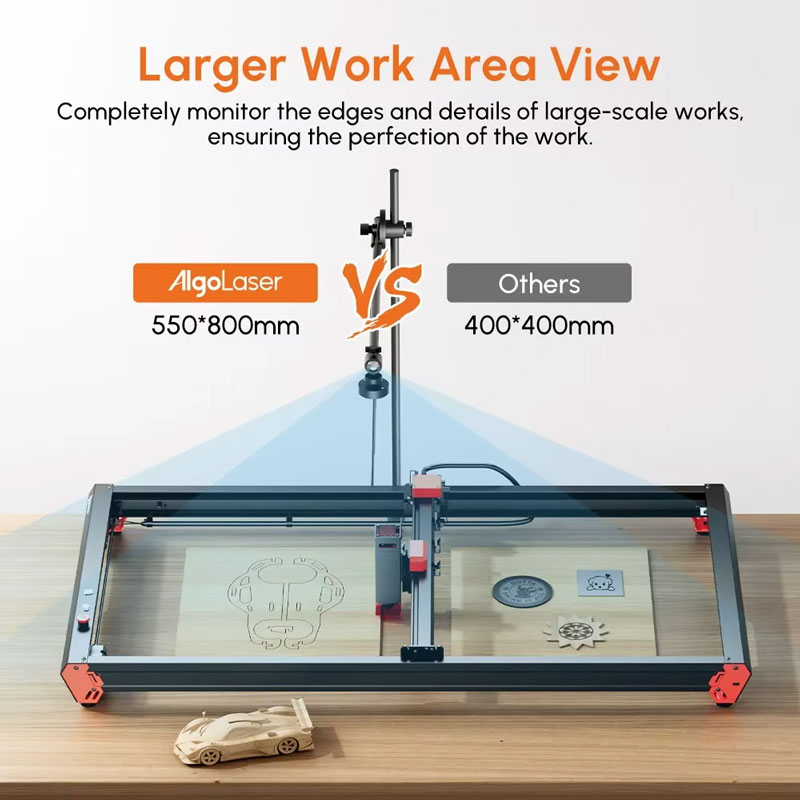
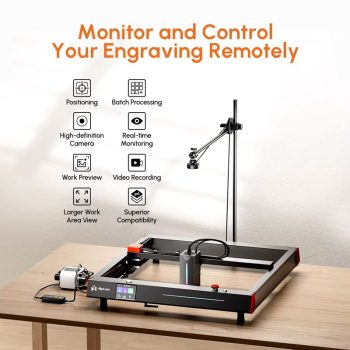
Figure 1: The AlgoLaser Wireless Laser Engraving Camera – your eye in the sky for perfect laser engraving every time.
Have you ever wasted expensive wood, acrylic, or leather because your laser engraver was just slightly out of alignment? Have you ever wished you could watch your engraving progress from your phone while you work on something else? Meet the AlgoLaser Wireless Laser Engraving Camera. This smart camera gives you a high-definition, bird’s-eye view of your entire engraving work area. With a massive 550x800mm viewing area, you can see exactly where your design will go before you fire the laser. You can monitor your projects in real time from your smart device. And you can even record time-lapse videos of your creations. In this complete guide, we will explain everything you need to know about the AlgoLaser Wireless Laser Engraving Camera. You will learn how it works, why it saves you time and money, and how it can transform your laser engraving hobby or small business.
H2: What is the AlgoLaser Wireless Laser Engraving Camera?
The AlgoLaser Wireless Laser Engraving Camera is a high-definition smart camera system designed specifically for laser engraving machines. It mounts above your engraving area and gives you a clear, real-time view of your work surface. Unlike your eyes, which can only guess where the laser will hit, this camera shows you exactly where your design will be engraved. It connects wirelessly to your computer or smart device, so you can see everything from a safe distance.
This AlgoLaser Wireless Laser Engraving Camera is compatible with most popular laser engraver brands, including AlgoLaser, Ortur, Aufero, and Two Trees. It provides a massive 550x800mm viewing area, which means it can see almost any size material you put on your engraving bed. With features like visual positioning, batch processing, and time-lapse recording, this camera turns your laser engraver into a precision tool that saves material, time, and frustration.
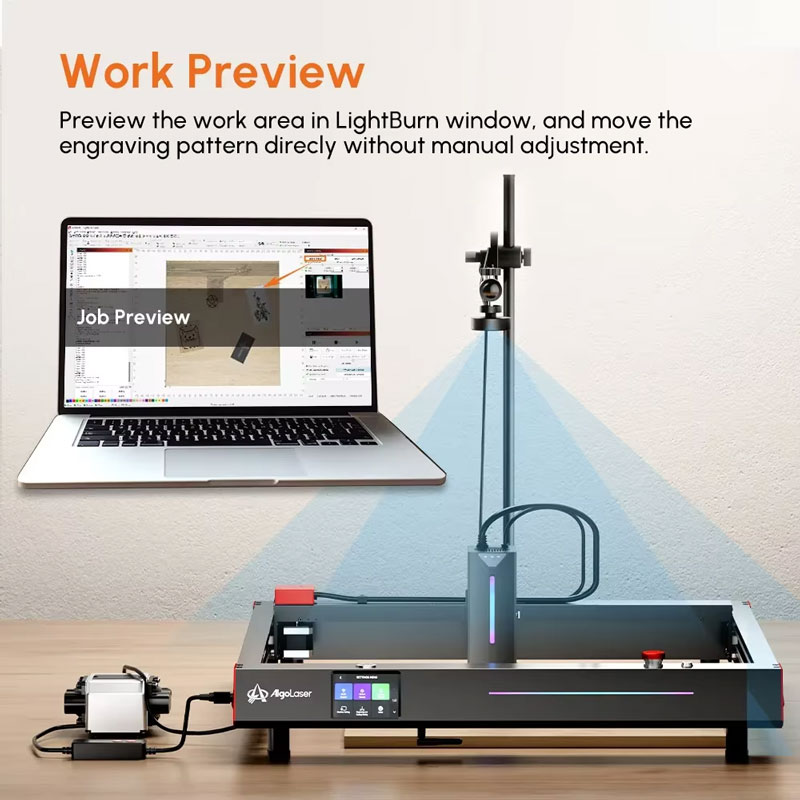
Figure 2: The AlgoLaser Wireless Laser Engraving Camera work preview in LightBurn – see exactly where your design will go.
H3: How the AlgoLaser Wireless Laser Engraving Camera Solves Common Engraving Problems
If you have used a laser engraver before, you know the struggle. You line up your material. You guess where the laser will hit. You run a test fire. You adjust. You try again. It takes time, and you still waste materials. The AlgoLaser Wireless Laser Engraving Camera solves this problem completely.
- No More Guessing: The camera gives you a live overhead view of your material. You can see exactly where your design will be placed before you ever turn on the laser.
- No More Wasted Material: Because you can see the preview, you will not ruin expensive wood, acrylic, or leather with misaligned engravings.
- No More Standing Around: The wireless feature lets you monitor your engraving from your phone or tablet. You can work on other tasks while keeping an eye on your project.
- No More Complicated Setups: The AlgoLaser Wireless Laser Engraving Camera is designed to work with popular software like LightBurn. Setup is straightforward and well documented.
H3: Key Features of the AlgoLaser Wireless Laser Engraving Camera
Let us break down the main features of this smart AlgoLaser Wireless Laser Engraving Camera and why they matter for USA users.
- High-Definition Precision Camera: The AlgoLaser Wireless Laser Engraving Camera delivers a crystal-clear, high-definition overhead view of your engraving surface. You can see fine details, material grain, and exact positioning down to the millimeter.
- Massive 550x800mm Viewing Area: Most engraving cameras only see a small portion of your work area. This camera sees almost the entire bed. Whether you are using a small diode laser or a larger frame, the AlgoLaser Wireless Laser Engraving Camera covers it all.
- Wireless Remote Monitoring: Connect the camera to your Wi-Fi network. Then watch your engraving progress in real time from your smartphone, tablet, or computer. This is great for safety and convenience. You can be in another room and still know when your project finishes.
- Advanced Work Preview in LightBurn: The camera integrates with LightBurn and other popular engraving software. You can see your design overlaid on the live camera feed. Drag and drop your design to the perfect position. No more manual alignment.
- Batch Processing Made Easy: Do you make multiple copies of the same item? The AlgoLaser Wireless Laser Engraving Camera makes batch processing simple. Set up one item, align it, engrave it. Then move to the next. The camera helps you position each piece perfectly every time.
- Time-Lapse Video Recording: Automatically record stunning time-lapse videos of your engravings from start to finish. This is perfect for documenting your work, sharing on social media, or showing clients the process.
- Broad Machine Compatibility: The AlgoLaser Wireless Laser Engraving Camera works with AlgoLaser, Ortur, Aufero, and Two Trees machines. If your laser engraver uses LightBurn or similar software, this camera will likely work with it.
- Safety Certifications: EMC, CE, and GS certified. This camera has been tested for safety and electromagnetic compatibility.
H2: Top Benefits of Using the AlgoLaser Wireless Laser Engraving Camera for Your USA Workshop
Why should you add the AlgoLaser Wireless Laser Engraving Camera to your laser engraving setup? Here are the real-world benefits that USA hobbyists and small business owners love.
H3: Save Money on Materials with Precise Positioning
Wood, acrylic, leather, and other engraving materials are not cheap. Every time you make a mistake because of poor alignment, you throw money away. The AlgoLaser Wireless Laser Engraving Camera virtually eliminates alignment errors. You see exactly where your design will go before you start. You can even rotate, resize, and move your design on the live camera view. This means every piece of material is used correctly. Over time, the camera pays for itself in saved materials alone.
H3: Save Time with Batch Processing
Do you make custom coasters, keychains, ornaments, or signs? The AlgoLaser Wireless Laser Engraving Camera makes batch processing fast and easy. Set up your first item. Align it using the camera preview. Engrave it. Then simply slide the next item into place. The camera helps you position the second item exactly where the first one was. No more trial and error. No more test fires. Just consistent, perfect results every time.
H3: Monitor Your Engraver from Anywhere – Even While You Work
Laser engraving takes time. A complex project might run for 30 minutes, an hour, or even longer. With the AlgoLaser Wireless Laser Engraving Camera, you do not have to sit in front of your machine the whole time. Connect the camera to your Wi-Fi. Then watch the live feed from your phone or tablet. You can be in the kitchen, in your office, or even outside. If something goes wrong, you will see it immediately and can rush back. This freedom lets you be more productive with your day.
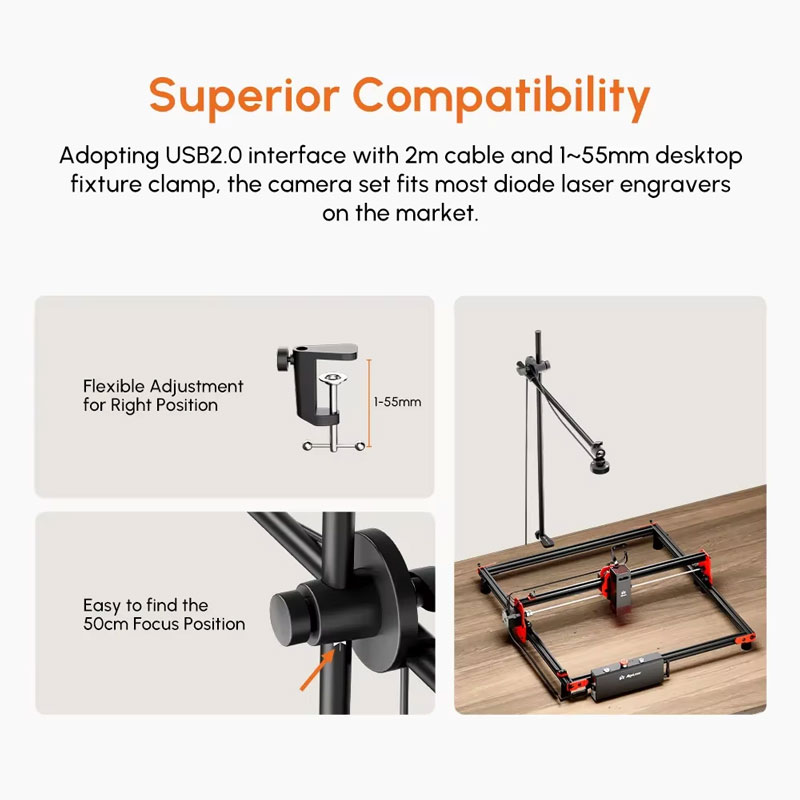
Figure 3: The AlgoLaser Wireless Laser Engraving Camera mounted above your engraver gives you a perfect top-down view.
H3: Create Professional-Looking Products with Perfect Alignment
If you sell your engraved items, quality matters. Customers notice when a design is slightly crooked or off-center. The AlgoLaser Wireless Laser Engraving Camera ensures every product you make looks professional. The visual positioning feature lets you align designs to the millimeter. Whether you are engraving on round coasters, rectangular signs, or oddly shaped items, you get perfect placement every time.
H3: Document Your Work with Time-Lapse Videos
Do you share your creations on social media? Do you show clients the process? The AlgoLaser Wireless Laser Engraving Camera can automatically record time-lapse videos of your engravings. Watch your design appear from start to finish in a short, shareable video. This is great for Instagram, TikTok, YouTube, or your business portfolio. It shows customers the care and precision you put into every piece.
H3: Safer Operation with Remote Viewing
Laser engraving involves a high-powered laser beam. Smoke and fumes are produced. The AlgoLaser Wireless Laser Engraving Camera lets you monitor your machine from a safe distance. You do not have to stand near the machine breathing in fumes. You do not have to stare directly at the laser light. The camera gives you a clear view from your phone or computer while you stay in a safe, well-ventilated area.
H2: How to Install and Use the AlgoLaser Wireless Laser Engraving Camera
Getting the most out of your AlgoLaser Wireless Laser Engraving Camera is easy. Just follow these simple steps.
H3: Step-by-Step Installation
- Mount the Camera: Use the included mounting arm and bracket to attach the AlgoLaser Wireless Laser Engraving Camera to your work table or frame. Position it so it has a clear, top-down view of your entire engraving bed. Make sure it is stable and will not fall onto the laser area.
- Connect Power: Plug the camera into power using the included cable.
- Connect to Wi-Fi: Follow the instructions in the setup guide to connect the AlgoLaser Wireless Laser Engraving Camera to your local wireless network. This enables remote monitoring from your smart devices.
- Install Software: The camera works with LightBurn and other popular laser engraving software. Make sure you have the latest version.
- Calibrate the Camera: This is a critical step. The calibration process tells the software exactly where the camera is in relation to your laser. Follow the calibration guide carefully. You will typically engrave a small calibration mark, then tell the software where that mark is in the camera view.
- Test the Preview: After calibration, place a piece of scrap material on your engraving bed. Open the camera preview in your software. You should see a live view of your material. Draw a simple shape in your design software. You should be able to move that shape around on the live camera view.
H3: Using the Work Preview Feature in LightBurn
The AlgoLaser Wireless Laser Engraving Camera works brilliantly with LightBurn, which is the most popular laser engraving software. Here is how to use the work preview feature.
- Open the Camera View: In LightBurn, go to the camera window. The live feed from your AlgoLaser Wireless Laser Engraving Camera will appear.
- Position Your Design: Drag your design directly onto the live camera view. You will see the design overlaid on your actual material. Move it, rotate it, or resize it until it is exactly where you want it.
- Check Alignment: Zoom in on the camera view. Make sure your design aligns with the edges, corners, or grain of your material.
- Engrave with Confidence: Once the design looks perfect in the preview, start your engraving. The laser will fire exactly where the preview showed.
This visual workflow is much faster and more accurate than manual alignment. It is the main reason so many engravers buy the AlgoLaser Wireless Laser Engraving Camera.
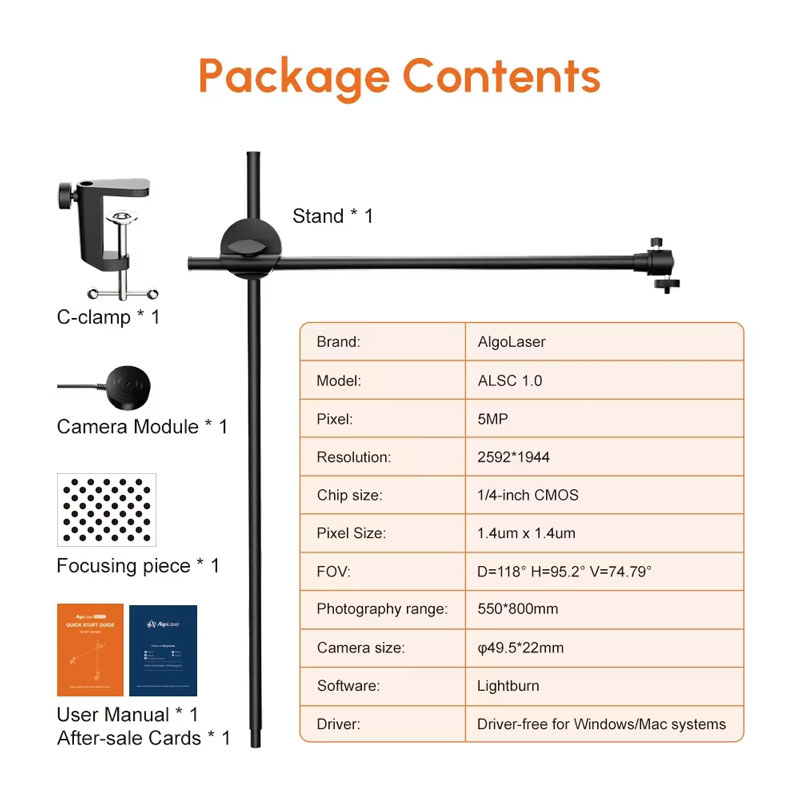
Figure 4: Batch processing with the AlgoLaser Wireless Laser Engraving Camera – align multiple items quickly and accurately.
H3: Tips for Batch Processing
Batch processing is one of the best features of the AlgoLaser Wireless Laser Engraving Camera. Here is how to do it efficiently.
- Engrave your first item using the camera preview for perfect alignment.
- Remove the finished item.
- Place the next blank item on the engraving bed.
- Look at the camera preview. The previous engraving position will still be visible.
- Move the new item until it perfectly matches the previous position in the camera view.
- Engrave. Repeat.
This method works for coasters, keychains, ornaments, phone cases, and any other repeatable item. You can produce dozens of identical items with perfect consistency.
H3: How to Record Time-Lapse Videos
The AlgoLaser Wireless Laser Engraving Camera can automatically record time-lapse videos of your engravings. Here is how.
- Open the camera software or LightBurn camera window.
- Look for the time-lapse recording option.
- Start recording before you begin your engraving.
- Let the engraving run from start to finish.
- Stop the recording. The software will compress the video into a short time-lapse.
- Save and share your video.
Time-lapse videos are great for social media, client presentations, or your own records of complex projects.
H2: Compatibility – What Laser Engravers Work with the AlgoLaser Wireless Laser Engraving Camera?
The AlgoLaser Wireless Laser Engraving Camera is designed to work with a wide range of laser engraving machines. Here are the brands and models that are officially compatible.
H3: Officially Supported Brands
- AlgoLaser: All models that work with LightBurn or similar software.
- Ortur: Laser Master series and other Ortur diode lasers.
- Aufero: Aufero laser engravers.
- Two Trees: Two Trees laser engraving machines.
H3: Software Compatibility
The AlgoLaser Wireless Laser Engraving Camera works best with LightBurn, which is the industry standard software for laser engraving. LightBurn has built-in camera support that works perfectly with this camera. You can also use other software that supports external camera feeds, but LightBurn provides the best integration with drag-and-drop design positioning.
H3: What About Other Brands?
If your laser engraver uses LightBurn and has a standard work area, the AlgoLaser Wireless Laser Engraving Camera will likely work. The camera does not care about the brand of the laser – it only needs a clear view of the work area and software that can display the camera feed. However, for guaranteed compatibility, stick with the officially supported brands listed above.
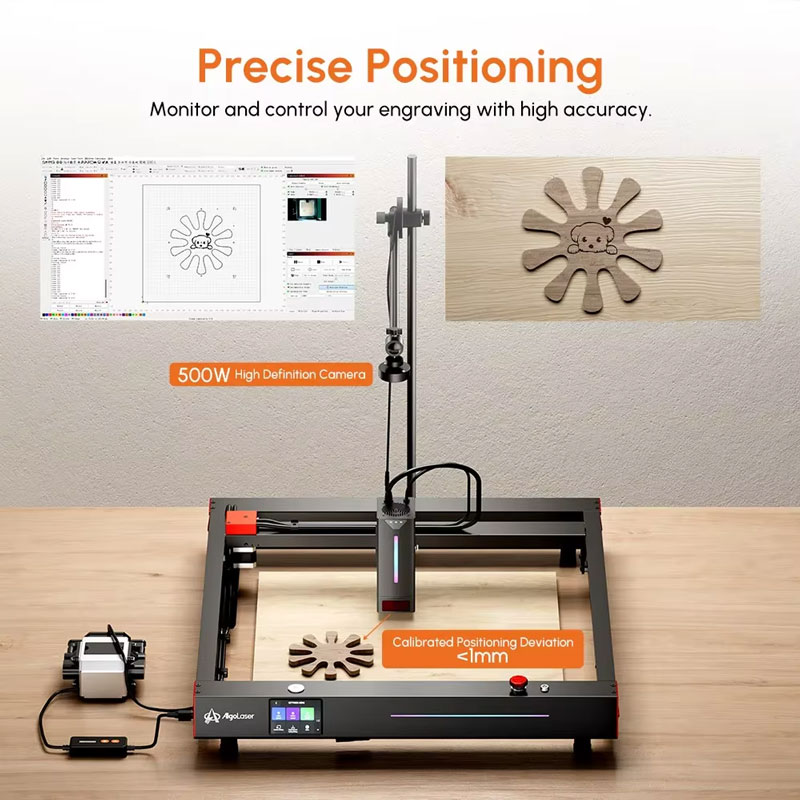
Figure 5: Time-lapse recording with the AlgoLaser Wireless Laser Engraving Camera – document your creations from start to finish.
H2: Technical Specifications of the AlgoLaser Wireless Laser Engraving Camera
For those who love the technical details, here is the full spec sheet for the AlgoLaser Wireless Laser Engraving Camera.
| Specification | Detail |
|---|---|
| Brand Name | AlgoLaser |
| Product Type | Wireless Smart Camera for Laser Engravers |
| Viewing Area | 550mm x 800mm (Massive coverage) |
| Camera Quality | High-Definition (HD) |
| Wireless Connectivity | Yes – Wi-Fi enabled for remote monitoring |
| Key Functions | Visual Positioning, Batch Processing, Video Recording, Real-Time Monitoring |
| Machine Compatibility | AlgoLaser, Ortur, Aufero, Two Trees |
| Software Integration | LightBurn and other compatible software |
| Certifications | EMC, CE, GS |
| Included Accessories | Mounting Arm, Power Cable, Setup Guide |
H2: Pros and Cons of the AlgoLaser Wireless Laser Engraving Camera
Every product has strengths and weaknesses. Here is an honest look at the AlgoLaser Wireless Laser Engraving Camera.
Pros – What We Love
- Massive 550x800mm viewing area – covers almost any engraving bed
- High-definition camera for precise positioning
- Wireless remote monitoring from phone or tablet
- Time-lapse video recording built in
- Batch processing saves huge amounts of time
- Works with LightBurn for drag-and-drop design placement
- Compatible with AlgoLaser, Ortur, Aufero, Two Trees
- EMC, CE, GS certified for safety
- Saves material by eliminating alignment errors
Cons – What to Know
- Requires proper calibration for accurate positioning
- Camera lens needs regular cleaning from smoke residue
- Initial setup takes some time and patience
- Best results with LightBurn software (sold separately)
H2: Who Should Buy the AlgoLaser Wireless Laser Engraving Camera?
The AlgoLaser Wireless Laser Engraving Camera is perfect for many different types of USA users. Here is who will benefit the most.
H3: Hobbyists Who Want Better Results
Do you make engraved gifts for family and friends? Do you sell at local craft fairs? The AlgoLaser Wireless Laser Engraving Camera takes your work from amateur to professional. Perfect alignment means every piece looks like it came from a factory. No more crooked text. No more off-center designs. Just beautiful, precise engravings every time.
H3: Small Business Owners Making Products to Sell
If you sell engraved items on Etsy, Amazon Handmade, or at in-person markets, time is money. The AlgoLaser Wireless Laser Engraving Camera speeds up your workflow dramatically. Batch processing means you can produce more items in less time. Perfect alignment means less waste and higher profit margins. The time-lapse videos are great for social media marketing. This camera pays for itself in weeks.
H3: Schools and Makerspaces
Do you run a school laser lab or community makerspace? Students and members will love the AlgoLaser Wireless Laser Engraving Camera. It makes alignment fast and intuitive. The remote monitoring feature lets instructors keep an eye on multiple machines from a central computer. And the time-lapse recording is great for documenting student projects.
H3: Anyone Tired of Wasting Material
Wood, acrylic, leather, and other materials are expensive. Every misaligned engraving is money in the trash. The AlgoLaser Wireless Laser Engraving Camera virtually eliminates waste. The visual preview shows you exactly where your design will go. You can adjust before firing the laser. Over time, the savings in material alone will cover the cost of the camera.
H3: LightBurn Users Looking for an Upgrade
If you already use LightBurn, adding the AlgoLaser Wireless Laser Engraving Camera is a no-brainer. LightBurn’s camera integration is excellent. You can drag and drop designs onto the live camera view. You can see exactly where your laser will fire. It transforms LightBurn from a good software into a great one.
H2: How Does the AlgoLaser Wireless Laser Engraving Camera Compare to Other Options?
There are a few ways to align your laser engraver. Here is how the AlgoLaser Wireless Laser Engraving Camera stacks up against the alternatives.
- VS. Manual Alignment with Crosshairs: Manual alignment is slow and inaccurate. You fire the laser, look at the burn mark, adjust, and try again. You waste material and time. The AlgoLaser Wireless Laser Engraving Camera is instant and precise. No waste. No guesswork.
- VS. A USB Webcam: You can try using a regular USB webcam. But most webcams have a small viewing angle. They are not designed for large engraving beds. They do not integrate with LightBurn. And they do not have wireless monitoring. The AlgoLaser Wireless Laser Engraving Camera is built specifically for laser engraving.
- VS. No Camera at All: If you do not use a camera, you are flying blind. You will waste material. You will waste time. You will get frustrated. The AlgoLaser Wireless Laser Engraving Camera is an affordable upgrade that transforms your entire engraving experience.
H2: Frequently Asked Questions About the AlgoLaser Wireless Laser Engraving Camera
H3: Does the AlgoLaser Wireless Laser Engraving Camera work with LightBurn?
Yes. The AlgoLaser Wireless Laser Engraving Camera is designed to work with LightBurn. LightBurn has a built-in camera calibration and preview feature that works perfectly with this camera. You can see your design overlaid on the live camera feed and position it with drag-and-drop.
H3: What is the maximum viewing area of the AlgoLaser Wireless Laser Engraving Camera?
The AlgoLaser Wireless Laser Engraving Camera provides a massive 550mm x 800mm viewing area. That is approximately 21.6 inches by 31.5 inches. This covers almost all diode laser engraving beds and many larger CO2 machines.
H3: Can I monitor my engraving from my phone?
Yes. The AlgoLaser Wireless Laser Engraving Camera connects to your Wi-Fi network. You can then view the live camera feed on your smartphone, tablet, or computer using the compatible software or app. This allows you to monitor your engraving from anywhere in your home or shop.
H3: Does the AlgoLaser Wireless Laser Engraving Camera work with Ortur lasers?
Yes. The AlgoLaser Wireless Laser Engraving Camera is officially compatible with Ortur laser engravers, including the popular Laser Master series. It also works with AlgoLaser, Aufero, and Two Trees machines.
H3: How difficult is it to calibrate the camera?
Calibration takes about 10-15 minutes the first time. You will follow the instructions in the setup guide. You will typically engrave a small calibration mark, then tell the software where that mark appears in the camera view. After the initial calibration, you rarely need to calibrate again unless you move the camera.
H3: Can I use the AlgoLaser Wireless Laser Engraving Camera for batch processing?
Absolutely. Batch processing is one of the best features of the AlgoLaser Wireless Laser Engraving Camera. After engraving the first item, you can use the camera preview to perfectly position subsequent items. This saves enormous amounts of time when making multiple copies of the same product.
H3: Does the camera record video automatically?
The AlgoLaser Wireless Laser Engraving Camera can record time-lapse videos of your engravings. You start the recording manually before your engraving. The camera then captures frames throughout the process and compresses them into a short time-lapse video. This is great for documentation and sharing.
H3: How do I keep the camera lens clean?
Laser engraving produces smoke and residue. Over time, this can build up on the camera lens. Use a soft microfiber cloth to gently wipe the lens after several uses. A clean lens ensures a clear, sharp preview. Do not use harsh chemicals or abrasive materials on the lens.
H2: Why the AlgoLaser Wireless Laser Engraving Camera Saves You Money
At $98.48, the AlgoLaser Wireless Laser Engraving Camera might seem like an extra expense. But let us look at the math. A single sheet of quality 12×12 walnut wood veneer costs $5 to $10. A sheet of clear acrylic costs $10 to $20. If you ruin just two sheets per week due to alignment errors, that is $20 to $40 per week wasted. Over a year, that is over $1,000 in wasted material. The AlgoLaser Wireless Laser Engraving Camera eliminates almost all alignment waste. It pays for itself in saved materials within weeks, not months. Add in the time savings from faster batch processing, and the return on investment is even greater.
H2: Final Verdict – Should You Buy the AlgoLaser Wireless Laser Engraving Camera?
If you take your laser engraving seriously, the answer is yes. Whether you are a hobbyist who wants perfect results or a small business owner who wants to save time and material, the AlgoLaser Wireless Laser Engraving Camera is a game-changer. It gives you precision that is impossible with manual alignment. It saves you money by eliminating waste. It saves you time with batch processing and remote monitoring. It even creates beautiful time-lapse videos of your work.
Stop guessing where your laser will hit. Stop wasting expensive materials. Stop standing over your machine for hours. Get the AlgoLaser Wireless Laser Engraving Camera and see exactly what you are engraving – before, during, and after each project.
H2: What’s in the Box?
When you order the AlgoLaser Wireless Laser Engraving Camera, you will receive.
- 1 x AlgoLaser Wireless Smart Camera
- 1 x Mounting Arm / Bracket Stand
- 1 x Connection / Power Cable
- 1 x Setup and Calibration Guide
Note: LightBurn software and laser engraver are sold separately. Make sure your laser engraver is compatible before purchasing. For USA users, the camera works with standard 110V power outlets.
Only $98.48. Get perfect alignment, batch processing, and remote monitoring for your laser engraver. Order today.
Disclaimer: This information is for informational purposes only. Product specifications, prices, and availability are subject to change without notice. Always follow laser safety guidelines and never leave a running laser engraver completely unattended. The AlgoLaser Wireless Laser Engraving Camera is an accessory – your laser engraver must be properly set up and ventilated. LightBurn software compatibility is as of the date of this writing; check with AlgoLaser for the latest software support.