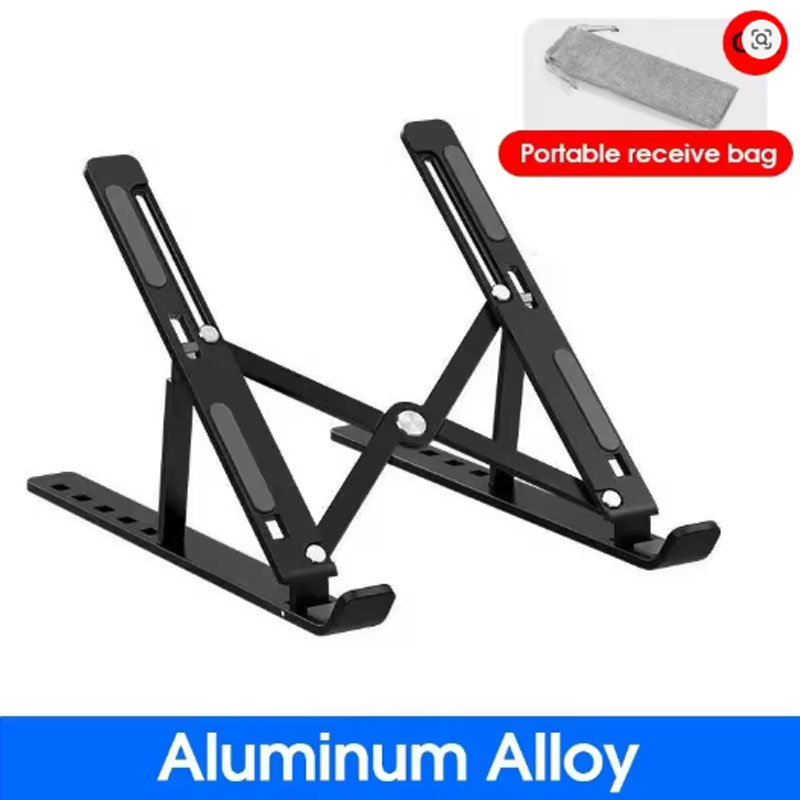
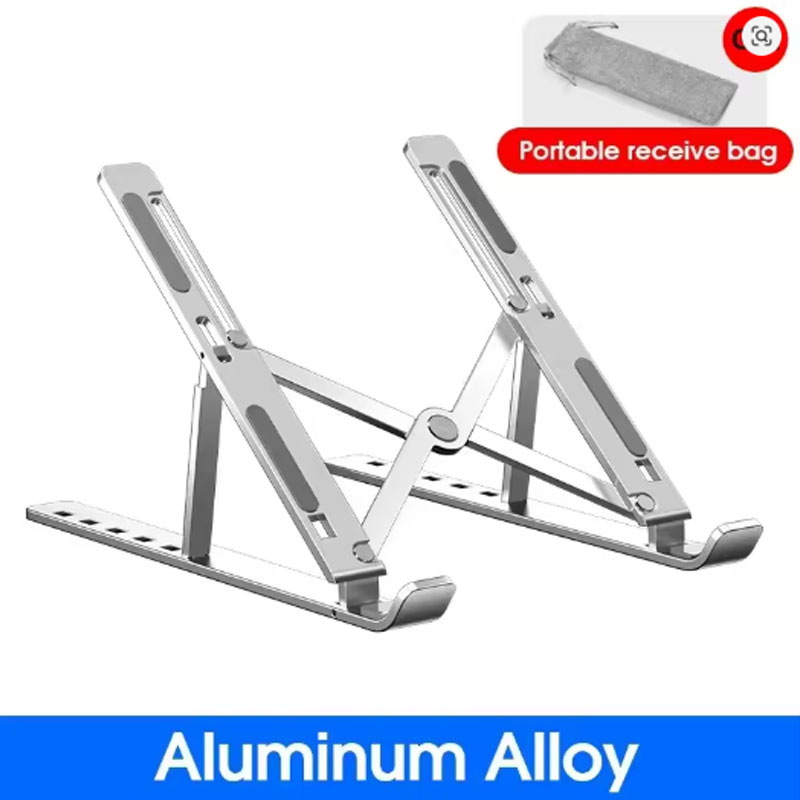
Portable Aluminum Laptop Stand Foldable Notebook Holder

Elevate your workspace with this portable aluminum laptop stand — a foldable docking station and computer bracket. Perfect for MacBook and other notebooks. Improves airflow, ergonomics, and stability. A must-have computer accessory.

kebidumei Aluminum Alloy Laptop Holder – 6 Level Adjustable Angle – Portable Foldable Laptop Stand for MacBook Air, Pro, and PC
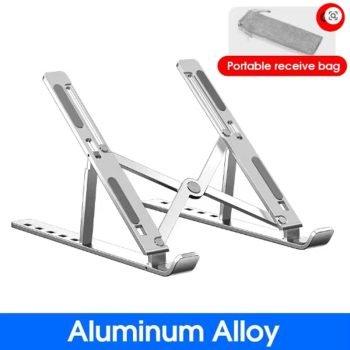
Elevate your laptop experience with the kebidumei aluminum alloy laptop holder. This ultra-portable stand lifts your laptop screen to eye level, promoting better posture and reducing neck and back strain during long work sessions. The 6-level adjustable angle lets you find the perfect viewing position for any task – from typing to watching videos. Made from high-quality aluminum alloy, this stand is both lightweight and incredibly sturdy, supporting up to 40kg (88 pounds) – more than enough for any laptop. The hollow cooling design promotes airflow to prevent overheating, while the foldable construction makes it easy to slip into any bag for on-the-go use. Compatible with all laptops including MacBook Air, MacBook Pro, Dell XPS, HP Spectre, Lenovo ThinkPad, and more.
- Premium aluminum alloy construction – lightweight yet durable
- 6-level adjustable angle – customize your viewing position
- Supports up to 40kg (88 lbs) – sturdy for any laptop
- Hollow cooling design – prevents laptop overheating
- Foldable and portable – easy to carry and store
- Premium Aluminum Alloy Construction – Crafted from high-quality aluminum alloy for exceptional durability. Weighs only a few ounces yet provides rock-solid stability. Resists bending, warping, and corrosion for years of reliable use.
- 6-Level Adjustable Angle – Choose from 6 different height and angle positions to find your perfect ergonomic setup. Raise your laptop screen to eye level to reduce neck, shoulder, and back strain during long work sessions.
- Supports Up to 40kg (88 lbs) – Engineered to hold even the heaviest laptops with ease. The sturdy aluminum frame and non-slip silicone pads keep your device securely in place. Tested to withstand daily wear and tear.
- Hollow Cooling Design – Open-back construction allows maximum airflow around your laptop. Helps dissipate heat during intensive tasks like gaming, video editing, or streaming. Keeps your device running cooler and potentially extends battery life.
- Portable and Foldable – Folds flat to just 240mm x 40mm (approximately 9.4 x 1.6 inches). Slips easily into laptop bags, backpacks, or even large pockets. Perfect for digital nomads, students, and remote workers who need ergonomic support on the go.
- All Laptop Sizes – Compatible with laptops from 11 inches to 17 inches, including MacBook Air (all models), MacBook Pro (13/14/15/16 inch), Dell XPS, HP Spectre, Lenovo ThinkPad, ASUS ZenBook, Acer Swift, and Chromebooks.
- Home Office & Remote Work – Elevate your laptop to eye level for better posture during video calls, Zoom meetings, email writing, and document editing. Reduces fatigue during 8+ hour workdays.
- Students & Studying – Perfect for dorm rooms, libraries, coffee shops, and lecture halls. Lightweight design makes it easy to carry between classes. Raises laptop for more comfortable note-taking and research.
- Travel & Commuting – The foldable design fits in carry-on luggage, backpacks, or briefcases. Use in airports, hotels, trains, or co-working spaces. Never suffer from cramped neck positions while traveling again.
- Gaming & Media Consumption – The hollow cooling design helps gaming laptops stay cooler during intense sessions. Adjust angle for better viewing while watching movies, streaming content, or doing graphic design work.
- Unfolding the Stand – Simply pull the two legs apart until the stand clicks into your desired angle. The hinge mechanism locks securely at 6 different positions. Do not force beyond the maximum angle.
- Selecting Your Angle – For typing, use a lower angle (closer to flat). For watching videos or presentations, use a higher angle. Experiment with all 6 levels to find what is most comfortable for your height and desk setup.
- Placing Your Laptop – Center your laptop on the stand. Ensure the front lip or silicone pads catch the bottom edge of your laptop to prevent sliding. For larger laptops, position the stand closer to the back for better weight distribution.
- Adjusting While in Use – You can change the angle without removing your laptop. Lift the front of the laptop slightly and adjust the stand legs to a new position. Lower gently onto the new angle.
- Folding for Storage – Remove your laptop. Collapse the stand legs completely until flat. Store in a laptop bag sleeve or desk drawer. The compact size (240mm x 40mm) takes up minimal space.
Product Specifications
| Brand Name | kebidumei |
| Product Name | Aluminum Alloy Laptop Holder / Laptop Stand |
| Material | Aluminum Alloy (premium, lightweight, durable) |
| Application | Laptop (all brands, 11-17 inches) |
| Adjustable Angles | 6 levels (multiple angle positions) |
| Maximum Load Capacity | Approximately 40kg (88 lbs) – stable for any laptop |
| Product Size (Folded) | 240mm x 40mm (approximately 9.4 x 1.6 inches) |
| Feature | Easy to install and carry / Hollow cooling design / Non-slip silicone pads |
| Compatible Laptops | MacBook Air, MacBook Pro, Dell XPS, HP Spectre, Lenovo ThinkPad, ASUS, Acer, Chromebooks, and all standard laptops |
| Origin | Mainland China |
Packing List
1 x kebidumei Aluminum Alloy Laptop Holder (foldable stand)
*Retail box not included. Ships in protective packaging. No assembly required – ready to use out of the package.
Warnings and Safety Notes
- Do not exceed the recommended weight capacity of 40kg (88 lbs). This stand is designed for laptops only – not for monitors, desktop computers, or other heavy equipment.
- Ensure the stand is placed on a flat, stable, level surface before placing your laptop. Uneven or soft surfaces (beds, couches, carpet) may cause instability.
- The hollow cooling design promotes airflow but does not replace your laptop’s internal cooling system. Ensure your laptop’s fan vents are not blocked by the stand.
- Do not use the stand as a carrying handle for your laptop. Always remove the laptop before folding or moving the stand.
- Keep away from children – the stand contains small moving parts (hinges) and could pinch fingers.
- Clean with a soft, dry cloth only. Do not use water, solvents, or abrasive cleaners which may damage the aluminum finish or silicone pads.
- Inspect the stand periodically for loose hinges or damaged silicone pads. Discontinue use if any part becomes loose or broken.
- Do not modify or disassemble the stand. The hinge mechanism is calibrated for specific tension and stability.
- Avoid placing the stand near edge of desks or tables where it could be knocked off. The non-slip pads reduce sliding but do not prevent falling from impact.
- When using with MacBooks, ensure the stand does not cover the bottom air intake vents located on the sides or near the hinge.
- Color may vary slightly from product images due to monitor settings and lighting – the stand is standard aluminum silver as shown.