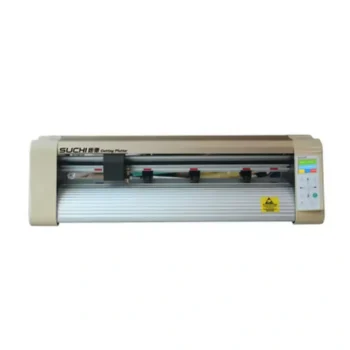
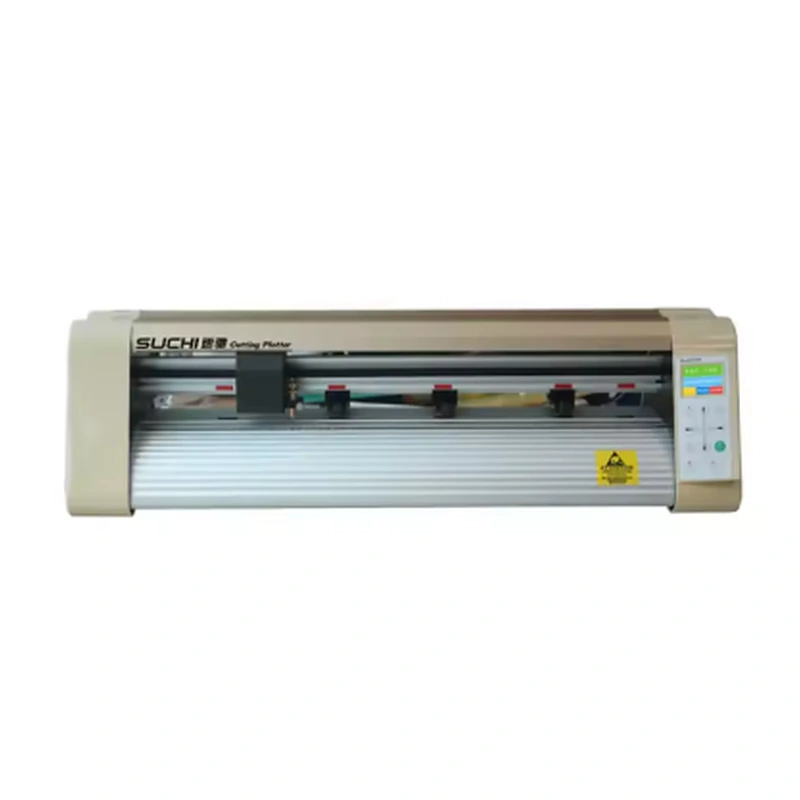
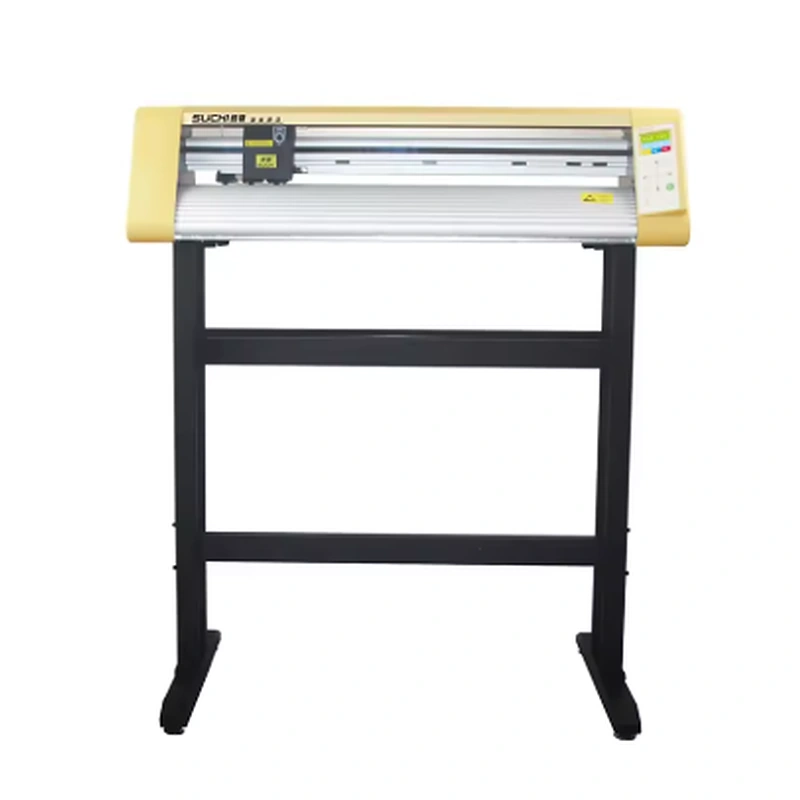
730mm Vinyl Plotter Cutter with Automatic Edge-Searching Function – Professional Vinyl Sticker, Poster, and Sign Making Machine

730mm Vinyl Plotter Cutter with Automatic Edge-Searching Function – Professional Vinyl Sticker, Poster, and Sign Making Machine

Upgrade your sign-making and vinyl cutting business with the 730mm Vinyl Plotter Cutter with Automatic Edge-Searching Function. Designed for commercial graphics production, this professional cutting machine is suitable for businesses working with vinyl stickers, advertising graphics, custom lettering, decorative designs, poster applications, and other compatible cutting materials.
Featuring an automatic edge-searching function, this vinyl plotter cutter is designed to help users identify material edges and position cutting jobs more accurately. Its 730mm model designation makes it an option for businesses looking for a wider-format cutting solution for different signage and graphic design projects.
Whether you operate a sign-making workshop, advertising agency, sticker production business, vehicle graphics service, or custom decoration studio, a vinyl plotter cutter can help streamline your everyday production workflow. It provides a practical solution for creating cut designs from compatible vinyl materials for commercial and creative applications.
The machine is identified as model SC730A in the product selection. It is marketed for commercial use and features a USB interface, wired network support, automatic paper feeding, and app-based control according to the supplied specifications.
Key Features of the 730mm Vinyl Plotter Cutter
- 730mm Cutting Format: Designed around a 730mm model designation for wider-format vinyl cutting applications.
- Automatic Edge-Searching Function: Advertised automatic edge-searching functionality helps identify material edges during compatible cutting operations.
- Commercial Application: Suitable for sign-making businesses, advertising workshops, sticker production, and professional graphics applications.
- Vinyl Sticker Production: Designed for businesses producing custom vinyl lettering, decorative graphics, and compatible sticker designs.
- Poster and Signage Applications: Can be considered for compatible advertising graphics, lettering, and sign-making projects.
- USB Connectivity: Includes a USB interface for compatible computer connections.
- Wired Connectivity: The supplied specifications identify wired network printing support.
- App-Based Control: The listed control method is app-based, subject to compatible software and device support.
- Automatic Media Feeding: Features an automatic paper-feed mode according to the supplied specifications.
- Commercial Production Workflow: Offers a machine option for businesses handling regular graphics and vinyl production orders.
Automatic Edge-Searching Function for Vinyl Cutting
One of the main advertised features of this vinyl plotter cutter is its automatic edge-searching function.
Material positioning is an important part of vinyl cutting. Incorrect alignment can affect the placement of graphics, particularly when working with larger designs or pre-printed materials.
An edge-searching function is designed to help the machine identify material boundaries or positioning references before cutting, depending on its supported operating mode.
Improved Material Positioning
Automatic edge detection can help users establish the correct material position for compatible cutting jobs. This is particularly useful when preparing graphics that require accurate placement on vinyl sheets or rolls.
Support for Production Workflows
For sign-making and sticker businesses, consistent material positioning can help organize repeated production tasks. It may also reduce some manual alignment steps when the supported edge-searching function is used correctly.
Important Operating Considerations
Before production, users should confirm the machine’s edge-detection method, supported registration marks, compatible software, and material alignment procedure with the supplier.
730mm Vinyl Plotter Cutter for Professional Sign Making
Vinyl plotter cutters are commonly used in the sign-making industry to produce graphics from compatible cutting materials. They provide a practical way to create custom lettering, logos, decorative shapes, and advertising elements.
Custom Vinyl Lettering
Businesses can use compatible vinyl cutting workflows to prepare letters, numbers, business names, and promotional messages.
These graphics can be used for shop signs, office displays, window lettering, and other suitable surfaces.
Business Signage Production
Sign-making workshops can consider this machine for preparing custom lettering and decorative vinyl graphics for commercial signage projects.
It can be incorporated into a wider production workflow that includes graphic design, vinyl cutting, weeding, and application.
Advertising Graphics
Advertising agencies and promotional businesses often require customized graphics for campaigns, events, and commercial displays.
A compatible vinyl plotter cutter can support the preparation of lettering, shapes, and decorative graphic elements for these projects.
Vinyl Sticker and Decal Production
Custom sticker and decal production is another potential application for a vinyl plotter cutter.
Businesses can prepare digital artwork and use compatible cutting materials to produce different shapes and designs.
Custom Logo Stickers
Prepare suitable logo graphics and branded decals for businesses, promotional campaigns, and product identification.
Decorative Vinyl Stickers
Create decorative graphics for compatible surfaces, including windows, display panels, and selected interior decoration projects.
Product Label Cutting
Use compatible vinyl materials to prepare custom-shaped labels and decorative product identification graphics.
Personalized Decals
Custom graphics businesses can offer personalized names, lettering, numbers, and decorative designs for customers.
Applications for Advertising and Decoration Businesses
The 730mm vinyl plotter cutter can be considered for several professional and creative production environments.
1. Sign-Making Workshops
Sign-making businesses can explore this machine for producing vinyl lettering, logos, and decorative elements used in commercial signage.
2. Advertising Agencies
Advertising agencies can incorporate vinyl cutting into their graphic production services for promotional displays, event graphics, and branded materials.
3. Vehicle Graphics
Compatible vinyl materials can be cut into suitable decorative graphics, lettering, and decals for vehicle customization projects.
Material selection and application should be appropriate for automotive surfaces and outdoor conditions.
4. Window Graphics
Businesses can prepare vinyl lettering and decorative designs for shop windows, office glass, and suitable display surfaces.
5. Poster and Display Production
Graphic production workshops can use compatible cutting workflows to prepare decorative elements and lettering for advertising displays and poster-related projects.
6. Interior Decoration
Custom decoration businesses can explore vinyl cutting for wall graphics, decorative lettering, and suitable interior design applications.
7. Promotional Product Businesses
Businesses producing customized promotional materials can consider vinyl cutting for branded graphics, names, and decorative elements.
8. Craft and DIY Projects
Creative studios and DIY businesses can use compatible vinyl cutting materials to produce personalized designs, decorative shapes, and craft projects.
How to Use a Vinyl Plotter Cutter
Operating a vinyl plotter cutter generally involves preparing artwork, configuring the cutting software, loading the material, setting cutting parameters, and completing the cutting job.
Step 1: Prepare Your Digital Artwork
Create your design using compatible graphic design software. Prepare the required lettering, shapes, logos, or decorative graphics.
Make sure the artwork is converted into a suitable vector format supported by the machine’s cutting software.
Step 2: Connect the Machine
Connect the plotter cutter to a compatible computer or supported control device using the available interface.
The supplied specifications identify USB connectivity. Confirm the supported operating systems and software requirements before installation.
Step 3: Install Compatible Software
Install the cutting software recommended by the manufacturer. Configure the machine model and communication settings according to the supplied instructions.
Step 4: Load the Vinyl Material
Position the compatible vinyl sheet or roll in the machine’s feeding system.
Check that the material is properly aligned and positioned before starting the cutting operation.
Step 5: Configure Cutting Settings
Adjust the cutting parameters according to the selected material. These may include cutting force, speed, blade depth, and other supported settings.
Correct settings help achieve clean cuts while reducing the risk of damaging the backing material.
Step 6: Use the Automatic Edge-Searching Function
Activate the advertised edge-searching function according to the manufacturer’s operating instructions.
Allow the machine to complete its supported material-positioning procedure before beginning the cutting job.
Step 7: Start the Cutting Process
Send the prepared design to the plotter cutter and monitor the cutting operation.
Check that the material feeds correctly and that the cutting head follows the intended design path.
Step 8: Remove the Cut Material
After cutting is complete, carefully remove the material from the machine.
Use appropriate weeding tools to remove unwanted vinyl sections while preserving the required design.
Step 9: Complete the Application
Apply suitable transfer tape when required and position the finished vinyl design on the intended surface.
Follow the material manufacturer’s application recommendations for the best results.
Materials Suitable for Vinyl Plotter Cutting
Material compatibility is an important consideration when choosing a vinyl plotter cutter. Different materials have different thicknesses, adhesive properties, and cutting requirements.
Depending on the machine’s supported blade and cutting specifications, compatible materials may include:
- Self-adhesive sign vinyl.
- Colored adhesive vinyl.
- Decorative vinyl film.
- Compatible sticker vinyl.
- Heat transfer vinyl (HTV).
- Compatible craft vinyl.
- Suitable lettering and decal materials.
- Compatible advertising graphics film.
Always confirm the supported material thickness, cutting force, blade compatibility, and maximum media width with the seller before purchasing.
Benefits of Using a Professional Vinyl Plotter Cutter
Flexible Graphic Production
A vinyl plotter cutter provides businesses with an additional production method for preparing custom lettering, logos, shapes, and decorative graphics.
Support for Customized Orders
Custom graphics and personalized vinyl designs can help businesses serve customers with different branding and decoration requirements.
Digital Design Integration
Compatible cutting software allows users to prepare digital artwork and convert it into machine-readable cutting instructions.
Commercial Business Applications
Sign-making companies, advertising workshops, and sticker production businesses can explore vinyl cutting as part of their regular service offerings.
Automatic Edge-Searching
The advertised edge-searching function provides an additional positioning feature for supported cutting workflows.
Maintenance and Care for Your Vinyl Plotter Cutter
Regular maintenance helps keep a cutting machine in suitable operating condition. Proper care can also help reduce material-feeding problems and inconsistent cutting results.
Clean the Cutting Area
Keep the cutting area free from dust, vinyl scraps, and adhesive residue. Clean accessible surfaces using suitable materials and the manufacturer’s recommended procedures.
Inspect the Cutting Blade
Check the blade regularly for wear or damage. Replace it when necessary and use a blade compatible with the material being cut.
Check Material Alignment
Inspect the material feeding system and confirm that the vinyl is properly aligned before starting each job.
Maintain the Cutting Head
Keep the cutting head and its surrounding components clean. Follow the manufacturer’s instructions for inspection and maintenance.
Inspect USB and Electrical Connections
Check the connection cables and power supply regularly. Avoid using damaged cables or unsuitable electrical connections.
Update Compatible Software
Use the recommended software versions and drivers. Confirm compatibility before installing updates to avoid communication problems.
Technical Specifications of the SC730A Vinyl Plotter Cutter
| Specification | Details |
|---|---|
| Product Name | 730mm Vinyl Plotter Cutter |
| Model Number | SC730A (Product Selection) |
| Model Listed in Specifications | KL-1601 |
| Product Category | Plotter Cutter, According to Product Title |
| Advertised Function | Automatic Edge-Searching |
| Application | Commercial |
| Maximum Paper Size | A2+ |
| Maximum Resolution | 1200 × 600 dpi (As Listed) |
| Print Speed | 12 ppm (As Listed) |
| Control Method | App |
| Connectivity | Wired |
| Interface Type | USB |
| Signal Connection Type | None (As Listed) |
| Media Feed Mode | Automatic |
| Output Type | Colored (As Listed) |
| Double-Sided Printing | No |
| Internal Memory | 256 MB |
| Voltage | 100–240V |
| Battery Included | No |
| Brand Name | Kingcolor |
| Certification | CE (As Listed) |
| Origin | Mainland China |
| After-Sales Service | National Joint Guarantees (As Listed) |
| High-Concern Chemicals | None |
Frequently Asked Questions
What is the 730mm Vinyl Plotter Cutter used for?
It is marketed for vinyl sticker production, sign making, poster-related graphics, advertising materials, and compatible vinyl cutting applications.
What is the model number?
The product selection identifies SC730A. However, the technical specification table also lists KL-1601. Confirm the exact machine model with the supplier before ordering.
What is the automatic edge-searching function?
It is an advertised feature designed to help identify material edges or positioning references during compatible cutting operations.
Can this machine cut vinyl stickers?
The product is advertised for vinyl stickers and compatible vinyl cutting applications. Confirm the supported material types and thickness with the seller.
Can it be used for commercial sign making?
Yes. The product is marketed for commercial applications, including sign-making and advertising graphics production.
Does it support USB connectivity?
Yes. USB is listed as the interface type in the supplied specifications.
Does the machine support automatic feeding?
Yes. The specification table identifies the paper feed mode as automatic.
Does it support app-based control?
The supplied specification table identifies the control method as App. Confirm the compatible application and supported devices with the manufacturer.
What voltage does the machine support?
The supplied specifications list 100–240V. Confirm the required electrical frequency and local installation requirements before operation.
Where is the machine manufactured?
The supplier identifies Mainland China as its origin.
Does the machine include a cutting blade?
The supplied product specifications do not clearly confirm the included blade or accessories. Ask the seller for the complete package contents.
Can it cut heat transfer vinyl?
Heat transfer vinyl may be suitable if its thickness and material properties are supported by the machine. Confirm compatibility with the supplier before production.
Important Purchasing Considerations
Before purchasing this machine, buyers should confirm several important details with the supplier.
- Confirm whether SC730A or KL-1601 is the correct machine model.
- Verify the actual maximum cutting width and usable media width.
- Confirm that the machine is a vinyl plotter cutter rather than a UV or conventional inkjet printer.
- Ask how the automatic edge-searching function operates.
- Verify compatible cutting software and operating systems.
- Confirm blade type, cutting force, and supported material thickness.
- Ask whether the stand, cutting blade, cables, and other accessories are included.
- Verify the actual cutting speed and positioning accuracy.
- Confirm warranty coverage and technical support availability.
Note: Some entries in the supplied technical specification table, including inkjet printer, UV printer, A2+ paper size, print speed, and print resolution, do not clearly match the advertised vinyl plotter cutter. Buyers should obtain a confirmed specification sheet for the SC730A before making a purchase decision.
Choose the 730mm Vinyl Plotter Cutter for Your Graphics Business
The 730mm Vinyl Plotter Cutter with Automatic Edge-Searching Function is marketed as a commercial graphics cutting solution for businesses working with vinyl stickers, advertising lettering, custom decals, and signage projects.
Its advertised automatic edge-searching capability, USB interface, app-based control, and commercial application make it worth considering for sign-making workshops and customized graphics production businesses.
Whether you are expanding an existing advertising workshop or adding vinyl cutting services to a graphics business, selecting compatible materials, software, and machine accessories is essential for achieving consistent production results.
Review the available machine configuration and confirm the technical specifications with the supplier before ordering.
Explore the 730mm Vinyl Plotter Cutter and expand your capabilities in professional vinyl sticker, signage, and custom graphics production.