A1 DTF Printer for Textile Printing – Dual i3200 Printheads, High-Resolution PET Film Inkjet Printer with Built-In Smoke Purifier

A1 DTF Printer features dual i3200 printheads and a built-in smoke purifier for textile printing. Explore features, performance, and buying tips.

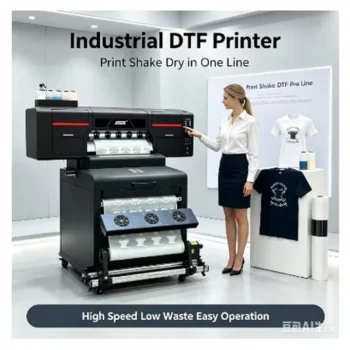
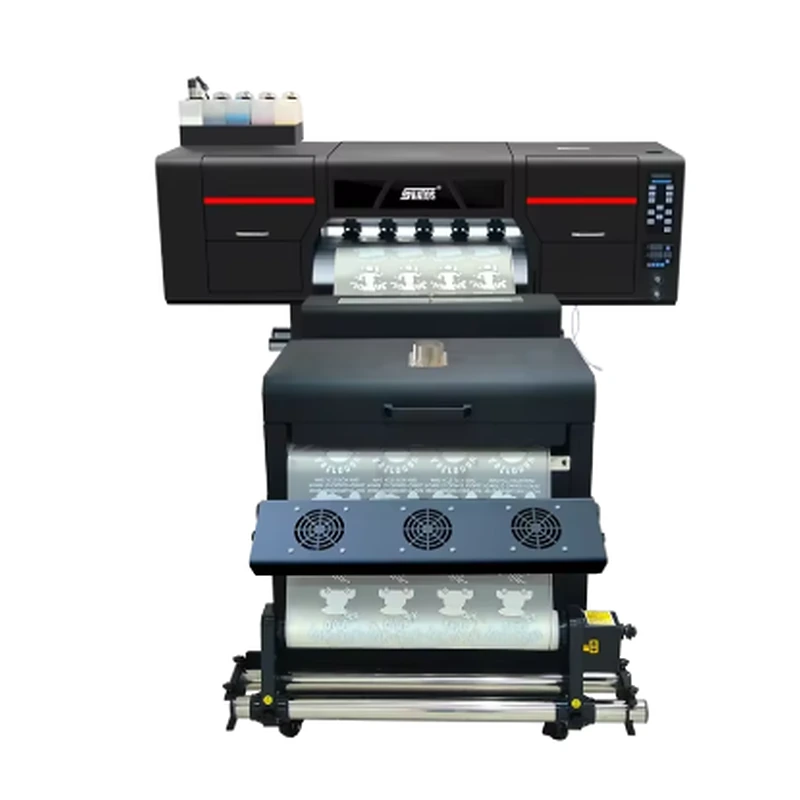
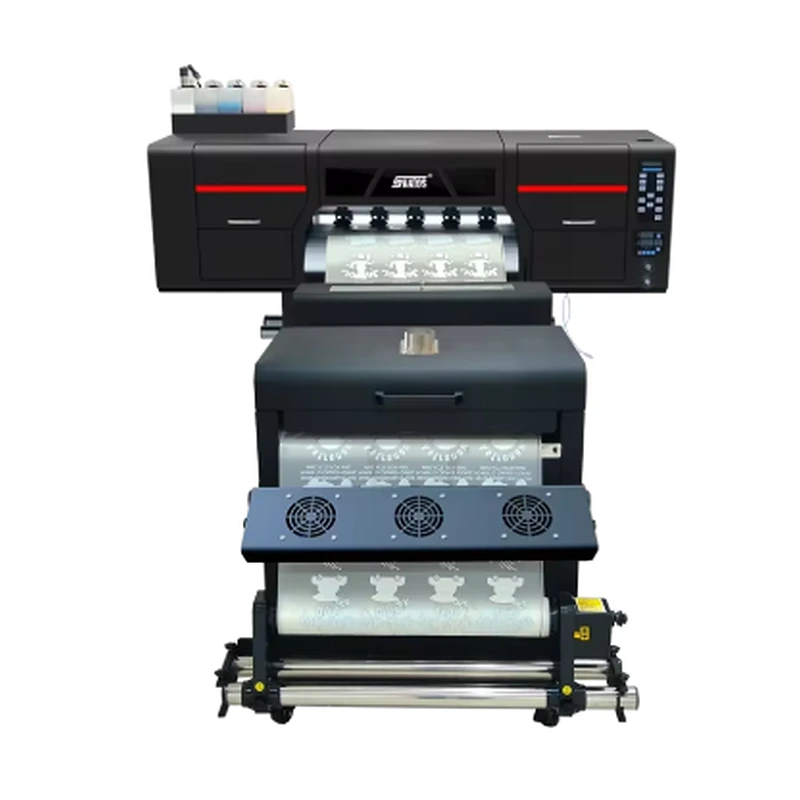
Upgrade your garment printing production with this A1 DTF Printer for Textile Printing, a commercial Direct to Film printing solution designed for professional apparel decoration, customized clothing production, and textile printing businesses. Featuring two i3200 printheads, high-resolution inkjet printing technology, and an integrated print, powder-shaking, and drying workflow, this industrial DTF printer offers a comprehensive setup for businesses looking to expand their garment printing capabilities.
Designed for professional printing environments, this machine combines digital artwork printing with compatible adhesive powder application and drying processes in one production line. Its integrated configuration helps streamline the preparation of DTF transfers while reducing the need to manage separate printing and powder-handling stages manually.
The machine supports an A1 maximum paper size and features a listed maximum printing resolution of 1200 × 600 dpi. Additionally, it includes 256 MB of internal memory, automatic paper feeding, wired connectivity, and a USB interface for computer-based printing operations.
With CMYKW ink configuration indicated in the product title, this DTF printing solution is designed for colorful textile artwork and compatible garment transfer applications. The built-in smoke purifier is another highlighted feature intended for the integrated production environment.
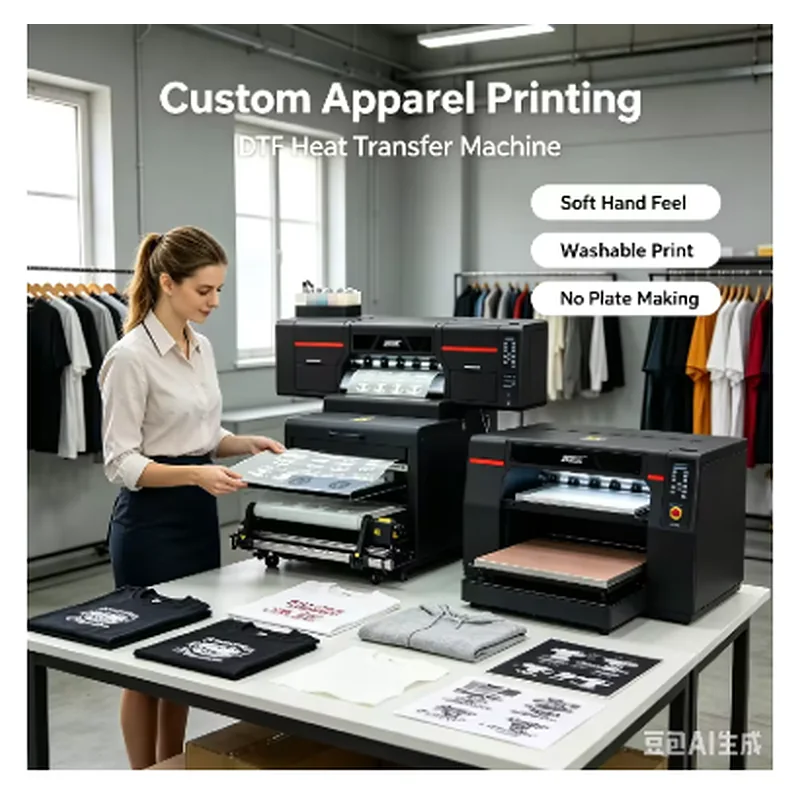
Whether you operate a garment manufacturing business, custom T-shirt printing studio, promotional apparel company, or commercial textile printing workshop, this industrial DTF printer is an option to consider for professional printing production.
Key Features and Benefits of the A1 Industrial DTF Printer
- Dual i3200 Printheads: Features two i3200 printheads according to the product title, designed for professional inkjet printing applications.
- A1 Large-Format Printing: Supports a maximum listed paper size of A1 for larger textile transfer artwork and printing layouts.
- High-Resolution Printing: Offers a listed maximum printing resolution of 1200 × 600 dpi for detailed digital artwork.
- CMYKW Ink Configuration: The product title identifies CMYKW printing, supporting color and white ink workflows when configured with compatible inks.
- Integrated Print, Shake, and Dry System: Combines printing, adhesive powder shaking, and drying in one production-line configuration.
- Built-In Smoke Purifier: Features a smoke purification system highlighted in the product title for the integrated production setup.
- Automatic Paper Feeding: Supports automatic media feeding to simplify compatible roll-based printing operations.
- High-Speed Production Workflow: The supplier lists a print speed of 12 pages per minute. Actual production speed depends on the print mode and artwork.
- 256 MB Internal Memory: Includes internal memory for machine processing and operating requirements.
- USB Connectivity: Provides a wired USB interface for computer-based printing operations.
- Commercial Printing Application: Designed for professional garment printing and commercial textile production environments.
- Push-Button Control: Uses a push-button control method for machine operation.
- US and EU Plug Options: Available with different plug configurations to accommodate compatible electrical connections.
- 100–240V Voltage: Supports the voltage range listed by the supplier, subject to the applicable electrical frequency and installation requirements.
What Is an Industrial A1 DTF Printer?
A Direct to Film (DTF) printer is a digital printing machine that produces designs on specialized PET transfer film. The printed artwork is then prepared with compatible adhesive powder and transferred onto suitable garments using a heat press.
Unlike conventional direct-to-garment printing, DTF technology prepares the design on a separate transfer medium before it is applied to the final fabric. This workflow allows printing businesses to prepare customized designs for different compatible textile products.
The A1 industrial DTF printer combines the printing process with a powder-shaking and drying configuration. This integrated production arrangement is designed to make the preparation of DTF transfers more organized and efficient.
Understanding the Direct to Film Printing Process
DTF printing generally involves several stages:
- Prepare the digital artwork using compatible graphic design software.
- Print the design onto specialized PET transfer film.
- Apply compatible hot-melt adhesive powder to the printed ink layer.
- Remove excess powder using the appropriate shaking mechanism.
- Cure the adhesive powder using the recommended drying process.
- Transfer the prepared design onto compatible fabric using a heat press.
- Remove the film according to its specified peeling method.
By combining printing, powder shaking, and drying in one production-line configuration, this machine is designed to support a more streamlined DTF workflow.
Dual i3200 Printheads for Professional Textile Printing
One of the main features highlighted in the product title is the use of two i3200 printheads.
Printheads are important components of an inkjet printing system because they control the placement of ink droplets onto the printing medium. Their configuration influences printing performance, ink delivery, and the overall production workflow.
Dual Printhead Configuration
The machine is advertised with two i3200 printheads, providing a dual-head configuration for its industrial printing setup.
This configuration is intended for professional printing applications where businesses require a dedicated large-format DTF printing solution.
High-Resolution Digital Artwork
The supplier lists a maximum printing resolution of 1200 × 600 dpi. This specification is relevant when evaluating the printer for detailed artwork, graphic elements, text, and customized garment designs.
Actual printing quality depends on several factors, including ink quality, printhead condition, media coating, software settings, and maintenance.
CMYKW Ink Configuration
The product title identifies a CMYKW ink configuration.
CMYK refers to cyan, magenta, yellow, and black inks. The additional W represents white ink, which is commonly used in DTF printing to create an underbase for designs applied to dark or colored fabrics.
When properly configured, a CMYKW DTF workflow can support colorful designs and white ink applications on compatible textile materials.
Integrated Print, Powder Shake, and Dry Production Line
A major highlight of this industrial DTF printer is its integrated print, powder-shaking, and drying configuration.
Traditional DTF production may involve separate equipment or manually managed stages for printing, adhesive powder application, and curing. An integrated production line brings these processes together in a coordinated machine setup.
1. Digital Film Printing
The first stage involves printing the prepared artwork onto compatible PET transfer film.
The printer applies the selected ink configuration to reproduce the digital design on the transfer medium.
2. Adhesive Powder Application
After printing, compatible hot-melt adhesive powder is applied to the appropriate printed areas.
The adhesive powder helps prepare the transfer for application to compatible fabrics during the subsequent heat-pressing process.
3. Automatic Powder Shaking
The powder-shaking section helps distribute the adhesive powder and remove excess material according to the machine’s configuration.
This stage is important for preparing a more consistent transfer before curing.
4. Integrated Drying Process
The drying section prepares the adhesive powder using the machine’s curing system.
Correct temperature and curing conditions depend on the selected adhesive powder and transfer film. Always follow the manufacturer’s operating recommendations.
Benefits of an Integrated Production Setup
- Combines multiple DTF production stages in one machine configuration.
- Helps organize the transfer preparation workflow.
- Reduces the need to move film manually between separate processing stages.
- Supports continuous production arrangements on compatible equipment.
- Provides a more centralized printing and transfer preparation setup.
- Can help printing businesses manage regular garment decoration orders.
Built-In Smoke Purifier for the Production Environment
The product title specifically highlights a built-in smoke purifier.
Smoke and airborne emissions can be generated during certain heating and adhesive-curing operations. A suitable extraction and filtration arrangement can help manage the production environment.
Integrated Purification Feature
The advertised smoke purifier is intended to form part of the machine’s integrated production configuration.
Before installation, businesses should confirm the purifier’s filtration method, airflow capacity, filter replacement requirements, and maintenance instructions with the supplier.
Workshop Ventilation
Even when equipment includes a smoke purification feature, appropriate workshop ventilation remains important.
Follow the manufacturer’s safety instructions and local workplace ventilation requirements. Do not assume that a built-in purifier eliminates the need for additional ventilation.
A1 Large-Format DTF Printing Capability
The supplier identifies A1 as the maximum paper size for this machine.
Large-format printing provides additional layout space for preparing garment transfer designs. Businesses can arrange multiple graphics within a suitable print layout, depending on the machine’s actual printable width and length.
Advantages of A1 Printing
- Supports larger artwork layouts than smaller-format printing setups.
- Provides space for arranging multiple garment designs.
- Offers flexibility for different custom apparel projects.
- Can support larger graphic transfer requirements.
- Provides an option for professional textile printing workshops.
Suitable Printing Projects
The A1 format can be useful for businesses preparing:
- Large T-shirt graphics.
- Multiple smaller garment designs in one layout.
- Custom hoodie artwork.
- Sportswear graphics.
- Promotional apparel designs.
- Fashion clothing decorations.
- Personalized textile transfer artwork.
Actual printable dimensions should be confirmed with the seller because the maximum paper size does not necessarily equal the usable print area.
DTF Printing Applications for Different Textile Products
DTF printing is widely used in custom garment decoration because compatible transfer designs can be prepared separately and applied to different fabric products.
1. Custom T-Shirt Printing
Custom T-shirt production is one of the most popular applications for DTF printing.
Businesses can prepare colorful graphics, brand logos, illustrations, personalized names, and promotional designs for compatible T-shirt fabrics.
The transfer-based workflow is suitable for businesses offering customized clothing and small-batch apparel production.
2. Hoodie and Sweatshirt Printing
DTF printing can be considered for suitable hoodies and sweatshirts.
Large graphics, decorative artwork, brand identities, and personalized designs can be prepared on compatible transfer film and applied using suitable heat-press settings.
3. Sportswear and Team Uniforms
Sportswear businesses can explore DTF printing for compatible team uniforms and athletic apparel.
Names, numbers, logos, and other decorative graphics can be prepared for suitable textile applications.
Always test transfer compatibility with stretch fabrics and performance garments before bulk production.
4. Fashion and Designer Clothing
Fashion brands and clothing manufacturers can consider DTF printing for selected apparel decoration projects.
Designers can prepare custom artwork for T-shirts, casual wear, fashion tops, and other compatible clothing products.
5. Promotional Apparel
Companies producing branded merchandise can use compatible DTF workflows to prepare customized promotional clothing.
Printed company logos, event graphics, and marketing designs can be applied to suitable apparel.
6. Children’s Clothing
Custom children’s clothing businesses can explore suitable DTF transfer applications for personalized designs and decorative artwork.
Use transfer materials appropriate for the garment fabric and intended application.
7. Workwear and Company Uniforms
Businesses producing uniforms and workwear can consider DTF printing for compatible logos, employee names, and company identification graphics.
8. Personalized Clothing Businesses
Small businesses offering customized gifts and personalized apparel can evaluate an industrial DTF printer for preparing different customer designs.
How to Use an Industrial DTF Printer
Operating an industrial DTF printer involves artwork preparation, media loading, printing, adhesive powder application, curing, and garment transfer.
The following steps describe a general DTF production workflow. The exact procedures and settings should follow the manufacturer’s instructions for the KL-301 machine.
Step 1: Prepare Your Digital Design
Create the artwork using compatible graphic design software. Adjust the design dimensions according to the intended garment and available printing area.
Prepare the artwork using the color settings and file format recommended by the printer’s software.
Step 2: Prepare the Printer
Check the printer’s condition, printhead status, ink supply, and required operating connections.
Make sure the machine is installed on a stable surface and connected to an appropriate power supply.
Step 3: Load the PET Transfer Film
Install compatible DTF PET film according to the manufacturer’s media-loading instructions.
Check the printable side, media alignment, and feeding configuration before starting the job.
Step 4: Configure CMYKW Ink Settings
Confirm that the appropriate CMYK and white ink channels are configured correctly.
Use the recommended ink profile and printing settings for the selected PET transfer film.
Step 5: Print the Artwork
Send the prepared design to the printer through the compatible computer software.
Monitor the printing process and check for media feeding problems, ink inconsistencies, or alignment issues.
Step 6: Apply Adhesive Powder
After printing, the compatible adhesive powder is applied to the printed film using the integrated powder application system.
Follow the recommended powder quantity and application settings for the selected transfer materials.
Step 7: Shake Off Excess Powder
The powder-shaking section helps remove excess adhesive powder from the transfer film.
Check the powder distribution to ensure that the printed areas are prepared correctly.
Step 8: Cure the Adhesive Powder
The integrated drying section prepares the adhesive using the recommended curing process.
Follow the manufacturer’s instructions for curing temperature, duration, and operating conditions.
Step 9: Prepare the Garment
Position the compatible garment on a suitable heat press. Prepare the fabric according to the transfer manufacturer’s instructions.
Step 10: Apply the Transfer
Position the prepared DTF transfer on the garment and apply the specified temperature, pressure, and pressing time.
Step 11: Remove the Transfer Film
Follow the recommended hot-peel, warm-peel, or cold-peel procedure for the selected PET film.
The supplied specifications do not identify the peel type, so confirm it with the film supplier.
Step 12: Complete and Inspect the Garment
Complete any recommended finishing press and inspect the final printed design.
Check the transfer appearance, edges, alignment, and adhesion before packaging the finished garment.
Technical Specifications of the A1 DTF Printer
| Specification | Details |
|---|---|
| Product Name | A1 Industrial DTF Printer |
| Model Number | KL-301 |
| Brand Name | Kingcolor |
| Printer Type | Inkjet Printer |
| Printing Application | DTF Textile and Clothing Printing |
| Printhead Configuration | 2 i3200 Printheads, According to Product Title |
| Ink Configuration | CMYKW, According to Product Title |
| Maximum Paper Size | A1 |
| Maximum Resolution | 1200 × 600 dpi |
| Print Resolution | 1200 × 600 dpi |
| Scan Resolution | 600 × 1200 dpi |
| Print Speed | 12 ppm |
| Internal Memory | 256 MB |
| Control Method | Push Button |
| Print Method | Inkjet Printing |
| Media Feed Mode | Automatic |
| Connectivity | Wired |
| Interface Type | USB |
| Output Type | Colored |
| Double-Sided Printing | No |
| Consumable Type | Black Powder One (As Listed) |
| Production Configuration | Print, Powder Shake, and Dry in One Line |
| Smoke Purifier | Built-In, According to Product Title |
| Dimensions | 174 × 84 × 79 cm |
| Product Weight | 22 kg, According to Supplier Listing |
| Voltage | 100–240V |
| Battery Included | No |
| Application | Commercial |
| Available Plug Types | US / EU |
| Certification | CE |
| High-Concern Chemicals | None Listed |
| Origin | Mainland China |
| After-Sales Service | National Joint Guarantees, According to Listing |
How to Choose the Right PET Film for This DTF Printer
PET transfer film is an essential consumable in DTF printing. Selecting compatible film helps support the printing, adhesive application, curing, and transfer processes.
Check Film Width
Choose a film width supported by the machine’s actual feeding and printing configuration. Confirm the maximum usable media width before purchasing.
Check Film Coating
Use specialized DTF transfer film with an appropriate ink-receptive coating. Ordinary PET film may not provide the required printing and transfer characteristics.
Confirm Hot-Peel or Cold-Peel Type
Different transfer films may require different peeling procedures. Confirm the correct type for your production process.
Verify Ink Compatibility
Make sure the selected PET film works with the printer’s CMYKW ink configuration and recommended ink profiles.
Choose Suitable Adhesive Powder
Select hot-melt adhesive powder according to the film, fabric, and curing system requirements.
Maintenance and Care for the Industrial DTF Printer
Regular maintenance is essential for keeping an industrial DTF printer in suitable operating condition. Proper cleaning and inspection can help reduce printing problems and unnecessary downtime.
Printhead Maintenance
Follow the manufacturer’s recommended printhead cleaning and maintenance procedures. Avoid allowing ink to dry inside the printhead system.
White Ink Management
White ink systems may require regular circulation or maintenance procedures to reduce settling. Follow the equipment manufacturer’s specific recommendations.
Cleaning the Printing Area
Keep the printing area free from dust, loose adhesive powder, and unwanted material. Clean accessible areas according to the manufacturer’s instructions.
Powder Shaker Maintenance
Inspect the powder application and shaking mechanism regularly. Remove accumulated powder using an appropriate cleaning procedure.
Drying System Inspection
Check the drying section for accumulated residue and ensure that its operating components are maintained according to the equipment manual.
Smoke Purifier Maintenance
Inspect the smoke purifier and replace or clean filters according to the manufacturer’s recommended maintenance schedule.
Electrical and USB Connections
Inspect cables, connectors, and electrical connections regularly. Disconnect the equipment before performing maintenance that requires access to electrical components.
Common DTF Printing Problems and Troubleshooting
1. White Ink Printing Problems
Possible causes: Ink settling, blocked nozzles, incorrect ink circulation, or unsuitable maintenance.
Recommended action: Follow the manufacturer’s white ink maintenance and printhead cleaning procedures.
2. Uneven Printing Results
Possible causes: Incorrect media alignment, unsuitable print settings, or printhead condition.
Recommended action: Check media positioning, printing profiles, and printhead status.
3. Adhesive Powder Application Problems
Possible causes: Incorrect powder quantity, uneven application, or incompatible consumables.
Recommended action: Adjust the powder application according to the recommended material settings.
4. Incomplete Adhesive Curing
Possible causes: Incorrect temperature, insufficient curing time, or unsuitable adhesive powder.
Recommended action: Follow the adhesive manufacturer’s curing specifications.
5. Transfer Peeling Problems
Possible causes: Incorrect peeling method, unsuitable heat press settings, or incompatible transfer film.
Recommended action: Confirm the correct film type and follow its recommended transfer procedure.
6. Media Feeding Problems
Possible causes: Incorrect roll installation, film wrinkles, or media alignment issues.
Recommended action: Check the film loading process and feeding mechanism.
Frequently Asked Questions
What is the A1 DTF Printer KL-301 used for?
The KL-301 is marketed for commercial DTF textile printing. It is designed to print artwork onto compatible PET film for subsequent transfer onto suitable garments.
How many printheads does this machine have?
The product title advertises two i3200 printheads. Confirm the exact printhead model and configuration with the seller before purchasing.
What ink configuration does the printer support?
The product title identifies a CMYKW ink configuration, which includes cyan, magenta, yellow, black, and white ink channels.
Does this machine include a powder shaker and dryer?
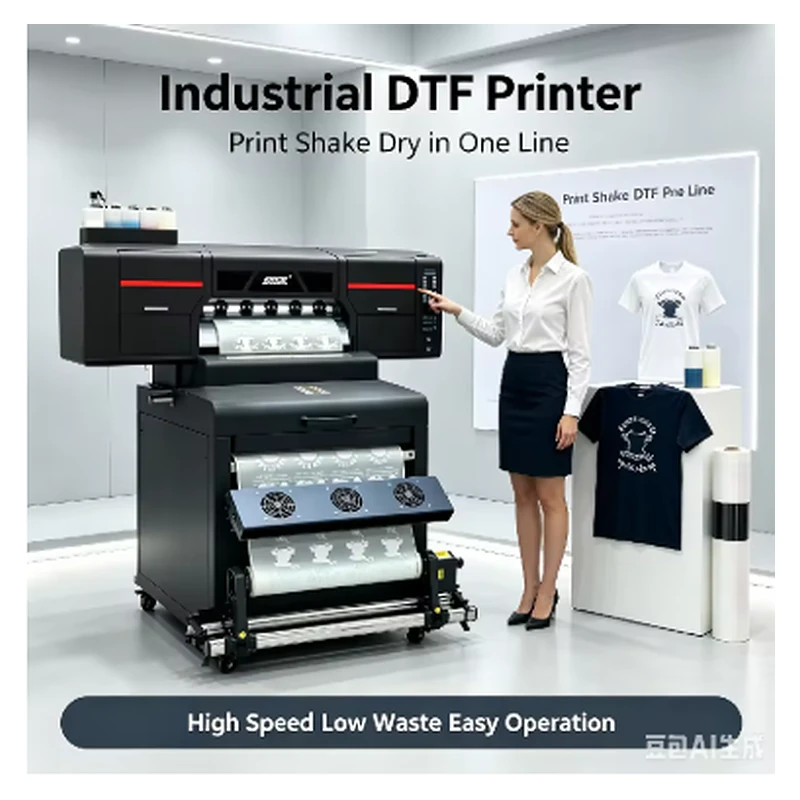
Yes. The promotional image identifies a print, shake, and dry production line, indicating an integrated printing and transfer preparation configuration.
Does the printer have a built-in smoke purifier?
Yes. The product title specifically advertises a built-in smoke purifier. Confirm its filtration specifications and maintenance requirements with the seller.
What is the maximum printing size?
The supplier lists A1 as the maximum paper size. Confirm the actual printable dimensions with the seller.
What is the maximum printing resolution?
The listed maximum printing resolution is 1200 × 600 dpi.
What is the printing speed?
The supplied specifications list a printing speed of 12 pages per minute. Actual output depends on the selected print mode, artwork, and operating conditions.
Can this machine print white ink?
The product title identifies a CMYKW ink configuration, which includes white ink. Confirm the white ink system and supported printing workflow with the supplier.
Does the printer support automatic feeding?
Yes. The specifications identify the paper feed mode as automatic.
How does the printer connect to a computer?
The machine uses a wired connection and a USB interface, according to the supplied specifications.
What is the internal memory capacity?
The product listing identifies 256 MB of internal memory.
What is the voltage requirement?
The supplier lists 100–240V. Confirm the local electrical frequency and installation requirements before connecting the equipment.
Are US and EU plug options available?
Yes. The product listing provides US and EU plug options.
What is the machine’s weight?
The supplied specifications list a weight of 22kg. However, the listed dimensions are 174 × 84 × 79cm, so buyers should confirm the complete shipping and machine weight with the seller.
Can this printer print on T-shirts?
It is marketed for DTF textile printing and can be considered for compatible T-shirt transfer applications using suitable PET film, adhesive powder, and heat press equipment.
Can I use this printer for hoodies and sweatshirts?
Yes, compatible DTF transfers can be applied to suitable hoodies and sweatshirts. Confirm fabric compatibility and the correct transfer settings before production.
Does this machine print directly onto clothing?
No. DTF printing uses PET film as an intermediate transfer medium. The prepared design is subsequently transferred onto compatible fabric using a heat press.
Does the printer support double-sided printing?
No. The supplied specifications identify double-sided printing as unavailable.
Where is this industrial DTF printer manufactured?
The supplier identifies Mainland China as the country of origin.
What certification is listed?
The product specifications list CE certification.
Why Choose This Industrial A1 DTF Printing Machine?
Choosing professional textile printing equipment is an important decision for businesses looking to increase their production capabilities and offer more customized apparel services.
This A1 Industrial DTF Printer with Dual i3200 Printheads combines several features for commercial garment printing, including large-format A1 printing, CMYKW ink configuration, automatic feeding, and an integrated print, powder-shaking, and drying arrangement.
Its built-in smoke purifier, USB connectivity, 256 MB internal memory, and listed 1200 × 600 dpi resolution provide additional features to consider when evaluating the machine for a professional printing environment.
Furthermore, the integrated production arrangement can help businesses organize multiple DTF preparation stages in one equipment setup rather than relying entirely on separate machines.
For custom apparel manufacturers, promotional clothing businesses, T-shirt printing studios, and commercial textile workshops, this industrial DTF printer offers a configuration worth exploring.
Order Your A1 Industrial DTF Printer Today
Expand your garment printing capabilities with this A1 DTF Printer for Textile Printing with Two i3200 Printheads. Designed for commercial textile applications, it combines high-resolution inkjet printing, CMYKW ink configuration, automatic media feeding, and integrated powder-shaking and drying functionality.
Choose your preferred US or EU plug configuration according to your electrical requirements. Before ordering, confirm the printhead model, ink system, supported PET film, printable dimensions, smoke purifier specifications, and software compatibility with the supplier.
Bring printing, powder application, and drying together in one industrial DTF production setup and explore new opportunities in custom garment printing.