
One Iron, Three Ways: The ALIENTEK T90 Smart Soldering Iron Review
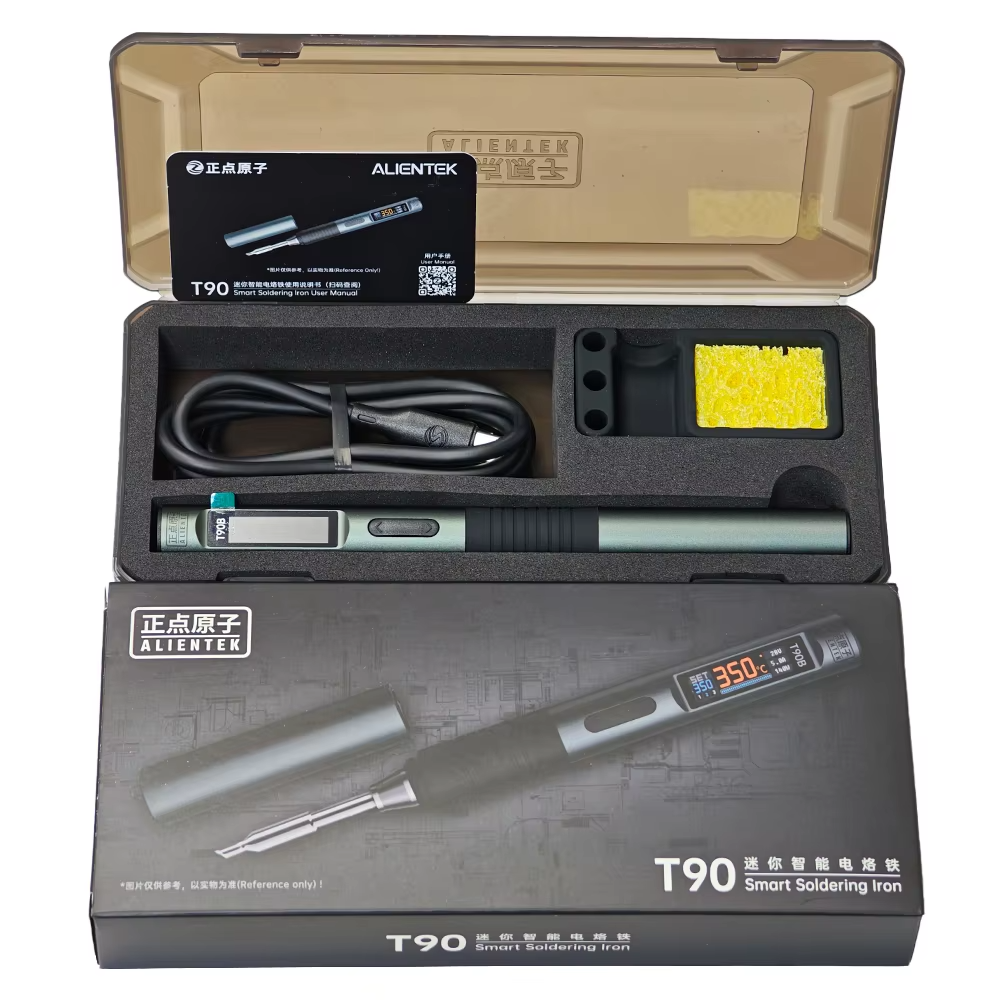
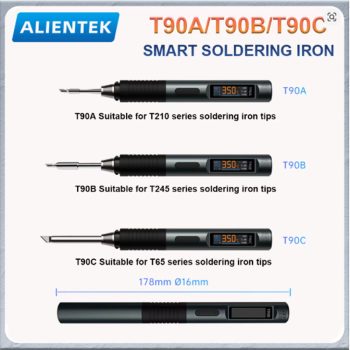
Figure 1: The ALIENTEK T90 Smart Soldering Iron – a modular soldering station that fits in your pocket.
Have you ever been frustrated by a cheap soldering iron that takes forever to heat up and never holds a steady temperature? Have you ever wished you could take a professional soldering station into the field to repair a drone or a car circuit? There is a better way. Meet the ALIENTEK T90 Smart Soldering Iron. This modular, portable soldering system is designed for electronics engineers, drone racers, phone repair technicians, and DIY hobbyists. The T90 is not just one soldering iron – it is three. The main control unit works with three different handle types: the T245 for heavy-duty soldering, the T210 for micro-soldering, and the T65 for general-purpose work. It heats up in seconds, maintains a stable temperature with smart PID control, and can be powered by anything from a USB-C laptop charger to a LiPo battery pack. In this complete guide, we will explain everything you need to know about the ALIENTEK T90 Smart Soldering Iron. You will learn how the modular system works, how to choose the right handle for your needs, and why this iron is perfect for both the workshop and the field.
H2: What is the ALIENTEK T90 Smart Soldering Iron?
The ALIENTEK T90 Smart Soldering Iron is a modular soldering system that separates the heating element from the control unit. The T90 main unit is a small, CNC aluminum block with an OLED screen and smart electronics. You attach a soldering handle (T245, T210, or T65) to the main unit via a cable. The handle contains the heating element and the soldering tip. This modular design gives you flexibility. One control unit works with multiple handles, each optimized for different soldering tasks.
The ALIENTEK T90 Smart Soldering Iron heats up incredibly fast – from room temperature to 380°C in as little as 6 seconds (depending on your power source). The temperature range is 80°C to 450°C (176°F to 842°F), covering everything from delicate low-temperature soldering to high-heat work on large connectors. The smart PID (Proportional-Integral-Derivative) algorithm keeps the temperature stable, even when you are soldering large joints that suck away heat. The 0.87-inch OLED screen shows temperature, voltage, and power load. The iron has an auto-sleep feature that saves your tips and energy. You can power it from a USB-C PD/QC charger, a DC power supply, or even a LiPo battery (3S to 6S). Whether you are at your bench or in the field, the ALIENTEK T90 Smart Soldering Iron is ready to work.
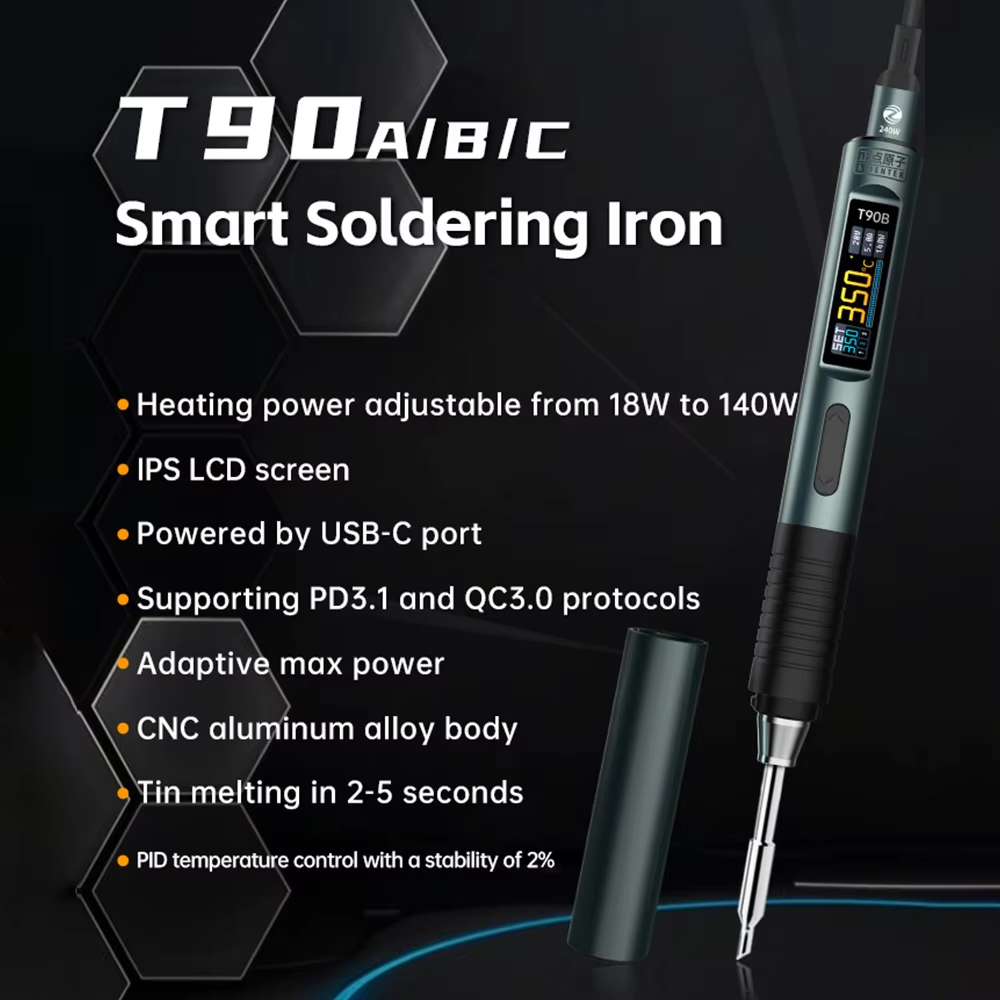
Figure 2: The ALIENTEK T90 Smart Soldering Iron features a bright OLED display for real-time temperature and power monitoring.
H3: Why the Modular Design of the ALIENTEK T90 Smart Soldering Iron is Revolutionary
Most soldering irons are single-purpose tools. A heavy-duty iron is too big for phone repair. A micro-soldering iron is too weak for large connectors. The ALIENTEK T90 Smart Soldering Iron solves this problem with its modular handle system.
- One Control Unit, Three Handles: You buy the T90 main unit once. Then you can buy additional handles (T245, T210, T65) separately as needed. This is much cheaper than buying three complete soldering stations.
- Change Handles in Seconds: The handles connect to the main unit via a durable cable and connector. You can swap handles in seconds, without tools.
- Each Handle is Optimized: The T245 handle has a larger heating element and more thermal mass for heavy work. The T210 handle is slim and lightweight for precision micro-soldering. The T65 is a great all-arounder. You use the right tool for the job.
- Firmware Knows Which Handle You Are Using: The ALIENTEK T90 Smart Soldering Iron automatically detects the attached handle and can optimize its PID parameters accordingly.
H3: Key Features of the ALIENTEK T90 Smart Soldering Iron
Let us break down the main features of this innovative ALIENTEK T90 Smart Soldering Iron and why they matter for USA electronics professionals and hobbyists.
- 3-in-1 Handle Compatibility (T245, T210, T65): This is the standout feature. The ALIENTEK T90 Smart Soldering Iron control core works with three different soldering handle series. The T245 handle is perfect for general-purpose soldering and large ground planes. It has high heat capacity for soldering XT60 connectors, thick wires, and large through-hole components. The T210 handle is ideal for micro-soldering, mobile phone repair, and tiny SMD components. It is slim and precise. The T65 handle is the classic portable standard for everyday tasks. You choose the handle kit that matches your work.
- Rapid Heating with PID Temperature Control: The ALIENTEK T90 Smart Soldering Iron goes from 0°C to 380°C in as little as 6 seconds (depending on your power source). The temperature range is 80°C to 450°C (176°F to 842°F). The intelligent PID control ensures temperature stability, preventing cold joints or component damage. When you touch a large joint, the iron senses the temperature drop and adds power immediately to maintain the set temperature.
- Dual Power Interface (USB-C PD/QC and DC 5525): This iron is incredibly flexible. Use a USB-C PD (Power Delivery) or QC (Quick Charge) charger from your laptop or phone. Use a DC 5525 power supply from your bench. Or connect a 3S to 6S LiPo battery (7.4V to 25.2V) for field repairs. The ALIENTEK T90 Smart Soldering Iron works with almost any power source you have.
- OLED Smart Display: The 0.87-inch OLED screen is crisp and easy to read. It shows the set temperature, actual temperature, voltage, and power load in real time. The interface is intuitive, and the screen orientation can automatically rotate for left-handed or right-handed use. You always know exactly what your iron is doing.
- Auto-Sleep and Safety Features: The ALIENTEK T90 Smart Soldering Iron protects your tips and saves energy. When idle, the iron automatically enters sleep or standby mode, reducing temperature to prevent tip oxidation. It wakes up instantly when you pick it up. The programmable low-voltage protection prevents draining your LiPo batteries below a safe level – crucial for field use.
- CNC Aluminum Alloy Body: The main control unit is machined from solid aluminum. It is durable, heat-resistant, and looks professional. It also acts as a heat sink for the internal electronics.
- Firmware Upgradable via USB: The ALIENTEK T90 Smart Soldering Iron supports USB firmware updates. As Alientek improves the software, you can upgrade your iron to get new features and performance improvements. Your iron gets better over time.
H2: Top Benefits of Using the ALIENTEK T90 Smart Soldering Iron for Your USA Electronics Work
Why should you buy the ALIENTEK T90 Smart Soldering Iron? Here are the real-world benefits that USA electronics repair technicians, drone racers, and DIYers love.
H3: One Iron for Everything – From Micro-Soldering to Heavy Connectors
If you do different types of soldering, you need different tools. Repairing an iPhone requires a fine tip and precise temperature control. Soldering an XT90 connector on a drone battery requires high heat capacity. The ALIENTEK T90 Smart Soldering Iron does both. Buy the T210 handle kit for micro-soldering. Buy the T245 handle kit for heavy work. The same control unit works for both. You save money and bench space.
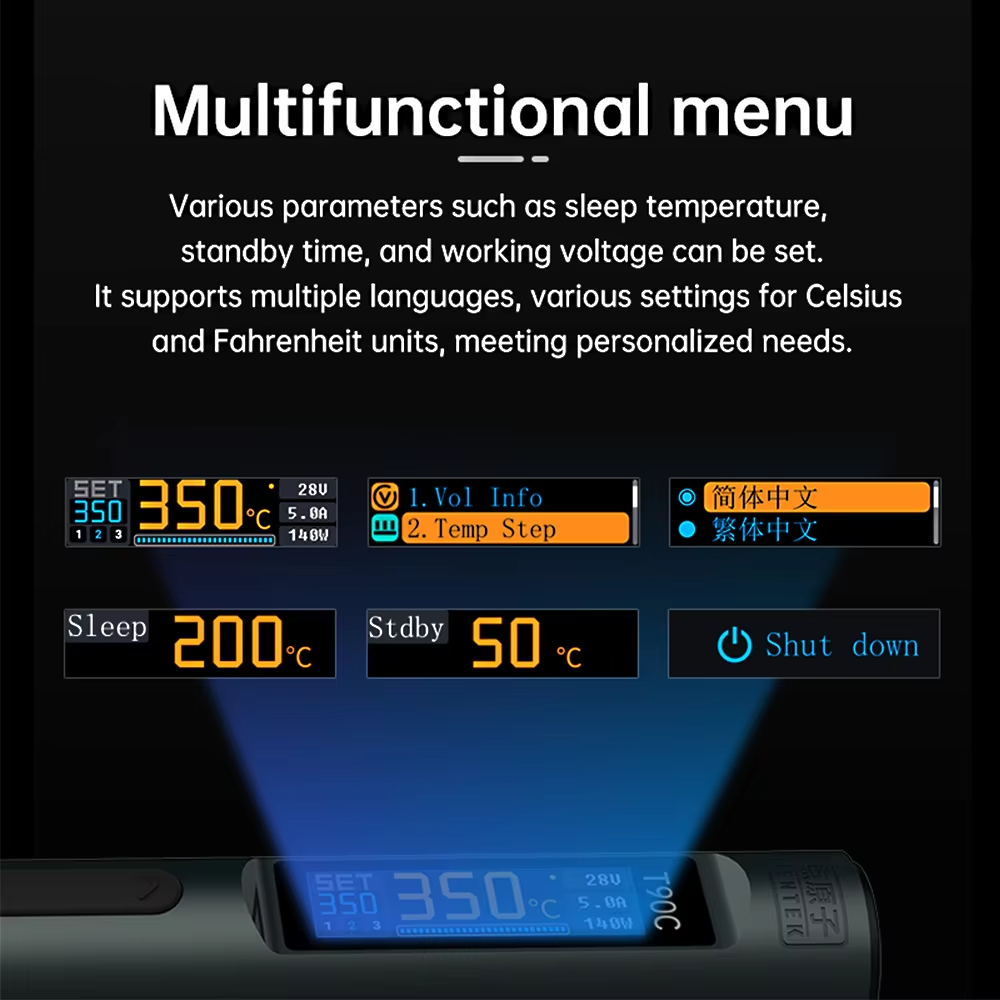
Figure 3: The ALIENTEK T90 Smart Soldering Iron supports both the T245 heavy-duty handle and the T210 micro-soldering handle.
H3: Take Professional Soldering into the Field
Do you repair drones at the race track? Do you fix car electronics in a parking lot? Do you work on boats or RVs away from your shop? The ALIENTEK T90 Smart Soldering Iron is for you. Power it from a 3S or 4S LiPo battery (the same batteries you use for your drones). The low-voltage protection prevents you from over-discharging your pack. The compact size fits in any toolbox. You can solder anywhere.
H3: Heat Up Fast, Solder Faster
Waiting for a cheap soldering iron to heat up is frustrating. The ALIENTEK T90 Smart Soldering Iron heats from room temperature to 380°C in about 6 seconds (with a good power source). You spend less time waiting and more time working. The PID controller maintains temperature even when you are soldering large ground planes or thick wires. No more waiting for the iron to recover between joints.
H3: See Your Temperature, Power, and Voltage at a Glance
The OLED display on the ALIENTEK T90 Smart Soldering Iron is not just a gimmick. It shows you the set temperature, the actual temperature, the input voltage, and the power being delivered to the tip. This feedback is invaluable. You can see if your power source is struggling. You can see if the iron is maintaining temperature. You can adjust your technique based on real data.
H3: Protect Your Expensive Soldering Tips
Good soldering tips cost money. Leaving an iron hot and idle oxidizes the tip, reducing its lifespan. The ALIENTEK T90 Smart Soldering Iron has an auto-sleep feature. When you set the iron down, it detects that it is idle and reduces the temperature (you can set the sleep timeout and temperature). When you pick it up, it heats back to operating temperature in seconds. Your tips last much longer.
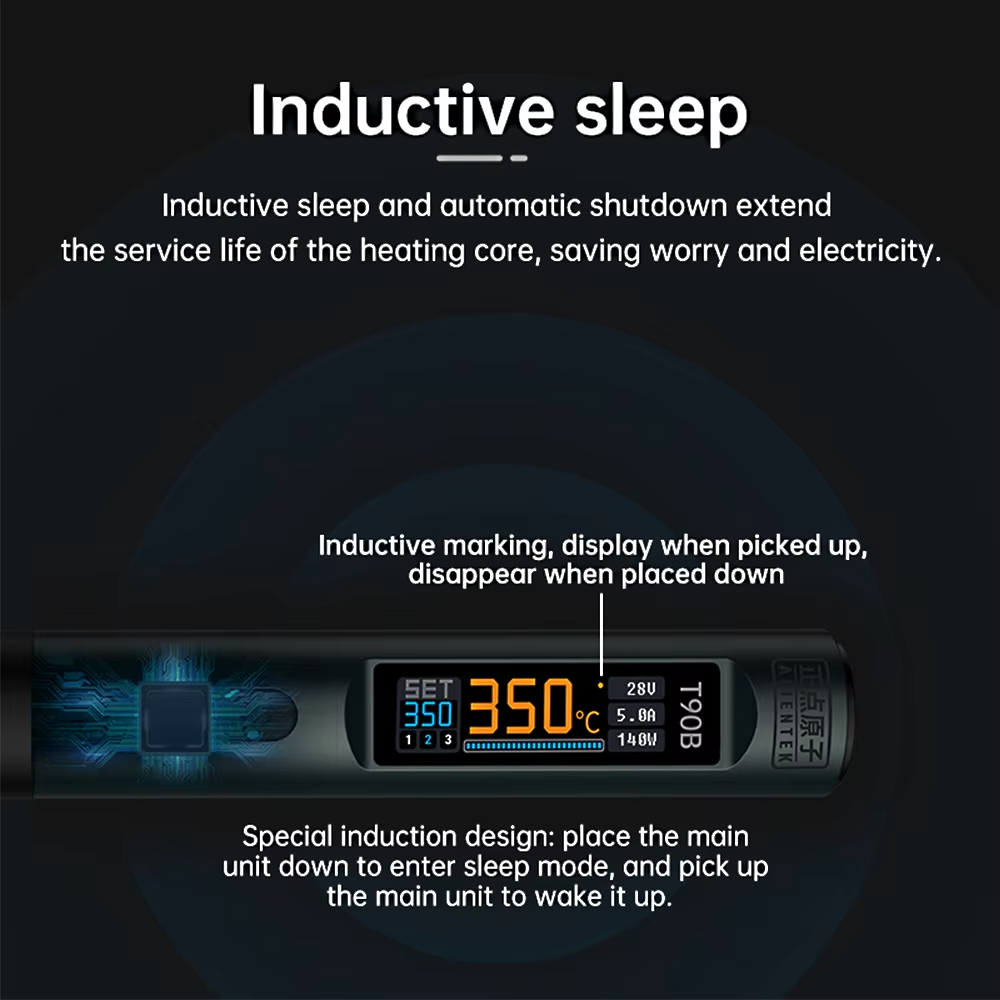
Figure 4: The ALIENTEK T90 Smart Soldering Iron can be powered by a USB-C PD power bank for true portability.
H3: Power It From Almost Anything
The ALIENTEK T90 Smart Soldering Iron is not picky about power. Use a USB-C PD charger (like a laptop charger) for bench work. Use a USB-C power bank for field repairs. Use a DC 5525 bench power supply. Use a 3S to 6S LiPo battery. Use a car battery with a DC adapter. If it provides between 9V and 24V, the T90 will work.
H2: How to Use the ALIENTEK T90 Smart Soldering Iron for Best Results
Getting the most out of your ALIENTEK T90 Smart Soldering Iron is easy. Just follow these simple steps and tips.
H3: Choosing the Right Handle for Your Work
The ALIENTEK T90 Smart Soldering Iron is modular. You must choose the right handle for your primary soldering tasks. Here is a guide.
- Choose the T245 Kit if: You solder XT60 or XT90 connectors, heavy gauge wires (12 AWG or thicker), large through-hole components, ground planes, or anything that requires high heat capacity. The T245 handle works with a wide range of tips, from chisels to conical. It is the best all-around choice for general electronics and drone work.
- Choose the T210 Kit if: You do micro-soldering. This includes iPhone and smartphone board repair, tiny SMD components (0201, 0402), jumper wire repair, and work on densely packed PCBs. The T210 handle is slim and lightweight, giving you excellent precision and control.
- Choose the T65 Kit if: You want a classic portable iron for general hobbyist use. The T65 is a good compromise between size and power. It is a great starting point, and you can always buy a second handle later.
You can buy additional handles separately. Many users start with the T245 for general work and then add the T210 for phone repair.
H3: Powering the ALIENTEK T90 Smart Soldering Iron
The ALIENTEK T90 Smart Soldering Iron has two input ports: USB-C (PD/QC) and DC 5525. Here is how to power it for different situations.
- USB-C PD (Power Delivery): For best performance, use a USB-C charger that supports PD 3.0 or QC 3.0. A 65W or 100W laptop charger works great. The iron will negotiate the highest available voltage (up to 20V) and deliver maximum power. You can also use a USB-C power bank that supports PD.
- USB-C QC (Quick Charge): If your charger only supports QC, the iron will work but may deliver slightly less power.
- DC 5525 Barrel Jack: Use a standard DC power supply (9V-24V). Many benchtop power supplies have a DC output. You can also use a 3S to 6S LiPo battery (11.1V to 25.2V) with a suitable adapter cable. This is ideal for field soldering at drone races.
- Low-Voltage Protection: When using a LiPo battery, set the low-voltage cutoff in the T90’s menu. This will shut off the iron before your battery is over-discharged, protecting your expensive packs.
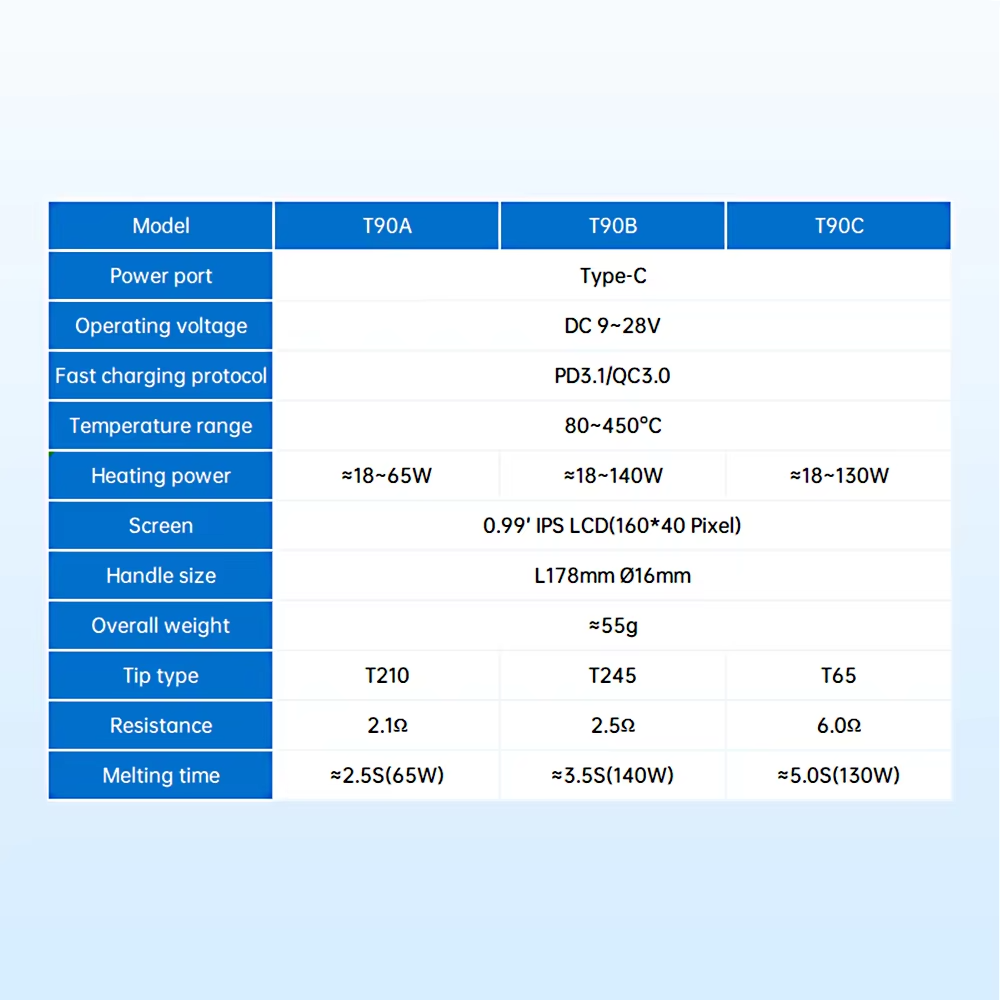
Figure 5: The ALIENTEK T90 Smart Soldering Iron can be powered from a LiPo battery via the DC 5525 port – perfect for field repairs.
H3: Setting Up and Using the Iron
- Attach the Handle: Connect your chosen handle (T245, T210, or T65) to the T90 main unit via the cable. The connector is keyed and should click or screw into place.
- Power On: Connect your power source. The ALIENTEK T90 Smart Soldering Iron will turn on automatically.
- Set Your Temperature: Use the buttons on the main unit to adjust the set temperature. For leaded solder, 350°C is a good starting point. For lead-free solder, 380°C-400°C. For delicate work, lower temperatures (300°C). For large connectors, higher temperatures (400°C-450°C).
- Wait for Heat Up: The OLED display will show the actual temperature climbing. In a few seconds, it will reach the set temperature.
- TIn the Tip: Before first use, and periodically during use, apply a small amount of solder to the tip to “tin” it. This improves heat transfer and prevents oxidation.
- Solder! Touch the tip to the joint, apply solder, and remove heat. The ALIENTEK T90 Smart Soldering Iron will maintain temperature throughout.
- Set Down the Iron: The auto-sleep feature will detect that the iron is idle and reduce temperature. When you pick it up, the iron will heat back to operating temperature.
H3: Configuring the Auto-Sleep and Low-Voltage Protection
The ALIENTEK T90 Smart Soldering Iron has a menu system (accessed by holding a button). Here are the key settings to configure.
- Sleep Timeout: Set how many seconds of idle time before the iron goes to sleep. 60-120 seconds is a good range.
- Sleep Temperature: Set the temperature the iron drops to when asleep. 150°C-200°C is typical. This keeps the tip warm enough for quick recovery but cool enough to prevent oxidation.
- Low-Voltage Cutoff (for DC input): If you are using a LiPo battery, set the cutoff voltage. For a 4S LiPo (14.8V nominal), a cutoff of 14V is safe. For a 6S LiPo, a cutoff of 22V. This prevents over-discharge.
- Screen Orientation: Choose left-handed or right-handed mode. The screen will rotate automatically.
H2: Technical Specifications of the ALIENTEK T90 Smart Soldering Iron
For those who love the technical details, here is the full spec sheet for the ALIENTEK T90 Smart Soldering Iron.
| Specification | Detail |
|---|---|
| Model | ALIENTEK T90 |
| Supported Handles | T245, T210, T65 (interchangeable) |
| Temperature Range | 80°C – 450°C (176°F – 842°F) |
| Input Interfaces | USB Type-C (PD/QC) + DC 5525 (9V-24V) |
| Max Power | Up to 65W-100W (depends on tip and power source) |
| Heat-Up Time | 0°C to 380°C in approximately 6 seconds |
| Display | 0.87-inch OLED (crisp, bright) |
| Temperature Control | Smart PID algorithm (stable, precise) |
| Auto-Sleep | Yes (programmable timeout and sleep temp) |
| Low-Voltage Protection | Yes (programmable for LiPo batteries) |
| Body Material | CNC Aluminum Alloy (durable) |
| Firmware Upgrade | Yes (via USB, field upgradable) |
H2: Pros and Cons of the ALIENTEK T90 Smart Soldering Iron
Every product has strengths and weaknesses. Here is an honest look at the ALIENTEK T90 Smart Soldering Iron.
Pros – What We Love
- Modular design – one control unit works with T245, T210, T65 handles
- Very fast heat-up (6 seconds to 380°C)
- Smart PID temperature control – stable and precise
- Dual power input (USB-C PD/QC and DC 5525)
- Can be powered by LiPo batteries for field use
- Bright OLED display with real-time temperature and power
- Auto-sleep feature protects tips and saves energy
- Low-voltage protection for LiPo batteries
- CNC aluminum body – durable and professional
- Firmware upgradable – gets better over time
- Excellent value at $41.82 for the main unit
Cons – What to Know
- Power supply not included in basic kit (cable and charger sold separately)
- You must choose a handle kit (T245, T210, or T65) – not all three included
- Tips are standard, but some specialized tips may be harder to find
- OLED screen is small (0.87 inches) – functional but not large
H2: Who Should Buy the ALIENTEK T90 Smart Soldering Iron?
The ALIENTEK T90 Smart Soldering Iron is perfect for many different types of USA electronics enthusiasts and professionals. Here is who will benefit the most.
H3: FPV Drone Racers and RC Enthusiasts
Drone racing is tough on equipment. You will break arms, rip off pads, and need to solder at the track. The ALIENTEK T90 Smart Soldering Iron is perfect for this. Power it from a 4S LiPo battery. The T245 handle has the heat capacity to solder XT60 and XT90 connectors. The compact size fits in your field kit. You can make repairs between heats and get back in the air.
H3: Mobile Phone and Electronics Repair Technicians
Repairing iPhones, Android phones, and laptops requires precision micro-soldering. The T210 handle for the ALIENTEK T90 Smart Soldering Iron is perfect for this work. It is slim, lightweight, and provides excellent control for tiny SMD components. The PID temperature stability prevents damage to delicate boards. The auto-sleep keeps your tips in good condition. Many phone repair shops use irons based on the JBC T210 system – the T90 gives you similar performance at a fraction of the cost.
H3: Electronics Hobbyists and DIY Makers
Do you build Arduino projects, assemble PCBs, or repair your own gadgets? The ALIENTEK T90 Smart Soldering Iron is a huge upgrade over cheap $15 irons. The fast heat-up, temperature stability, and comfortable handle will improve your soldering quality immediately. The T65 or T245 handle are both excellent for general hobbyist use. You will wonder why you waited so long.
H3: Field Service Technicians
Do you repair industrial equipment, automotive electronics, or marine systems in the field? Carrying a full soldering station is impractical. The ALIENTEK T90 Smart Soldering Iron fits in your toolbox. Power it from your vehicle’s 12V system (via DC adapter) or a portable power bank. The durable aluminum body can handle the rigors of field service. You can make reliable solder joints anywhere.
H3: Anyone Tired of Cheap, Inconsistent Soldering Irons
If you have been using a basic soldering iron that takes forever to heat up and loses temperature the moment you touch a joint, you need an upgrade. The ALIENTEK T90 Smart Soldering Iron is a professional tool at a hobbyist price. The difference in performance is night and day. Your soldering will be cleaner, faster, and more reliable.
H2: How Does the ALIENTEK T90 Smart Soldering Iron Compare to Other Soldering Irons?
There are many soldering irons on the market. Here is how the ALIENTEK T90 Smart Soldering Iron stacks up against common alternatives.
- VS. Cheap $15-$30 Soldering Irons: Cheap irons have no temperature control (they just get hotter and hotter), heat up slowly, and have poor tip quality. They are frustrating to use. The ALIENTEK T90 Smart Soldering Iron has precise PID temperature control, fast heat-up, and supports high-quality tips. It is a massive upgrade.
- VS. USB-C Soldering Irons (TS100, TS101, Pinecil): These are popular portable irons. They are good, but they are single-function. The T90 is modular. You can use T245, T210, or T65 handles. This gives you more flexibility. The T90 also has a larger OLED display and supports both USB-C and DC power. It is a more versatile system.
- VS. Professional Benchtop Stations (Hakko, Weller, JBC): Professional stations cost $200-$500. They have more power, better cable management, and are designed for all-day use. The ALIENTEK T90 Smart Soldering Iron cannot fully replace a top-tier benchtop station for 8-hour-a-day production work. However, for field use, portable use, and hobbyist work, the T90 offers 80% of the performance at 20% of the price. It is an excellent value.
- VS. No Soldering Iron: Without a good soldering iron, you cannot repair electronics. You are limited to buying new boards or paying someone else. The ALIENTEK T90 Smart Soldering Iron gives you the ability to fix things yourself, saving money and expanding your skills.
H2: Frequently Asked Questions About the ALIENTEK T90 Smart Soldering Iron
H3: Which handle should I choose with the ALIENTEK T90 Smart Soldering Iron?
The ALIENTEK T90 Smart Soldering Iron is available in different kits. Choose the T245 kit if you do general electronics, drone work, or need high heat capacity for large connectors. Choose the T210 kit if you do micro-soldering, phone repair, or work on tiny SMD components. Choose the T65 kit for general hobbyist use and maximum portability. You can always buy additional handles separately later.
H3: Does the ALIENTEK T90 Smart Soldering Iron work with a power bank?
Yes. The ALIENTEK T90 Smart Soldering Iron can be powered by a USB-C power bank that supports PD (Power Delivery) or QC (Quick Charge). For best performance, use a power bank that supports PD 3.0 and can deliver at least 45W-65W. Many laptop power banks work great. This is perfect for field soldering.
H3: Can I use the ALIENTEK T90 Smart Soldering Iron with a LiPo battery?
Yes. The ALIENTEK T90 Smart Soldering Iron has a DC 5525 barrel jack. You can connect a 3S to 6S LiPo battery (11.1V to 25.2V) using a suitable adapter cable. The iron has programmable low-voltage protection to prevent over-discharging your battery. This is a favorite feature for FPV drone pilots who already have LiPo batteries in their field kit.
H3: What tips does the ALIENTEK T90 Smart Soldering Iron use?
The ALIENTEK T90 Smart Soldering Iron uses different tips depending on which handle you have. The T245 handle uses T245-style tips (common and widely available). The T210 handle uses T210-style tips (fine tips for micro-soldering). The T65 handle uses T65-style tips. Alientek sells a variety of tips, and you can also find compatible tips from other brands online.
H3: What is the maximum power of the ALIENTEK T90 Smart Soldering Iron?
The maximum power depends on your power source and the tip you are using. With a 20V USB-C PD supply and a T245 handle, the ALIENTEK T90 Smart Soldering Iron can deliver up to 65W-100W. This is enough to solder large connectors and ground planes. With lower voltage power sources, the power output will be lower.
H3: Is the ALIENTEK T90 Smart Soldering Iron good for beginners?
Yes. The ALIENTEK T90 Smart Soldering Iron is actually a great choice for beginners. Why? Because good tools make learning easier. The fast heat-up means you spend less time waiting. The stable temperature means your joints will be more consistent. The OLED display helps you understand what the iron is doing. The auto-sleep protects your tips while you learn. It is a better experience than fighting a cheap, uncontrolled iron.
H2: Why the ALIENTEK T90 Smart Soldering Iron Saves You Money
At $41.82 for the main unit, the ALIENTEK T90 Smart Soldering Iron is a fantastic value. But the savings go beyond the purchase price. Buying three separate soldering irons (a heavy-duty iron, a micro-soldering iron, and a portable iron) could cost $150-$300. The T90 gives you all three with one control unit and different handles. You save money and bench space. Additionally, the auto-sleep feature makes your expensive soldering tips last much longer. Good tips cost $5-$15 each. Extending their life saves real money over time. Finally, being able to repair your own electronics instead of buying replacements saves money on every project.
H2: Final Verdict – Should You Buy the ALIENTEK T90 Smart Soldering Iron?
If you solder electronics of any kind, the answer is yes. The ALIENTEK T90 Smart Soldering Iron is one of the best values in soldering equipment today. It gives you modular flexibility with T245, T210, and T65 handle support. It heats up in seconds and maintains stable temperatures with smart PID control. It can be powered from USB-C, DC power supplies, or LiPo batteries. It has a bright OLED display, auto-sleep, low-voltage protection, and a durable CNC aluminum body. Whether you are a drone racer, a phone repair technician, an electronics hobbyist, or a field service professional, the T90 will improve your soldering experience.
Stop fighting with cheap, frustrating soldering irons. Get the ALIENTEK T90 Smart Soldering Iron and enjoy fast, precise, reliable soldering anywhere.
H2: What’s in the Box?
When you order the ALIENTEK T90 Smart Soldering Iron, the contents depend on which kit you choose. A typical kit includes.
- 1 x ALIENTEK T90 Main Control Unit
- 1 x Soldering Handle (T245, T210, or T65 – depending on your selection)
- 1 x Soldering Tip (typically one tip included, often a standard chisel or conical shape)
- 1 x User Manual
Note: The power supply (USB-C charger or DC power supply) and USB-C cable are often sold separately unless you choose a bundle that includes them. Be sure to check the product listing. You will need a suitable power source. A standard 65W USB-C laptop charger works perfectly.
Only $41.82. Modular design supports T245, T210, T65 handles. Fast heat-up, PID control, OLED display. Perfect for USA electronics repair. Order today.
Disclaimer: This information is for informational purposes only. Product specifications, prices, and availability are subject to change without notice. The ALIENTEK T90 Smart Soldering Iron is a precision tool. Always use appropriate safety precautions, including eye protection and adequate ventilation when soldering. Do not leave a hot iron unattended. The iron tips become extremely hot and can cause burns or fire.