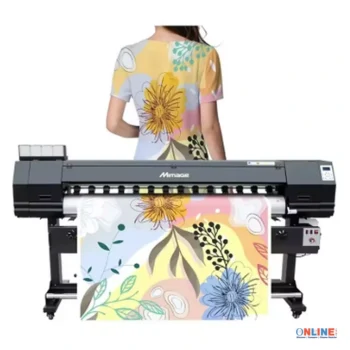
Mimage 1.6M Large Format Sublimation Printer – Industrial Textile and Fabric Printing Machine

Mimage **Sublimation Printer** features a 1.6M **Large Format** design for professional **Textile Printing** applications. Ideal for fabrics, apparel, banners, soft signage, custom graphics, and commercial production environments.

The Mimage 1.6M Large Format Sublimation Printer is a professional inkjet printing machine designed for textile printing, sublimation transfer production, fabric decoration, and commercial printing applications. Featuring a maximum listed printing width of 1600 mm, multiple printhead configuration options, and CMYK color printing capabilities, this machine offers a practical solution for businesses involved in customized textile products and digital printing.
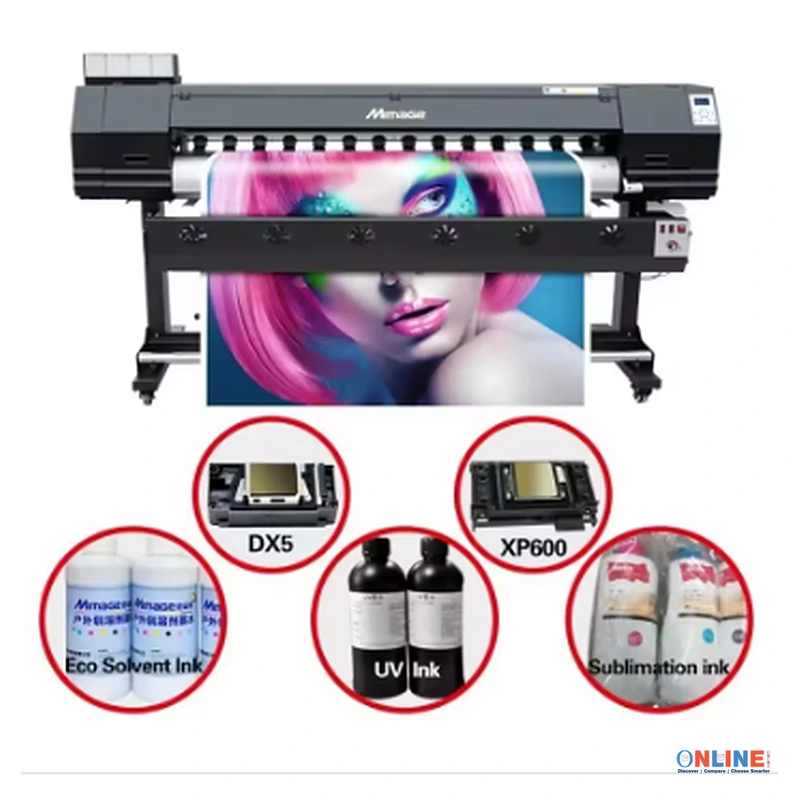
Designed for commercial printing environments, the Mimage sublimation printer supports supplier-listed printhead options including XP600, DX5, Epson i3200, DX7, and DX5 configurations. The machine is offered with single-head and dual-head options, allowing customers to select a configuration according to their production requirements.
With a large-format printing design, automatic operation, USB connectivity, and sublimation ink compatibility, this printer can support selected applications involving garment decoration, textile printing, and heat transfer production.
The supplier advertises a printing speed of approximately 1.6 meters per minute in the product title, while the specification table lists other speed information. Actual printing performance depends on the selected printhead, print resolution, pass settings, media type, and machine configuration.
Key Features and Benefits
- 1600 mm Printing Width: Supports a supplier-listed maximum printing width of 1600 mm, making the machine suitable for selected large-format textile and sublimation printing applications.
- Multiple Printhead Options: Listed printhead configurations include XP600, DX5, Epson i3200, and DX7, subject to model availability.
- Single and Dual Printhead Configurations: Available with one-head and two-head options according to the supplier specifications.
- Sublimation Ink Compatibility: Designed for sublimation ink printing applications involving suitable transfer materials and compatible production processes.
- CMYK Color Printing: Supports cyan, magenta, yellow, and black printing for multicolor graphics and decorative designs.
- Large Format Printing: Wide printing capability supports selected textile designs, decorative graphics, and transfer printing projects.
- Automatic Operation: Supplier-listed automatic functionality supports commercial printing workflows.
- USB Connectivity: Features USB connectivity according to the supplied specifications.
- Push Button Controls: Includes a supplier-listed push button control system.
- 1200 DPI Resolution: The specification table lists 1200 DPI printing resolution, with an additional 1440 DPI value mentioned elsewhere in the listing.
- Commercial Printing Applications: Suitable for evaluation in garment decoration businesses, textile printing workshops, and custom printing operations.
- One-Year Warranty: The supplier advertises a one-year warranty, subject to the seller’s terms and conditions.
- International After-Sales Service: The supplier states that engineers are available to service machinery overseas, subject to location and service arrangements.
Applications and Recommended Uses
1. Sublimation Transfer Printing
The Mimage large format printer is designed for sublimation printing applications using compatible sublimation inks and transfer media. Printed designs can be transferred to suitable polyester-based fabrics and coated products through an appropriate heat transfer process.
Sublimation printing is widely used for producing colorful designs on compatible textile products, decorative materials, and customized merchandise.
The printer’s large printing width may support selected commercial transfer printing workflows where wider designs or continuous printed media are required.
2. Custom T-Shirt Printing
Businesses producing custom T-shirts may evaluate this printer for sublimation transfer printing on suitable polyester garments or compatible textile materials.
Designs can include personalized graphics, logos, decorative artwork, and full-color illustrations.
For successful sublimation transfer, the fabric composition, transfer paper, sublimation ink, and heat press conditions must be compatible with the intended application.
3. Sportswear and Team Uniform Production
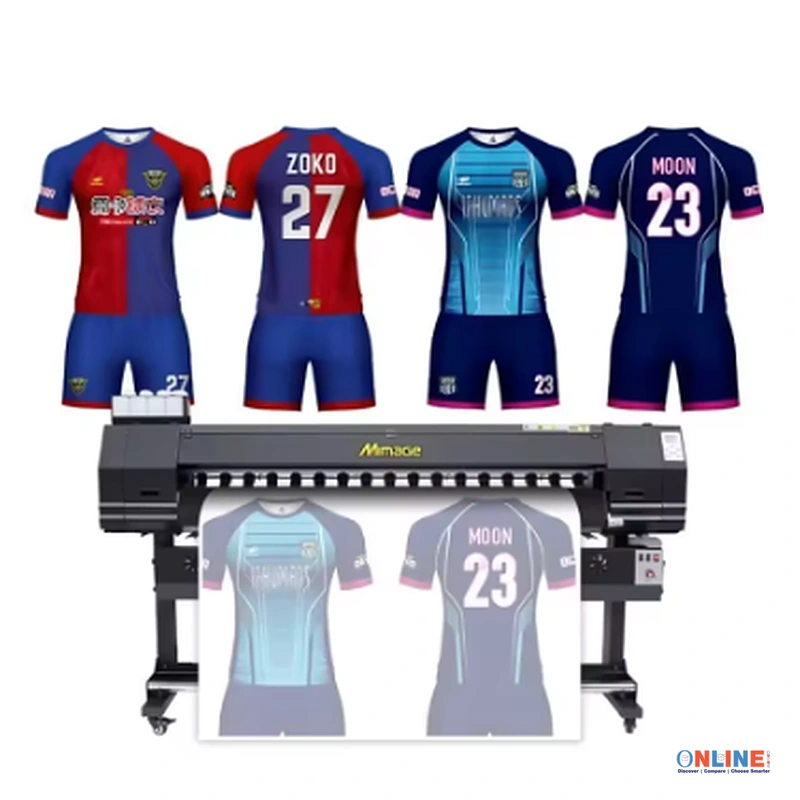
Large format sublimation printing equipment may be useful for businesses producing customized sportswear, team uniforms, cycling jerseys, and other polyester-based garments.
The 1600 mm printing width can accommodate selected larger transfer layouts, subject to media width, printer margins, and production settings.
4. Fashion and Textile Design
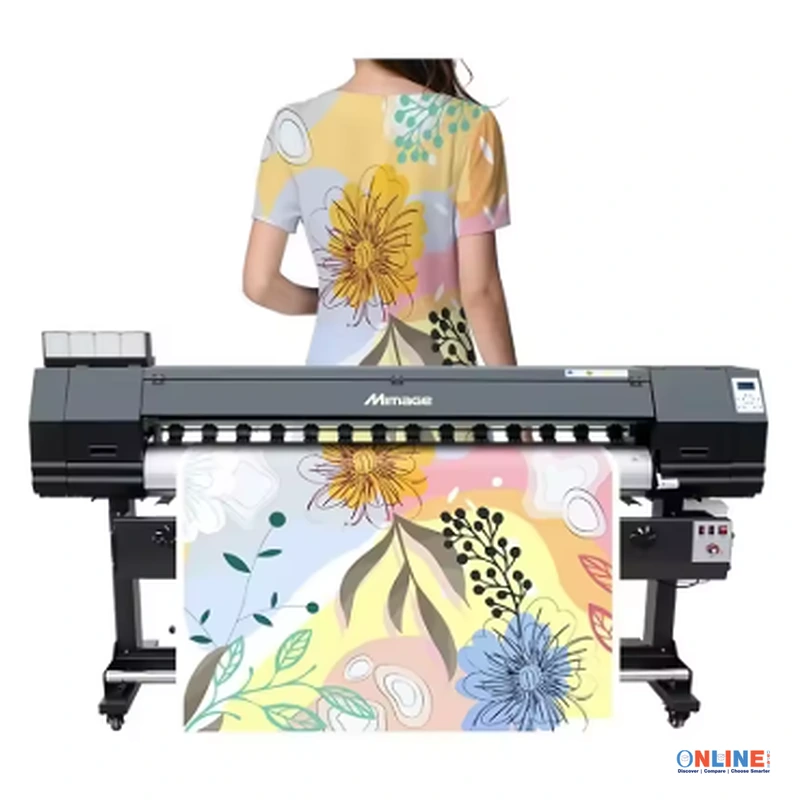
Textile designers may use compatible sublimation printing workflows to produce colorful patterns, floral graphics, geometric designs, and custom fashion artwork.
The printer can support selected digital textile design applications where sublimation transfer printing is appropriate for the fabric and finished product.
5. Home Textile Decoration
The machine may be suitable for preparing sublimation transfer designs for compatible home textile products, including polyester cushion covers, decorative fabrics, and selected interior textile accessories.
Printing results depend on the material composition and transfer process.
6. Personalized Merchandise Production
Custom printing businesses may use suitable sublimation workflows to prepare designs for coated merchandise and compatible promotional products.
Examples include selected promotional accessories, customized gifts, and decorative items designed for sublimation transfer.
7. Commercial Textile Printing Workshops
The Mimage printer may be useful for commercial workshops that require wide-format sublimation output for suitable textile printing projects.
Before selecting the printer for high-volume manufacturing, businesses should verify its actual production speed, operating costs, maintenance requirements, and printhead configuration.
8. Custom Fabric Pattern Production
Creative businesses may use this machine to print digital patterns onto compatible transfer media for subsequent application to suitable fabrics.
The large-format printing capability supports selected applications involving repeated patterns, decorative artwork, and customized fabric graphics.
Product Technical Specifications
| Specification | Details |
|---|---|
| Product Name | Mimage 1.6M Large Format Sublimation Printer |
| Brand | Mimage |
| Product Type | Large Format Inkjet Printer |
| Printing Technology | Inkjet Sublimation Printing |
| Maximum Listed Printing Width | 1600 mm |
| Printhead Options | XP600, DX5, Epson i3200, DX7 |
| Number of Printheads | 1 Head or 2 Heads |
| Ink Type | Sublimation Ink |
| Color Configuration | CMYK |
| Printing Resolution | 1200 DPI Listed; 1440 DPI Also Mentioned by Supplier |
| Advertised Printing Speed | 1.6 Meters per Minute, According to Product Title |
| Additional Speed Specification | 15 PPM, As Listed by Supplier |
| Print Media | Textile, According to Supplier Listing |
| Printing Material | Flex, According to Supplier Listing |
| Operating Mode | Automatic |
| Connectivity | USB |
| Control Method | Push Button |
| Operating Voltage | AC 220V Listed; 110V Also Mentioned |
| Power Mode | Power Supply |
| Machine Dimensions | 2870 × 850 × 650 mm |
| Listed Weight | 250, Unit Not Specified |
| Printer Function Type | Multifunction |
| Available Languages | Chinese and English |
| Product Condition | New |
| Warranty | 1 Year, According to Supplier |
| After-Sales Service | Engineers Available to Service Machinery Overseas, According to Supplier |
| Country of Origin | Mainland China |
| Place of Origin | Henan, China |
| Supplier Listed Applications | Textile Printing, Cloth Printing, Heat Transfer Printing, Advertising |
Available Printhead Configurations
The Mimage large format sublimation printer is advertised with several printhead options. The selected printhead can influence printing speed, image quality, maintenance requirements, consumable compatibility, and operating costs.
XP600 Printhead Configuration
The XP600 configuration is one of the printhead options listed for this printer. Businesses considering this option should confirm its supported resolutions, printing speeds, ink compatibility, and expected maintenance requirements.
The final printing performance depends on the printer configuration and operating settings.
DX5 Printhead Configuration
The supplier also lists a DX5 printhead option for selected printer configurations.
Before selecting this version, customers should verify printhead availability, compatibility with the machine’s ink delivery system, and manufacturer-recommended maintenance procedures.
Epson i3200 Printhead Configuration
The Epson i3200 is another printhead option advertised in the listing. Customers interested in this configuration should confirm the exact printhead variant and its compatibility with sublimation ink.
Printhead specifications and operating capabilities may differ between individual configurations.
DX7 Printhead Configuration
The DX7 is included among the supplier-listed printhead options. Availability and machine compatibility should be confirmed before purchasing.
Single-Head and Dual-Head Options
The machine is listed with one-head and two-head configurations.
A dual-head configuration may offer different production capabilities compared with a single-head model, depending on the printhead type, software, print mode, and machine design.
Important: The supplied specifications do not establish the exact production speed of each printhead configuration. Customers should request a detailed performance chart from the seller before ordering.
Understanding Sublimation Printing Technology
Sublimation printing is a digital printing method commonly used to transfer colorful designs onto compatible polyester-based textiles and specially coated products.
In a typical sublimation workflow, artwork is printed onto compatible sublimation transfer paper using sublimation ink. The printed design is then transferred to a suitable substrate using controlled heat, pressure, and time.
During the transfer process, sublimation dyes can penetrate compatible polyester fibers or polymer coatings, creating colorful decorative results.
Advantages of Sublimation Transfer Printing
- Supports detailed multicolor artwork on compatible materials.
- Suitable for selected polyester apparel and textile applications.
- Can produce decorative patterns and custom designs.
- Supports personalized garment printing workflows.
- Can be used for suitable promotional merchandise.
- Allows businesses to prepare digital artwork for repeat production.
- Provides flexibility for customized textile designs.
Important Fabric Compatibility Information
Traditional dye sublimation printing generally works best with suitable polyester fabrics and polymer-coated products.
It does not produce the same results on untreated cotton or other incompatible materials without a specialized process.
Customers should verify the intended fabric composition and printing method before purchasing the printer.
Printing Width and Large Format Production
The Mimage sublimation printer features a supplier-listed printing width of 1600 mm, making it suitable for selected wide-format printing applications.
This width may accommodate larger artwork, repeated pattern layouts, and wider sublimation transfer designs.
Large Textile Designs
Wide-format printing can help businesses prepare larger designs for compatible textile products and garment decoration workflows.
Repeated Pattern Printing
Textile designers may arrange multiple artwork elements across the available printing width to support selected pattern production processes.
Commercial Print Layouts
Businesses may use suitable design and RIP software to organize multiple graphics within the available printing area.
The actual usable print width may be smaller than the nominal machine specification because of margins, media positioning, and other equipment settings.
Product Demonstration Video
Watch the supplied product video to explore the Mimage large format sublimation printer, its physical construction, and the textile printing equipment shown in the seller’s demonstration.
Machine Design and Main Components
Large Format Printer Body
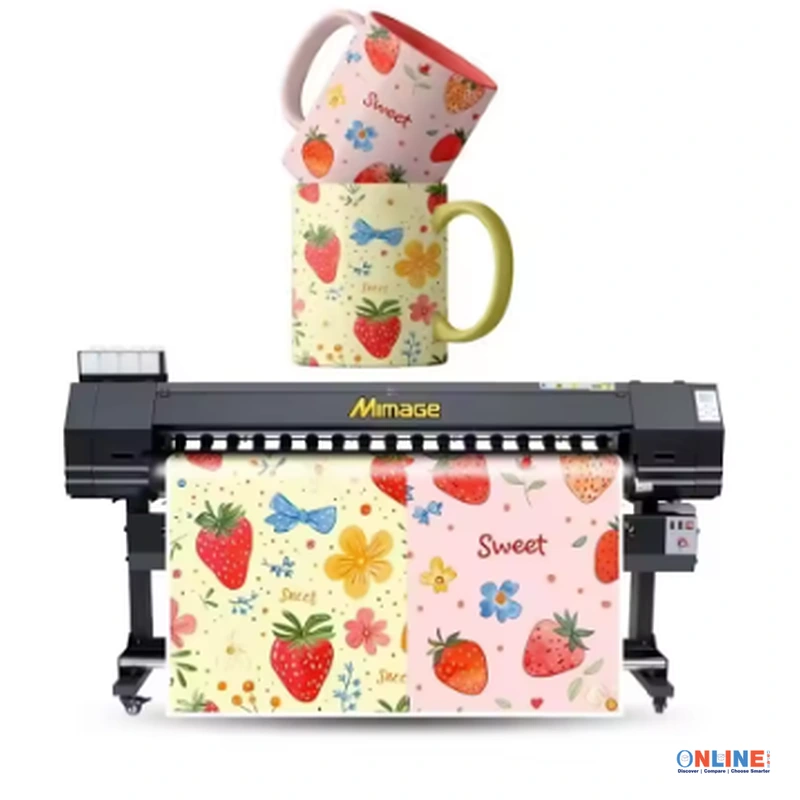
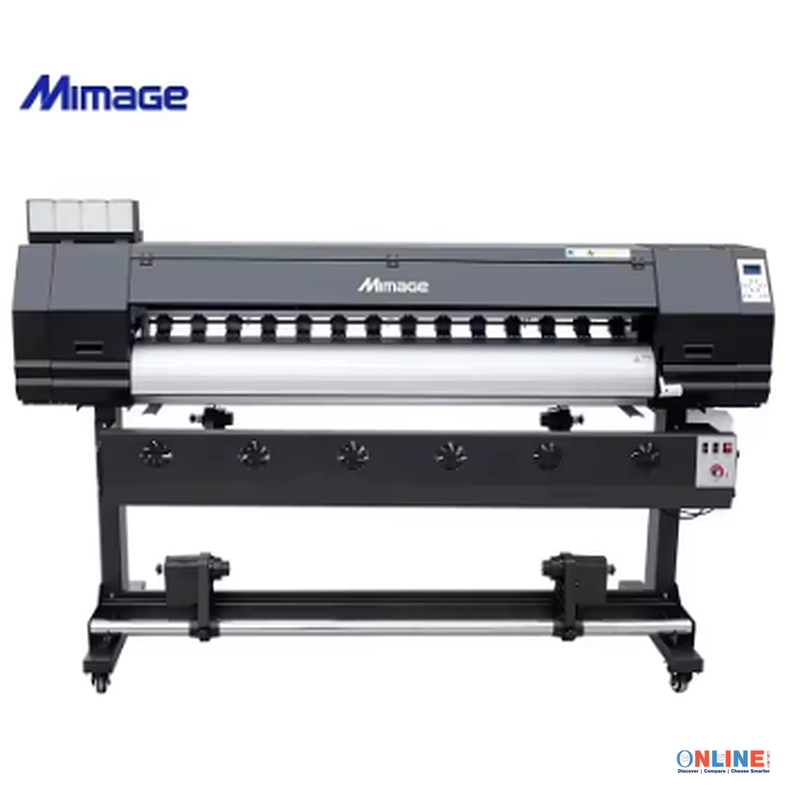
The product images show a wide-format printer mounted on a supporting stand. The horizontal printing structure accommodates large media widths for selected textile and transfer printing applications.
Media Feeding System
The machine is shown handling a wide printed media sheet. Proper media feeding and alignment are important for consistent print quality and reliable operation.
Printhead Assembly
The printer is offered with different printhead configurations. The printhead assembly is responsible for depositing ink onto compatible printing media according to the digital artwork.
Ink Supply System
The supplier identifies sublimation ink as the intended ink type. Product images show external ink supply components associated with the printing system.
Customers should confirm the exact ink delivery system, ink container capacity, and maintenance requirements with the manufacturer.
Printer Control System
The supplied specifications identify push button controls and USB connectivity.
Before purchasing, customers should verify the machine’s supported operating systems, RIP software compatibility, and available control functions.
Supporting Stand
The product images show the printer installed on a supporting stand with wheels.
The final package contents and stand specifications should be confirmed with the seller.
How to Operate the Sublimation Printing Machine
The following steps provide a general overview of a typical sublimation printing workflow. Actual operation must follow the printer manufacturer’s official installation, maintenance, and operating instructions.
Step 1: Prepare the Installation Area
Install the printer in a clean, stable, and appropriately ventilated workspace with sufficient space for media loading, operation, maintenance, and printed material handling.
Ensure the electrical supply matches the manufacturer’s requirements before connecting the equipment.
Step 2: Verify the Printhead Configuration
Confirm that the installed printhead model matches the machine configuration and the intended sublimation printing application.
Use compatible inks and manufacturer-approved consumables.
Step 3: Prepare the Sublimation Ink System
Follow the manufacturer’s instructions for preparing the ink supply system.
Do not mix incompatible ink formulations or use unapproved cleaning chemicals.
Step 4: Load Compatible Printing Media
Load the recommended sublimation transfer paper or other manufacturer-approved printing material.
Ensure that the media is correctly aligned and properly tensioned according to the printer’s operating instructions.
Step 5: Prepare the Digital Artwork
Create or import the intended design using compatible graphics software.
Configure the artwork dimensions, color settings, and layout according to the printing requirements.
Step 6: Configure the Printing Software
Use compatible printer control and RIP software to select the appropriate print resolution, media settings, color profile, and printing mode.
The exact software requirements should be confirmed with the supplier.
Step 7: Perform a Print Quality Check
Complete the manufacturer-recommended nozzle check and printhead maintenance procedures before production.
Check that the printer is operating correctly and that the media is feeding consistently.
Step 8: Print the Sublimation Design
Start the printing process using the approved operating procedure.
Monitor media movement, ink delivery, and print quality throughout the production process.
Step 9: Prepare the Heat Transfer Process
Allow the printed transfer media to dry or stabilize according to the ink and paper manufacturers’ instructions.
Prepare compatible fabric or coated products for the heat transfer process.
Step 10: Complete the Sublimation Transfer
Use an appropriate heat press or calendar transfer machine to apply the printed design to a compatible substrate.
Follow the recommended temperature, pressure, and transfer time for the specific ink, paper, and material.
Recommended Equipment for a Sublimation Printing Business
Businesses planning to use a large-format sublimation printer should consider the additional equipment and supplies required for a complete production workflow.
- Compatible Sublimation Ink: Use the ink formulation approved for the installed printhead and printer system.
- Sublimation Transfer Paper: Select transfer paper suitable for the printer and intended application.
- Heat Transfer Equipment: Use a compatible heat press or calendar transfer machine for suitable fabric and product applications.
- Graphics Software: Prepare artwork using software compatible with the printing workflow.
- RIP Software: Use manufacturer-supported RIP software for print management and color control.
- Color Profiles: Apply suitable color profiles for the ink, media, and transfer process.
- Maintenance Supplies: Keep manufacturer-approved cleaning and maintenance materials available.
- Compatible Textiles: Use appropriate polyester fabrics or specially coated products for standard sublimation transfer.
- Work Tables: Provide suitable surfaces for material inspection, preparation, and finishing.
- Ventilation: Follow applicable workplace ventilation and heat transfer safety requirements.
Tips for Better Printing Quality
- Use compatible sublimation ink and transfer paper.
- Select the correct printhead configuration for the intended application.
- Maintain consistent media alignment and feeding.
- Use appropriate color profiles and printing settings.
- Keep the printing environment clean and stable.
- Follow the manufacturer’s recommended printhead maintenance schedule.
- Perform regular nozzle checks.
- Avoid using incompatible cleaning fluids or ink formulations.
- Verify the printing resolution and speed settings before production.
- Test new materials before beginning large production runs.
- Monitor transfer temperature, pressure, and time.
- Inspect finished products for color consistency and transfer quality.
Print Resolution and Color Quality
The supplier lists a printing resolution of 1200 DPI and also mentions 1440 DPI in the product specifications.
These values should be verified for the selected printhead and printing mode before ordering.
Understanding DPI
DPI stands for dots per inch and describes a printing resolution measurement.
Print quality depends on several factors beyond the listed DPI value, including printhead technology, ink formulation, droplet control, media quality, RIP settings, and color management.
CMYK Color Printing
The printer is listed with a CMYK color configuration consisting of cyan, magenta, yellow, and black.
CMYK printing supports the production of multicolor graphics, decorative patterns, illustrations, and customized textile designs.
Color Management
For consistent commercial printing results, businesses should use appropriate color profiles and test prints for their intended materials.
Sublimation designs may appear different on transfer paper before the heat transfer process is completed.
Understanding the Advertised Printing Speed
The product title advertises a printing speed of approximately 1.6 meters per minute. The specifications also list 15 PPM.
These are different measurement formats, and the supplied information does not establish how they relate to the selected machine configuration.
Actual production speed may vary based on:
- Printhead model.
- Number of installed printheads.
- Printing resolution.
- Number of printing passes.
- Artwork complexity.
- Media type.
- Ink and color settings.
- Machine operating conditions.
Customers planning commercial production should request verified printing speed information for the exact model and configuration being purchased.
Machine Installation and Workspace Requirements
The supplier lists machine dimensions of approximately 2870 × 850 × 650 mm.
Businesses should ensure that the installation area provides adequate room for the printer, supporting equipment, media handling, and maintenance access.
Electrical Requirements
The main specification table lists AC 220V, while another field mentions 220V and 110V.
Customers should confirm the exact voltage requirement and electrical power consumption of their selected machine before installation.
Environmental Conditions
Printing performance may be affected by temperature, humidity, dust, and environmental stability.
Follow the manufacturer’s recommended operating conditions to support reliable inkjet printing performance.
Media Handling Space
Provide adequate working space for loading rolls, handling printed transfer materials, and preparing production orders.
Equipment Maintenance Access
Allow sufficient clearance for routine printhead inspection, cleaning, and other manufacturer-recommended maintenance procedures.
Maintenance and Care Guidelines
Proper maintenance is important for consistent printing quality and equipment reliability.
- Follow the manufacturer’s recommended daily maintenance procedures.
- Perform nozzle checks according to the operating manual.
- Keep compatible ink supplies available.
- Maintain the ink delivery system according to manufacturer instructions.
- Keep media feeding components clean.
- Inspect the printer for unusual noises, vibration, or printing errors.
- Use manufacturer-approved cleaning solutions.
- Do not manually interfere with moving printer components during operation.
- Follow approved shutdown and storage procedures.
- Contact qualified service personnel when technical problems occur.
Warranty and After-Sales Service
The Mimage printer is advertised with a one-year warranty and overseas engineering support.
Warranty coverage, replacement parts, technical assistance, and on-site service availability may vary depending on the seller’s terms and the customer’s location.
Important Warranty Questions
- Does the warranty include the printhead?
- Are ink delivery components covered?
- What technical support services are available?
- Are replacement parts available internationally?
- Does the supplier provide remote installation assistance?
- Is on-site engineer support available in the customer’s country?
- Are travel and labor expenses included in overseas service?
- Does the supplier provide installation and maintenance documentation?
Customers should request written warranty conditions before completing a purchase.
Important Information for United States Customers
Customers purchasing this sublimation printer for use in the United States should verify the machine’s electrical requirements, certification status, software compatibility, service availability, and shipping arrangements.
The supplier’s specifications contain both 220V and 110V references. The selected machine’s exact electrical input requirements must be confirmed before installation.
Commercial buyers should also verify import documentation, customs requirements, replacement part availability, and technical support arrangements.
Frequently Asked Questions
What is the Mimage 1.6M sublimation printer?
It is a large-format inkjet printing machine advertised for textile and sublimation printing applications, with a supplier-listed printing width of 1600 mm.
What is the maximum printing width?
The supplier lists a maximum printing width of 1600 mm.
What printhead options are available?
The supplier identifies XP600, DX5, Epson i3200, and DX7 printhead options. Customers should confirm the available configurations before purchasing.
Does the printer support two printheads?
Yes. The supplier lists both one-head and two-head configurations.
What type of ink does the printer use?
The supplier specifies sublimation ink.
Can this printer produce colorful textile designs?
Yes. The product is listed with CMYK multicolor printing capabilities for suitable textile and sublimation transfer applications.
Can I print directly onto cotton fabric?
Standard sublimation printing generally requires compatible polyester or polymer-coated materials. The supplied specifications do not confirm a specialized process for direct printing onto untreated cotton.
Is the printer suitable for T-shirt printing?
The machine may be used in suitable sublimation transfer workflows for compatible T-shirts, particularly polyester-based garments.
Does the printer include a heat press machine?
The supplied information does not confirm that a heat press is included. Customers should verify the package contents with the seller.
What printing resolution does the machine support?
The supplier lists 1200 DPI and also references 1440 DPI. The actual supported resolution should be confirmed for the selected printhead configuration.
What is the advertised printing speed?
The product title advertises approximately 1.6 meters per minute. Another specification lists 15 PPM. Customers should request verified speed data for the selected model.
Does the printer support USB connectivity?
Yes. USB connectivity is listed in the product specifications.
What voltage does the machine require?
The supplier lists AC 220V in the main specification table and also mentions 110V elsewhere. Confirm the exact voltage requirement before purchasing.
What are the machine dimensions?
The supplier lists dimensions of approximately 2870 × 850 × 650 mm.
Does the printer include a warranty?
The supplier advertises a one-year warranty. Actual warranty coverage depends on the seller’s terms.
Is overseas technical support available?
The supplier states that engineers are available to service machinery overseas. Customers should confirm service availability and associated costs for their location.
Can the printer be used for commercial production?
The machine is marketed for commercial printing applications. Businesses should verify its production capacity, reliability, maintenance requirements, and operating costs before selecting it for high-volume manufacturing.
Does the printer come with RIP software?
The supplied specifications do not confirm whether RIP software is included. Customers should ask the seller about supported software and licensing.
Is the printer suitable for sublimation transfer paper?
The supplier identifies sublimation ink and heat transfer printing as part of the product’s intended application. Confirm compatible transfer paper specifications before use.
Can this printer print banners and advertising materials?
The supplier lists advertising applications. However, compatibility with specific banner materials, coatings, and printing methods must be confirmed before use.
Important Product Information
This Mimage large-format printing machine is advertised with sublimation ink compatibility, a 1600 mm printing width, CMYK printing, multiple printhead options, and automatic operation.
The supplied specifications contain different references for printing speed, printing resolution, and operating voltage. These values may depend on the selected configuration or reflect differences within the supplier listing.
Before purchasing, customers should request a detailed technical specification sheet confirming the exact machine model, installed printhead, printing width, production speed, electrical requirements, software compatibility, package contents, and warranty conditions.
The printing method must also be verified for the intended material. Standard sublimation ink is not universally compatible with every fabric or printing substrate.
Why Choose the Mimage 1.6M Large Format Sublimation Printer?
The Mimage 1.6M Large Format Sublimation Printer combines wide-format printing capabilities, multiple printhead options, and CMYK color printing for selected commercial textile and heat transfer applications.
Its supplier-listed 1600 mm printing width may support businesses producing customized garment graphics, decorative textile patterns, sublimation transfers, and compatible promotional printing materials.
With single-head and dual-head configurations, USB connectivity, automatic operation, and advertised after-sales support, the machine offers several configuration options for businesses evaluating commercial sublimation printing equipment.
Customers should select the appropriate configuration according to their intended printing applications, expected production volume, available workspace, and technical requirements.
Order Your Mimage Large Format Sublimation Printing Machine Today
Explore the Mimage 1.6M large-format printer for compatible textile printing, sublimation transfer production, and commercial digital printing applications.
Choose the appropriate XP600, DX5, Epson i3200, or DX7 printhead configuration and confirm the available single-head or dual-head options.
Before ordering, verify the machine’s electrical requirements, printing speed, software compatibility, ink system, package contents, warranty conditions, and international shipping arrangements.
Select your preferred printer configuration and confirm the complete technical specifications with the supplier before completing your order.