
See the Invisible Heat: The P3 Professional USB Thermal Camera for Android iPhone Review
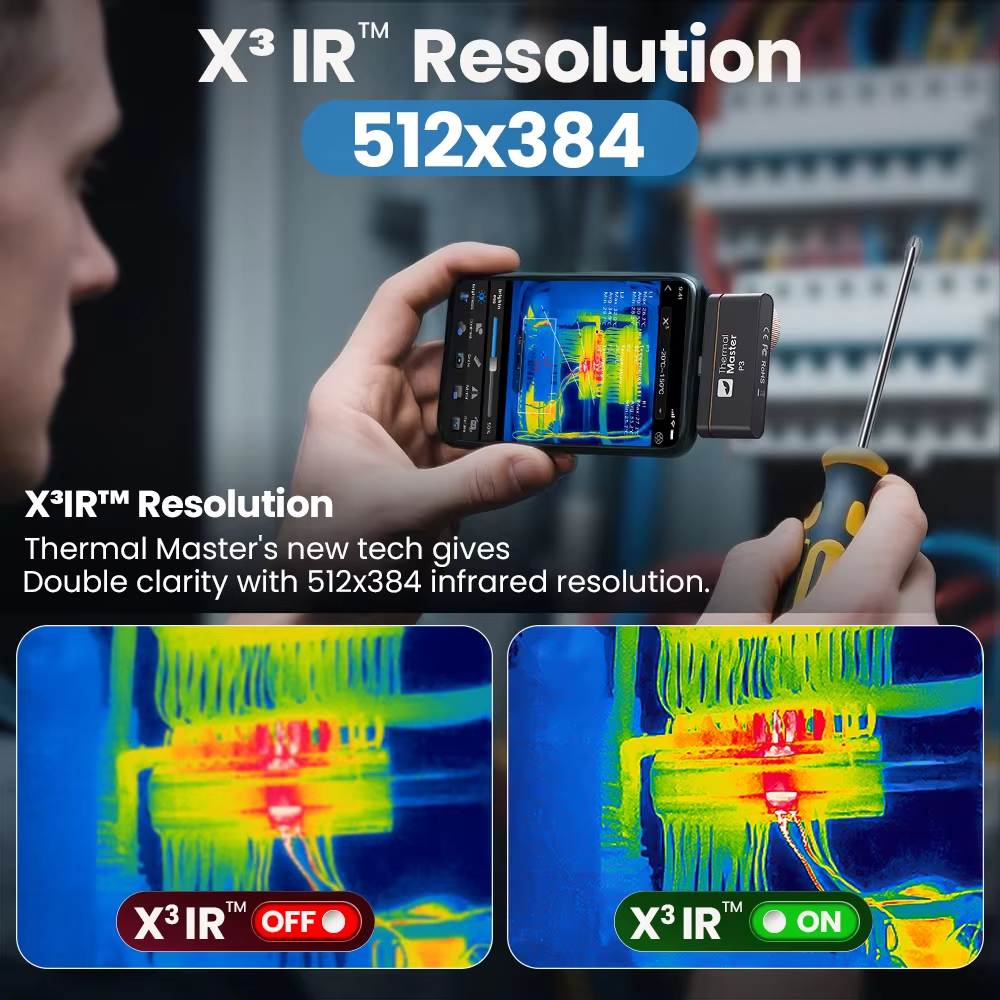
Figure 1: The P3 Professional USB Thermal Camera for Android iPhone turns your smartphone into a powerful thermal imaging tool.
Have you ever spent hours trying to find a short circuit on a computer motherboard? Have you ever wished you could see through walls to find a water leak? Have you ever wanted to know exactly which component is overheating before it fails? There is a tool for that. Meet the P3 Professional USB Thermal Camera for Android iPhone. This tiny device plugs directly into your smartphone and turns it into a high-resolution thermal imaging camera. With an incredible 512×384 IR resolution and a built-in adjustable macro lens, you can see heat signatures as small as a tiny 0201 capacitor. Whether you are an electronics repair technician, a home inspector, an HVAC professional, or a DIY enthusiast, the P3 Professional USB Thermal Camera for Android iPhone helps you see what your eyes cannot. In this complete guide, we will explain everything you need to know about this powerful thermal camera. You will learn how it works, why the resolution matters, how to use the macro lens for circuit board repair, and how it can save you time and money.
H2: What is the P3 Professional USB Thermal Camera for Android iPhone?
The P3 Professional USB Thermal Camera for Android iPhone is a compact thermal imaging sensor that connects to your smartphone via USB-C. It captures the heat signatures of objects and displays them as a color-coded thermal image on your phone screen. Hotter areas appear in red, orange, or white. Cooler areas appear in blue, purple, or black. This allows you to see temperature differences that are invisible to the naked eye.
What makes the P3 Professional USB Thermal Camera for Android iPhone special is its combination of high resolution and a built-in adjustable macro lens. Most thermal cameras have low resolution (256×192 or less) and cannot focus on tiny objects. The P3 has a massive 512×384 resolution – that is 196,608 temperature pixels. The adjustable macro lens lets you focus on objects as close as 2 centimeters (about 0.8 inches). This means you can see the heat from a tiny shorted capacitor on a smartphone motherboard. You can also twist the lens to focus on distant objects like electrical panels or walls. It works with Android phones (via USB-C OTG) and iPhone 15 and 16 series (also USB-C). Older iPhones with Lightning ports may need an adapter. The temperature range is huge: from -20°C to 600°C (-4°F to 1112°F). The P3 is a professional-grade tool that fits in your pocket.

Figure 2: The P3 Professional USB Thermal Camera for Android iPhone features an adjustable macro lens for focusing on tiny components.
H3: Why the P3 Professional USB Thermal Camera Beats Low-Resolution Thermal Cameras
There are many cheap thermal cameras on the market. Most have low resolution and fixed focus lenses. Here is why the P3 Professional USB Thermal Camera for Android iPhone is in a different league.
- Much Higher Resolution: Many thermal cameras have 256×192 resolution (about 49,000 pixels). The P3 Professional USB Thermal Camera for Android iPhone has 512×384 resolution (196,608 pixels). That is four times more detail. You can see individual components on a circuit board instead of fuzzy blobs.
- Built-in Adjustable Macro Lens: Most thermal cameras cannot focus on small objects. They need expensive add-on macro lenses. The P3 has a manual focus lens built right in. Twist it to focus on objects as close as 2cm. This is essential for electronics repair where you need to see which tiny capacitor is shorted.
- Fast 25Hz Frame Rate: The P3 captures thermal video at 25 frames per second. That is smooth and responsive. Cheaper cameras often have 9Hz or less, which is choppy and laggy.
- Wide Temperature Range: From -20°C to 600°C, the P3 covers everything from freezing pipes to soldering iron temperatures. You can use it for HVAC, automotive, electronics, and home inspection.
- Professional App Features: The companion app includes temperature tracking, multiple color palettes, and data export. You can automatically track the hottest point on the screen – critical for finding short circuits.
H3: Key Features of the P3 Professional USB Thermal Camera for Android iPhone
Let us break down the main features of this powerful P3 Professional USB Thermal Camera for Android iPhone and why they matter for USA users.
- Ultra-High 512×384 IR Resolution: The P3 Professional USB Thermal Camera for Android iPhone delivers 196,608 temperature pixels. This high definition clarity is critical for identifying exactly which tiny capacitor or IC is overheating on a dense circuit board. You can see the difference between a hot component and its neighbor – something lower-resolution cameras cannot do.
- Built-in Adjustable Macro Lens: This is the standout feature for electronics repair. The manual focus lens has two modes. In Macro Mode, twist the lens to focus on objects just 2cm away. You can inspect tiny SMD components like 0201 capacitors (that is 0.6mm x 0.3mm). In Distance Mode, twist the lens back to focus on objects further away – breaker panels, water leaks, or engine bays. No extra lenses to buy or carry.
- Dual Compatibility (Android and iPhone): The P3 Professional USB Thermal Camera for Android iPhone has a USB Type-C interface. It connects directly to Android phones that support USB OTG. It also works with iPhone 15 and 16 series (which use USB-C). For older iPhones with Lightning ports, you may need an adapter (check the package). This versatility means you can use it with almost any modern smartphone.
- Wide Temperature Range (-20°C to 600°C): From freezing cold to melting lead. The P3 covers a massive temperature range. Use it to find subtle leakage currents (milliamp shorts) or monitor high-heat soldering tasks. Accuracy is ±2°C or ±2%, which is excellent for a device this size.
- Rapid Fault Diagnosis: Forget the old “Rosin smoke” method where you apply alcohol and watch where it evaporates. The P3 Professional USB Thermal Camera for Android iPhone detects thermal runaway and short circuits in seconds. The dedicated app allows you to track the highest temperature point automatically. This saves you hours of diagnostic time.
- Professional App Analysis: The companion app offers advanced features. Auto-track High, Low, and Center temperatures. Switch between multiple color palettes (Iron, Rainbow, White Hot, Black Hot) for better contrast. Export data for PC analysis and professional report generation.
- Metal Alloy Housing: The camera is built into a durable metal alloy housing. This helps with heat dissipation and protects the internal components. It feels solid and professional, not cheap and plastic.
- Field of View (FOV): 45° x 34°. This wide field of view lets you see a good-sized area at once, whether you are inspecting a circuit board or a wall.
H2: Top Benefits of Using the P3 Professional USB Thermal Camera for Android iPhone for Your USA Business or Hobby
Why should you invest in the P3 Professional USB Thermal Camera for Android iPhone? Here are the real-world benefits that USA electronics repair technicians, home inspectors, HVAC pros, and DIY enthusiasts love.
H3: Find Short Circuits on Motherboards in Seconds, Not Hours
Finding a short circuit on a modern smartphone or laptop motherboard is like finding a needle in a haystack. There are hundreds of tiny capacitors and ICs. A shorted component can be smaller than a grain of sand. The P3 Professional USB Thermal Camera for Android iPhone makes this easy. Power up the board. The shorted component will heat up immediately. The camera shows it as a bright hot spot. You can pinpoint the exact faulty part in seconds. This saves hours of guesswork and multimeter probing. For a repair shop, that means faster turnaround times and happier customers.
H3: Inspect PCBs Without Removing the Board from the Device
Sometimes you need to find a short on a board that is still inside a laptop or phone. The P3 Professional USB Thermal Camera for Android iPhone can help. Connect the camera to your phone. Point it at the board. The macro lens can focus close enough to see individual components even inside a partially disassembled device. You can find the problem without fully stripping the device down. This saves time and reduces the risk of damaging connectors or cables.
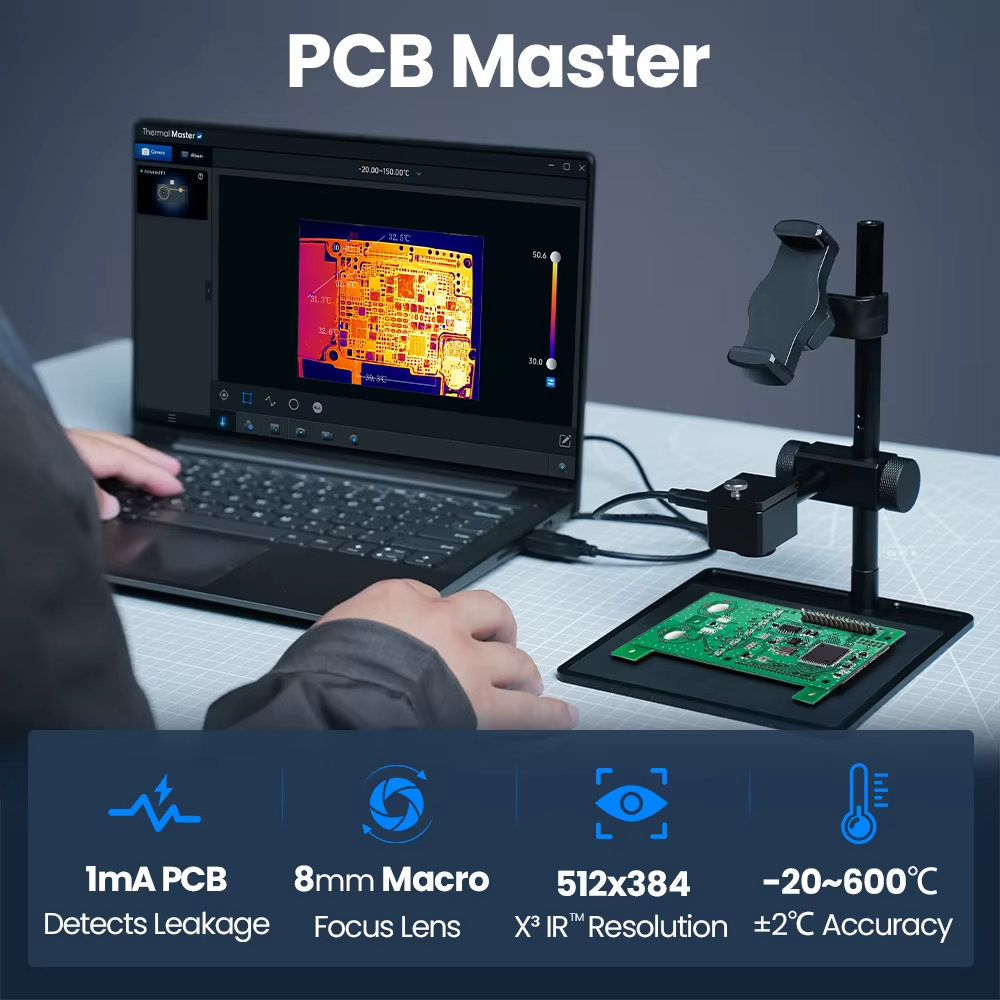
Figure 3: The P3 Professional USB Thermal Camera for Android iPhone reveals hot spots on a circuit board instantly.
H3: Find Water Leaks Behind Walls and Under Floors
Water damage is a nightmare for homeowners. Finding the source of a leak often involves cutting holes in walls or ceilings. The P3 Professional USB Thermal Camera for Android iPhone can help you find leaks non-destructively. Water evaporates and cools the surrounding area. The thermal camera shows these cool spots as blue or purple patches. You can trace the leak back to its source without damaging your home. This is a huge benefit for home inspectors, restoration professionals, and DIY homeowners.
H3: Check Electrical Panels and Circuit Breakers for Overheating
Loose connections and overloaded circuits generate heat. That heat is a fire hazard. The P3 Professional USB Thermal Camera for Android iPhone lets you safely inspect electrical panels from a distance. Point the camera at the panel. Hot breakers or connections show up as bright red spots. You can identify problems before they cause a fire or a power outage. Electricians and facility managers use thermal cameras as a standard part of preventive maintenance.
H3: Diagnose HVAC and Automotive Problems Quickly
HVAC technicians use thermal cameras to find clogged filters, leaking ducts, and failing compressors. Mechanics use them to find overheating brakes, failing bearings, and electrical shorts in car wiring. The P3 Professional USB Thermal Camera for Android iPhone is perfect for both. The wide temperature range (-20°C to 600°C) covers everything from frozen AC lines to hot exhaust manifolds. The 25Hz frame rate gives you smooth video, so you can see temperature changes in real time as you test systems.
H3: Save Money by Doing Your Own Diagnostics
Hiring a professional to find a water leak, an electrical problem, or a circuit board fault can cost hundreds of dollars. The P3 Professional USB Thermal Camera for Android iPhone costs $277.05. If it helps you avoid just one professional repair call, it has paid for itself. For electronics repair businesses, the time savings alone will pay for the camera in a week or less. For homeowners, it is a tool that pays for itself over time.

Figure 4: The P3 Professional USB Thermal Camera for Android iPhone detects insulation gaps and air leaks in buildings.
H2: How to Use the P3 Professional USB Thermal Camera for Android iPhone for Best Results
Getting the most out of your P3 Professional USB Thermal Camera for Android iPhone is easy. Just follow these simple steps and tips.
H3: Setting Up the Camera for the First Time
- Download the App: Scan the QR code in the manual or search for the recommended thermal app in your phone’s app store. There are several compatible apps; the manual will specify the best one for the P3 Professional USB Thermal Camera for Android iPhone.
- Connect the Camera: Plug the P3 into your phone’s USB-C port. For Android, make sure USB OTG is enabled (usually automatic). For iPhone 15/16, it works natively. For older iPhones, use the required Lightning adapter.
- Open the App: Launch the thermal app. You should see a live thermal image. If not, check the connection and permissions.
- Allow Permissions: The app may need permission to access the USB device. Grant the permissions.
- You Are Ready: The P3 Professional USB Thermal Camera for Android iPhone is now ready to use.
H3: Adjusting the Macro Lens for Electronics Repair
The adjustable macro lens is the most important feature for circuit board work. Here is how to use it.
- For Tiny Components (Capacitors, ICs, Resistors): Twist the lens to the Macro position. Hold the camera about 2 cm (0.8 inches) from the circuit board. Slowly adjust the focus ring until the thermal image is sharp. You will see individual components clearly.
- For Larger Boards or Distance Viewing: Twist the lens to the Distance position. Hold the camera further away. Adjust focus as needed. The P3 Professional USB Thermal Camera for Android iPhone can focus from a few inches to several feet.
- Practice Focusing: The manual focus takes a little practice. Try focusing on a warm resistor or your own hand. Turn the ring slowly until the edges of the heat signature are crisp.
H3: Using the App to Find Short Circuits
The companion app for the P3 Professional USB Thermal Camera for Android iPhone has features specifically for finding hot spots.
- Enable Auto Hot Spot Tracking: Look for an option that automatically marks the hottest temperature in the image. This will put a crosshair or circle on the hottest component. This is how you find the shorted part.
- Use the Right Color Palette: The default palette is often “Iron” or “Rainbow”. For electronics, “White Hot” or “Black Hot” can sometimes show more detail. Experiment with different palettes to see which makes the hot spot most obvious.
- Adjust the Temperature Span: If the whole image looks like one color, the temperature span is too wide. Narrow the span to focus on a smaller temperature range. This increases contrast and makes hot spots stand out.
- Take Photos and Videos: Capture images of the hot spot for documentation. You can share these with customers or colleagues.
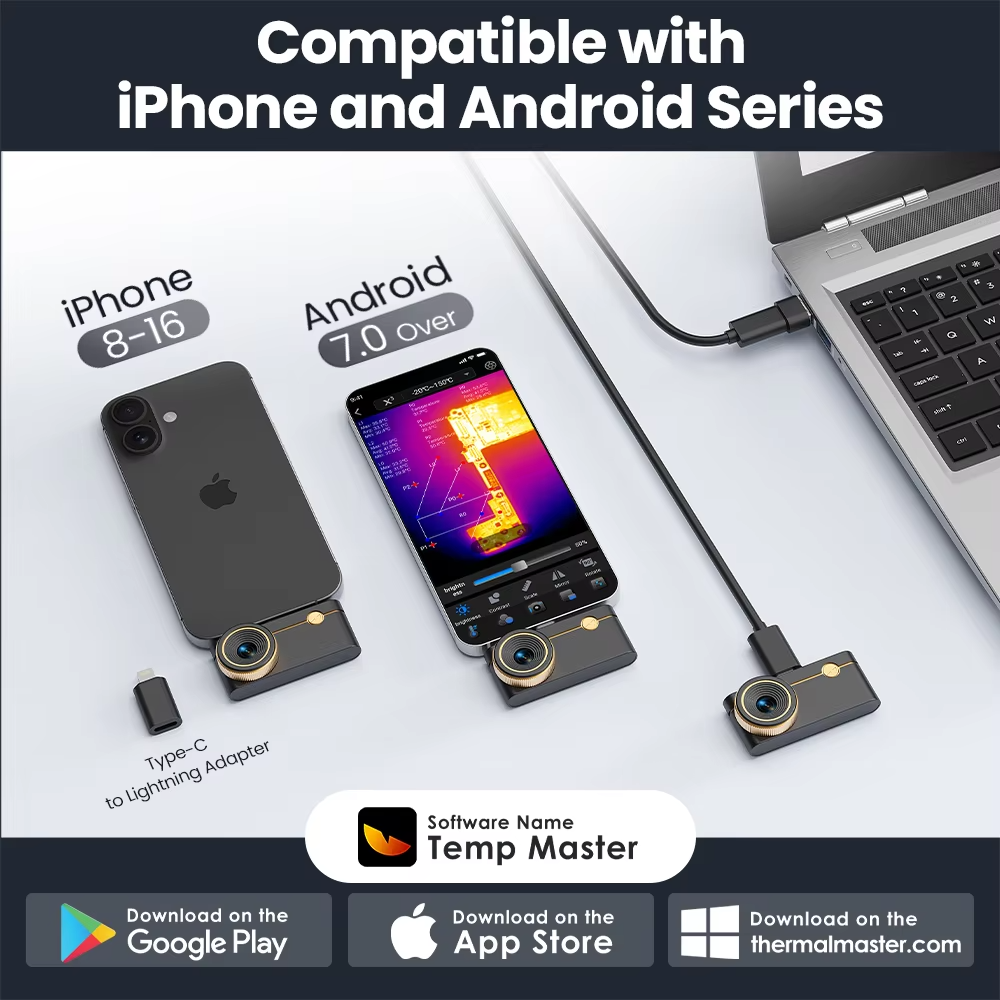
Figure 5: The P3 Professional USB Thermal Camera for Android iPhone app shows temperature measurements and hot spot tracking.
H3: Tips for Home Inspection and Building Diagnostics
Using the P3 Professional USB Thermal Camera for Android iPhone for home inspection requires a different technique.
- Look for Temperature Differences: Water leaks, insulation gaps, and air leaks all create temperature differences. On a cold day, a leak will show as a warm spot. On a hot day, a leak will show as a cool spot.
- Inspect from Both Sides: If possible, look at the wall from inside and outside. A consistent temperature difference across a large area suggests an insulation problem. A localized spot suggests a leak.
- Check Electrical Panels Safely: Keep the camera at a safe distance. Open the panel cover, but do not touch anything inside. Scan the breakers and wires. Hot breakers (compared to others) indicate a problem. Use the auto hot spot tracking to find the hottest connection.
- Inspect Windows and Doors: Scan around window and door frames on a cold day. You will see cold air leaking in as blue or purple streaks. This helps you find where to add weatherstripping.
H2: Technical Specifications of the P3 Professional USB Thermal Camera for Android iPhone
For those who love the technical details, here is the full spec sheet for the P3 Professional USB Thermal Camera for Android iPhone.
| Specification | Detail |
|---|---|
| Model | P3 Pro Thermal Imager |
| IR Resolution | 512 x 384 pixels (196,608 temperature pixels) |
| Frame Rate | 25 Hz (smooth video) |
| Focus Mode | Manual Adjustable Focus (Macro to Infinity) |
| Minimum Focus Distance (Macro) | 2 cm (0.8 inches) – for tiny SMD components |
| Temperature Range | -20°C to 600°C (-4°F to 1112°F) |
| Measurement Accuracy | ±2°C or ±2% |
| Interface | USB Type-C |
| Field of View (FOV) | 45° x 34° |
| Compatibility | Android (USB-OTG) | iPhone 15/16 (USB-C) | Older iPhones with adapter |
| Housing Material | Metal Alloy (Durable, Heat Dissipating) |
| Applications | Electronics Repair, PCB Diagnostics, Home Inspection, HVAC, Automotive |
H2: Pros and Cons of the P3 Professional USB Thermal Camera for Android iPhone
Every product has strengths and weaknesses. Here is an honest look at the P3 Professional USB Thermal Camera for Android iPhone.
Pros – What We Love
- Very high 512×384 IR resolution – 4x detail of standard cameras
- Built-in adjustable macro lens – focus on tiny 0201 components
- Dual compatibility – works with Android and iPhone (USB-C)
- Wide temperature range (-20°C to 600°C)
- Smooth 25Hz frame rate for video
- Professional app with auto hot spot tracking
- Metal alloy housing – durable and professional
- Perfect for electronics repair, home inspection, HVAC, automotive
- Saves hours of diagnostic time on short circuits
Cons – What to Know
- Price is higher than entry-level thermal cameras ($277)
- Requires compatible smartphone (USB-C or adapter)
- Manual focus takes practice to master
- App may not be as polished as very expensive Flir cameras
- Not waterproof – keep away from liquids
H2: Who Should Buy the P3 Professional USB Thermal Camera for Android iPhone?
The P3 Professional USB Thermal Camera for Android iPhone is perfect for many different types of USA users. Here is who will benefit the most.
H3: Electronics Repair Technicians and Phone Repair Shops
If you repair iPhones, Android phones, laptops, or game consoles, this camera is a must-have. Finding short circuits on multi-layer PCBs is extremely difficult without thermal imaging. The P3 Professional USB Thermal Camera for Android iPhone makes short circuit diagnosis fast and certain. You will save hours per week. You will fix more devices. Your customers will get their devices back faster. For a repair shop, this camera pays for itself in the first week.
H3: Home Inspectors and Building Contractors
Home inspectors use thermal cameras to find water leaks, insulation gaps, electrical hot spots, and HVAC problems. The P3 Professional USB Thermal Camera for Android iPhone gives you professional-grade resolution in a compact, phone-based form. You can include thermal images in your inspection reports. This sets you apart from inspectors who do not have thermal capability. The macro lens is also useful for inspecting tight spaces.
H3: HVAC Technicians and Electricians
HVAC systems and electrical panels generate heat. That heat tells you where problems are. The P3 Professional USB Thermal Camera for Android iPhone lets you see those problems instantly. Find failing compressor bearings. Detect loose electrical connections before they start a fire. Check ductwork for leaks. The wide temperature range covers everything from freezing refrigerant lines to hot motors.
H3: Automotive Mechanics and DIY Car Enthusiasts
Modern cars have many electrical systems and computers. Finding a short in a car’s wiring harness is difficult. The P3 Professional USB Thermal Camera for Android iPhone can help. Scan fuse boxes, control modules, and wiring bundles. The hot spot will show you exactly where the short is. You can also check brake temperatures, bearing temperatures, and HVAC performance.
H3: DIY Homeowners and Hobbyists
Do you enjoy fixing things around the house? Do you have a workshop where you repair electronics? The P3 Professional USB Thermal Camera for Android iPhone is an advanced tool that makes many jobs easier. Find that water leak behind the wall without cutting holes. See which circuit breaker is overloaded. Diagnose your own electronics projects. It is an investment that will pay for itself over time.
H2: How Does the P3 Professional USB Thermal Camera Compare to Other Thermal Cameras?
There are many thermal cameras on the market. Here is how the P3 Professional USB Thermal Camera for Android iPhone stacks up against common alternatives.
- VS. High-End Standalone Thermal Cameras (Flir, Fluke): Professional standalone cameras cost $1,000 to $5,000. They have built-in screens and batteries. They are excellent but very expensive. The P3 Professional USB Thermal Camera for Android iPhone offers similar resolution and features for a fraction of the price, using your phone as the display.
- VS. Entry-Level Phone Thermal Cameras ($200-$300): Most entry-level cameras have 256×192 resolution and fixed focus. They cannot see tiny components. The P3 has double the resolution (512×384) and a built-in macro lens. It is significantly better for electronics repair.
- VS. Cheap No-Name Thermal Cameras: Many cheap cameras have very low resolution (80×60 or less) and low frame rates (9Hz or less). They are barely usable for serious work. The P3 Professional USB Thermal Camera for Android iPhone is in a completely different class.
- VS. No Thermal Camera at All: Without a thermal camera, you diagnose short circuits by removing components one by one. This is slow and can damage boards. You guess at water leak locations by cutting holes. The P3 saves time, reduces damage, and gives you confidence in your diagnosis.
H2: Frequently Asked Questions About the P3 Professional USB Thermal Camera for Android iPhone
H3: Does the P3 Professional USB Thermal Camera work with my iPhone?
The P3 Professional USB Thermal Camera for Android iPhone works with iPhone 15 and 16 series directly via USB-C. For older iPhones with Lightning ports, you may need a Lightning to USB-C adapter or a specific cable kit. Check the product listing or contact the seller to confirm what is included. The camera is not compatible with iPhones that do not support external USB devices via the Lightning port without an approved adapter.
H3: Can the P3 Professional USB Thermal Camera see through walls?
No. The P3 Professional USB Thermal Camera for Android iPhone cannot see through walls. It detects surface temperatures. If a water leak is behind a wall, the water will cool the wall surface. The camera detects that surface temperature difference. It does not “see” the water directly. It detects the thermal effect of the water on the wall. This is how all thermal cameras work for building inspection.
H3: What is the smallest component the P3 can focus on?
With the built-in macro lens, the P3 Professional USB Thermal Camera for Android iPhone can focus on objects as small as 0201 capacitors. That is 0.6mm x 0.3mm (0.024 inches x 0.012 inches). This is small enough for virtually all electronics repair work, including smartphone motherboards, laptop motherboards, and other dense PCBs.
H3: Is the P3 Professional USB Thermal Camera accurate?
The P3 Professional USB Thermal Camera for Android iPhone has a rated accuracy of ±2°C or ±2%. This is very good for a camera in this price range. It is accurate enough for finding short circuits, water leaks, and electrical hot spots. For laboratory-grade absolute temperature measurements, you would need a more expensive calibrated instrument. For repair and inspection work, the accuracy is excellent.
H3: Does the P3 Professional USB Thermal Camera work with Android phones?
Yes. The P3 Professional USB Thermal Camera for Android iPhone works with most Android phones that support USB OTG (On-The-Go). Most modern Android phones support this. You plug the camera in, open the compatible app, and it should work. Check the product listing for specific Android version requirements.
H3: What is the battery life of the P3 Professional USB Thermal Camera?
The P3 Professional USB Thermal Camera for Android iPhone does not have its own battery. It draws power from your phone via the USB connection. It will use some of your phone’s battery. For typical diagnostic use (a few minutes at a time), the impact is minimal. For extended use, keep your phone on a charger or use a USB hub that provides external power.
H2: Why the P3 Professional USB Thermal Camera for Android iPhone Saves You Money
At $277.05, the P3 Professional USB Thermal Camera for Android iPhone is an investment. But let us look at the math. A single electronics repair diagnostic fee is often $50-$100. If you own a repair shop, the time savings alone (~1-2 hours per day) is worth hundreds per week. For a homeowner, hiring a professional to find a water leak costs $150-$500. The camera pays for itself with one use. For an HVAC technician, finding a failing compressor early prevents an emergency service call and a compressor replacement (costing hundreds or thousands). The P3 Professional USB Thermal Camera for Android iPhone quickly pays for itself in saved diagnostic time, avoided repairs, and increased customer satisfaction.
H2: Final Verdict – Should You Buy the P3 Professional USB Thermal Camera for Android iPhone?
If you repair electronics, inspect buildings, work on HVAC systems, or work on cars, the answer is yes. The P3 Professional USB Thermal Camera for Android iPhone is one of the best values in thermal imaging. It offers high 512×384 resolution, a built-in adjustable macro lens, dual phone compatibility, a wide temperature range, and a smooth 25Hz frame rate. For electronics repair, the macro lens is a game-changer – you can see tiny shorted components without buying expensive add-ons. For home inspection and HVAC work, the wide temperature range and remote focus cover all common use cases.
Stop guessing where the short circuit is. Stop cutting holes in walls to find leaks. Stop touching breakers to see if they are hot. Get the P3 Professional USB Thermal Camera for Android iPhone and see the invisible heat that tells you exactly where the problem is.
H2: What’s in the Box?
When you order the P3 Professional USB Thermal Camera for Android iPhone, you will receive.
- 1 x P3 Thermal Camera Unit
- 1 x USB-C Connection Cable / Adapter
- 1 x Protective Carrying Case (hard or soft depending on package)
- 1 x Cleaning Cloth (for lens)
- 1 x User Manual
Note: The specific adapter for older iPhones with Lightning ports may be included or may need to be purchased separately. Check the product listing for details. The camera requires a compatible smartphone and the appropriate app (free download).
Only $277.05. 512×384 resolution, built-in macro lens, dual compatibility. Find short circuits instantly. Order today.
Disclaimer: This information is for informational purposes only. Product specifications, prices, and availability are subject to change without notice. The P3 Professional USB Thermal Camera for Android iPhone is a diagnostic tool and should be used as directed. Always follow electrical safety practices when inspecting live circuits. The camera is not waterproof. Compatibility with all phone models is not guaranteed – check the product listing for specific requirements.
{ “@context”: “https://schema.org”, “@graph”: [ { “@type”: “WebPage”, “@id”: “https://www.onlinedaraz.com/blog/p3-type-c-thermal-imaging-repair-camera/#webpage”, “url”: “https://www.onlinedaraz.com/blog/p3-type-c-thermal-imaging-repair-camera/”, “name”: “P3 Professional USB Thermal Camera for Android iPhone | Complete Review”, “description”: “Complete review of P3 professional USB thermal camera with 512×384 IR resolution, built-in adjustable macro lens (2cm focus for tiny components), 25Hz frame rate, -20°C to 600°C range. For electronics repair, PCB diagnostics, home inspection, HVAC.”, “datePublished”: “2026-04-30”, “dateModified”: “2026-04-30”, “author”: { “@id”: “https://www.onlinedaraz.com/blog#author” }, “isPartOf”: { “@id”: “https://www.onlinedaraz.com#website” }, “primaryImageOfPage”: { “@type”: “ImageObject”, “contentUrl”: “https://www.onlinedaraz.com/wp-content/uploads/p3-thermal-camera-review.jpg”, “name”: “P3 Professional USB Thermal Camera”, “description”: “P3 USB thermal camera plugged into smartphone showing thermal image of circuit board hot spot” }, “mainEntity”: { “@id”: “https://www.onlinedaraz.com/blog/p3-type-c-thermal-imaging-repair-camera/#article” } }, { “@type”: “Article”, “@id”: “https://www.onlinedaraz.com/blog/p3-type-c-thermal-imaging-repair-camera/#article”, “headline”: “P3 Professional USB Thermal Camera for Android iPhone Review”, “alternativeHeadline”: “512×384 IR Resolution, Adjustable Macro Lens (2cm Focus), 25Hz Frame Rate, -20°C to 600°C Temperature Range”, “description”: “Comprehensive review of the P3 professional USB thermal camera. Key features: ultra-high 512×384 IR resolution (196,608 temperature pixels – 4x detail of 256×192 cameras), built-in adjustable macro lens (manual focus with Macro mode for tiny SMD components like 0201 capacitors at 2cm distance, Distance mode for wider areas), 25Hz frame rate (smooth responsive video vs 9Hz choppy cameras), wide temperature range -20°C to 600°C (-4°F to 1112°F), accuracy ±2°C or ±2%, USB Type-C interface, field of view 45° x 34°, metal alloy housing, dual compatibility (Android via USB OTG, iPhone 15/16 USB-C direct, older iPhones with adapter). Benefits: find short circuits on motherboards in seconds (power board, shorted component heats up immediately, auto hot spot tracking in app), inspect PCBs without removing board from device, find water leaks behind walls/under floors (water evaporation creates cool spots), check electrical panels and circuit breakers for overheating (identify loose connections/fire hazards), diagnose HVAC and automotive problems (clogged filters, failing compressors, overheating brakes, electrical shorts). App features: auto-track High/Low/Center temperatures, multiple color palettes (Iron, Rainbow, White Hot, Black Hot), data export for PC analysis. Applications: electronics repair (phone/laptop repair shops, PCB diagnostics), home inspection (water leaks, insulation gaps, air leaks), HVAC technicians, electricians, automotive mechanics, DIY homeowners. Price $277.05.”, “datePublished”: “2026-04-30”, “dateModified”: “2026-04-30”, “author”: { “@id”: “https://www.onlinedaraz.com/blog#author” }, “publisher”: { “@id”: “https://www.onlinedaraz.com#organization” }, “isPartOf”: { “@id”: “https://www.onlinedaraz.com/blog/p3-type-c-thermal-imaging-repair-camera/#webpage” }, “mainEntityOfPage”: { “@id”: “https://www.onlinedaraz.com/blog/p3-type-c-thermal-imaging-repair-camera/#webpage” }, “articleSection”: “Product Review”, “keywords”: [“P3 thermal camera”, “USB thermal imaging”, “thermal camera for electronics repair”, “macro thermal camera”, “circuit board thermal inspection”, “phone thermal camera”, “512×384 thermal resolution”, “short circuit finder”] }, { “@type”: “Person”, “@id”: “https://www.onlinedaraz.com/blog#author”, “name”: “OnlineDaraz Editorial Team”, “worksFor”: { “@id”: “https://www.onlinedaraz.com#organization” } }, { “@type”: “Organization”, “@id”: “https://www.onlinedaraz.com#organization”, “name”: “OnlineDaraz”, “url”: “https://www.onlinedaraz.com”, “logo”: “https://www.onlinedaraz.com/logo.png”, “description”: “Online retailer and review site specializing in thermal imaging cameras, diagnostic tools, and electronics repair equipment.”, “sameAs”: [ “https://www.facebook.com/onlinedaraz”, “https://www.instagram.com/onlinedaraz” ] }, { “@type”: “WebSite”, “@id”: “https://www.onlinedaraz.com#website”, “url”: “https://www.onlinedaraz.com”, “name”: “OnlineDaraz”, “description”: “Expert reviews for P3 thermal cameras and diagnostic tools”, “publisher”: { “@id”: “https://www.onlinedaraz.com#organization” }, “potentialAction”: { “@type”: “SearchAction”, “target”: “https://www.onlinedaraz.com/search?q={search_term_string}”, “query-input”: “required name=search_term_string” } }, { “@type”: “Product”, “@id”: “https://www.onlinedaraz.com/blog/p3-type-c-thermal-imaging-repair-camera/#product”, “name”: “P3 Professional USB Thermal Camera”, “description”: “512×384 IR resolution thermal camera with adjustable macro lens (2cm focus) and USB-C interface. 25Hz frame rate, -20°C to 600°C temperature range. Compatible with Android and iPhone.”, “brand”: { “@type”: “Brand”, “name”: “P3” }, “offers”: { “@type”: “Offer”, “price”: “277.05”, “priceCurrency”: “USD”, “availability”: “https://schema.org/InStock”, “priceValidUntil”: “2026-12-31”, “seller”: { “@id”: “https://www.onlinedaraz.com#organization” } }, “audience”: { “@type”: “Audience”, “name”: “Electronics repair technicians, home inspectors, HVAC pros, electricians”, “audienceType”: “Professionals and DIY enthusiasts” }, “category”: “Thermal Imaging Camera” }, { “@type”: “FAQPage”, “@id”: “https://www.onlinedaraz.com/blog/p3-type-c-thermal-imaging-repair-camera/#faq”, “isPartOf”: { “@id”: “https://www.onlinedaraz.com/blog/p3-type-c-thermal-imaging-repair-camera/#webpage” }, “mainEntity”: [ { “@type”: “Question”, “name”: “What is the smallest component the P3 can focus on?”, “acceptedAnswer”: { “@type”: “Answer”, “text”: “With the built-in adjustable macro lens, the P3 can focus on objects as small as 0201 capacitors—that’s 0.6mm x 0.3mm (0.024 x 0.012 inches). This is small enough for virtually all electronics repair work, including smartphone motherboards, laptop motherboards, and other dense PCBs. The macro mode focuses as close as 2cm (0.8 inches).” } }, { “@type”: “Question”, “name”: “Can the P3 thermal camera see through walls?”, “acceptedAnswer”: { “@type”: “Answer”, “text”: “No. The P3 cannot see through walls. It detects surface temperatures. If a water leak is behind a wall, the water will cool the wall surface. The camera detects that surface temperature difference. It does not ‘see’ the water directly—it detects the thermal effect of the water on the wall. This is how all thermal cameras work for building inspection.” } }, { “@type”: “Question”, “name”: “Does the P3 work with iPhones?”, “acceptedAnswer”: { “@type”: “Answer”, “text”: “The P3 works with iPhone 15 and 16 series directly via USB-C. For older iPhones with Lightning ports, you may need a Lightning to USB-C adapter or a specific cable kit. Check the product listing to confirm what is included. The camera is not compatible with iPhones that do not support external USB devices via the Lightning port without an approved adapter.” } }, { “@type”: “Question”, “name”: “What is the resolution of the P3 thermal camera?”, “acceptedAnswer”: { “@type”: “Answer”, “text”: “The P3 has a very high 512 x 384 IR resolution (196,608 temperature pixels). This is four times the detail of common 256 x 192 thermal cameras. The higher resolution allows you to see individual components on a circuit board instead of fuzzy blobs, which is critical for electronics repair and finding short circuits.” } }, { “@type”: “Question”, “name”: “Is the P3 accurate for finding short circuits?”, “acceptedAnswer”: { “@type”: “Answer”, “text”: “Yes. The P3 has an accuracy of ±2°C or ±2%, which is excellent for this price range. When you power a shorted circuit board, the faulty component heats up immediately. The camera shows it as a bright hot spot. The companion app has auto hot spot tracking that automatically marks the hottest temperature in the image—perfect for locating the exact shorted capacitor or IC.” } }, { “@type”: “Question”, “name”: “Does the P3 have its own battery?”, “acceptedAnswer”: { “@type”: “Answer”, “text”: “No, the P3 draws power from your phone via the USB connection. It does not have its own battery. For typical diagnostic use (a few minutes at a time), the impact on your phone’s battery is minimal. For extended use, you can keep your phone on a charger or use a USB hub that provides external power.” } } ] }, { “@type”: “ItemList”, “@id”: “https://www.onlinedaraz.com/blog/p3-type-c-thermal-imaging-repair-camera/#specs”, “name”: “P3 Thermal Camera Specifications”, “description”: “Technical specifications for the P3 professional USB thermal imaging camera”, “numberOfItems”: 10, “itemListElement”: [ { “@type”: “ListItem”, “position”: 1, “name”: “Model”, “item”: { “@type”: “PropertyValue”, “propertyID”: “model”, “value”: “P3 Pro Thermal Imager” } }, { “@type”: “ListItem”, “position”: 2, “name”: “IR Resolution”, “item”: { “@type”: “PropertyValue”, “propertyID”: “resolution”, “value”: “512 x 384 pixels (196,608 temperature pixels)” } }, { “@type”: “ListItem”, “position”: 3, “name”: “Frame Rate”, “item”: { “@type”: “PropertyValue”, “propertyID”: “frameRate”, “value”: “25 Hz (smooth video)” } }, { “@type”: “ListItem”, “position”: 4, “name”: “Focus Mode”, “item”: { “@type”: “PropertyValue”, “propertyID”: “focus”, “value”: “Manual Adjustable Focus (Macro to Infinity)” } }, { “@type”: “ListItem”, “position”: 5, “name”: “Minimum Focus Distance (Macro)”, “item”: { “@type”: “PropertyValue”, “propertyID”: “minFocus”, “value”: “2 cm (0.8 inches)” } }, { “@type”: “ListItem”, “position”: 6, “name”: “Temperature Range”, “item”: { “@type”: “PropertyValue”, “propertyID”: “tempRange”, “value”: “-20°C to 600°C (-4°F to 1112°F)” } }, { “@type”: “ListItem”, “position”: 7, “name”: “Measurement Accuracy”, “item”: { “@type”: “PropertyValue”, “propertyID”: “accuracy”, “value”: “±2°C or ±2%” } }, { “@type”: “ListItem”, “position”: 8, “name”: “Interface”, “item”: { “@type”: “PropertyValue”, “propertyID”: “interface”, “value”: “USB Type-C” } }, { “@type”: “ListItem”, “position”: 9, “name”: “Field of View (FOV)”, “item”: { “@type”: “PropertyValue”, “propertyID”: “fov”, “value”: “45° x 34°” } }, { “@type”: “ListItem”, “position”: 10, “name”: “Housing Material”, “item”: { “@type”: “PropertyValue”, “propertyID”: “housing”, “value”: “Metal Alloy” } } ] }, { “@type”: “HowTo”, “@id”: “https://www.onlinedaraz.com/blog/p3-type-c-thermal-imaging-repair-camera/#howto”, “name”: “How to Use the P3 Thermal Camera for Electronics Repair”, “description”: “Step-by-step guide to finding short circuits on PCBs using the P3 thermal camera’s macro lens.”, “step”: [ { “@type”: “HowToStep”, “position”: 1, “name”: “Download the companion app”, “text”: “Scan the QR code in the manual or search for the recommended thermal app in your phone’s app store. The manual specifies the best app for the P3 camera.” }, { “@type”: “HowToStep”, “position”: 2, “name”: “Connect the camera to your phone”, “text”: “Plug the P3 into your phone’s USB-C port. For Android, ensure USB OTG is enabled (usually automatic). For iPhone 15/16, it works natively. Open the app and grant USB permissions.” }, { “@type”: “HowToStep”, “position”: 3, “name”: “Adjust the macro lens for small components”, “text”: “Twist the lens to the Macro position. Hold the camera about 2cm (0.8 inches) from the circuit board. Slowly adjust the focus ring until the thermal image is sharp enough to see individual components like 0201 capacitors.” }, { “@type”: “HowToStep”, “position”: 4, “name”: “Power the circuit board”, “text”: “Apply power to the board you are testing. The shorted component will heat up immediately. Do not touch the board while powered.” }, { “@type”: “HowToStep”, “position”: 5, “name”: “Enable auto hot spot tracking”, “text”: “In the app, look for the option that automatically marks the hottest temperature in the image. This will put a crosshair or circle on the hottest component—the shorted part.” }, { “@type”: “HowToStep”, “position”: 6, “name”: “Capture and document”, “text”: “Take a photo or video of the hot spot for documentation. Use the app’s data export feature to save temperature data for PC analysis or customer reports.” } ] }, { “@type”: “BreadcrumbList”, “@id”: “https://www.onlinedaraz.com/blog/p3-type-c-thermal-imaging-repair-camera/#breadcrumb”, “itemListElement”: [ { “@type”: “ListItem”, “position”: 1, “name”: “Home”, “item”: “https://www.onlinedaraz.com” }, { “@type”: “ListItem”, “position”: 2, “name”: “Blog”, “item”: “https://www.onlinedaraz.com/blog/” }, { “@type”: “ListItem”, “position”: 3, “name”: “P3 Thermal Camera Review”, “item”: “https://www.onlinedaraz.com/blog/p3-type-c-thermal-imaging-repair-camera/” } ] } ] }