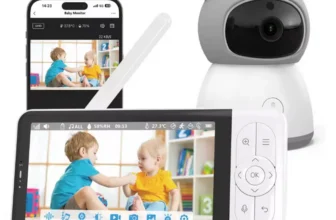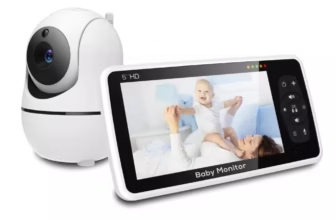
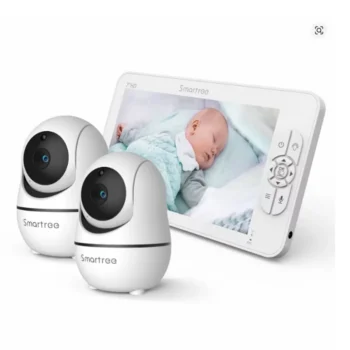

The 7 Inch Split Screen 1080P Baby Monitor with 2 Cameras is a dedicated nursery-monitoring system designed for parents who need to watch two babies, two rooms, or two different areas at the same time. Instead of switching constantly between individual camera feeds, the large 7-inch display can show two camera views together in split-screen mode, making this system especially useful for twins, siblings sleeping in separate rooms, or families who want one camera focused on a crib and another covering a play area.
View 7 Inch Split Screen Baby Monitor Product Details
For U.S. shoppers searching for a baby monitor with 2 cameras, split screen baby monitor, 7 inch baby monitor, 1080P baby monitor, baby monitor for twins, or a no WiFi baby monitor with pan, tilt, zoom, night vision, two-way talk, temperature monitoring, and long battery life, this product offers a practical combination of large-screen viewing and private local wireless operation.
Current matching specifications show a 7-inch HD parent monitor bundled with two Full HD 1080P nursery cameras. The system supports simultaneous split-screen viewing of two cameras and can expand to as many as four compatible cameras, depending on the exact configuration.
Each camera can pan approximately 355 degrees horizontally and tilt approximately 120 degrees vertically. The parent monitor also supports 2X and 4X digital zoom, allowing parents to adjust framing or enlarge a smaller area of the live video without entering the nursery.
The system uses a dedicated 2.4GHz FHSS wireless connection rather than normal home WiFi. That means no smartphone app, account registration, or internet connection is required for everyday camera-to-monitor communication.
Matching specifications also include a 4000mAh rechargeable parent-unit battery, automatic infrared night vision, VOX power-saving mode, sound detection, two-way audio, nursery-temperature monitoring, built-in lullabies, and an advertised wireless range of up to approximately 1000 feet under favorable barrier-free conditions.
The exact OnlineDaraz product page was not directly retrievable during verification, so variation-sensitive specifications should still be checked at checkout. However, the current matching product listing strongly supports the core two-camera, 7-inch, 1080P, split-screen, no-WiFi configuration described throughout this guide.

What Is the 7 Inch Split Screen Baby Monitor with 2 Cameras?
This is a dedicated video-monitoring system built around three main components: one portable parent display and two nursery cameras.
One Large Parent Monitor
The parent unit uses a 7-inch color screen, giving caregivers significantly more viewing area than compact 3.5-inch or 5-inch baby monitors.
Two Cameras Included
The package is designed to provide two nursery camera feeds without requiring parents to purchase the second camera separately.
Split-Screen Monitoring
Both cameras can be displayed at the same time, making the system especially useful for twins or siblings.
Expandable Multi-Camera Design
Current matching listings indicate support for up to four cameras, although the standard package includes two.
Why Two Cameras Can Be Better Than One
A single-camera baby monitor works well when only one nursery or sleeping area needs attention. Families with more complex needs can benefit significantly from a second camera.
Monitor Two Children
One camera can stay in each child’s room.
Monitor Two Cribs
Parents of twins can position one camera for each sleeping area.
Monitor Sleep and Play Areas
One camera can focus on the crib while the second watches a playroom or another nursery area.
Reduce Camera Repositioning
Using two dedicated cameras eliminates the need to physically move one camera between locations throughout the day.
Split-Screen Monitoring for Twins
Twins are one of the clearest use cases for a two-camera baby monitor.
See Both Babies Simultaneously
Parents can check two separate crib views without manually switching channels.
Useful During Naps
If the babies have different sleep patterns, both remain visible on one screen.
Useful Overnight
The parent monitor can remain bedside while two nursery views stay available.
Split Screen Saves Time
Instead of repeatedly switching between Camera 1 and Camera 2, parents can compare both views instantly.
Split-Screen Monitoring for Siblings
The system is equally useful when children sleep in different rooms.
Camera 1 in the Baby’s Nursery
The first camera can remain focused on the crib or bassinet area.
Camera 2 in an Older Child’s Room
The second camera can monitor a toddler or young child’s room.
One Parent Unit for Both Rooms
Parents do not need separate baby-monitor screens for each child.
Expandable Systems Can Grow With a Family
Support for up to four compatible cameras may allow additional rooms to be added later.

Large 7-Inch HD Display
The 7-inch parent screen is one of the most noticeable features of this monitor.
More Viewing Area
A larger display makes it easier to see details without holding the monitor very close.
Useful for Split Screen
When two video feeds share the display, screen size becomes especially important.
Practical for Bedside Use
The parent monitor can remain on a nightstand while still showing reasonably large camera views.
Larger Screen Supports Multi-Camera Monitoring Better
A small display can make each split-screen image feel cramped, while a 7-inch panel provides more room for two live feeds.
1080P Full HD Cameras
Current matching listings specify two Full HD 1080P cameras.
Improved Nursery Detail
Higher camera resolution can make sleep position, room layout, and movement easier to see.
Useful With Digital Zoom
More source image detail can improve the usefulness of 2X and 4X magnification.
Useful During Day and Night
The cameras are designed to provide monitoring across both normal lighting and infrared night-vision conditions.
Camera Resolution and Parent-Screen Resolution Are Different Specifications
A camera can capture at 1080P even when the monitor’s display resolution is different. Buyers should review the exact listing if parent-screen pixel resolution is important.
Crystal-Clear Daytime Monitoring
Natural Room Lighting
During the day, the camera provides a color view of the nursery.
See Crib Position Clearly
Parents can check whether the baby is sleeping, sitting, or moving.
Monitor Play Areas
The wide camera movement range can help cover more than one fixed point.
Good Lighting Improves Image Quality
Even high-resolution cameras produce better daytime video when the room has adequate ambient light.
355-Degree Pan Control
Each matching camera provides approximately 355 degrees of horizontal pan.
Nearly Full Horizontal Rotation
The camera can look across most of the room from one central position.
Useful for Toddlers
Once a child becomes mobile, monitoring may need to extend beyond the crib.
Remote Adjustment
The caregiver can reposition the camera from the parent monitor.
Reduces the Need to Enter the Nursery
If the child moves outside the original frame, the parent can adjust the view remotely.
120-Degree Tilt Control
The camera also provides approximately 120 degrees of vertical movement.
Look Down Toward a Crib
An elevated camera can tilt downward toward the sleeping area.
Look Toward the Floor
This becomes useful when a toddler plays in the room.
Works Well With Wall Mounting
Higher installation positions can provide broad viewing coverage.
Pan and Tilt Provide Flexible Nursery Coverage
Together, the two controls reduce the limitations of a fixed camera.

2X and 4X Digital Zoom
The matching baby-monitor system supports digital magnification up to 4X.
2X Zoom
This gives parents a moderate close-up while maintaining more of the surrounding image.
4X Zoom
This can enlarge a smaller portion of the camera view when a closer check is needed.
Useful for Crib Monitoring
Parents may want to zoom in before deciding whether to enter the nursery.
Digital Zoom Does Not Create New Image Detail
It enlarges the existing camera image rather than physically changing lens focal length.
Multi-Camera Scanning Mode
Current matching configurations include automatic camera scanning.
Cycle Between Camera Feeds
The parent monitor can switch between connected cameras automatically.
Useful Beyond Split Screen
Some parents may prefer a larger single-camera view that changes periodically instead of displaying both feeds at once.
Helpful With Three or Four Cameras
Scanning becomes more valuable as additional compatible cameras are added.
Audio Behavior Can Differ Between Modes
On some multi-camera monitors, audio follows one selected camera or switches during scan mode. Buyers should confirm the exact audio behavior of the selected product version.
Can You Hear Both Cameras?
The current matching product listing states that both camera audio feeds can be heard in its two-camera configuration.
Useful for Twins
Parents can remain aware of sounds from two sleeping areas.
Useful for Separate Rooms
One child may wake while the second remains asleep.
Audio Implementation Can Vary Across Similar Models
Because other split-screen monitors sometimes limit audio to one camera at a time, buyers should confirm the exact behavior on the selected OnlineDaraz unit.
2.4GHz FHSS Wireless Connection
The system uses a direct 2.4GHz FHSS wireless link between the cameras and parent monitor.
What Is FHSS?
FHSS stands for Frequency-Hopping Spread Spectrum, a wireless communication method that changes frequencies during transmission.
No Home WiFi Required
The monitor does not need to connect to a router for normal camera viewing.
No Smartphone App Required
The dedicated parent screen provides all normal monitoring functions.
No Account Creation Required for Basic Use
This appeals to parents who prefer a self-contained monitoring system rather than an internet-connected nursery camera.
Why No-WiFi Baby Monitors Remain Popular
Simple Setup
Parents can generally power the system, pair the cameras, and begin monitoring.
No Internet Dependency
An internet outage does not automatically eliminate local monitoring.
No Smartphone Needed
The nursery display remains separate from calls, messages, social media, and other phone functions.
Remote Internet Viewing Is the Tradeoff
A no-WiFi FHSS system is primarily designed for monitoring within the local wireless range rather than viewing the nursery from another city.
Private Local Monitoring
A closed local connection can be attractive to parents concerned about unnecessary internet exposure.
Camera Feed Stays Within the Dedicated System
Normal monitoring does not depend on cloud servers.
No App Password to Manage
There is no separate mobile account for ordinary use.
No Router Configuration Needed
Parents avoid common smart-camera setup steps.
Physical Access Still Matters
Like any nursery device, the parent monitor and cameras should be kept secure and used according to the product instructions.

Up to 1000-Foot Advertised Wireless Range
Current matching listings advertise up to approximately 1000 feet of range in barrier-free conditions.
Open Space Produces the Longest Range
Signals can travel farther when fewer objects stand between the camera and monitor.
Indoor Range Is Usually Shorter
Walls, floors, furniture, metal framing, concrete, and appliances can reduce range.
Useful for Many Average U.S. Homes
Even when practical indoor range is lower than the maximum figure, the system can still provide useful household coverage.
Do Not Treat 1000 Feet as Guaranteed Through Walls
The published specification should be understood as a favorable open-area maximum.
Improving Wireless Range
Raise the Parent-Unit Antenna
Matching product instructions recommend lifting the monitor antenna to improve reception.
Avoid Large Metal Barriers
Metal can significantly weaken wireless signals.
Test the Monitor Before Permanent Installation
Carry it throughout the home and confirm stable reception where it will actually be used.
Do Not Move Cameras Into Unsafe Positions for Better Reception
Cord safety and secure mounting remain more important than maximizing range.
4000mAh Rechargeable Parent Monitor
The matching configuration uses a rechargeable parent-unit battery rated up to 4000mAh.
Portable Around the House
The display can move between bedrooms, living spaces, the kitchen, and a home office.
No Need to Remain Plugged In Continuously
This improves everyday convenience.
Useful Overnight
The monitor can remain beside the bed without requiring constant handheld use.
The Cameras Still Require Power
Current matching documentation states that the nursery cameras must remain connected to electrical power; the battery is located in the parent monitor.
Up to About 22 Hours in VOX Mode
Matching listings commonly associate the long battery figure with VOX or screen-sleep operation.
Screen Turns Off During Quiet Periods
This saves substantial battery power.
Sound Can Reactivate Monitoring
When noise such as crying is detected, the system can alert the caregiver and wake the display according to the selected settings.
Useful for Overnight Monitoring
The screen does not need to remain illuminated throughout the entire night.
Long Runtime Depends on Power-Saving Use
Battery life will generally be shorter if the 7-inch screen remains continuously active.
VOX Mode Explained
VOX is a sound-activated power-saving feature.
Quiet Room
The display can enter a low-power or screen-off state.
Baby Cries or Makes Noise
The monitor detects the sound and can wake the display or provide an alert.
Adjustable Sensitivity
Matching products commonly provide multiple VOX sensitivity levels.
VOX Reduces Unnecessary Screen Time
This can extend battery operation while maintaining awareness of significant nursery sounds.

Automatic Infrared Night Vision
Both matching cameras provide automatic infrared night vision.
Monitor in a Dark Nursery
Parents do not need to leave the main room lights on.
Automatic Day-to-Night Switching
The cameras transition into infrared viewing when ambient light becomes low.
Useful for Both Cameras Simultaneously
Parents can continue checking two sleeping children after lights are turned off.
Night-Vision Images Are Typically Black and White
This is normal for infrared monitoring systems.
Invisible or Low-Disturbance Night Monitoring
Matching product descriptions emphasize night viewing without a bright visible light that would disturb the baby.
Dark Nursery Environment
The child can sleep without a strong white camera light.
Parents Can Still See the Crib
Infrared illumination provides the camera with visibility that the human eye may not have in the same darkness.
Night Vision Is for Monitoring, Not Medical Observation
A video monitor should never be treated as a medical breathing or health monitor.
Two-Way Audio
The system includes a microphone and speaker path for two-way communication.
Hear the Baby
Audio from the nursery travels to the parent monitor.
Speak Through the Camera
The caregiver can send voice audio back to the nursery.
Useful for Toddlers
Parents may be able to reassure an older child verbally before entering the room.
Two-Way Talk Does Not Replace Physical Care
Feeding, changing, illness, discomfort, and safety needs still require direct caregiver response.
Room Temperature Monitoring
The nursery cameras include temperature sensing.
See Approximate Room Temperature
The parent screen can show environmental information for the monitored room.
Useful Across Different Seasons
Heating and air-conditioning can create substantial changes in bedroom conditions.
Useful Across Two Rooms
Separate cameras may provide information about each nursery location.
Temperature Reading Can Be Influenced by Camera Heat
Matching product instructions warn that the powered camera itself can become warm and may cause its displayed temperature to differ somewhat from the true surrounding room temperature.
Lullaby Music
Current matching specifications include built-in soothing audio.
Play Music Through the Nursery Camera
This can reduce the need for a separate bedside music device.
Useful During Nap Routines
Families can integrate familiar sounds into sleep preparation.
Keep Sound Levels Comfortable
Camera speakers should not be placed very close to a baby’s ears or used at unnecessarily high volume.
Feeding or Alarm Reminder
The parent monitor also includes timer or alarm functions.
Useful for Routine Scheduling
Caregivers can set reminders around recurring tasks.
Helpful During Newborn Sleep Deprivation
Parents managing multiple babies may appreciate additional organizational tools.
Follow Individual Medical and Feeding Guidance
A timer should not replace instructions provided by a pediatric professional.
Split-Screen Baby Monitor for Twins
The combination of two included cameras and a large display makes this system especially relevant to parents of twins.
Separate Camera for Each Crib
Each camera can be positioned for its own optimized view.
One Screen for Both Babies
The parent does not have to switch constantly between separate devices.
Two-Way Talk
Parents can communicate through the camera when appropriate.
Two-Camera Monitoring Can Simplify Nighttime Checks
A single glance can show whether one or both babies are awake.

Baby Monitor for Two Different Rooms
Nursery and Toddler Bedroom
Parents can dedicate one camera to each child.
Nursery and Playroom
One camera can stay in the sleeping area while the second monitors another frequently used room.
Bedroom and Travel Crib Area
The second camera gives families greater flexibility without repeatedly relocating the primary camera.
Check Wireless Range Between Rooms
Building materials can affect the signal differently in each location.
Expandable Up to Four Cameras
Current matching product listings state that the monitor can pair with up to four compatible cameras.
Start With Two Cameras
The included package already covers two rooms or children.
Add More Cameras Later
Compatible additional cameras may be useful as the household changes.
Use Scan Mode for Multiple Cameras
Automatic channel cycling can help manage more than two views.
Confirm Additional Camera Compatibility Before Ordering
Not every camera from the same brand or appearance will necessarily pair with the monitor.
Using Four Cameras
A four-camera system can serve a larger household.
Two Children’s Bedrooms
Two cameras can remain dedicated to sleeping areas.
Playroom
A third camera can monitor a shared activity space.
Another Nursery Area
A fourth may cover a changing, reading, or sleep area.
Audio Management Becomes More Important
Understand how the monitor handles audio when multiple cameras are paired.
Safe Camera Placement
Nursery electronics should always be installed with child safety as the priority.
Keep Power Cords Away From the Crib
Children should never be able to reach camera cables.
Keep Cameras Outside the Sleeping Space
Do not place a baby monitor inside the crib.
Use Secure Mounting
Wall mounts should be appropriate for the surface and tightened properly.
Reassess the Installation as Children Grow
A cable that was unreachable by a newborn may become accessible to a standing toddler.
Recommended Camera Distance
The matching product instructions include practical setup guidance.
Camera and Parent Monitor Separation
Keeping them approximately 5 to 7 feet apart during normal nearby use can help prevent feedback or buzzing.
Camera and Crib Distance
Matching instructions suggest keeping the camera roughly 7 feet away when using zoom, where practical.
Keep Cords Even Farther From Reach
The child’s ability to grab the cable is more important than achieving a particular camera distance.
Use the Safest Location That Still Gives a Clear View
Nursery safety should never be compromised for camera framing.
Using the Monitor During Daytime Naps
Keep the Parent Unit Nearby
The rechargeable battery allows portable monitoring around the house.
Use Split Screen
Parents can monitor both children during overlapping naps.
Use VOX Mode
The display can conserve battery during quiet periods.
Zoom Before Entering the Nursery
A quick visual check may prevent an unnecessary room visit that could wake a sleeping child.
Using the Monitor Overnight
Automatic Night Vision
Both camera views remain useful after the nursery lights are off.
VOX Power Saving
The screen can sleep while the rooms remain quiet.
Sound Alerts
Noise can bring the caregiver’s attention back to the monitor.
Keep the Charging Adapter Nearby
Battery runtime varies depending on screen use, audio, brightness, and battery age.
Using the Baby Monitor in a Two-Story Home
Put Each Camera in Its Permanent Room
Then carry the monitor through the rest of the house.
Test Upstairs-to-Downstairs Reception
Floors can reduce signal strength.
Test With Doors Closed
This better represents overnight conditions.
Check Both Camera Feeds Separately
One room may have a stronger wireless path than the other.
Using the Monitor in an Apartment
Shorter Distances Can Be Advantageous
Many apartments fall easily within the local operating range.
2.4GHz Congestion Can Still Exist
Neighboring routers and wireless electronics may occupy the same general frequency range.
No Router Connection Is Needed
The FHSS system remains separate from normal home WiFi configuration.
Test Before Final Mounting
Concrete walls or metal structures can still weaken reception.

Split-Screen Baby Monitor Versus Two Separate Monitors
One Screen Is Simpler
A single parent unit reduces the number of devices that need charging and carrying.
Both Children Can Be Viewed Together
Separate monitors cannot normally combine their feeds into one display.
One Control Interface
Pan, tilt, zoom, audio, and settings remain centralized.
Two Separate Systems May Offer More Independence
Some families may still prefer separate monitors if they want two caregivers to monitor independently in different locations.
7-Inch Monitor Versus 5-Inch Monitor
More Screen Area
A 7-inch monitor can make split-screen images easier to see.
Better for Bedside Viewing
Parents may be able to read the display from farther away.
Larger Device
The tradeoff is that a 7-inch monitor takes up more space and may be slightly less convenient to carry.
The Larger Screen Is Especially Valuable for Two Cameras
Split-screen monitoring benefits more from additional display area than single-camera viewing does.
Two-Camera Monitor Versus App-Based WiFi Cameras
No Account Required
The FHSS monitor is designed for local operation without a cloud account.
No Smartphone Required
The dedicated parent unit remains available all the time.
WiFi Cameras Offer Remote Internet Viewing
They can be useful when someone needs to check the nursery from outside the home.
Choose Based on Privacy and Remote-Access Priorities
This product is strongest for parents who prioritize local dedicated monitoring over smartphone internet access.
Two-Camera Monitor Versus Audio-Only Monitor
Video Adds Visual Information
Parents can distinguish sleeping, sitting, standing, or movement.
Split Screen Adds Comparison
Two children remain visible at once.
Audio-Only Devices Are Simpler
They can still be useful when only sound notification is required.
Video Becomes More Useful as Children Become Mobile
A toddler moving around a bedroom can provide important visual information that audio alone cannot convey.
U.S. Plug Availability
The current matching listing is offered with a U.S.-plug option.
Select the U.S. Version
This is preferable to using an unnecessary travel adapter.
Check Adapter Labels After Delivery
Verify that the supplied equipment corresponds to the selected regional variation.
Cameras Require Continuous Power
Matching instructions state that only the parent monitor contains a rechargeable battery.
Do Not Use Random Replacement Adapters
Voltage, current, polarity, connector, and safety requirements need to match the device.
First-Time Setup Guide
Charge the Parent Monitor
Begin with a full battery.
Power Both Cameras
Place them temporarily in safe test positions.
Verify Camera 1
Check video, audio, pan, tilt, zoom, and night vision.
Verify Camera 2
Repeat the same process for the second camera.
Test Split Screen
Confirm that both feeds display simultaneously.
Test Wireless Range Before Permanent Mounting
Carry the parent unit around the home and identify any weak-signal locations.
How to Test VOX Mode
Enable VOX
Choose the desired sensitivity setting.
Allow the Screen to Sleep
Wait for the system to enter power-saving mode.
Create Sound Near a Camera
Speak or create ordinary room noise to verify activation.
Repeat for Both Cameras
Make sure your chosen multi-camera mode behaves as expected.
How to Improve Night Viewing
Keep the Lens Clean
Dust and fingerprints can reduce night-image clarity.
Avoid Reflective Objects Very Close to the Camera
Nearby bright surfaces can reflect infrared light back toward the lens.
Use a Clear Camera Angle
Crib rails or furniture can block or reflect infrared illumination.
Test Night Vision Before Finalizing the Camera Position
A location that looks good during the day may behave differently in infrared mode.
Battery Care
Charge Before Overnight Use
This reduces the chance of low-battery warnings during sleep hours.
Use VOX When Appropriate
Power-saving mode can significantly reduce LCD usage.
Avoid Extreme Heat
Rechargeable batteries generally perform best at normal indoor temperatures.
Expect Capacity to Decline With Age
No rechargeable battery maintains its original runtime permanently after repeated charging cycles.
Cleaning the Parent Monitor and Cameras
Disconnect Power First
Unplug camera units and charging connections before cleaning.
Use a Soft Cloth
Gently wipe the screen, housing, and camera lens area.
Avoid Spraying Cleaner Directly on Electronics
Moisture should not enter microphones, speakers, ports, buttons, or housing seams.
Keep Camera Lenses Clean
Clear lenses improve daytime and infrared viewing quality.
Common Mistakes to Avoid
Mounting Camera Cords Within Reach
This creates an unnecessary nursery hazard.
Assuming 1000 Feet Is Guaranteed Indoors
The longest range applies to favorable barrier-free conditions.
Leaving the Screen On Continuously and Expecting Maximum Battery Life
The longest runtime depends on VOX or power-saving use.
Using Outdoor Pavement Distance as a Home-Range Prediction
Real homes contain walls and floors that weaken wireless signals.
Assuming Every Two-Camera Monitor Handles Audio the Same Way
Multi-camera audio behavior differs among brands and models.
Placing Cameras Too Close to the Parent Unit
Matching guidance warns that very close spacing can contribute to feedback or buzzing.
Using the Monitor as a Substitute for Caregiver Supervision
A video monitor improves awareness but does not replace direct caregiving or established infant safety practices.

What U.S. Buyers Should Check Before Ordering
Confirm Two Cameras Are Included
Make sure you are purchasing the two-camera package rather than a single-camera version.
Confirm the 7-Inch Display
The large screen is one of the defining features of this model.
Confirm 1080P Cameras
Current matching listings specify Full HD camera resolution.
Confirm Split-Screen Function
Both camera feeds should be viewable simultaneously.
Confirm Expandability
Check whether the selected unit supports up to four compatible cameras.
Confirm 355-Degree Pan
This provides broad horizontal viewing control.
Confirm 120-Degree Tilt
Vertical camera adjustment helps cover crib and floor areas.
Confirm 2X/4X Zoom
Both magnification levels are listed in matching product specifications.
Confirm 2.4GHz FHSS
This establishes the no-WiFi dedicated communication method.
Confirm 4000mAh Battery
Current matching versions commonly list this capacity.
Confirm VOX Mode
This is important for battery-saving overnight use.
Confirm Night Vision
Automatic infrared monitoring is part of the matching configuration.
Confirm Two-Way Audio
The system should allow listening and speaking through the camera.
Confirm Temperature Monitoring
Nursery-temperature information is included.
Select the U.S. Plug
Choose the correct regional package during checkout.
Check the Exact Selected Variation Before Payment
Closely related 7-inch baby monitors can use different batteries, display resolutions, mounts, or package accessories.
Frequently Asked Questions About the 7 Inch Split Screen Baby Monitor with 2 Cameras
How many cameras are included?
The featured package is designed with two cameras.
Can I see both cameras at the same time?
Yes. Split-screen viewing is one of the main features.
Is the parent monitor 7 inches?
Yes. The matching configuration uses a large 7-inch color display.
Are the cameras 1080P?
Yes. Current matching listings specify Full HD 1080P cameras.
Can the system support more than two cameras?
Matching listings indicate expansion up to four compatible cameras.
Does the camera pan remotely?
Yes. Horizontal movement is approximately 355 degrees.
Does the camera tilt?
Yes. Vertical tilt is approximately 120 degrees.
Does it have 4X zoom?
Yes. The monitor supports digital zoom up to 4X.
Does it require WiFi?
No. The matching system uses a dedicated 2.4GHz FHSS connection.
Do I need a smartphone?
No. All ordinary monitoring is performed through the dedicated parent screen.
Do I need an app?
No. The system is designed to operate without an app or account.
Can I watch from outside the home over the internet?
This no-WiFi version is primarily designed for local monitoring within its wireless range rather than smartphone internet access.
What is the maximum range?
Matching specifications advertise up to approximately 1000 feet under favorable open conditions.
Will I get 1000 feet inside a house?
Not necessarily. Walls, floors, concrete, metal, and interference can significantly reduce actual indoor range.
How large is the battery?
Current matching versions specify a 4000mAh rechargeable battery in the parent monitor.
Do the cameras have batteries?
No. Matching instructions state that the cameras need to remain plugged into electrical power.
How long can the monitor battery last?
Matching listings commonly advertise up to approximately 22 hours in VOX or power-saving mode. Runtime is shorter when the screen stays continuously active.
What is VOX mode?
VOX lets the screen sleep during quiet periods and reactivate or alert when sound is detected.
Does the system have night vision?
Yes. Automatic infrared night vision is included.
Does night vision show color?
Infrared night images are normally black and white.
Can I talk to my baby?
Yes. Two-way audio is included.
Can I hear both cameras?
The closest matching current listing states that both cameras can provide audio in the two-camera configuration. Confirm the exact behavior of the OnlineDaraz version before relying on this feature.
Does the monitor show nursery temperature?
Yes. Temperature monitoring is included.
Is the temperature sensor perfectly accurate?
No. Matching instructions note that heat from the powered camera can influence the displayed reading.
Does it play lullabies?
Yes. Matching versions include soothing music or lullaby functions.
Does it have alarm reminders?
Yes. Alarm or feeding-reminder functions are included in current matching configurations.
Can I use one camera in each room?
Yes. This is one of the strongest use cases for a two-camera system.
Is it good for twins?
Yes. Split-screen viewing allows both babies to remain visible at the same time.
Can I use it in a two-story house?
Yes, but wireless performance should be tested through actual floors and walls.
Can the cameras be wall mounted?
Matching models support wall installation, although exact included hardware should be verified.
Is a U.S. plug available?
Yes. The current matching listing offers a U.S.-plug configuration.
Does it record video?
Recording is not one of the consistently verified core features of the matching no-WiFi configuration, so do not assume local recording unless the exact selected version states it.
Can this monitor detect breathing?
No verified medical breathing-monitoring feature is associated with this product. It should not be used as a medical monitor.
Can a baby monitor prevent SIDS?
No. A consumer video baby monitor does not prevent SIDS and should not replace established infant safe-sleep practices.
Can it replace direct adult supervision?
No. It is a supplemental monitoring device.
What are the main verified features?
The core matching feature set includes a 7-inch display, two 1080P cameras, split-screen viewing, expansion up to four cameras, 355-degree pan, 120-degree tilt, 2X/4X zoom, 2.4GHz FHSS no-WiFi communication, automatic night vision, two-way audio, temperature monitoring, VOX mode, sound alerts, lullaby functions, a rechargeable parent monitor, and U.S.-plug availability.

Why Split Screen Can Be Better Than Camera Switching
Traditional multi-camera systems often require parents to view one camera at a time.
Both Rooms Stay Visible
Split screen removes the delay between checking Camera 1 and Camera 2.
Useful When Both Children Make Noise
The parent can immediately see what is happening in each room.
Helpful During Bedtime
Parents can compare whether both children have settled without cycling through channels.
A Large Screen Makes Split Viewing More Practical
This is where the 7-inch panel becomes particularly useful.
Why a Two-Camera Kit Can Be Better Than Adding a Camera Later
Compatibility Is Already Established
The included cameras are designed to work with the parent unit.
No Need to Search for a Separate Matching Camera
Accessory cameras can sometimes become difficult to find after a model has been discontinued.
Better for Twins From Day One
Both nursery views can be configured immediately.
Check Expansion Compatibility Before Adding Third or Fourth Cameras
Additional cameras should be confirmed as compatible with the exact monitor model.
Why the 7-Inch Screen Matters for Two-Camera Monitoring
Two Feeds Need More Display Space
Each image becomes smaller when split screen is activated.
Easier Bedside Viewing
A parent may be able to check both images without picking up the monitor.
Useful for Grandparents and Caregivers
A larger display can be easier to understand than a small handheld screen.
Screen Size Is One of the Strongest Advantages of This Product
For families buying specifically for two-camera viewing, a larger screen can be more valuable than many secondary features.
Why a No-WiFi Design Can Appeal to U.S. Parents
Simple Local Operation
No router pairing is required for normal use.
No Cloud Account
Video does not need to be routed through an online account for ordinary monitoring.
No Phone Notifications to Manage
The dedicated monitor handles nursery alerts separately.
The Tradeoff Is No Normal Remote App Viewing
Parents who want to check the nursery while away from home should consider whether a WiFi-enabled model better fits their needs.

Final Thoughts on the 7 Inch Split Screen 1080P Baby Monitor with 2 Cameras
The 7 Inch Split Screen 1080P Baby Monitor with 2 Cameras is particularly well suited to families who need to monitor two children, two bedrooms, two cribs, or two different nursery areas without managing separate monitoring systems.
The 7-inch parent screen is one of the biggest practical advantages. Split-screen viewing naturally reduces the size of each camera image, so having a larger display makes simultaneous viewing substantially more useful than it would be on a very small monitor.
The two included 1080P cameras provide a strong foundation for nursery monitoring. Parents can position one camera for each child, and remote 355-degree pan with approximately 120-degree tilt provides broad room coverage without repeatedly adjusting the camera by hand.
2X and 4X digital zoom allow closer viewing when required. This can be useful when parents want to inspect a crib area before deciding whether an in-person room check is necessary.
The split-screen feature is especially valuable for twins. Both camera feeds can remain visible at the same time rather than forcing the caregiver to switch repeatedly between channels. Families with siblings in separate rooms can use the system in the same way.
Support for up to four compatible cameras also provides room for future expansion. A family might begin with two bedroom cameras and later add coverage for a playroom or another nursery area.
The dedicated 2.4GHz FHSS connection means normal monitoring does not require home WiFi, a smartphone application, cloud account, or internet service. This gives the system a straightforward local-monitoring design that many parents prefer.
Battery-powered parent-unit operation makes the 7-inch display portable around the house. Matching configurations commonly use a 4000mAh battery and advertise extended operation in VOX mode, where the screen sleeps during quiet periods and wakes or alerts when sound is detected.
Automatic infrared night vision keeps both nursery cameras useful after lights are turned off. Two-way audio allows parents to listen and speak through the cameras, while temperature monitoring adds information about room conditions.
The maximum advertised wireless range is approximately 1000 feet under barrier-free conditions, but real indoor performance will usually be shorter. U.S. homes vary widely in construction, so buyers should test the monitor through their actual walls, doors, floors, and living areas.
Safe camera installation remains essential. Keep both cameras and every power cord securely outside the children’s reach, use appropriate mounting hardware, and reassess the setup as babies become toddlers capable of standing, climbing, or reaching farther.
The system is a useful observation tool, but it is not a medical device and should not be considered a substitute for adult supervision, pediatric care, or established infant safe-sleep practices.
View 7 Inch Split Screen Baby Monitor Product Details
Before ordering, confirm that the selected package includes two 1080P cameras, a 7-inch parent monitor, simultaneous split-screen viewing, support for additional cameras if needed, 355-degree pan, 120-degree tilt, 2X/4X digital zoom, 2.4GHz FHSS connectivity, VOX mode, 4000mAh battery capacity, automatic night vision, two-way talk, temperature monitoring, sound alerts, lullaby functions, mounting accessories, and the correct U.S.-plug variation.
For U.S. parents searching for a baby monitor with 2 cameras, split screen baby monitor, 7 inch baby monitor, 1080P baby monitor, baby monitor for twins, or a no WiFi dual camera baby monitor with night vision, pan-and-tilt control, zoom, two-way audio, temperature monitoring, and long-battery VOX operation, this 7-inch system offers a practical combination of large-screen visibility, multi-room flexibility, privacy-focused local connectivity, and family-friendly monitoring features.