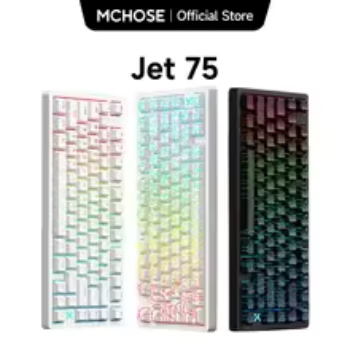

The MCHOSE Jet 75 Magnetic Gaming Keyboard is designed for gamers who want responsive key inputs, customizable actuation, advanced magnetic switch technology, and a compact desktop setup. Featuring Hall Effect magnetic switches, Rapid Trigger technology, adjustable actuation points, and customizable RGB lighting, this keyboard offers features that appeal particularly to competitive PC gamers. Its 75% compact layout provides a balance between gaming functionality and desktop space, making it an interesting option for players who want a high-performance gaming keyboard without the footprint of a traditional full-size model. Whether you enjoy competitive FPS games, multiplayer adventures, strategy titles, or everyday computer work, understanding its features can help you decide whether this magnetic gaming keyboard matches your setup.
Check Current MCHOSE Jet 75 Keyboard Details

One of the main reasons gamers consider a Hall Effect gaming keyboard is the ability to customize how individual keys respond. Instead of relying exclusively on a fixed mechanical switch activation point, magnetic switches can detect key movement and allow users to configure actuation behavior through compatible software. This makes the Jet 75 especially interesting for players who want more control over movement inputs, repeated key presses, and keyboard responsiveness.
What Is the MCHOSE Jet 75 Magnetic Gaming Keyboard?
The MCHOSE Jet 75 is a compact wired gaming keyboard built around magnetic Hall Effect switch technology. Unlike conventional keyboards that depend on physical electrical contacts to register a key press, Hall Effect switches use magnetic sensing to detect the movement of a key. This technology enables adjustable actuation and advanced input features.
The keyboard is designed for gaming desktops, competitive gaming stations, and everyday computer setups. Its compact layout keeps frequently used keys accessible while reducing the amount of desk space occupied by the keyboard.
Understanding the 75% Keyboard Layout
A 75% keyboard is a compact keyboard format that combines many important features of a traditional keyboard while removing some less frequently used spacing and sections.
Unlike a full-size keyboard with a dedicated numeric keypad, a 75% layout generally prioritizes the main typing area, function row, navigation keys, and arrow keys.
Why Gamers Prefer Compact Keyboard Layouts
- More mouse space: A smaller keyboard leaves additional room for mouse movement.
- Organized desktop: The compact arrangement creates a cleaner gaming environment.
- Essential keys: Important gaming and navigation keys remain accessible.
- Portable setup: A smaller keyboard can be easier to transport between gaming locations.
- Flexible positioning: Players can adjust keyboard placement to suit their preferred gaming posture.
For competitive FPS players, additional mouse space can be particularly valuable because low-sensitivity mouse settings often require larger physical movements.
Hall Effect Magnetic Switch Technology Explained
The standout feature of the MCHOSE Jet 75 is its magnetic switch technology. Hall Effect switches use magnetic sensors to detect key movement instead of depending entirely on traditional metal contact mechanisms.
When a key moves downward, its magnetic position changes relative to the sensor. The keyboard’s electronic system interprets this movement and registers the input according to the configured actuation settings.
How Magnetic Switches Work
Traditional mechanical keyboard switches usually register a key press when internal electrical contacts connect. Magnetic switches operate differently because the keyboard detects changes in the magnetic field as the switch moves.
This approach enables adjustable actuation points and dynamic key behavior. Rather than relying on one fixed activation point, compatible magnetic keyboards allow users to configure when an input should register.
Advantages of Magnetic Gaming Switches
- Adjustable key activation points.
- Support for Rapid Trigger functionality.
- Customizable key response behavior.
- Dynamic input settings for gaming.
- Compatibility with supported advanced keyboard functions.
Magnetic Switches vs Traditional Mechanical Switches
Traditional mechanical keyboards remain popular because of their familiar tactile feedback, switch variety, and typing characteristics. Magnetic keyboards introduce another approach that prioritizes adjustable input detection.
| Feature | Magnetic Switch Keyboard | Traditional Mechanical Keyboard |
|---|---|---|
| Input Detection | Magnetic sensing | Physical electrical contacts |
| Actuation Point | Adjustable on supported models | Usually fixed by switch design |
| Rapid Trigger | Supported on compatible models | Generally unavailable without specialized technology |
| Key Response | Configurable through software | Determined mainly by switch characteristics |
| Gaming Applications | Competitive gaming and customizable inputs | General and competitive gaming |
| Switch Replacement | Requires compatible magnetic switches | Depends on the keyboard’s switch socket |
Neither technology is automatically better for every user. The right choice depends on your gaming habits, typing preferences, budget, and interest in customizable input behavior.
Rapid Trigger Technology for Competitive Gaming
Rapid Trigger is one of the most interesting features of modern magnetic gaming keyboards. It allows a key to reset dynamically according to its movement rather than requiring it to travel back to one predetermined reset position.
For competitive players, this can make repeated movement inputs feel more responsive.
How Rapid Trigger Works
With conventional mechanical switches, the activation and reset points are generally fixed. After pressing a key, the switch must travel back through its reset position before another press can register.
Rapid Trigger changes this behavior by allowing the keyboard to respond dynamically to the key’s movement direction.
When the key moves upward, it can reset according to the configured sensitivity. When pressed downward again, it can register another input without requiring the same full travel cycle associated with traditional fixed-reset behavior.
Why Rapid Trigger Matters in FPS Games
First-person shooter games frequently require precise movement control. Players may need to move left, move right, stop immediately, and change directions repeatedly.
In these situations, Rapid Trigger can provide more flexible control over repeated directional inputs.
Counter-Strafing and Movement Control
Counter-strafing involves changing movement direction to help control character positioning. A responsive keyboard can make repeated directional inputs easier to manage, although actual results also depend on player timing, game mechanics, and practice.
Quick Direction Changes
Players who frequently switch between directional keys may appreciate the ability to configure faster key reset behavior.
Repeated Key Presses
Rapid Trigger can also be useful for other games that require frequent repeated inputs, provided the game supports the intended behavior.
Adjustable Actuation for Personalized Key Response
Adjustable actuation allows users to select how far a key must travel before an input registers.
The MCHOSE Jet 75 product specifications list an adjustable actuation range of approximately 0.1mm to 3.4mm, depending on the selected switch and configuration.
What Is an Actuation Point?
The actuation point is the distance a key travels before the keyboard recognizes the press as an input.
A shorter actuation distance means the key can register with less physical movement. A longer distance requires the player to press the key farther before activation.
Benefits of Shorter Actuation Settings
Shorter actuation settings can be useful for players who prefer highly responsive inputs. They may suit fast-paced games where frequent directional changes and quick commands are important.
Benefits of Longer Actuation Settings
Longer actuation settings can help reduce accidental key presses for users who prefer more deliberate input.
They may also be more comfortable for everyday typing, depending on personal preferences.
Finding the Right Actuation Setting
There is no single ideal setting for every gamer. A competitive FPS player may prefer a different configuration from someone who spends several hours typing documents or playing strategy games.
A practical approach is to begin with moderate settings, test the keyboard in your favorite games, and make gradual adjustments.
8,000Hz Polling Rate and 128K Scan Rate
Another important feature associated with the MCHOSE Jet 75 is its high-speed input reporting capability.
The manufacturer’s specifications advertise an 8,000Hz polling rate and a scan rate of up to 128K. These specifications are intended to support responsive keyboard input for competitive gaming.
What Is Keyboard Polling Rate?
Polling rate describes how frequently a keyboard reports its input information to a connected computer.
A polling rate of 1,000Hz represents up to 1,000 reports per second. An 8,000Hz polling rate represents up to 8,000 reports per second under supported operating conditions.
Why Does a Higher Polling Rate Matter?
A higher polling rate can reduce the time between input reports. This may contribute to lower theoretical input-reporting latency.
However, polling rate is only one part of the complete input system. Computer performance, USB configuration, game processing, display refresh rate, and other factors also influence the overall experience.
Understanding the Advertised 0.1ms Latency
The Jet 75 is advertised with approximately 0.1ms ultra-low latency. This is a manufacturer-stated performance figure, not a guarantee that every complete gaming action will be processed in exactly that amount of time.
Actual input-to-screen response depends on the entire computer system and the software being used.
Advanced Gaming Features and Customizable Key Functions
The MCHOSE Jet 75 supports several advanced keyboard functions through compatible M HUB software and configurations.
SOCD Support
SOCD refers to simultaneous opposite cardinal directions. This functionality manages situations in which opposite directional inputs are pressed at the same time.
Its behavior can be relevant to certain competitive gaming techniques, but users should always check the rules of the specific game or tournament before enabling advanced input functions.
Dynamic Keystroke (DKS)
Dynamic Keystroke functionality allows different actions to be assigned to different stages of a key’s travel on compatible configurations.
This can provide additional flexibility when assigning game commands and creating personalized keyboard profiles.
Mod-Tap Functionality
Mod-Tap, often abbreviated as MT, allows a key to perform different functions depending on whether it is tapped or held, where supported by the software.
Key Remapping
Key remapping allows users to change the function assigned to selected keys.
This can be useful for creating personalized control layouts, adapting keyboard shortcuts, and improving convenience across different applications.
Macro Recording
Supported macro functions allow users to configure sequences of keyboard actions for compatible applications.
Macro functionality should be used responsibly. Some multiplayer games and competitive tournaments restrict automated inputs or certain combinations of advanced keyboard features.
RGB Backlighting and Keyboard Appearance
Gaming keyboards are not only about input performance. Their visual design also contributes to the appearance of a gaming desktop.
The MCHOSE Jet 75 features customizable RGB lighting, allowing users to personalize their keyboard’s appearance.

Customizable RGB Lighting Effects
RGB backlighting can provide different lighting patterns, colors, and brightness levels, depending on the supported software and keyboard configuration.
Users can choose a lighting appearance that matches their gaming room, mouse, headset, desktop accessories, and other peripherals.
Why RGB Lighting Is Popular Among PC Gamers
- Creates a personalized gaming environment.
- Complements RGB gaming mice and accessories.
- Provides a distinctive desktop appearance.
- Offers visual customization options.
- Can improve key visibility in dimly lit environments.
PBT Keycaps and Everyday Typing Comfort
Keycap material can influence the overall typing experience, surface texture, appearance, and long-term feel of a keyboard.
The MCHOSE Jet 75 is offered with PBT keycap configurations, although the exact keycap design can vary by product version.

What Is PBT Keycap Material?
PBT stands for polybutylene terephthalate. It is a thermoplastic material commonly used in mechanical and gaming keyboard keycaps.
PBT keycaps are popular because they generally offer good resistance to wear and can maintain their surface texture with regular use.
Benefits of PBT Keycaps
- Durable material for frequent typing.
- Comfortable textured surface on many designs.
- Good resistance to ordinary surface wear.
- Suitable for gaming and everyday computer use.
- Available in different colors and designs.
Gasket Structure and Internal Sound-Dampening Design
The keyboard’s internal construction is another factor worth considering when evaluating a premium gaming keyboard.
The MCHOSE Jet 75 is listed with a gasket-style structure and multiple internal sound-management components.
What Is a Gasket-Mounted Keyboard?
A gasket-mounted keyboard uses cushioning materials between selected internal components to create a more isolated mounting structure.
This construction can influence the way a keyboard feels and sounds when keys are pressed.
Internal Dampening Materials
The listed construction includes an aluminum alloy positioning plate, sound-absorbing materials, and a silicone bottom pad.
These components are intended to contribute to the keyboard’s structural feel and sound characteristics.
Why Internal Construction Matters
Two keyboards with similar magnetic switches can still provide different typing experiences because their cases, plates, mounting structures, keycaps, and internal materials are different.
For users who spend long hours gaming or typing, overall construction deserves attention alongside headline performance specifications.
Design Options and Desktop Compatibility
The MCHOSE Jet 75 lineup includes different appearance options. Depending on the selected product version, buyers may find black, white, black topographic, and white topographic designs.


Black Keyboard Design
A black keyboard can work well with darker desktop setups, black gaming mice, and minimalist computer accessories.
White Keyboard Design
White keyboards provide a brighter appearance and can complement white desktop cases, light-colored desk surfaces, and coordinated gaming accessories.
Topographic Design Options
Topographic styling offers a distinctive appearance for users who prefer a more visually detailed keyboard rather than a plain surface design.
Wired USB-C Connectivity and Computer Setup
The MCHOSE Jet 75 uses a wired USB connection through its USB Type-C interface. It is important to understand this before purchasing because the keyboard is not presented as a wireless or Bluetooth model.

Why Wired Connectivity Is Useful for Gaming
Wired keyboards provide a direct physical connection to the computer and do not require a wireless receiver or Bluetooth pairing.
They also avoid the need to recharge an internal keyboard battery.
How to Connect the Keyboard
- Place the keyboard on a stable desktop surface.
- Connect the USB Type-C end of the supplied cable to the keyboard.
- Connect the other end to a compatible computer USB port.
- Allow the operating system to recognize the keyboard.
- Open the compatible MCHOSE software if you want to configure advanced features.
Software and Firmware Configuration
The MCHOSE M HUB software provides access to supported keyboard settings, including actuation adjustments, Rapid Trigger, key remapping, and performance configurations.
Users should check for current firmware updates and follow the manufacturer’s instructions when changing advanced settings.
How to Customize the MCHOSE Jet 75 for Gaming
One of the advantages of a magnetic gaming keyboard is the ability to personalize input behavior for different applications and games.
Create a Gaming Profile
Start by connecting the keyboard and opening the compatible M HUB software. Select an available configuration or create a custom profile if you want to personalize the settings.
Adjust Actuation Distance
Choose an actuation distance that matches your preferred typing and gaming behavior. Begin with moderate settings before experimenting with shorter activation distances.
Configure Rapid Trigger
Enable Rapid Trigger where supported and adjust its sensitivity gradually. Extremely sensitive settings may produce unintended inputs if your fingers rest on keys or if your movements are inconsistent.
Customize Individual Keys
Some configurations allow users to adjust selected keys separately. This can be helpful when you want a different response for directional controls than for general typing.
Save and Test Your Configuration
After making changes, test the keyboard in a suitable game or application. Make small adjustments until the response feels comfortable and predictable.
Important Tip for Beginners
Do not immediately select the most sensitive settings. A balanced configuration can be easier to control, especially when transitioning from a traditional mechanical keyboard.
Technical Specifications of the MCHOSE Jet 75
The following table summarizes commonly listed MCHOSE Jet 75 specifications. Exact specifications and included accessories should be checked against the selected product variation before purchasing.
| Specification | Details |
|---|---|
| Brand | MCHOSE |
| Model | Jet 75 |
| Keyboard Type | Magnetic Gaming Keyboard |
| Keyboard Layout | 75% Compact Layout |
| Key Count | Approximately 80 keys, depending on version |
| Switch Technology | Hall Effect Magnetic Switches |
| Switch Options | Selected magnetic switch variants |
| Actuation Range | Approximately 0.1–3.4mm |
| Rapid Trigger | Supported |
| Advertised Rapid Trigger Precision | Up to 0.005mm in supported settings |
| Polling Rate | Up to 8,000Hz |
| Scan Rate | Up to 128K |
| Advertised Latency | Approximately 0.1ms |
| Backlighting | RGB |
| Keycap Material | PBT, depending on configuration |
| Connectivity | Wired USB Type-C |
| Advanced Functions | SOCD, RS, DKS, MT, TGL, Macros |
| Software | MCHOSE M HUB |
| Structure | Gasket-Style Construction |
| Dimensions | Approximately 322 × 136.9 × 40.7mm |
| Weight | Approximately 1,030g |
Is the MCHOSE Jet 75 Good for FPS Gaming?
FPS gaming is one of the main applications where magnetic keyboards with adjustable actuation and Rapid Trigger can be particularly interesting.
Competitive games frequently require quick movement, precise directional control, and repeated inputs. The ability to customize key response may help players create a keyboard configuration that suits their preferred movement style.
VALORANT and Competitive Tactical Shooters
In tactical shooters, movement accuracy and timing can influence gameplay. Players often benefit from responsive directional controls and consistent key behavior.
Counter-Strike 2
Counter-Strike 2 players may appreciate customizable movement inputs and Rapid Trigger settings when practicing directional control and counter-strafing techniques.
Overwatch and Other Fast-Paced Games
Fast-paced multiplayer games can involve repeated movement commands, ability activation, and frequent direction changes. Adjustable keyboard settings may help users personalize their control experience.
Performance Depends on the Complete Gaming Setup
A high-performance keyboard cannot independently guarantee better aim, faster reactions, or improved competitive rankings. Monitor refresh rate, computer performance, network conditions, mouse settings, and player skill remain important factors.
Using the Jet 75 for Everyday Typing and Productivity
Although the keyboard is designed with gaming performance in mind, its compact layout can also be useful for everyday computer activities.
Office Work and Document Editing
The main typing area and function keys make the Jet 75 suitable for many everyday computer tasks, including writing documents, editing spreadsheets, and browsing the internet.
Programming and Development
Programmers who prefer compact keyboards may appreciate the reduced footprint while retaining access to frequently used keyboard functions.
Multimedia and General Computer Use
The keyboard can also serve as a primary input device for general desktop applications, online communication, and multimedia controls.
Gaming and Productivity Profiles
Users who switch between work and gaming can create different supported configurations rather than using one setting for every activity.
What to Consider Before Buying a Magnetic Gaming Keyboard
Before purchasing the MCHOSE Jet 75, consider how its features fit your current gaming setup and daily computer use.
1. Decide Whether You Need Rapid Trigger
If you primarily play competitive FPS games, Rapid Trigger may be an attractive feature. If your main activities involve office work, browsing, and casual gaming, you may not need every advanced magnetic keyboard function.
2. Check the Keyboard Layout
A 75% layout saves desk space, but it does not include the dedicated numeric keypad found on full-size keyboards. If you regularly enter large amounts of numerical data, consider whether this layout suits your work.
3. Understand the Wired Connection
The Jet 75 is a wired keyboard. If you specifically need Bluetooth or 2.4GHz wireless connectivity, this model may not meet that requirement.
4. Confirm the Magnetic Switch Version
Different Jet 75 variations may use different magnetic switch options and keycap designs. Confirm the selected version before ordering.
5. Check Software Compatibility
Advanced customization requires compatible software and firmware. Review the manufacturer’s latest setup documentation and operating-system support information.
6. Check Package Contents
Depending on the selected configuration, the package may include the keyboard, USB cable, keycap and switch puller, spare magnetic switches, dust cover, and user documentation.
Always confirm the actual package contents on the product listing before placing an order.
Advantages and Limitations of the MCHOSE Jet 75
Potential Advantages
- Hall Effect magnetic switch technology.
- Adjustable actuation points.
- Rapid Trigger support.
- High advertised 8,000Hz polling rate.
- Compact 75% keyboard layout.
- Customizable RGB backlighting.
- PBT keycap options.
- Advanced key customization features.
- Wired USB-C connectivity.
- Gasket-style internal construction.
Important Limitations to Consider
- No built-in Bluetooth or wireless connection.
- No dedicated numeric keypad.
- Advanced settings may require time to understand.
- Magnetic switches require compatible replacement switches.
- Very sensitive settings can cause accidental key activation.
- Some advanced features may be restricted by individual game rules.
How to Maintain Your MCHOSE Jet 75 Gaming Keyboard
Regular cleaning and careful handling can help keep your keyboard in good working condition.
Clean the Keycaps Regularly
Dust and debris can collect around the keycaps during everyday use. Use a soft brush or suitable cleaning cloth to remove surface dust.
Keep Liquids Away From the Keyboard
Spilled drinks can damage electronic components. Keep water bottles, coffee, and other liquids away from your gaming keyboard.
Use a Suitable Cleaning Tool
A keycap puller can help remove compatible keycaps when deeper cleaning is necessary. Follow the manufacturer’s instructions and avoid forcing components.
Keep the USB Connection Secure
Check the USB cable and connector periodically. Avoid excessive bending, pulling, or twisting that could damage the cable.
Update Firmware Carefully
Use official manufacturer software and follow the recommended update procedure. Avoid disconnecting the keyboard while firmware updates are in progress.
Store the Keyboard Properly
When the keyboard is not in use, keep it covered or store it in a clean, dry environment to reduce dust accumulation.
Frequently Asked Questions About the MCHOSE Jet 75
1. What is the MCHOSE Jet 75?
The MCHOSE Jet 75 is a compact wired gaming keyboard featuring Hall Effect magnetic switches, adjustable actuation, Rapid Trigger, and customizable RGB lighting.
2. Is the MCHOSE Jet 75 a mechanical keyboard?
It is a magnetic switch keyboard. Although it provides a keyboard experience similar to some mechanical gaming keyboards, its Hall Effect sensing technology differs from conventional contact-based mechanical switches.
3. What does Hall Effect mean in a gaming keyboard?
Hall Effect refers to magnetic sensing technology used to detect key movement. It enables compatible keyboards to support adjustable actuation and dynamic key-reset behavior.
4. Does the MCHOSE Jet 75 support Rapid Trigger?
Yes. Rapid Trigger is one of the keyboard’s major advertised features. It allows supported keys to reset dynamically based on their movement.
5. What is the actuation range of the Jet 75?
Commonly listed specifications indicate an adjustable actuation range of approximately 0.1mm to 3.4mm. Exact settings depend on the selected configuration and supported software.
6. Does the MCHOSE Jet 75 support 8K polling?
Yes. The manufacturer advertises an 8,000Hz polling rate for the Jet 75.
7. What is the scan rate?
The keyboard is advertised with a scan rate of up to 128K. This describes its internal input scanning capability and is different from the USB polling rate.
8. Is the MCHOSE Jet 75 wireless?
No. The Jet 75 uses a wired USB Type-C connection. It is not a Bluetooth or 2.4GHz wireless keyboard.
9. Does it have RGB lighting?
Yes. The Jet 75 supports RGB backlighting, with lighting customization available through compatible settings.
10. Does it use PBT keycaps?
Yes. PBT keycap configurations are available, although the exact design can vary between product versions.
11. Is the Jet 75 suitable for VALORANT?
Its magnetic switches, adjustable actuation, and Rapid Trigger features make it an interesting option for VALORANT players who want customizable movement inputs.
12. Is it suitable for Counter-Strike 2?
Yes. The keyboard’s adjustable magnetic input technology may appeal to Counter-Strike 2 players who want to customize movement and repeated key responses.
13. Can I use the keyboard for everyday typing?
Yes. Its compact layout supports everyday typing, office work, browsing, and other computer activities.
14. Does the keyboard support key remapping?
Yes. Compatible M HUB configurations support key remapping and other customization functions.
15. Can I customize individual key actuation?
Supported software configurations allow users to adjust actuation behavior for selected keys, rather than applying identical settings to the entire keyboard.
16. Does the Jet 75 support macros?
Yes. Macro functionality is included among its advertised advanced configuration features. However, users should follow the rules of their games and applications.
17. Can I replace the magnetic switches?
The keyboard supports compatible hot-swappable magnetic switch configurations. Replacement switches must be compatible with the keyboard’s magnetic switch system; ordinary mechanical switches should not be assumed compatible.
18. Is the keyboard suitable for small desks?
Its compact 75% layout can be useful for smaller desks because it occupies less space than a conventional full-size keyboard.
19. Does the Jet 75 include a wrist rest?
A wrist rest is not established as a standard included accessory in the specifications discussed here. Check the selected package contents before purchasing.
20. What software does the MCHOSE Jet 75 use?
The keyboard uses MCHOSE M HUB software for supported customization, performance settings, key configuration, and firmware management.
21. Is the keyboard good for beginners?
Beginners can use the Jet 75 with basic settings and gradually explore advanced features. Starting with moderate actuation and sensitivity settings is generally easier than immediately using extremely sensitive configurations.
22. Can I use it with a laptop?
Yes, a compatible laptop with a suitable USB connection can be used. Advanced customization may depend on operating-system and software support.
23. Does it require a battery?
No battery is needed for normal operation because the keyboard receives power through its wired USB connection.
24. Is the MCHOSE Jet 75 worth considering?
It is worth considering if you want a compact Hall Effect gaming keyboard with adjustable actuation, Rapid Trigger, high polling capabilities, and RGB customization. Its value depends on your budget and whether you will actually use these advanced features.
Final Verdict: Is the MCHOSE Jet 75 the Right Gaming Keyboard?
The MCHOSE Jet 75 Magnetic Gaming Keyboard brings several advanced gaming technologies together in a compact 75% layout. Its Hall Effect magnetic switches, adjustable actuation, Rapid Trigger, and high-speed polling specifications make it particularly interesting for competitive PC gamers who want greater control over keyboard input behavior.
For FPS players, customizable directional key response can be an attractive feature. The ability to configure actuation and Rapid Trigger provides more flexibility than conventional fixed-actuation keyboards.
Beyond gaming, the keyboard’s compact design, PBT keycap options, RGB lighting, and customizable functions also make it suitable for everyday computer use.
Its wired USB-C connection is worth considering before purchasing, especially if you prefer a wireless desktop setup. Buyers should also verify the exact switch option, keycap design, and package contents associated with their selected variation.
Ultimately, the MCHOSE Jet 75 is an interesting choice for users looking for a customizable magnetic gaming keyboard rather than a basic mechanical keyboard. If adjustable actuation, Rapid Trigger, and compact desktop organization are important to your gaming experience, this model deserves a closer look.
Explore the MCHOSE Jet 75 Magnetic Gaming Keyboard
Interested in upgrading your gaming setup? Explore the product listing to review the available keyboard designs, magnetic switch options, current pricing, and product details before making your decision.
Explore MCHOSE Jet 75 – Check Product Details
Watch the MCHOSE Jet 75 Gaming Keyboard Video
Watch the product video below to explore the MCHOSE Jet 75’s appearance, design, and features before choosing your preferred keyboard configuration.
Product Image Gallery
Explore the additional product images to see the MCHOSE Jet 75’s design and available visual details.