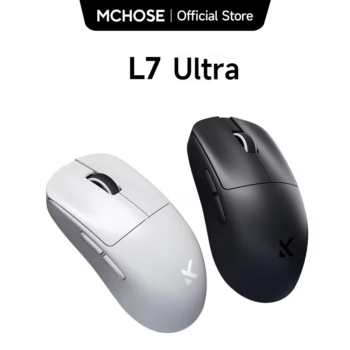

MCHOSE L7 Ultra Wireless Gaming Mouse Complete Buying Guide
Competitive PC gaming places enormous importance on speed, precision, consistency, and comfort. A gaming mouse may look like a relatively small part of a desktop setup, but it directly controls aiming, camera movement, target acquisition, menu navigation, and many of the rapid actions that determine how a game feels. The MCHOSE L7 Ultra Wireless Gaming Mouse is designed for players who want an extremely lightweight mouse combined with a modern high-performance sensor, high polling rates, tri-mode connectivity, optical switches, fast wireless technology, and smooth PTFE glides.
For U.S. shoppers searching for an ultralight wireless gaming mouse, 8K wireless gaming mouse, PAW3950 gaming mouse, 39g gaming mouse, competitive FPS gaming mouse, tri-mode gaming mouse, or MCHOSE L7 Ultra review, this model brings together many of the specifications commonly associated with modern enthusiast gaming peripherals.
The L7 Ultra sits within MCHOSE’s L7 family and is particularly notable for its compact lightweight body. Current official specifications place the L7 Ultra at approximately 39 grams, with dimensions of roughly 115.62 × 60.61 × 36.04 mm. It uses the PixArt PAW3950 optical sensor, supports sensitivity up to 42,000 DPI, offers up to an 8,000Hz polling rate in supported wired and 2.4GHz wireless operation, and uses MCHOSE TOPSPEED wireless technology with a Realtek chipset.
Those specifications make the mouse especially interesting for FPS players, esports-style gaming, fast-paced shooters, battle royale titles, tactical games, and anyone who prefers making rapid mouse movements with relatively little physical resistance.
This comprehensive guide explains the MCHOSE L7 Ultra’s sensor, 8K polling, lightweight design, shape, switches, battery, tri-mode connectivity, PTFE feet, M HUB software, gaming performance considerations, grip compatibility, setup, maintenance, and frequently asked questions. It also explains what specifications actually matter in real-world gaming so buyers can determine whether the L7 Ultra fits their individual setup rather than choosing a mouse based only on large marketing numbers.

What Is the MCHOSE L7 Ultra Wireless Gaming Mouse?
The MCHOSE L7 Ultra is a compact ultralight gaming mouse built for high-speed cursor control and competitive gaming. It belongs to the broader MCHOSE L7 lineup, which includes multiple performance and size variations.
The Ultra is positioned above the PAW3395-equipped L7 Pro by using the newer PAW3950 sensor and supporting up to 42,000 DPI. It retains the smaller L7 body rather than using the larger Ultra+ chassis.
This distinction is important. The standard L7 Ultra is designed primarily around a compact shape suitable for smaller hands and claw-oriented control, while the larger L7 Ultra+ is intended for users who want additional size and a broader range of grip options.
A Gaming Mouse Built Around Low Weight
The L7 Ultra’s approximately 39-gram weight is one of its defining characteristics. That places it well within the modern ultralight gaming-mouse category.
Removing unnecessary mass can make rapid direction changes feel easier, particularly for players who use relatively low in-game sensitivity and make wide arm movements across a mouse pad.
Low Weight Does Not Automatically Mean Better Aim
A lighter mouse can reduce the amount of force required to start and stop movement, but personal preference remains important. Some players prefer slightly heavier mice because they enjoy greater physical stability or simply have years of muscle memory with heavier hardware.
The L7 Ultra is best suited to users who specifically enjoy fast, lightweight mouse control rather than buyers who assume the smallest possible number is automatically superior.
MCHOSE L7 Ultra Key Specifications
| Specification | MCHOSE L7 Ultra |
|---|---|
| Sensor | PixArt PAW3950 |
| Maximum DPI | Up to 42,000 DPI |
| Maximum Tracking Speed | Up to 750 IPS |
| Maximum Acceleration | Up to 50G |
| Maximum Polling Rate | Up to 8,000Hz wired and 2.4GHz wireless |
| Approximate Weight | 39g ±2g |
| Dimensions | 115.62 × 60.61 × 36.04 mm |
| Connectivity | USB-C wired, 2.4GHz wireless, Bluetooth |
| Wireless Technology | MCHOSE TOPSPEED |
| Chipset | Realtek |
| Current Switch Positioning | Kailh Black Green Dot optical switches on current production |
| Switch Durability Positioning | Up to 150 million clicks on current Kailh-equipped version |
| Scroll Encoder | TTC Gold wheel encoder |
| Mouse Feet | Pure PTFE glides |
| Battery | 250mAh for current compact L7 Ultra specification |
| Software | MCHOSE M HUB web and application driver support |
| Primary Size Positioning | Compact / small-hand-oriented |
| Primary Grip Positioning | Claw grip |
MCHOSE has updated parts of the L7 family over time. Current official information lists upgraded Kailh Black Green Dot optical switches on newer production, while some older L7 Ultra units and retailer listings may reference Omron optical switches. Buyers who specifically care about the exact switch should verify the current product batch before ordering.
Why Production Revision Matters
Gaming peripheral manufacturers sometimes change components during a product’s life while keeping the same core model name. The overall mouse may remain functionally similar while switches, coatings, packaging, or minor internal components are revised.
Check the Current Product Variation
If a specific switch type matters to you, inspect the current product images, variation description, and packaging information rather than relying entirely on an older review.

Watch the MCHOSE L7 Ultra Gaming Mouse Video
A product video can help buyers evaluate the mouse shape, body proportions, button placement, coating appearance, scroll wheel, and overall movement better than specifications alone.
What to Examine in the Product Video
Pay attention to how compact the mouse appears relative to the user’s hand. Notice the central hump, narrow waist, side-button location, scroll-wheel placement, and how quickly the shell can be moved around the mouse pad.
Shape Matters More Than Specifications for Comfort
A top-tier sensor cannot compensate for a shape that does not fit your hand. Use the video and dimensions to decide whether the compact L7 Ultra body matches your preferred grip.
PixArt PAW3950 Sensor Explained
The PixArt PAW3950 is the major performance differentiator between the L7 Ultra and lower L7 configurations using the PAW3395.
MCHOSE lists the PAW3950-equipped L7 Ultra with sensitivity up to 42,000 DPI, tracking speeds up to 750 IPS, and acceleration up to 50G.
What Does 42,000 DPI Mean?
DPI, commonly used as a mouse sensitivity specification, describes how much cursor movement the mouse can generate relative to physical movement.
A maximum of 42,000 DPI demonstrates the sensor’s extremely broad configurable sensitivity range, but most gamers will never play at anything close to the maximum value.
Higher DPI Is Not Automatically Better
Competitive FPS players often use much lower sensitivity settings because lower effective sensitivity can make fine aiming easier. The value of a high-end sensor is less about using the maximum DPI and more about accurate tracking, consistency, customization range, and high-speed performance.
What Is 750 IPS Tracking?
IPS means inches per second. A mouse rated for up to 750 IPS is designed to continue tracking accurately even during extremely fast physical movement.
Why This Matters for Low-Sensitivity Players
Players using low sensitivity may perform rapid sweeping movements when turning 180 degrees or tracking an opponent moving across the screen.
A high tracking-speed ceiling provides substantial performance headroom for those movements.
Most Players Will Never Reach the Limit
The specification demonstrates sensor capability rather than a speed users are expected to achieve constantly. What matters is that fast swipes remain accurately tracked during normal gaming.
Understanding the 50G Acceleration Specification
Maximum acceleration refers to how quickly the mouse can change velocity while the sensor continues tracking reliably.
Gaming Acceleration Rating Is Not Mouse Acceleration Software
A 50G sensor specification should not be confused with operating-system pointer acceleration. The sensor’s acceleration rating describes its tracking capability under rapid physical movement.
It Provides Additional Tracking Headroom
Combined with high IPS capability, it helps ensure that sudden flicks do not exceed the sensor’s designed operating range during realistic gaming.
Why the 39g Weight Matters for FPS Gaming
Weight has become one of the most competitive areas in gaming-mouse design. Older gaming mice commonly exceeded 90 or even 100 grams, while modern enthusiast models can weigh less than half as much.
Faster Start and Stop Movements
A lightweight mouse requires relatively little force to begin moving. This can make rapid flicks and corrections feel extremely responsive.
Lower Perceived Fatigue
Players who make thousands of repeated movements during long sessions may prefer the reduced mass of an ultralight mouse.
Mouse Pad and Sensitivity Still Matter
A 39g mouse on a fast glass pad will feel dramatically different from the same mouse on a slow control-oriented cloth pad. Weight should be considered as part of the entire aiming setup.

What Does an 8K Polling Rate Do?
The MCHOSE L7 Ultra supports polling rates up to 8,000Hz in supported wired and 2.4GHz wireless operation.
Polling rate describes how frequently the mouse reports its position to the computer.
1000Hz vs 8000Hz
A traditional 1000Hz gaming mouse can report to the computer up to approximately 1,000 times per second. An 8K mouse can theoretically report at a much higher frequency.
This can reduce the time between movement updates and create finer cursor motion, particularly when used with high-refresh-rate displays and powerful gaming systems.
8K Polling Is Not Necessary for Everyone
The difference becomes more relevant in high-performance competitive environments than in ordinary desktop browsing. A 144Hz monitor and casual game library may not benefit in the same way as a 360Hz or 500Hz competitive setup.
Can 8K Polling Affect PC Performance?
Higher polling rates send more frequent input updates to the operating system. That requires additional CPU processing compared with lower polling rates.
Modern Gaming PCs Usually Handle It Better
Players with relatively powerful processors are more likely to use high polling rates without performance concerns.
Older PCs May Benefit From Lower Settings
If a game experiences unusual frame-time behavior or CPU limitations, reducing polling from 8000Hz to 4000Hz, 2000Hz, or 1000Hz can be worth testing.
Use the Highest Setting That Makes Sense for Your System
Maximum specifications are optional tools rather than mandatory settings. A stable 2000Hz or 4000Hz experience can be preferable to forcing 8000Hz on a system that does not benefit from it.
Wireless 8K Makes the L7 Ultra More Flexible
High polling rates were once primarily associated with wired gaming mice, but modern wireless technology has narrowed the performance gap substantially.
The L7 Ultra uses MCHOSE TOPSPEED wireless technology and a Realtek chipset for its gaming-oriented 2.4GHz connection.
2.4GHz Is the Primary Gaming Mode
For competitive play, the dedicated 2.4GHz receiver is generally the connection mode designed around the mouse’s low-latency high-polling performance.
Place the Receiver Appropriately
For the best wireless environment, keep the receiver reasonably close to the mouse and avoid unnecessary interference from dense wireless-device clusters when possible.
Tri-Mode Connectivity Adds Everyday Convenience
The MCHOSE L7 Ultra supports three connection approaches: wired USB-C operation, 2.4GHz wireless, and Bluetooth.
USB-C Wired Mode
Wired mode can be useful while charging, troubleshooting wireless connectivity, or when users simply prefer a cable connection.
2.4GHz Wireless Mode
This is the performance-oriented wireless mode for gaming and high polling rates.
Bluetooth Mode
Bluetooth is useful for laptops, tablets, office devices, or systems where maximum gaming polling performance is not required.
One Mouse Can Serve Multiple Roles
Tri-mode connectivity means the same L7 Ultra can function as a competitive desktop gaming mouse and a portable everyday mouse.
How to Connect the L7 Ultra in Wired Mode
Connect the USB-C end of the supplied cable to the mouse and the USB end to the computer. The mouse should be detected automatically on a compatible system.
Wired Mode Also Simplifies Charging
You can continue using the mouse while it is physically connected, reducing downtime if the battery becomes low during a gaming session.
Use a Flexible Cable Position
When gaming wired, route the cable so it does not drag heavily across the desk or catch against other objects.
How to Use 2.4GHz Wireless Mode
Connect the included wireless receiver, switch the mouse into its 2.4GHz operating mode, and allow the factory pairing to establish communication.
Manual Pairing Is Available if Needed
MCHOSE’s current user guide provides a manual pairing process if the mouse and receiver lose their connection.
Keep the Receiver Safe
A small receiver can be easy to misplace. When transporting the mouse, store accessories carefully with the mouse or in a dedicated electronics pouch.
How to Connect the MCHOSE L7 Ultra Through Bluetooth
Switch the mouse to Bluetooth mode, open Bluetooth settings on the computer or compatible device, and select the MCHOSE L7 when it appears in the available-device list.
Bluetooth Is Useful for Productivity
It can free a USB port and make the mouse convenient for laptops or other devices.
Use 2.4GHz for Serious Competitive Gaming
Bluetooth prioritizes general wireless convenience rather than the maximum polling-rate performance available from the gaming receiver.

Compact Shape and Grip Style
The L7 Ultra’s dimensions are approximately 115.62 mm long, 60.61 mm wide, and 36.04 mm high according to current MCHOSE documentation.
That places it in the compact gaming-mouse category.
Designed Primarily for Smaller Hands
MCHOSE positions the compact L7 Pro and L7 Ultra body for smaller hands, with claw grip as the primary recommended grip style.
Why Claw Grip Works Well With Compact Mice
Claw grip typically places part of the palm against the rear of the mouse while the fingers arch toward the buttons. Compact shapes can allow rapid repositioning while providing enough rear support for control.
Hand Size Is Personal
A player with medium hands may still love a compact mouse, especially when using fingertip-like control, while another player with identical hand measurements may find it too small. Shape preference is highly individual.
L7 Ultra vs L7 Ultra+ Size
MCHOSE offers the Ultra+ for players who want a larger version of the high-performance L7 platform.
| Feature | L7 Ultra | L7 Ultra+ |
|---|---|---|
| Size Category | Compact | Medium / larger |
| Dimensions | 115.62 × 60.61 × 36.04 mm | 119.6 × 62.9 × 38.1 mm |
| Approx. Weight | 39g ±2g | 48g ±2g |
| Battery | 250mAh | 500mAh |
| Sensor | PAW3950 | PAW3950 |
| Maximum DPI | 42,000 | 42,000 |
| Grip Positioning | Primarily claw | Claw, fingertip, palm depending on hand size |
Choose the Standard Ultra for Minimum Weight
The standard L7 Ultra is particularly attractive for users who want the lightest compact configuration.
Choose Ultra+ for More Hand Support
Players with medium-to-large hands may prefer the additional dimensions and battery capacity of the Ultra+, even though it adds some weight.
Current Kailh Optical Switches Explained
MCHOSE currently lists upgraded Kailh Black Green Dot optical switches on new L7 series production, with durability positioning up to 150 million clicks.
Why Optical Switches Are Used in Gaming Mice
Optical designs detect actuation differently from conventional mechanical electrical contacts and are commonly used in modern performance mice for responsiveness and resistance to certain contact-wear issues.
Older Units May Use Omron Optical Switches
The L7 family has existed in multiple production revisions. Older reviews and retailer inventory may show Omron optical switches rated differently from the current Kailh-equipped production.
Neither Switch Name Determines the Entire Mouse Experience
Click feel is influenced by shell design, button tensioning, switch installation, and personal preference in addition to the internal switch model.
TTC Gold Scroll Wheel Encoder
The scroll wheel uses a TTC Gold encoder according to MCHOSE specifications.
Why the Encoder Matters
The encoder controls rotational steps and contributes to how clearly the wheel feels while scrolling.
Gaming Uses Extend Beyond Web Browsing
Many players bind weapon switching, jumping, inventory actions, or other commands to the wheel.
Scroll Preference Is Personal
Some users like very defined steps, while others prefer a smoother wheel. The TTC Gold encoder is part of the L7 Ultra’s enthusiast-oriented component selection.
Pure PTFE Mouse Feet and Glide Performance
MCHOSE equips the L7 Ultra with pure PTFE glides.
Why PTFE Is Common in Gaming Mice
PTFE provides a low-friction surface that lets the mouse move smoothly across compatible pads.
Mouse Pad Choice Changes the Experience
On a fast pad, the lightweight L7 Ultra can feel extremely quick. On a control pad, the surface provides more stopping resistance.
Keep the Feet Clean
Dust and debris around skate edges can change glide consistency. Periodically clean the bottom of the mouse using a dry or appropriately gentle method.

High-Performance Surface Coating
MCHOSE describes the L7 series as using a premium glass-like or UV-treated surface coating designed around grip comfort, visual finish, and resistance to everyday fingerprints and oil marks.
Coating Influences Grip More Than Many Buyers Expect
Two mice with nearly identical shapes can feel completely different if one has a slippery glossy surface and another uses a more secure texture.
Grip Tape Is Included With Current Official Packaging
The current MCHOSE package specification includes anti-slip stickers, giving players another option if they want additional traction around the mouse buttons or sides.
What Comes in the MCHOSE L7 Ultra Package?
Current MCHOSE package information lists the mouse setup with an 8K receiver, charging/data paracord cable, user manual, and anti-slip sticker set.
Package details can change between production batches or sellers, so buyers should compare the actual listing before purchase.
The 8K Receiver Is Important
High wireless polling depends on the performance receiver rather than a generic Bluetooth connection.
Keep Original Accessories Together
Storing the receiver, cable, and documentation together can make troubleshooting or future resale easier.
250mAh Battery in the Compact L7 Ultra
Current official specifications list a 250mAh battery for the compact L7 Ultra and a larger 500mAh battery for the Ultra+.
Why the Smaller Mouse Uses a Smaller Battery
Battery capacity contributes to weight. Keeping the compact model around 39 grams requires careful weight management across the shell, electronics, battery, and internal structure.
Polling Rate Influences Battery Consumption
Higher wireless polling rates generally require more frequent communication and can use more energy than lower polling settings. Users prioritizing longer time between charges may choose a lower polling rate when maximum performance is unnecessary.
M HUB Software and Web Driver Support
MCHOSE supports the L7 series through its M HUB software ecosystem, including web-based and application driver options.
DPI Customization
Players can configure sensitivity according to their preferred gaming and desktop settings rather than relying on an extremely high factory maximum.
Polling Rate Configuration
Users can select an appropriate polling level based on monitor refresh rate, PC performance, battery priorities, and gaming preferences.
Button Configuration
Software can provide control over supported button functions and other mouse settings.
Use Stable Settings Before Competitive Play
After experimenting with settings, save a configuration and practice with it rather than constantly changing DPI and sensitivity. Muscle memory benefits from consistency.
Best DPI Settings for the L7 Ultra
There is no universally correct gaming DPI.
800 DPI Remains Common
Many competitive players use relatively moderate values such as 800 DPI and adjust in-game sensitivity accordingly.
1600 DPI Can Also Work Well
Higher base DPI combined with lower in-game sensitivity can provide a similar overall effective sensitivity.
Do Not Choose 42,000 DPI Just Because It Is Available
The maximum specification demonstrates sensor capability. It is not a recommendation for everyday competitive gameplay.
Understanding Effective DPI
Mouse DPI works together with game sensitivity. Two players can use different DPI values while achieving nearly identical physical movement requirements.
Consistency Is More Important Than a Trend
If your existing sensitivity allows reliable aiming, switching simply because another player uses a different DPI may not improve performance.
Measure Your Movement
Competitive players often think in terms of how many centimeters of mouse movement are required to rotate the in-game camera through a full turn. This provides a more meaningful comparison than DPI alone.
Is the MCHOSE L7 Ultra Good for FPS Games?
The combination of low weight, high-performance tracking, high polling, compact claw-oriented shape, optical switches, and smooth PTFE feet makes the L7 Ultra particularly relevant to first-person shooters.
Valorant and Counter-Strike Style Games
Tactical shooters emphasize precise crosshair placement, micro-corrections, and fast flicks. The lightweight chassis can suit players who prefer low sensitivity and controlled arm movement.
Call of Duty and Apex-Style Games
Faster shooters require sustained tracking and repeated direction changes, both areas where lightweight wireless mice are popular.
Skill Still Matters More Than Hardware
A gaming mouse can improve comfort and reduce technical limitations, but it cannot replace aim training, positioning, decision making, and game knowledge.
Is the L7 Ultra Good for Battle Royale Gaming?
Battle royale games combine long-range accuracy, rapid close-range movement, inventory interaction, and extended sessions.
Low Weight Supports Repeated Movement
The 39g design can be attractive to players who make frequent broad mouse movements during long matches.
Side Buttons Can Support Common Actions
Depending on the game and software mapping, side buttons can be used for abilities, communication, melee, equipment, or other frequently accessed commands.
Is the L7 Ultra Good for MOBA Games?
MOBA players may not require the same extreme tracking specifications as FPS players, but low-latency clicking and comfortable movement remain valuable.
Switch Durability Can Matter
Games involving constant rapid clicking place significant use on primary mouse buttons.
Shape Remains the Main Comfort Factor
Long sessions make hand fit especially important, so larger-handed MOBA players may prefer comparing the standard Ultra with the Ultra+.
Can the L7 Ultra Be Used for Work and Productivity?
Yes. High-end gaming hardware functions perfectly well for normal desktop work.
Bluetooth Makes Laptop Use Convenient
Users can reserve the 2.4GHz receiver for a gaming desktop while pairing Bluetooth with another compatible device.
Low Weight Helps With Portable Use
The compact mouse adds relatively little weight to a laptop bag.
Extremely High Polling Is Unnecessary for Office Work
There is little reason to run 8000Hz while editing documents or checking email. Lower settings can make more sense for ordinary productivity.

MCHOSE L7 Ultra for Gaming Laptops
The mouse is particularly convenient for laptop gamers because users can choose between 2.4GHz performance mode and Bluetooth portability.
Use the Receiver for Gaming
Connect the dedicated receiver when low-latency wireless performance is the priority.
Use Bluetooth When USB Ports Are Limited
Modern thin laptops may offer relatively few USB ports, making Bluetooth useful during ordinary travel or office use.
Carry the Cable for Backup
The ability to switch to wired operation means a depleted battery does not necessarily end a gaming session if a suitable cable and port are available.
How to Build a Competitive Setup Around the L7 Ultra
A high-performance mouse works best when the rest of the setup supports precise movement.
Choose an Appropriate Mouse Pad
Control-oriented cloth pads provide more stopping resistance, while faster surfaces emphasize glide.
Use a Stable Desk
A moving or uneven desk can undermine the advantages of precise hardware.
Set a Comfortable Monitor Position
Good posture and visual positioning matter during extended gaming sessions.
Create Enough Mouse Space
Low-sensitivity players need enough desk area to perform broad movements without hitting a keyboard, monitor stand, or other object.
How to Clean the MCHOSE L7 Ultra
Routine maintenance can help keep the mouse coating, feet, buttons, and sensor area clean.
Disconnect or Power Off Before Cleaning
Avoid accidental clicks or electrical issues while cleaning.
Use a Soft Dry Cloth
Remove ordinary surface dust and fingerprints gently.
Check the Sensor Opening
Dust or hair near the sensor area can occasionally interfere with tracking.
Avoid Saturating the Mouse With Liquid
The mouse is an electronic device. Do not spray cleaner directly into buttons, seams, charging ports, or the scroll wheel.
How to Maintain PTFE Feet
Keep the Mouse Pad Clean
Dust and debris on the pad can accumulate around the edges of the skates.
Do Not Scrape the Feet With Sharp Objects
Damage to the glide surface can create inconsistent movement.
Replace Worn Skates When Necessary
Players who use a mouse heavily may eventually replace feet after significant wear, depending on replacement-part availability.
Potential Advantages of the MCHOSE L7 Ultra
- Approximately 39g ultralight compact construction
- PixArt PAW3950 optical sensor
- Up to 42,000 DPI adjustment range
- Up to 750 IPS tracking speed
- Up to 50G acceleration capability
- Up to 8K polling in supported wired and 2.4GHz wireless operation
- Tri-mode wired, 2.4GHz, and Bluetooth connectivity
- MCHOSE TOPSPEED wireless technology
- Realtek chipset
- Current Kailh Black Green Dot optical switch positioning
- TTC Gold scroll-wheel encoder
- Pure PTFE glides
- Compact claw-grip-oriented shape
- M HUB web and application driver support
- 250mAh battery in the compact current L7 Ultra specification
- 8K receiver included in current official package specification
- Anti-slip stickers included in current official package specification
- Suitable for competitive FPS-style gaming
- Bluetooth adds productivity and laptop convenience
Important Considerations Before Buying
The compact L7 Ultra is primarily designed for smaller hands and claw-oriented use, so large-hand palm-grip users should compare the L7 Ultra+ before ordering. High 8K polling can use more system resources and battery than lower polling rates. The 250mAh battery prioritizes low weight rather than maximum capacity. Current production can also differ from older review units in switch configuration, so confirm the seller’s current batch if switch type matters to you.
Who Gets the Most Value?
The strongest buyer is a competitive or enthusiast PC gamer who wants an exceptionally light compact wireless mouse and is willing to trade some battery capacity and physical size for lower weight and faster-feeling movement.
Frequently Asked Questions About the MCHOSE L7 Ultra
What sensor does the MCHOSE L7 Ultra use?
The current L7 Ultra specification uses the PixArt PAW3950 optical sensor.
What is the maximum DPI?
MCHOSE lists sensitivity up to 42,000 DPI for the PAW3950-equipped L7 Ultra.
How much does the L7 Ultra weigh?
Current official MCHOSE specifications position the compact L7 Ultra at approximately 39 grams with a tolerance of around ±2 grams.
Is the MCHOSE L7 Ultra wireless?
Yes. It supports 2.4GHz wireless and Bluetooth as well as USB-C wired operation.
Does the L7 Ultra support 8K polling?
Yes. MCHOSE lists support for up to 8,000Hz polling in supported wired and wireless gaming operation.
Do I have to use 8K polling?
No. Lower polling settings may be more appropriate for battery conservation, older PCs, or ordinary desktop use.
Is 8000Hz noticeably better than 1000Hz?
The difference can become more relevant on high-refresh-rate systems and in competitive gaming, but it is not equally noticeable for every player, monitor, game, or PC configuration.
Will 8K polling lower FPS?
Very high polling rates can increase CPU input-processing demands. On some systems or games, lowering polling can improve consistency if CPU limitations appear.
What tracking speed does the sensor support?
MCHOSE lists the L7 Ultra at up to 750 IPS.
What acceleration is supported?
The current official performance description lists up to 50G.
What switches does the current L7 Ultra use?
Current MCHOSE material lists upgraded Kailh Black Green Dot optical switches rated up to 150 million clicks. Older production or retailer inventory may use Omron optical switches, so verify the current batch if this detail is important.
What scroll-wheel encoder does it use?
The L7 series uses a TTC Gold wheel encoder.
What feet does the L7 Ultra use?
MCHOSE specifies pure PTFE glides.
What battery does the compact L7 Ultra use?
Current MCHOSE specifications list a 250mAh battery for the L7 Pro and compact L7 Ultra, while the larger Ultra+ uses a 500mAh battery.
Does the battery capacity affect weight?
Yes. Battery size is one of many factors influencing total mouse weight. The compact L7 Ultra emphasizes very low overall mass.
Can I use the mouse while charging?
Yes. The wired connection can be used for mouse operation as well as charging.
Does it have Bluetooth?
Yes. Bluetooth is one of its three connection modes.
Should I game through Bluetooth?
For competitive gaming, use the dedicated 2.4GHz receiver rather than Bluetooth when you want the mouse’s high-performance wireless features.
Is the L7 Ultra good for Valorant?
Its low weight, PAW3950 sensor, high polling capability, optical switches, and compact claw-oriented shape make it relevant for tactical FPS players, provided the shape fits the user’s hand.
Is it good for Counter-Strike?
Yes, particularly for players who prefer ultralight mice and lower in-game sensitivity. Personal shape preference remains important.
Is it suitable for Fortnite?
It can work well for fast movement and aiming in Fortnite, although button-count preferences vary between players.
Is it good for Apex Legends?
The lightweight body and high tracking capabilities can suit continuous tracking and rapid movement in fast shooters such as Apex Legends.
Is it good for office work?
Yes. Bluetooth, wireless, and wired operation also make it suitable for normal desktop productivity.
Is it good for travel?
The roughly 39g compact design makes it relatively easy to carry, although users should store the small wireless receiver carefully.
What hand size is the L7 Ultra designed for?
MCHOSE positions the compact L7 Pro and L7 Ultra primarily for smaller hands.
What grip works best?
The compact L7 Ultra is primarily positioned for claw grip. Individual fingertip or hybrid use may depend on hand size and preference.
Is the L7 Ultra good for palm grip?
Large-hand palm users may find the compact body too small. The larger L7 Ultra+ is more appropriate for buyers seeking additional palm support.
What are the L7 Ultra dimensions?
Current MCHOSE documentation lists approximately 115.62 × 60.61 × 36.04 mm for the compact L7 Ultra body.
What software does it use?
MCHOSE supports the L7 series through its M HUB environment with web-driver and application-driver options.
Can I change DPI?
Yes. DPI can be adjusted, and the mouse also provides rapid sensitivity control according to the current product feature set.
Can I change the polling rate?
Yes. Polling can be configured so users are not required to operate at the maximum 8K setting continuously.
Does the L7 Ultra have RGB lighting?
Lighting is not the primary design focus of this ultralight model. Buyers seeking elaborate RGB effects should review the exact current product images and specifications rather than assuming lighting features.
What is the difference between the L7 Ultra and L7 Ultra+?
The Ultra+ uses a larger chassis for medium-to-large hands, weighs more, and currently uses a larger 500mAh battery. Both are positioned around PAW3950 performance.
Does the mouse come with an 8K receiver?
Current official package information lists an 8K receiver.
Does it include a charging cable?
Current MCHOSE package specifications include a charging/data paracord cable.
Are grip stickers included?
The current official package specification lists anti-slip stickers.
Is the L7 Ultra worth considering for competitive gaming?
For users who prefer compact ultralight mice, its combination of PAW3950 tracking, high polling, low weight, optical switching, and PTFE feet makes it a strong specification package. Shape compatibility should still be the first priority.

Why the MCHOSE L7 Ultra Stands Out
The MCHOSE L7 Ultra Wireless Gaming Mouse combines several characteristics that enthusiast players frequently seek in one compact design.
The Weight Is Exceptionally Low
At approximately 39 grams, the mouse prioritizes low physical resistance and rapid movement.
The PAW3950 Provides High-End Sensor Headroom
Up to 42,000 DPI, 750 IPS tracking, and 50G acceleration place the sensor specification well beyond what normal gaming movement requires.
8K Wireless Polling Targets Competitive Setups
Players using high-refresh-rate displays can experiment with higher input-reporting frequencies without returning to a permanent cable connection.
Tri-Mode Connectivity Expands Its Use
The mouse can move from a dedicated gaming desktop to a Bluetooth laptop or wired setup without requiring a separate everyday mouse.
The Main Question Is Whether the Shape Fits Your Hand
Performance specifications are excellent on paper, but mouse shape remains extremely personal. The compact L7 Ultra should be selected because its size and claw-oriented ergonomics suit the user—not simply because it has a PAW3950 sensor.
How to Decide if the L7 Ultra Is Right for You
Choose It if You Love Ultralight Mice
The roughly 39g construction is clearly aimed at players who prefer extremely low mouse weight.
Choose It if You Have Smaller Hands
The compact dimensions can provide excellent control for players who find larger ergonomic mice cumbersome.
Choose It if You Prefer Claw Grip
The shape and size are specifically positioned around claw-oriented gaming.
Choose It if You Want High Polling Wireless
The ability to operate at up to 8K through its performance wireless mode is one of its headline gaming features.
Choose It if You Want One Mouse for Several Devices
Tri-mode connectivity provides useful versatility beyond a dedicated gaming PC.
Consider the Ultra+ if Your Hands Are Larger
The larger model preserves the high-end sensor family while providing more physical size and a larger battery.
Shop the MCHOSE L7 Ultra Wireless Gaming Mouse
If you are looking for an ultralight wireless gaming mouse with competitive-oriented hardware, the MCHOSE L7 Ultra deserves consideration. Its combination of approximately 39g weight, PixArt PAW3950 sensor, up to 42,000 DPI, 8K polling support, TOPSPEED wireless technology, optical switching, TTC Gold encoder, PTFE glides, and tri-mode connectivity creates a strong technical package.
Before ordering, compare the dimensions with your current favorite mouse and consider your hand size and grip style. Also review the current product variation to confirm the exact switch revision, color, package contents, and seller specifications.
Check Current MCHOSE L7 Ultra Gaming Mouse Details
Final Thoughts on the MCHOSE L7 Ultra Gaming Mouse
The MCHOSE L7 Ultra Wireless Gaming Mouse represents the modern competitive-gaming approach to mouse design: reduce weight aggressively, preserve a solid shell, use a high-end optical sensor, support fast wireless communication, and give players enough software control to configure the device around their own system.
For U.S. shoppers searching for a 39g wireless gaming mouse, PAW3950 mouse, 8K gaming mouse, lightweight FPS mouse, wireless esports mouse, small gaming mouse for claw grip, or MCHOSE gaming mouse, the L7 Ultra checks many of the technical boxes associated with current enthusiast products.
Its approximately 39-gram weight will likely be the first thing many users notice. Moving from a conventional 80-gram or 100-gram mouse to something this light can make the desktop experience feel dramatically different.
Rapid flicks require less effort, lifting and repositioning feel easier, and broad movements across a low-sensitivity mouse pad can feel extremely responsive.
The PAW3950 sensor provides substantial technical headroom. Few players need anything close to 42,000 DPI, but the specification reflects the advanced sensor platform used inside the mouse.
The more meaningful benefits are reliable tracking during rapid movement, broad sensitivity customization, and compatibility with high-performance polling configurations.
The 8K capability is another enthusiast-oriented feature. It gives players with very fast monitors and capable gaming PCs the option to increase mouse-reporting frequency substantially above the traditional 1000Hz standard.
At the same time, buyers should remember that maximum polling is not automatically the best setting for every computer. Higher polling can place additional load on the CPU, and the real-world benefit varies according to game engine, system performance, refresh rate, frame rate, and individual sensitivity to input changes.
Fortunately, purchasing an 8K mouse does not mean you have to use 8K continuously. Players can choose a lower setting when they want longer wireless runtime, reduced system load, or simply do not notice a meaningful difference at the maximum rate.
Tri-mode connectivity increases the mouse’s usefulness beyond competitive games. The dedicated 2.4GHz connection handles performance-oriented wireless use, Bluetooth provides convenient connectivity for everyday devices, and USB-C wired operation offers a dependable backup while charging.
This makes the L7 Ultra potentially useful for someone who games on a desktop but also carries a laptop. Instead of packing two mice, the same compact device can perform both roles.
The current switch configuration also reflects ongoing development of the product family. MCHOSE’s latest materials list upgraded Kailh Black Green Dot optical switches rated for up to 150 million clicks, whereas older units and reviews may reference Omron optical switches.
This does not necessarily mean older units are inferior. It simply means buyers should understand which production version they are ordering if switch type matters to them.
The TTC Gold scroll-wheel encoder and pure PTFE feet complete the enthusiast-oriented component package. Smooth skates are particularly important on a mouse this light because the relationship between weight, mouse-pad friction, and stopping control strongly influences the overall feel.
Players who love extremely fast motion can combine the L7 Ultra with a faster pad. Players who want more control can use a slower cloth surface to balance the low mouse mass.
Battery capacity represents one of the clearest tradeoffs. The compact L7 Ultra currently uses a smaller 250mAh battery, while the larger Ultra+ has more capacity. This makes sense in the context of a mouse trying to stay around 39 grams.
Buyers who prioritize maximum time between charges over minimum weight may prefer the larger model or another mouse with a bigger battery. Competitive players who care more about reducing weight may consider the smaller battery an acceptable compromise.
The shape deserves equal attention. At approximately 115.62 × 60.61 × 36.04 mm, this is a compact gaming mouse. MCHOSE itself positions it toward smaller hands and claw grip.
Large-hand players should not purchase it purely because of the sensor specification. A high-end sensor inside an uncomfortable shape is less useful than a slightly heavier mouse that fits the hand properly.
The Ultra+ exists specifically for users who like the L7 platform but want more physical size and palm support.
For smaller-hand claw users, however, the compact body can be one of the L7 Ultra’s strongest advantages. The high hump and narrow waist are designed to give the fingers and rear palm area useful control while maintaining the agility expected from a lightweight esports-style mouse.
Software support through M HUB also lets buyers make the hardware their own. DPI and polling-rate adjustments allow the mouse to be tuned for both competitive games and ordinary desktop work.
The best approach after purchasing is to experiment initially and then stop changing settings constantly. Find a DPI and in-game sensitivity that feel comfortable, choose a stable polling rate, and spend time building consistent muscle memory.
A gaming mouse is a tool. The sensor, polling rate, switches, and weight can remove technical barriers, but they cannot substitute for practice.
Players improve by learning maps, positioning, recoil, movement, crosshair placement, timing, and decision making. High-performance hardware supports that process by giving the player a consistent physical interface.
This is ultimately where the MCHOSE L7 Ultra makes the most sense. It provides a compact, very lightweight platform with enough performance headroom that most users are unlikely to outgrow its sensor or polling capabilities.
If you prefer ultralight mice, have small-to-medium hands, use claw-oriented control, enjoy competitive shooters, and want the convenience of wired, 2.4GHz, and Bluetooth connections, the L7 Ultra can be an appealing addition to a modern gaming setup.
Before checkout, compare its dimensions with your current mouse, verify the current switch and color variation, and decide whether the compact 250mAh model or larger Ultra+ better matches your priorities.
If the smaller shape fits your hand, the MCHOSE L7 Ultra offers a compelling combination of low weight, high-end tracking, high polling capability, smooth movement, and flexible wireless connectivity for modern PC gaming.