
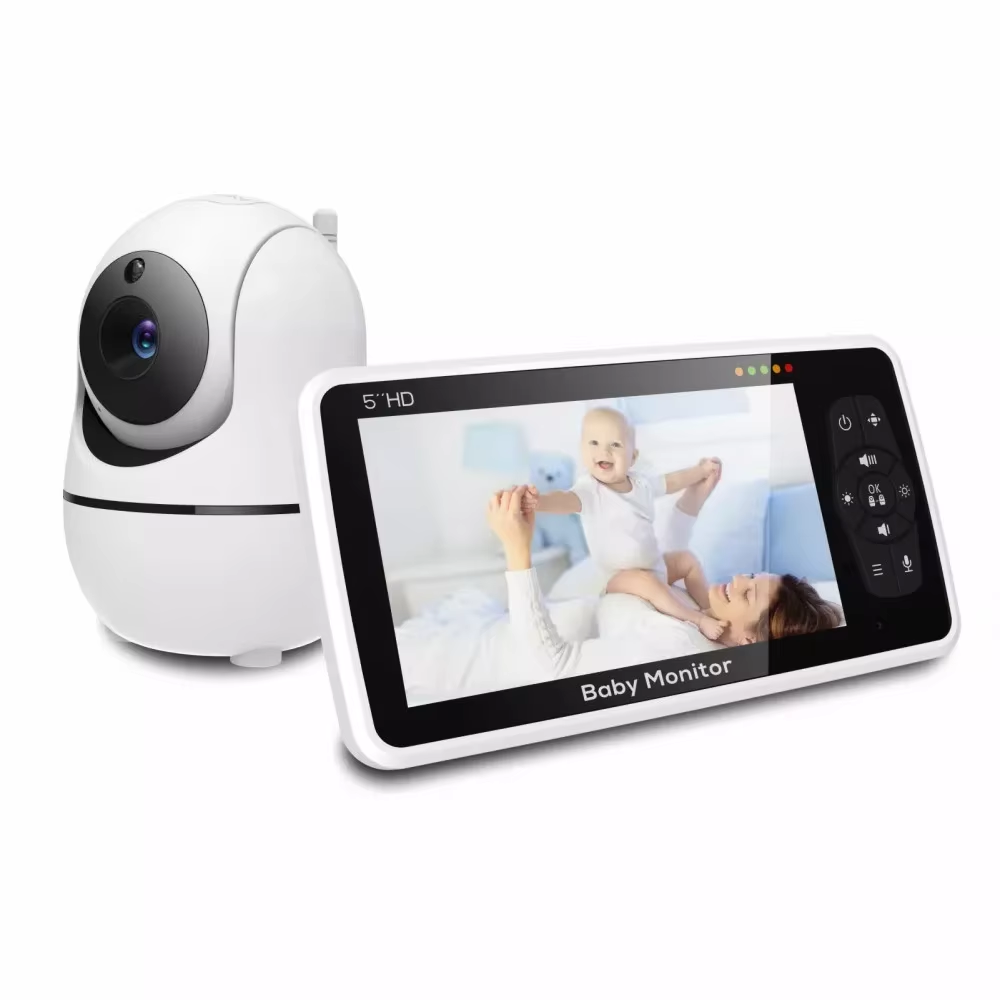
The 5 Inch Video Baby Monitor with 4X Zoom and 22-Hour Battery is a dedicated wireless monitoring system designed for parents and caregivers who want to see and hear a baby without depending on a smartphone app or home Wi-Fi network. The system combines a 5-inch 720P color monitor, remote pan-and-tilt camera, 2X and 4X digital zoom, automatic night vision, two-way audio, room-temperature monitoring, sound alerts, built-in lullabies, feeding reminders, and a rechargeable 4000mAh parent-unit battery.
View 5 Inch Video Baby Monitor Product Details
For U.S. shoppers searching for a 5 inch baby monitor, video baby monitor without WiFi, baby monitor with camera and audio, 4X zoom baby monitor, long battery baby monitor, or a dedicated nursery monitor with night vision and two-way talk, this system provides a practical alternative to app-based cameras that require cloud accounts or internet connectivity.
The verified product configuration uses a 5-inch 1280 × 720 color parent display and a 720P camera. The camera can pan approximately 355 degrees and tilt approximately 120 degrees, while 2X and 4X digital zoom allow parents to take a closer look at the crib, sleeping area, or other part of the nursery.
Communication between the camera and parent monitor uses 2.4GHz FHSS wireless technology. That means the system is designed to communicate directly between its own camera and screen instead of depending on a home Wi-Fi router for normal monitoring.
The rechargeable parent monitor contains a 4000mAh battery. Current matching specifications list approximately eight hours of operation with the screen continuously on and up to 22 hours in the default sleep or power-saving mode. The stated maximum wireless range is up to 1000 feet under favorable open conditions.
Additional functions include automatic night vision, sound alerts, a room-temperature sensor, two-way audio, eight built-in lullabies, an alarm or feeding-time reminder, volume and screen-brightness controls, and wall-mount support for the camera.
This complete guide explains each feature in practical terms, how the monitor can fit into a U.S. nursery, how FHSS differs from Wi-Fi monitoring, how to use night vision and two-way talk, how battery-saving mode works, where to position the camera safely, and what parents should check before ordering.

What Is the 5 Inch Video Baby Monitor?
This product is a two-part baby-monitoring system consisting of a nursery camera and a portable parent monitor with its own color display.
Dedicated Parent Monitor
Instead of opening a phone application each time you want to check the nursery, the system provides a separate 5-inch display designed specifically for monitoring.
Wireless Nursery Camera
The camera communicates with the parent monitor over a 2.4GHz FHSS wireless connection.
Camera and Audio Monitoring
Parents can watch the video feed while also hearing sounds from the nursery.
No Smartphone Is Required for Normal Monitoring
Because the parent unit has its own screen and controls, the system can operate as a dedicated baby monitor without requiring a phone to remain connected.
5-Inch 720P Color Display
The parent monitor uses a 5-inch color LCD with a verified resolution of 1280 × 720 pixels.
Larger Than Compact 2.4- or 3.5-Inch Monitors
A 5-inch screen provides more viewing area for checking sleeping position, crib surroundings, and general nursery activity.
720P Resolution
The display provides enough detail for normal nursery monitoring without requiring a high-bandwidth internet video stream.
Portable Parent Unit
The screen can move around the house with the caregiver instead of remaining permanently mounted in one location.
Screen Size Can Matter at Night
A larger display can make it easier to check the child quickly without bringing the parent unit very close to the face.
720P Baby-Monitor Camera
The matching system is documented with an HD 720P nursery camera.
Designed for Real-Time Monitoring
The camera sends live nursery video directly to the parent display.
Suitable for Crib and Room Viewing
When positioned correctly, the camera can show both the sleeping area and surrounding nursery space.
Works With Digital Zoom
The 720P image can be enlarged using the monitor’s 2X or 4X zoom function.
Positioning Matters as Much as Resolution
A high-quality camera still provides a poor view if it is blocked by furniture or aimed from an unsuitable angle.

355-Degree Remote Pan Control
The nursery camera supports approximately 355 degrees of horizontal pan movement.
View Different Areas of the Nursery
Parents can reposition the camera remotely instead of entering the room and physically moving it.
Useful as the Child Becomes More Mobile
A wider viewing range becomes particularly helpful when the monitored child begins spending time outside the crib.
Useful for Larger Rooms
The camera can look toward different sides of the room from one mounting location.
355 Degrees Is Nearly a Full Rotation
The camera does not need to rotate continuously through multiple full circles to provide extensive room coverage.
120-Degree Tilt Control
Vertical movement is specified at approximately 120 degrees.
Look Down Toward the Crib
The camera can be mounted above or beside the sleeping area and tilted downward.
Adjust for Changing Furniture Layouts
The viewing angle can be changed if the crib or play area is relocated.
Improve Wall-Mounted Viewing
Tilt control is especially useful when the included mounting option positions the camera above the area being monitored.
Pan and Tilt Work Together
Horizontal and vertical control give the caregiver more flexibility than a fixed-position camera.
2X and 4X Digital Zoom
The verified product specification lists both 2X and 4X zoom.
2X Zoom for a Moderate Close-Up
This can be useful when you want a closer view without enlarging the image as much as possible.
4X Zoom for Greater Magnification
The higher zoom setting can help caregivers inspect a smaller area of the live image.
Useful During Sleep Monitoring
Parents may want a closer look at the crib without physically entering the nursery.
Digital Zoom Does Not Add New Camera Detail
Digital zoom enlarges the existing video image, so image sharpness naturally decreases as magnification increases.
Why Remote Pan, Tilt, and Zoom Are Useful
A fixed camera works well only when the child stays in one predictable part of the frame.
Babies Change Sleeping Position
Remote controls allow the caregiver to adjust the view without entering the room.
Toddlers Move Around the Room
A nearly 360-degree pan range provides more flexibility as nursery use changes.
Furniture Changes Over Time
The same camera can often continue to work after the crib is repositioned.
Remote Viewing Reduces Unnecessary Nursery Visits
If the video confirms that everything looks normal, a caregiver may not need to open the door and risk waking a sleeping child.

2.4GHz FHSS Wireless Technology
The camera and monitor communicate using 2.4GHz FHSS technology.
What Does FHSS Mean?
FHSS stands for Frequency-Hopping Spread Spectrum. The wireless signal changes frequencies according to a predetermined pattern rather than remaining permanently on one narrow channel.
Direct Camera-to-Monitor Communication
The system is designed to communicate between its dedicated components rather than routing video through a cloud server for ordinary use.
No Home Internet Required for Normal Monitoring
This can be attractive to parents who prefer a self-contained nursery monitoring system.
Wireless Does Not Mean Wi-Fi
The monitor uses wireless radio communication, but that is different from connecting the camera to a home Wi-Fi network and smartphone application.
Why Some Parents Prefer a Baby Monitor Without Wi-Fi
Wi-Fi and non-Wi-Fi baby monitors serve different needs.
No App Setup
A dedicated monitor can avoid app installation, account registration, and smartphone notification settings.
No Dependence on Internet Service
The local camera-to-monitor connection does not normally depend on an active broadband connection.
Dedicated Screen Remains Available
Parents do not have to stop another phone activity every time they want to view the nursery.
Remote Viewing Outside the Home Is Different
A dedicated FHSS monitor is generally intended for local monitoring within its wireless range rather than internet viewing from another city or workplace.
Up to 1000-Foot Stated Wireless Range
The product is advertised with a maximum range of approximately 1000 feet.
This Is a Maximum Stated Figure
Wireless distance is usually greatest under open or favorable conditions.
Walls Can Reduce Range
Concrete, metal, insulation, appliances, and multiple floors can weaken a wireless signal.
Home Layout Matters
A large open-plan house may provide a different experience from a concrete apartment building.
Do Not Interpret 1000 Feet as Guaranteed Indoor Range
The practical distance inside a real home can be shorter because of walls and interference.
Long-Range Monitoring Around the Home
The stated range is intended to let parents move around different areas while remaining connected to the nursery.
Kitchen Use
A caregiver can prepare meals while keeping the monitor nearby.
Living Room Use
The dedicated display can remain within view while relaxing or completing other activities.
Home Office Use
Parents working remotely can keep the monitor on the desk without using a phone screen.
Check the Signal When Moving Between Floors
Test the system in the actual locations where you expect to use it before relying on the maximum advertised range.
4000mAh Rechargeable Parent Monitor Battery
The portable display contains a rechargeable 4000mAh battery.
Designed for Cord-Free Monitoring
The parent unit can move through the house without remaining continuously connected to a wall outlet.
Useful During Evening Routines
Parents can carry the screen between the kitchen, living room, bedroom, and home office.
Battery Capacity Supports Longer Sessions
The 4000mAh capacity is one of the major features distinguishing this monitor from some smaller-screen systems.
Actual Runtime Depends on How the Monitor Is Used
Screen brightness, audio activity, power-saving mode, battery age, and other settings can influence operating time.

About 8 Hours With the Display On
The verified specification lists approximately eight hours of battery operation when the display remains continuously active.
Continuous Video Uses More Power
The LCD is one of the more energy-intensive components in the parent unit.
Useful for Active Daytime Monitoring
Eight hours can cover a substantial portion of normal household use before recharging, depending on settings and battery condition.
Charging Overnight May Be Convenient
Parents can develop a routine of charging the monitor when it is not needed for portable use.
Battery Runtime Is an Approximate Specification
Real-world performance naturally varies with screen brightness, volume, battery age, temperature, and frequency of control use.
Up to 22 Hours in Default Sleep Mode
The product title highlights a 22-hour battery figure. This refers to operation in the default sleep or power-saving mode rather than keeping the display illuminated continuously for 22 hours.
Screen Can Remain Off Until Needed
Power-saving behavior helps reduce energy consumption when there is no reason to watch the live video constantly.
Audio and Alerts Can Keep Monitoring Practical
Depending on the selected settings, the monitor can alert the caregiver when sound activity is detected.
Longer Battery Life Is Useful Overnight
Parents do not necessarily need the screen illuminated throughout the entire night.
Understand the Difference Between Screen-On and Sleep Runtime
The verified figures are approximately eight hours with the display continuously on and up to 22 hours under the default sleep-mode configuration.
Sound Alert Function
The baby monitor includes sound-detection alert functionality.
Helps Draw Attention to Nursery Noise
The system can notify the caregiver when sound is detected rather than requiring constant visual monitoring.
Useful During Power-Saving Operation
Sound alerts can work alongside a screen-off monitoring routine.
Useful When Completing Household Tasks
Parents may not always be looking directly at the display.
Sound Detection Is Not a Substitute for Direct Care
Baby monitors are supplemental tools and should never replace appropriate supervision, safe-sleep practices, or caregiver judgment.
Automatic Night Vision
The monitor includes night vision for viewing the nursery when the room is dark.
Useful During Overnight Sleep
Parents can check the crib without turning on the main room light.
Reduces the Need to Enter the Nursery
The monitor can provide a visual check before a caregiver decides whether an in-person visit is needed.
Automatic Switching
Baby-monitor cameras commonly switch into infrared night-vision operation when ambient light drops sufficiently.
Night-Vision Images Look Different From Daytime Video
Infrared night vision is typically monochrome rather than full-color.

Two-Way Audio and Talk Function
The system supports two-way audio between the parent monitor and nursery camera.
Hear the Nursery
The camera microphone sends room audio to the parent unit.
Speak Through the Camera
A caregiver can use the parent monitor to send voice audio back into the nursery.
Useful for Reassurance
Parents may be able to speak calmly to a child before deciding whether to enter the room.
Two-Way Talk Does Not Replace Physical Care
If the baby needs feeding, changing, comfort, or assistance, the caregiver should respond appropriately in person.
Room Temperature Monitoring
The nursery camera includes a temperature sensor.
Monitor the Nursery Environment
The parent display can provide information about the approximate room temperature.
Useful Across Seasons
Heating and air-conditioning conditions can change significantly between winter and summer.
Useful for Upstairs Rooms
Temperature in a nursery may differ from the thermostat location elsewhere in the house.
Temperature Readings Are Supplemental
The monitor should not be treated as a laboratory-grade temperature instrument. Parents should continue following appropriate nursery comfort and safety guidance.
Eight Built-In Lullabies
The matching product specification includes eight lullabies.
Play Music Through the Nursery Camera
The built-in audio feature provides simple soothing sound without requiring a separate speaker.
Useful During Bedtime Routines
Some families may incorporate a lullaby into the transition toward sleep.
Controlled From the Monitoring System
The feature keeps nursery audio functions integrated into the same device.
Use Comfortable Volume Levels
The camera speaker should not be positioned very close to the baby’s head or played at unnecessarily high volume.
Alarm Clock and Feeding-Time Reminder
The baby monitor includes alarm or feeding-reminder functionality.
Useful for Routine Scheduling
Caregivers can use reminders as an organizational aid.
Useful During Newborn Routines
Frequent feeding schedules can be difficult to track when parents are tired.
Integrated Into the Parent Unit
This can reduce the need to configure a separate phone alarm for every routine.
Follow Professional Feeding Guidance
A reminder is only a scheduling tool and should not override individualized feeding instructions from a pediatric professional.
Volume and Screen-Brightness Controls
The parent unit includes controls for both audio volume and display brightness.
Reduce Brightness at Night
A lower screen level can make nighttime checks less visually harsh.
Increase Brightness During Daytime Use
Brighter settings may improve visibility in well-lit rooms.
Adjust Audio to the Environment
A quieter bedroom and a busy kitchen may require different volume levels.
Lower Settings Can Also Help Battery Runtime
Reducing unnecessary screen brightness can contribute to more efficient battery use.

Camera Wall Mount Included
The product specification lists a wall mount as part of the camera setup.
Higher Viewing Angle
Wall mounting can provide a better view across the crib or nursery than placing the camera on a low piece of furniture.
Uses Pan and Tilt More Effectively
An elevated central position allows the camera to look across a wider section of the room.
Keeps the Camera Out of Reach
As babies become toddlers, keeping electronic equipment away from curious hands becomes increasingly important.
Mounting Position Must Prioritize Cord Safety
Camera and power cords should always remain well outside a child’s reach.
Safe Camera Placement Around a Crib
Placement should consider child safety before image convenience.
Keep Cords Away From the Crib
Never place a baby-monitor cable where an infant or toddler can grab it.
Do Not Mount Directly Where Equipment Could Fall Into the Crib
The camera and mounting hardware should be securely installed.
Check Placement as the Child Grows
A location that was inaccessible to a newborn may become reachable by a standing toddler later.
Re-Evaluate the Nursery Regularly
Camera placement should change as the child becomes more mobile.
Baby Monitor Safety Is More Important Than Camera Angle
A clear picture is useful, but safety must come first.
Avoid Loose Cables
Secure power cords away from sleeping and play areas.
Use Stable Mounting
Follow installation instructions for wall-mounted equipment.
Keep Small Components Away From Children
Mounting screws and accessories should never be accessible to the baby.
A Monitor Does Not Make an Unsafe Sleep Space Safe
Parents should continue following established infant safe-sleep recommendations regardless of monitoring technology.
Video Baby Monitor Versus Audio-Only Monitor
Video Provides Visual Information
Parents can see whether the child is moving, standing, sitting, or appearing settled.
Audio-Only Monitors Are Simpler
They can be sufficient for families who only want sound alerts.
Video May Reduce Unnecessary Room Checks
A visual glance can help caregivers decide whether nursery noise requires immediate attention.
Video Is Particularly Useful as Children Become More Mobile
The pan-and-tilt camera can provide information that sound alone cannot.
Dedicated Baby Monitor Versus Smartphone Camera
A Dedicated Monitor Has Its Own Screen
Your smartphone remains free for calls, work, navigation, or other tasks.
No App Is Required for Normal Use
The monitor is designed around direct local communication.
Smartphone Cameras May Offer Remote Internet Viewing
App-based systems can be useful when someone wants access from outside the home.
Choose Based on How You Plan to Monitor
This 5-inch system is strongest for parents who want a dedicated local baby-monitoring device.
Non-WiFi FHSS Monitor Versus Wi-Fi Baby Monitor
FHSS Uses a Dedicated Local Connection
The camera and monitor communicate directly through the system’s radio link.
Wi-Fi Monitors Connect Through a Network
They often use smartphone applications and may support internet-based remote access.
FHSS Can Be Easier to Set Up
There is no need to enter home Wi-Fi credentials for ordinary operation.
Neither System Is Automatically Best for Everyone
Some parents value internet access, while others prefer a dedicated local-only monitoring approach.
Using the Monitor in a Two-Story Home
Place the Camera in the Nursery
Choose an elevated safe location with a clear view.
Test the Monitor Downstairs
Check signal stability in the kitchen, living room, and other common areas.
Test Through Closed Doors
Real home conditions can reduce the stated maximum range.
Do the Range Test Before Relying on the System Overnight
Every building has a different combination of walls, floors, wiring, and wireless interference.
Using the Monitor in an Apartment
A dedicated FHSS baby monitor can also be practical in apartments.
Range Requirements May Be Lower
Most rooms are closer together than in a large suburban home.
Nearby Wireless Devices May Be More Numerous
Apartments can contain many neighboring 2.4GHz devices.
The Dedicated Display Remains Convenient
Parents can move between rooms without using a smartphone.
Test Performance in the Actual Apartment
Metal framing, concrete walls, elevators, and nearby electronics can affect radio performance.
Using the Baby Monitor During Naps
Keep the Parent Monitor Nearby
The portable screen can follow the caregiver around the house.
Use Sound Alerts
This can reduce the need to keep the display continuously illuminated.
Use Zoom for a Closer Check
2X or 4X magnification may be helpful before entering the room.
Battery-Saving Mode Is Particularly Useful for Longer Naps
Allowing the screen to sleep can extend portable operating time.
Using the Monitor Overnight
Night Vision Handles Dark-Room Viewing
The camera does not require the nursery’s main light to remain on.
Lower Parent-Screen Brightness
A dimmer display can be more comfortable during nighttime checks.
Use Power-Saving Mode
The stated 22-hour figure is associated with the default sleep-mode configuration.
Keep a Charging Cable Accessible
Battery life varies with settings, so having power available near the parent’s sleeping area is practical.

U.S. Plug Option
Current matching listings include a U.S.-plug variation in addition to EU, UK, and AU plug options.
Choose the Correct Regional Plug
U.S. buyers should select the U.S. version where available rather than relying on a travel adapter.
Two Power Adapters Are Included in Matching Packages
Current package descriptions list separate adapters for the parent monitor and camera.
Check Voltage Ratings on Arrival
International products may be sold in several regional configurations.
Use Only Compatible Power Supplies
Do not substitute an adapter unless its voltage, current, polarity, connector, and safety requirements match the product.
What Comes in the Package?
Matching current specifications list the following basic package contents.
One 5-Inch Parent Monitor
This is the portable color-screen receiver.
One Nursery Camera
The camera handles video, audio, temperature sensing, night vision, and two-way communication.
Two Power Adapters
The monitor and camera have their own power connections.
One User Manual
The manual explains pairing, operation, controls, and basic setup.
Wall Mount Support Is Also Listed
Check the exact package contents after delivery before beginning installation.
Setup Tips for First-Time Use
Fully Charge the Parent Monitor
Starting with a full battery makes it easier to evaluate real operating time.
Power the Camera Near the Nursery
Use a safe outlet location and secure the cable.
Confirm Pairing
Make sure live video and audio appear normally on the parent unit.
Test Pan, Tilt, and Zoom
Verify remote camera movement before final mounting.
Test Night Vision
Darken the nursery and confirm that the camera switches appropriately.
Perform a Whole-Home Range Test
Carry the parent unit through the locations where it will normally be used.
How to Improve Wireless Performance
Avoid Unnecessary Obstructions
Large metal objects can weaken radio signals.
Keep the Camera and Monitor Away From Extremely Congested Electronics When Possible
Many household devices use the 2.4GHz spectrum.
Choose a Practical Camera Position
A higher location can provide both a clearer view and potentially fewer nearby physical obstructions.
Do Not Sacrifice Child Safety to Improve Signal Strength
Safe cord placement and secure mounting are always more important than maximizing wireless distance.
Understanding the 1000-Foot Range Claim
Parents should interpret wireless-range figures realistically.
Open-Field Range Is Usually Highest
Wireless signals travel farther without walls and building materials.
Indoor Range Is Typically Shorter
Floors, doors, concrete, brick, insulation, appliances, and metal structures can reduce distance.
Interference Can Affect Performance
Routers, cordless equipment, neighboring electronics, and other 2.4GHz devices may influence reception.
Real-World Testing Is the Best Measure
What matters most is whether the monitor works reliably between the nursery and the places where your family will actually use it.
Battery Care Tips
Recharge Before the Battery Is Needed Overnight
A routine charging schedule reduces unexpected low-battery situations.
Avoid Extreme Heat
Rechargeable batteries generally perform best when stored and charged under normal indoor conditions.
Use the Supplied Charging Equipment
This helps ensure the monitor receives the correct electrical input.
Battery Capacity Naturally Declines With Age
The eight-hour and 22-hour figures describe rated performance under specified modes, not guaranteed runtime forever throughout the product’s life.
Cleaning the Baby Monitor
Disconnect Power Before Cleaning
Unplug components before wiping them.
Use a Soft Dry or Slightly Damp Cloth
Clean the monitor screen and camera housing gently.
Avoid Spraying Liquid Directly on Electronics
Moisture should not enter ports, buttons, speaker openings, or the camera housing.
Keep the Camera Lens Clean
A clean lens improves both daytime and night-vision image quality.
Common Baby-Monitor Mistakes to Avoid
Placing the Camera Too Close to the Crib
Power cords should remain well outside a baby’s reach.
Assuming 1000 Feet Means 1000 Feet Through Walls
The practical indoor range can be much shorter.
Assuming the Battery Lasts 22 Hours With the Screen Constantly On
The verified specification lists approximately eight hours screen-on and up to 22 hours in default sleep mode.
Using Maximum Zoom for Everything
4X digital zoom enlarges the image but reduces apparent detail compared with the normal view.
Relying Only on Room-Temperature Readings
Temperature monitoring should be considered supplemental information.
Using the Monitor as a Replacement for Supervision
A baby monitor is an aid rather than a substitute for responsible caregiving.
Leaving the Installation Unchanged as the Child Grows
Reassess cords, camera position, mounting hardware, and accessibility as mobility develops.
What U.S. Buyers Should Check Before Ordering
Confirm the 5-Inch 720P Monitor
The verified version uses a 1280 × 720 color display.
Confirm Camera Resolution
The matching camera is specified at HD 720P.
Confirm Pan and Tilt
The camera provides approximately 355-degree pan and 120-degree tilt.
Confirm 2X and 4X Zoom
Both digital magnification levels are included in the matching system.
Confirm 4000mAh Battery
The parent monitor uses a rechargeable 4000mAh battery.
Understand the Battery Ratings
Expect approximately eight hours in continuous-display mode and up to 22 hours under the specified default sleep-mode conditions.
Confirm FHSS Connectivity
The camera uses 2.4GHz FHSS communication rather than normal app-based Wi-Fi monitoring.
Confirm Night Vision
Automatic dark-room monitoring is included.
Confirm Two-Way Audio
The caregiver can both hear the nursery and speak through the camera.
Confirm Temperature Monitoring
A room-temperature sensor is included.
Confirm Eight Lullabies
The matching model includes eight built-in nursery melodies.
Choose the U.S. Plug
Make sure the correct regional electrical configuration is selected before checkout.
Check All Package Contents After Delivery
Verify the monitor, camera, power adapters, mounting components, and manual before installation.
Frequently Asked Questions About the 5 Inch Video Baby Monitor
How large is the display?
The parent unit uses a 5-inch color LCD.
What is the screen resolution?
The matching monitor has a 1280 × 720 display.
What resolution is the nursery camera?
The camera is specified at HD 720P.
Does the camera pan remotely?
Yes. It can pan approximately 355 degrees.
Does the camera tilt?
Yes. Vertical tilt is approximately 120 degrees.
Does it have 4X zoom?
Yes. The system supports 2X and 4X digital zoom.
Does the monitor use Wi-Fi?
The matching system uses direct 2.4GHz FHSS wireless communication rather than relying on normal home Wi-Fi for monitoring.
Do I need a smartphone?
No. The dedicated parent unit has its own 5-inch screen.
Do I need internet service?
Normal local monitoring through the dedicated FHSS connection does not require home internet access.
What is the maximum range?
The advertised maximum is up to approximately 1000 feet under favorable conditions.
Will I get 1000 feet through multiple walls?
Not necessarily. Walls, floors, building materials, and interference can substantially reduce real-world range.
How large is the battery?
The parent monitor uses a 4000mAh rechargeable battery.
Does the battery really last 22 hours?
The stated maximum is up to 22 hours in default sleep mode. Continuous screen-on runtime is specified at approximately eight hours.
Does it have night vision?
Yes. Night vision is one of the verified features.
Can I hear my baby?
Yes. Nursery audio is transmitted to the parent monitor.
Can I talk to my baby through the monitor?
Yes. The system supports two-way audio.
Does it monitor room temperature?
Yes. A temperature sensor is included.
Does it play lullabies?
Yes. The matching model contains eight lullabies.
Does it have sound alerts?
Yes. Sound-alert functionality is included.
Does it have a feeding reminder?
Yes. Alarm or feeding-time reminder functionality is part of the current feature list.
Can I adjust screen brightness?
Yes. Brightness controls are included on the parent unit.
Can I adjust volume?
Yes. Volume control is included.
Can the camera be mounted on a wall?
Yes. Current specifications list a wall-mount option.
Does the package include a camera?
Yes. The system includes one nursery camera with the parent monitor.
Does it include power adapters?
Matching package descriptions include two adapters.
Is a U.S. plug available?
Yes. Current listings show a U.S.-plug variation as well as other regional options.
Can I monitor from outside my house over the internet?
This model is primarily designed around the local FHSS connection between the camera and dedicated monitor rather than remote smartphone internet viewing.
Can I use the monitor while charging?
Portable monitors commonly support powered operation, but follow the supplied user manual regarding charging and use.
Does night vision show color?
Infrared baby-monitor night vision typically produces a monochrome image in darkness.
Is 4X zoom optical?
The product’s zoom function is digital magnification rather than a conventional optical zoom lens system.
Can the monitor replace direct supervision?
No. A baby monitor is a supplemental observation tool and does not replace responsible adult supervision.
What are the main features U.S. parents should remember?
The key verified features are the 5-inch 720P display, 720P camera, 355-degree pan, 120-degree tilt, 2X/4X zoom, 2.4GHz FHSS wireless connection, 4000mAh battery, approximately eight-hour screen-on runtime, up to 22-hour sleep-mode runtime, 1000-foot stated maximum range, night vision, two-way talk, temperature sensor, sound alerts, eight lullabies, and reminder functions.
Product Video
The following product video provides an additional look at the baby-monitor system and its design.
Why a Dedicated Baby Monitor Can Simplify Daily Routines
A dedicated monitor is useful because it separates nursery monitoring from the many other tasks handled by a smartphone.
Keep the Screen Visible While Using Your Phone
Parents can make calls, send messages, or work while the nursery remains visible on a separate display.
Move the Monitor From Room to Room
The 4000mAh rechargeable battery supports portable use.
Use Power-Saving Mode When Constant Video Is Unnecessary
This can extend the operating period substantially compared with leaving the screen continuously illuminated.
A Dedicated Device Keeps Monitoring Focused
There are no social-media notifications, incoming phone calls, or unrelated applications covering the nursery display.
Why the 5-Inch Screen Is a Practical Middle Ground
Baby-monitor screens range from very compact units to much larger tablet-style displays.
More Viewing Area Than Small Monitors
A 5-inch display makes it easier to identify nursery details from normal viewing distance.
Still Portable
The monitor is smaller and easier to move around than a large tablet or television-sized display.
Works Well With 720P Resolution
The 1280 × 720 panel provides a useful combination of screen area and detail.
Designed for Quick Checks
Parents can glance at the display and understand what is happening without opening another device.
Why Pan and Tilt Become More Valuable as a Baby Grows
A newborn may remain inside a crib most of the time, but monitoring needs change as mobility develops.
More of the Room Becomes Relevant
A toddler may move between the crib, floor, toys, and furniture.
Fixed Cameras Can Lose the Subject
Remote pan and tilt allow caregivers to reposition the view without entering the room.
One Camera Can Cover a Wider Area
The 355-degree pan range provides substantial flexibility.
Always Update Cord Safety as Mobility Changes
A child who could not reach the camera at six months may be able to reach the same installation later.
Why Battery-Saving Mode Matters More Than Maximum Screen Time
Many parents do not need to watch continuous video every second.
Most of the Time the Nursery May Be Quiet
Keeping the LCD off during quiet periods saves power.
Sound Alerts Can Draw Attention When Needed
The caregiver can then activate or check the video display.
Longer Portable Runtime Means Less Charging
The stated 22-hour sleep-mode figure gives the parent unit greater flexibility between charges.
Use the Right Mode for the Situation
Continuous screen viewing is useful when actively observing the child, while sleep mode is more efficient when the monitor is serving primarily as an alert system.
Final Thoughts on the 5 Inch Video Baby Monitor with 4X Zoom and 22-Hour Battery
The 5 Inch Video Baby Monitor with 4X Zoom and 22-Hour Battery offers a strong feature combination for parents who prefer a dedicated monitoring system rather than a smartphone-dependent Wi-Fi camera.
The 5-inch 1280 × 720 display is large enough for convenient nursery viewing while remaining portable around the home. The matching 720P camera supports approximately 355 degrees of horizontal pan and 120 degrees of vertical tilt, allowing caregivers to reposition the view remotely.
Digital 2X and 4X zoom provides additional flexibility when a closer look is needed. Although digital magnification cannot create new image detail, it can be convenient for focusing attention on a smaller part of the live view.
The system’s 2.4GHz FHSS connection is another important feature. Rather than requiring normal home Wi-Fi and a smartphone app for everyday operation, the nursery camera communicates directly with the dedicated parent monitor.
This approach can appeal to families who want simple local monitoring, fewer app requirements, and no dependence on broadband internet for ordinary use. The tradeoff is that it is not primarily designed for long-distance internet viewing when a caregiver is away from home.
The 4000mAh parent-unit battery supports portable use throughout the house. The important distinction is that the verified battery specifications list approximately eight hours with the screen continuously on and up to 22 hours under the default sleep or power-saving configuration.
Automatic night vision makes the monitor useful after nursery lights are turned off, while sound alerts can help draw attention to crying or other noise. Two-way talk adds the ability to speak through the nursery camera without immediately entering the room.
The temperature sensor provides another piece of nursery information, and eight built-in lullabies can be used as part of a bedtime routine. Alarm and feeding-reminder functions also add convenience for families managing frequent schedules.
The stated wireless range is up to 1000 feet, but U.S. buyers should interpret that as a maximum under favorable conditions rather than a guaranteed distance through several walls and floors. The best approach is to test the monitor throughout the actual home.
Safe installation is particularly important with any nursery camera. Position the camera and power cable well outside the child’s reach, use secure mounting hardware, and reassess the setup regularly as the baby becomes able to sit, stand, climb, and reach farther.
View 5 Inch Video Baby Monitor Product Details
Before ordering for use in the United States, confirm the U.S.-plug variation, 5-inch 720P monitor, 720P camera, 355-degree pan and 120-degree tilt, 2X/4X zoom, 4000mAh battery, 2.4GHz FHSS connection, night vision, two-way audio, temperature sensor, sound alerts, eight lullabies, wall-mount hardware, and package contents.
For U.S. parents searching for a 5 inch baby monitor, video baby monitor without WiFi, baby monitor with camera and audio, 4X zoom baby monitor, long battery baby monitor, or nursery camera with night vision, two-way talk, temperature monitoring, and a dedicated screen, this system offers a practical combination of local wireless monitoring, portable battery operation, flexible camera control, and useful everyday parenting features.