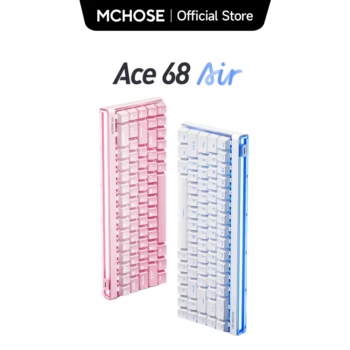

The MCHOSE ACE 68 Air Gaming Keyboard is a compact 68-key Hall Effect keyboard built for competitive gaming, fast movement input, and deep per-key customization. It combines magnetic switches, adjustable actuation, Rapid Trigger, an 8000Hz polling rate, onboard memory, RGB lighting, hot-swappable switch support, and MCHOSE’s M HUB software in a space-saving layout designed for desktop and laptop gaming setups.
For U.S. gamers searching for a Hall Effect gaming keyboard, 8K polling keyboard, Rapid Trigger keyboard, compact esports keyboard, magnetic switch keyboard, or Wooting-style alternative, the ACE 68 Air sits in a particularly competitive category. Its appeal is not simply that it is small. The keyboard is designed around configurable magnetic sensing, allowing the user to tune when a key activates and resets rather than relying on one fixed mechanical switch actuation point.
View MCHOSE ACE 68 Air Gaming Keyboard
MCHOSE currently offers the ACE 68 Air in Esports and Ultra Esports configurations. The standard Esports version is rated for 0.005 mm Rapid Trigger accuracy, 0.1 ms advertised latency, and a 128K scan rate. The Ultra Esports version raises the advertised precision to 0.001 mm, latency to 0.08 ms, and scan rate to 256K, while retaining an 8K polling rate. Because sellers may list several ACE 68 Air variants together, U.S. buyers should verify the exact switch, color, scan rate, trigger range, and version before ordering.
This comprehensive guide explains the ACE 68 Air’s Hall Effect switches, Rapid Trigger behavior, adjustable actuation, 8K polling, advanced input functions, RGB lightbox, M HUB software, 68-key layout, PBT keycaps, hot-swappable switch design, acoustic structure, gaming use cases, work and typing considerations, setup, maintenance, and the differences between the Esports and Ultra Esports versions.

MCHOSE ACE 68 Air Gaming Keyboard Product Overview
The MCHOSE ACE 68 Air Gaming Keyboard is a wired USB gaming keyboard using magnetic Hall Effect switch sensing rather than a conventional fixed-actuation mechanical switch design. Official specifications list 68 keys, Cherry-profile PBT keycaps, north-facing RGB LEDs, onboard memory, hot-swappable magnetic switches, and a compact chassis measuring approximately 314 × 116.5 × 34.6 mm. The listed weight is about 777 grams.
The compact design removes the dedicated number pad and much of the extra navigation area found on a full-size keyboard. That creates more horizontal desk space for mouse movement, which is especially useful for FPS players who use low mouse sensitivity and large sweeping motions.
MCHOSE ACE 68 Air Key Specifications
| Specification | MCHOSE ACE 68 Air |
|---|---|
| Keyboard Type | Hall Effect magnetic switch gaming keyboard |
| Key Count | 68 keys |
| Connection | Wired USB-C |
| Polling Rate | Up to 8000Hz |
| Polling Options | 1K, 2K, 4K, and 8K through M HUB |
| Standard Esports Scan Rate | 128K |
| Ultra Esports Scan Rate | 256K |
| Standard Advertised Latency | 0.1 ms |
| Ultra Advertised Latency | 0.08 ms |
| Standard RT Accuracy | 0.005 mm |
| Ultra RT Accuracy | 0.001 mm |
| Actuation Range | 0.1–3.4 mm |
| Dynamic Functions | SOCD, RS, DKS, MT, TGL, macros |
| Keycaps | Cherry-profile PBT |
| Switches | Hot-swappable magnetic switches |
| Lighting | RGB/ARGB depending on version plus Air lightbox effects |
| Onboard Memory | Supported |
| Dimensions | 314 × 116.5 × 34.6 mm |
| Weight | 777 g |
MCHOSE ACE 68 Air Version Matters
The phrase “ACE 68 Air” can refer to more than one performance tier. The Esports model and Ultra Esports model share the same general chassis and Hall Effect concept, but they do not have identical internal performance specifications. Buyers should never assume that every ACE 68 Air listing includes 0.001 mm precision or 0.08 ms advertised latency. Those figures belong to the higher Ultra Esports configuration.

MCHOSE ACE 68 Air Hall Effect Magnetic Switch Technology
Hall Effect technology is the main reason many competitive gamers consider the MCHOSE ACE 68 Air Gaming Keyboard. A traditional mechanical switch generally activates when internal metal contacts meet at a predetermined point. A Hall Effect keyboard instead uses magnetic sensing to detect switch travel.
That sensing method allows the keyboard firmware to determine how far a key has moved and lets the user configure actuation behavior through software. Instead of every key being locked to one fixed trigger point, the ACE 68 Air can be tuned for highly sensitive gaming inputs or deeper, more deliberate typing inputs.
MCHOSE ACE 68 Air Adjustable Actuation
Official ACE 68 Air specifications list an adjustable actuation range of approximately 0.1 to 3.4 mm. A shallow actuation setting means the key can register with very little downward movement. A deeper setting requires a more deliberate press before the input activates.
Competitive players often prefer shallow actuation on movement keys such as W, A, S, and D because it reduces how far a finger must move before the input is registered. For typing or keys that are easy to press accidentally, a deeper actuation point can be more comfortable.
MCHOSE ACE 68 Air Per-Key Tuning Is More Useful Than One Global Setting
The value of adjustable actuation is not simply setting every key to the minimum. M HUB allows trigger parameters to be customized by key, so a user can create sensitive movement keys while keeping utility keys, number keys, or rarely used commands at deeper actuation points. This can reduce accidental input while preserving fast response where it matters most.
MCHOSE ACE 68 Air Rapid Trigger Explained
Rapid Trigger is one of the most important gaming features of the ACE 68 Air. Conventional switches normally have a fixed actuation point and reset point. Rapid Trigger allows the keyboard to activate and reset based on the movement of the key rather than waiting for the switch to travel back to a fixed reset position.
In fast directional gameplay, this can make repeated tapping and direction changes feel more immediate. The feature is particularly relevant to FPS movement, rhythm games, and other situations where quickly releasing and reactivating a key matters.
MCHOSE ACE 68 Air RT Accuracy
The standard ACE 68 Air Esports model is officially listed with 0.005 mm Rapid Trigger accuracy. The Ultra Esports model is listed at 0.001 mm. These values describe the granularity available to the sensing and trigger system; they should not be interpreted as a guarantee that a human player will perceive every theoretical difference.
MCHOSE ACE 68 Air Extreme Sensitivity Requires Careful Setup
MCHOSE’s own support documentation warns that extremely sensitive parameters can increase the risk of missed or unstable behavior if the wrong switch profile is selected or the settings exceed what the switch can reliably support. For most users, the best configuration is the one that feels consistent rather than simply the smallest possible number.

MCHOSE ACE 68 Air 8000Hz Polling Rate
The MCHOSE ACE 68 Air Gaming Keyboard supports polling rates of 1K, 2K, 4K, and 8K through M HUB. At the maximum 8000Hz setting, the keyboard can report input to the computer up to 8,000 times per second.
Higher polling rates reduce the maximum interval between USB reports compared with traditional 1000Hz keyboards. The practical effect depends on the entire system, including the game engine, CPU, USB implementation, frame rate, monitor refresh rate, and other latency sources.
MCHOSE ACE 68 Air 8K Polling for Competitive Gaming
Gamers using high-refresh-rate monitors and powerful PCs may prefer the 8K setting because it minimizes one layer of input delay. Players using ordinary productivity workloads or lower-end systems may see little practical reason to keep the keyboard at the highest polling rate all the time.
MCHOSE ACE 68 Air Lets Users Choose Lower Polling Rates
The ability to select 1K, 2K, 4K, or 8K is useful because it allows users to balance performance and system overhead. If a particular PC, game, USB controller, or software setup behaves poorly at 8K, stepping down to 4K or 1K remains available without losing the keyboard’s core magnetic-switch features.
MCHOSE ACE 68 Air Scan Rate and Latency
Polling rate describes communication with the computer, while scan rate describes how frequently the keyboard scans its switch state internally. MCHOSE lists the standard ACE 68 Air at a 128K scan rate and the Ultra Esports model at 256K.
MCHOSE ACE 68 Air Esports Performance
The standard Esports version is advertised at 0.1 ms latency, 128K scan rate, 0.005 mm accuracy, and 8K polling. These specifications already place it firmly in the high-performance magnetic keyboard category.
MCHOSE ACE 68 Air Ultra Esports Performance
The Ultra Esports configuration increases the listed scan rate to 256K, improves claimed trigger precision to 0.001 mm, and reduces the advertised latency figure to 0.08 ms. MCHOSE also lists WASD direct connection on the Ultra model.
MCHOSE ACE 68 Air Advertised Latency Is Not Total System Latency
A keyboard latency specification does not represent the full time from finger movement to a visible action on the monitor. USB transmission, game processing, CPU and GPU rendering, display refresh, and monitor response all contribute to end-to-end latency. The ACE 68 Air is engineered to minimize the keyboard portion of that chain.
MCHOSE ACE 68 Air SOCD Feature
SOCD, or Simultaneous Opposing Cardinal Directions, controls what happens when opposite movement inputs such as A and D are pressed together. MCHOSE includes configurable SOCD behavior among the ACE 68 Air’s dynamic key functions.
This can be useful in games where fast movement-direction changes matter, but game developers and esports organizers may set rules regarding advanced input behavior. Competitive players should always check the current rules of the specific game, tournament, league, or anti-cheat environment before enabling features that alter simultaneous-key handling.
MCHOSE ACE 68 Air SOCD Is Only One Advanced Input Tool
The keyboard also supports RS, DKS, MT, TGL, and macros. These features allow individual keys to behave differently depending on depth, press duration, or programmed logic.
MCHOSE ACE 68 Air Tournament Users Should Use Rule-Compliant Profiles
Onboard memory makes it convenient to save settings, but it also means players should know which profile is active before a tournament or ranked session. A safe approach is to maintain a straightforward competition profile that complies with the rules of the game being played.

MCHOSE ACE 68 Air DKS, RS, MT, and TGL Functions
The ACE 68 Air goes beyond simple key remapping. Its magnetic sensing makes it possible to assign behavior according to how a key is pressed or how far it travels.
MCHOSE ACE 68 Air DKS
Dynamic Keystroke, commonly abbreviated DKS, can assign different actions to different stages of one key’s travel. For example, a light press and a deeper press can potentially trigger different configured actions depending on the profile.
MCHOSE ACE 68 Air RS
MCHOSE describes RS as a function that can prioritize the key that is pressed deeper when two selected inputs are bound together. This is another example of how analog-like magnetic sensing can create behavior that traditional fixed switches cannot easily reproduce.
MCHOSE ACE 68 Air MT
MT, or Mod-Tap style behavior, can allow one key to perform different functions depending on whether it is tapped or held. This can be useful on compact layouts where physical key count is limited.
MCHOSE ACE 68 Air TGL
TGL allows a configured function to behave as a toggle rather than requiring a continuous hold. Its usefulness depends on the application and game.
MCHOSE ACE 68 Air Advanced Functions Benefit from Profiles
Because these options can become complex, it is practical to create separate profiles for FPS gaming, general gaming, typing, and productivity instead of attempting to make one configuration handle every task.
MCHOSE ACE 68 Air M HUB Software
MCHOSE’s self-developed M HUB is central to the MCHOSE ACE 68 Air Gaming Keyboard. It is available as both a desktop driver and a web-based driver for supported browsers.
Official support documentation recommends Chrome or Edge for the web version and explains that the browser must be allowed to access the keyboard as an HID device.
MCHOSE ACE 68 Air M HUB Trigger Settings
Users can tune trigger travel, Rapid Trigger behavior, and dead-zone parameters. Settings can be applied across the keyboard or customized per key.
MCHOSE ACE 68 Air M HUB Remapping
Keys can be reassigned to different functions, layers, shortcuts, or recorded macros. This is especially useful on a 68-key board where users may want quick access to commands normally found on larger layouts.
MCHOSE ACE 68 Air M HUB Lighting
M HUB controls RGB effects, lightbox behavior, brightness, animation, and supported music-reactive modes. The ACE 68 Air is designed to be more visually expressive than a basic compact magnetic keyboard.
MCHOSE ACE 68 Air M HUB Firmware Management
Firmware updates and factory reset functions are available through the ecosystem. MCHOSE recommends keeping firmware and drivers current when troubleshooting compatibility or performance issues.
MCHOSE ACE 68 Air Onboard Memory Stores Settings
Onboard memory allows customized settings to stay with the keyboard. This is useful for users who move between computers or prefer not to keep configuration software open during gaming.
MCHOSE ACE 68 Air Adaptive Dynamic Calibration
Magnetic keyboards rely on accurate sensing of switch travel. MCHOSE includes Adaptive Dynamic Calibration so the keyboard can continuously refine its sensing behavior as keys are used.
MCHOSE ACE 68 Air Calibration Can Improve Consistency
According to MCHOSE support documentation, Adaptive Dynamic Calibration is recommended for normal use. Each key press contributes to recalibration, helping maintain accurate trigger behavior without requiring constant manual adjustment.
MCHOSE ACE 68 Air Manual Calibration Is Not Always Necessary
If the switch type has not been changed and the keyboard is operating correctly, MCHOSE notes that manual calibration is usually unnecessary. Recalibration becomes more relevant after changing magnetic switches or when particular keys behave inconsistently.

MCHOSE ACE 68 Air Hot-Swappable Magnetic Switches
The ACE 68 Air supports hot-swappable magnetic switches. This means compatible magnetic switches can be physically removed and replaced without soldering.
However, magnetic-switch compatibility is more specific than ordinary MX mechanical switch compatibility. A Hall Effect keyboard requires switches that work with its magnetic sensing geometry and firmware profiles.
MCHOSE ACE 68 Air Standard Switch Option
The current official product comparison lists the ACE 68 Air Esports configuration with the Kailh Magnetic God Switch.
MCHOSE ACE 68 Air Ultra Switch Option
The Ultra Esports configuration is currently listed with Mount Tai Magnetic Switch GT. Seller inventory and future variants can change, so buyers should confirm the switch selected on the actual product page.
MCHOSE ACE 68 Air Switch Type Must Match M HUB
After replacing magnetic switches, users should select the correct switch type in M HUB and calibrate as needed. Using an incorrect switch profile can affect travel detection and trigger reliability.
MCHOSE ACE 68 Air PBT Cherry-Profile Keycaps
MCHOSE specifies Cherry-profile PBT keycaps for the ACE 68 Air. PBT is commonly valued for its resistance to surface shine compared with many ABS keycaps, while Cherry profile provides a familiar sculpted typing shape.
MCHOSE ACE 68 Air Keycaps Suit Gaming and Typing
The profile is low enough to feel familiar to many mechanical-keyboard users without being extremely flat. Because the board has a compact layout, consistent keycap shaping can help users adapt more quickly.
MCHOSE ACE 68 Air Keycap Lighting Depends on Version
Lighting appearance can differ by colorway and keycap legend design. The official product comparison distinguishes RGB and ARGB lighting between configurations, so shoppers interested in shine-through legends or a particular lighting effect should check the exact variant photographs before ordering.
MCHOSE ACE 68 Air RGB and Dynamic Lightbox
The “Air” identity is visually reinforced by a dynamic RGB lightbox. Official MCHOSE material lists Air Dynamic RGB Lightbox features, GIF lighting effects, and eight self-developed Music Reactive Modes 2.0.
MCHOSE ACE 68 Air RGB for Gaming Desks
For gamers building an RGB-focused desktop, the keyboard can become part of the visual setup rather than simply serving as an input device. Lighting can be changed through M HUB instead of being limited to one factory animation.
MCHOSE ACE 68 Air Lighting Can Be Turned Off
Users who prefer a distraction-free setup can disable backlighting. MCHOSE’s official quick-start guide identifies Fn + T as a shortcut for toggling the keyboard backlight, with additional lighting customization available through M HUB.

MCHOSE ACE 68 Air Internal Acoustic Structure
The ACE 68 Air uses more internal dampening than many entry-level gaming keyboards. MCHOSE lists an aluminum alloy positioning plate together with a silicone sandwich pad, Poron switch pad, PET film, bottom cotton, and silicone gasket structure.
MCHOSE ACE 68 Air Multi-Layer Dampening
These internal layers are intended to reduce unwanted resonance and create a more controlled typing sound. Magnetic keyboards can sometimes prioritize performance over acoustics, so additional dampening makes the board more appealing to users who also care about sound and feel.
MCHOSE ACE 68 Air Sound Still Depends on Switch and Desk Setup
Keycap material, switch version, desk mat, typing force, room acoustics, and the desk itself all influence perceived sound. Internal foam can improve acoustics, but it cannot guarantee that every user will hear the board the same way.
MCHOSE ACE 68 Air Compact 68-Key Layout
The 68-key layout is one of the strongest everyday advantages of the ACE 68 Air. It is compact enough to free substantial mouse space but retains more functionality than ultra-minimal keyboards.
MCHOSE ACE 68 Air for FPS Gaming
FPS players can benefit from the smaller width because the keyboard leaves more room for low-sensitivity mouse movement. The compact chassis is particularly useful on shallow desks where a full-size board can force the mouse area too far to the right.
MCHOSE ACE 68 Air for General Gaming
The layout also works for action games, racing titles, MMOs, and casual PC gaming when users are comfortable accessing secondary functions through Fn layers.
MCHOSE ACE 68 Air Is Not Designed for Heavy Numpad Work
Users who frequently enter spreadsheets, accounting data, or long sequences of numbers may prefer a full-size keyboard or a separate external numpad. The ACE 68 Air prioritizes gaming desk space rather than maximum dedicated-key count.
MCHOSE ACE 68 Air for Competitive FPS Games
The keyboard’s Hall Effect platform is particularly relevant to games where movement control is critical. Adjustable actuation and Rapid Trigger allow the player to experiment with faster directional inputs.
MCHOSE ACE 68 Air for Direction Changes
Rapid reset can help keys deactivate as soon as the finger begins to lift, allowing the opposite direction to register sooner than on a conventional fixed-reset switch. This is the general reason magnetic keyboards are popular among competitive FPS players.
MCHOSE ACE 68 Air Cannot Replace Game Skill
Low latency and customizable actuation can make an input device more responsive, but they do not replace aim, positioning, movement knowledge, communication, or practice. A high-performance keyboard is best viewed as removing hardware limitations rather than creating skill automatically.
MCHOSE ACE 68 Air for Tactical Shooters
Tactical shooters reward precise movement and deliberate stopping. This makes configurable movement keys one of the most relevant use cases for a magnetic keyboard.
MCHOSE ACE 68 Air FPS Profile
A practical profile can use shallow actuation and Rapid Trigger on W, A, S, and D while leaving ability keys and other commands slightly deeper. This reduces accidental activation without sacrificing fast movement response.
MCHOSE ACE 68 Air Settings Should Be Personalized
There is no universal best actuation setting. Some players prefer extremely shallow movement keys, while others find them too sensitive. Start conservatively and reduce travel gradually until the keyboard feels responsive without accidental presses.

MCHOSE ACE 68 Air for Everyday Typing
Although designed around esports performance, the ACE 68 Air can also function as a normal everyday keyboard. PBT keycaps, compact dimensions, onboard memory, and configurable actuation can make it suitable for schoolwork, browsing, communication, and general desktop tasks.
MCHOSE ACE 68 Air Typing Profile
Users who make accidental keystrokes with shallow gaming settings can create a separate typing profile with deeper actuation. This is one of the advantages of magnetic sensing: the same switches can feel extremely sensitive in a gaming profile and more deliberate in a writing profile.
MCHOSE ACE 68 Air Compact Layout Requires Adjustment
People moving from a full-size keyboard may need time to learn Fn shortcuts and the position of secondary functions. Once memorized, the smaller layout can feel efficient, but heavy office users should decide whether dedicated function and navigation keys are important to their workflow.
MCHOSE ACE 68 Air Wired USB-C Connection
The ACE 68 Air is a wired keyboard. Official MCHOSE support explicitly states that both the ACE 68 and ACE 68 Air support wired connection only.
MCHOSE ACE 68 Air Does Not Have Bluetooth
Buyers looking for Bluetooth or 2.4GHz wireless connectivity should choose another model. The ACE 68 Air prioritizes stable wired communication and high polling performance.
MCHOSE ACE 68 Air Direct USB Connection Is Recommended
MCHOSE recommends connecting the keyboard directly to the computer during initial setup rather than using a docking station, external hub, or adapter. This can reduce detection problems when configuring M HUB and high polling rates.
MCHOSE ACE 68 Air Windows and macOS Modes
The official quick-start guide provides separate Windows and macOS modes. If modifier keys behave unexpectedly, the board may simply be operating in the wrong mode.
MCHOSE ACE 68 Air Windows Mode
MCHOSE identifies Fn + O as the shortcut for switching back to Windows mode.
MCHOSE ACE 68 Air macOS Mode
Fn + P switches to macOS mode according to the official support guide.
MCHOSE ACE 68 Air Win Key Lock
Gamers can lock the Windows key to reduce the chance of accidentally opening the Start menu during a match. MCHOSE also identifies Fn + Win as a quick way to control Win key lock behavior.
MCHOSE ACE 68 Air Setup for U.S. Gamers
Basic setup is straightforward because the keyboard uses a USB-C wired connection.
MCHOSE ACE 68 Air Initial Connection
Connect the USB Type-C end to the keyboard and the USB-A end to a computer. Wait for the backlight or indicator to confirm that the board has been recognized.
MCHOSE ACE 68 Air M HUB Setup
Open the MCHOSE M HUB desktop application or web driver. The web version works best in a compatible browser such as Chrome or Edge, where the user can grant HID access to the keyboard.
MCHOSE ACE 68 Air Performance Configuration
Select the preferred polling rate, choose the correct magnetic switch type, enable Adaptive Dynamic Calibration, and tune actuation or Rapid Trigger settings. Test settings before entering competitive play.
MCHOSE ACE 68 Air Factory Reset
If configuration becomes confusing or the board behaves unexpectedly, official MCHOSE guidance says to hold Fn + Esc for approximately five seconds to restore factory settings. This removes custom trigger, remapping, and lighting configurations, so save or document important profiles first.

MCHOSE ACE 68 Air Esports vs Ultra Esports
| Feature | ACE 68 Air Esports | ACE 68 Air Ultra Esports |
|---|---|---|
| Typical Switch | Kailh Magnetic God Switch | Mount Tai Magnetic Switch GT |
| RT Accuracy | 0.005 mm | 0.001 mm |
| RT Range | 0.005–3.4 mm | 0.001–3.4 mm |
| Actuation Range | 0.1–3.4 mm | 0.1–3.4 mm |
| Advertised Latency | 0.1 ms | 0.08 ms |
| Scan Rate | 128K | 256K |
| Polling Rate | 8K | 8K |
| WASD Direct Connection | Not listed | Supported |
| Lighting | Approx. 16 million RGB colors | Approx. 16 million ARGB colors |
| Connectivity | Wired | Wired |
MCHOSE ACE 68 Air Esports Is Already High Performance
The standard Esports version includes the features most buyers associate with a premium magnetic gaming keyboard: Rapid Trigger, adjustable actuation, 8K polling, hot-swappable magnetic switches, advanced key functions, RGB lighting, and M HUB.
MCHOSE ACE 68 Air Ultra Is for Maximum Specification Buyers
The Ultra Esports version is most relevant to enthusiasts who specifically want the 256K scan rate, 0.001 mm precision specification, lower advertised latency, and higher-end internal chipset configuration.
MCHOSE ACE 68 Air Buyers Should Verify the Product Variant
Marketplace listings may place several switch and color options under one page. Confirm the exact variant in the cart so you do not pay for an Ultra version while expecting a standard model, or purchase a standard model while expecting Ultra specifications.
MCHOSE ACE 68 Air Color Options
Official MCHOSE listings identify Snow White and Peach Gradient among standard Esports options, while Ultra Esports choices can include Snow White, Aurora Black, and Rose Red. Availability can change over time.
MCHOSE ACE 68 Air Snow White
Snow White works well with bright minimalist desks, white gaming mice, and RGB-focused setups.
MCHOSE ACE 68 Air Aurora Black
Aurora Black suits darker gaming setups and can make RGB lighting appear more visually prominent.
MCHOSE ACE 68 Air Rose Red and Peach Gradient
These more distinctive colors appeal to users who want a keyboard that stands out rather than blending into standard black-and-white peripherals.
MCHOSE ACE 68 Air Color Availability Depends on Version
Not every color is necessarily offered with every switch or performance tier. Check the selected color and switch combination before checkout.

MCHOSE ACE 68 Air Package Contents
MCHOSE’s official product page lists a useful accessory package with the keyboard.
MCHOSE ACE 68 Air Included Items
- 1 × MCHOSE ACE 68 Air keyboard.
- 1 × user guide.
- 1 × USB Type-C cable.
- 1 × keycap/switch puller.
- 2 × spare compatible switches.
- 1 × dust cover.
MCHOSE ACE 68 Air Marketplace Package Should Still Be Confirmed
Accessory bundles can differ between sellers or regional versions. Buyers should compare the product listing with the official package before purchase, especially if the dust cover, spare switches, or puller is important.
MCHOSE ACE 68 Air Maintenance and Cleaning
Like any gaming keyboard, the ACE 68 Air benefits from routine cleaning. Dust, hair, food particles, and skin oils can accumulate around keycaps over time.
MCHOSE ACE 68 Air Keycap Cleaning
Disconnect the keyboard before cleaning. Use the supplied puller when removing keycaps and avoid forcing caps sideways. A soft brush or carefully used compressed-air tool can remove loose debris around the plate.
MCHOSE ACE 68 Air Switch Replacement
If a compatible magnetic switch needs replacement, use the appropriate puller and ensure the replacement is properly aligned. Because Hall Effect keyboards depend on magnetic sensing, use compatible switch types rather than assuming any mechanical switch will work.
MCHOSE ACE 68 Air Should Be Recalibrated After Switch Changes
After changing magnetic switches, select the correct switch profile in M HUB and run calibration if needed. This helps the sensing system interpret key travel accurately.

MCHOSE ACE 68 Air Advantages
- Compact 68-key gaming layout.
- Hall Effect magnetic switch sensing.
- Adjustable actuation.
- Rapid Trigger support.
- Up to 8000Hz polling.
- 128K or 256K scan rate depending on version.
- 0.005 mm or 0.001 mm RT accuracy depending on version.
- Hot-swappable magnetic switches.
- SOCD, RS, DKS, MT, TGL, and macro support.
- Cherry-profile PBT keycaps.
- RGB or ARGB lighting depending on variant.
- Dynamic Air lightbox effects.
- M HUB web and desktop software.
- Onboard memory.
- Adaptive Dynamic Calibration.
- Multiple internal sound-dampening layers.
- Wired connection optimized for stable gaming use.
MCHOSE ACE 68 Air Considerations Before Buying
- No Bluetooth or 2.4GHz wireless mode.
- No dedicated number pad.
- Compact layout requires learning Fn shortcuts.
- Extreme magnetic sensitivity can cause accidental inputs if poorly configured.
- Advanced SOCD or macro behavior may be restricted by some games or tournaments.
- Standard and Ultra versions have different performance specifications.
- Magnetic hot-swap compatibility is more limited than ordinary MX mechanical switches.
- Maximum polling rate may offer limited practical benefit on lower-performance PCs.
- Users focused only on office work may not need its esports-oriented feature set.
MCHOSE ACE 68 Air Frequently Asked Questions
Is the MCHOSE ACE 68 Air a Hall Effect keyboard?
Yes. It uses magnetic Hall Effect sensing and supports adjustable actuation and Rapid Trigger behavior.
How many keys does the MCHOSE ACE 68 Air have?
The official specification lists 68 keys.
Does the MCHOSE ACE 68 Air support 8000Hz polling?
Yes. MCHOSE supports selectable 1K, 2K, 4K, and 8K polling rates, with 8K as the maximum.
Is the MCHOSE ACE 68 Air wireless?
No. Official MCHOSE documentation states that the ACE 68 Air is wired only.
Does the MCHOSE ACE 68 Air have Bluetooth?
No. It does not provide Bluetooth connectivity.
Does the MCHOSE ACE 68 Air use USB-C?
Yes. The keyboard connects through USB Type-C, with an included data cable.
What is the MCHOSE ACE 68 Air actuation range?
MCHOSE officially lists a 0.1–3.4 mm actuation range. Rapid Trigger sensitivity can be configured more finely depending on version.
What is the difference between ACE 68 Air Esports and Ultra Esports?
The standard Esports model is listed at 0.005 mm RT accuracy, 0.1 ms latency, and 128K scan rate. Ultra Esports is listed at 0.001 mm, 0.08 ms, and 256K respectively.
Does the MCHOSE ACE 68 Air support Rapid Trigger?
Yes. Rapid Trigger is one of its core Hall Effect gaming features.
Does the MCHOSE ACE 68 Air support SOCD?
Yes. SOCD is available together with RS, DKS, MT, TGL, and macro functions.
Can the MCHOSE ACE 68 Air switches be replaced?
Yes. It supports hot-swappable compatible magnetic switches.
Can I install normal mechanical switches in the ACE 68 Air?
Do not assume ordinary MX mechanical switches are compatible. The keyboard relies on magnetic sensing and requires supported magnetic switch types.
What keycaps does the MCHOSE ACE 68 Air use?
Official specifications identify Cherry-profile PBT keycaps.
Does the MCHOSE ACE 68 Air have RGB?
Yes. It uses north-facing RGB lighting, with RGB or ARGB implementation depending on variant, plus Air lightbox effects.
Does the MCHOSE ACE 68 Air have onboard memory?
Yes. Onboard memory is officially supported.
What software does the MCHOSE ACE 68 Air use?
It uses MCHOSE M HUB, available as a web driver and desktop application.
Can I change actuation per key?
Yes. M HUB allows trigger parameters to be configured globally or for selected individual keys.
Can I use the MCHOSE ACE 68 Air on macOS?
Yes. Official support documentation includes a macOS mode, activated with Fn + P.
How do I switch the MCHOSE ACE 68 Air to Windows mode?
MCHOSE identifies Fn + O as the Windows-mode shortcut.
How do I factory reset the MCHOSE ACE 68 Air?
Official guidance says to hold Fn + Esc for about five seconds. This erases custom trigger, remapping, and lighting settings.
What are the dimensions of the MCHOSE ACE 68 Air?
The official size is approximately 314 × 116.5 × 34.6 mm.
How much does the MCHOSE ACE 68 Air weigh?
MCHOSE lists the keyboard at approximately 777 grams.
Is the MCHOSE ACE 68 Air good for FPS gaming?
Its compact layout, Hall Effect sensing, Rapid Trigger, adjustable actuation, high polling rate, and advanced movement functions make FPS gaming one of its primary use cases.
Is the MCHOSE ACE 68 Air good for typing?
It can be. A deeper actuation profile can make typing more deliberate, while PBT Cherry-profile keycaps and internal dampening improve everyday usability.
Is the MCHOSE ACE 68 Air good for competitive esports?
It is designed for esports-oriented performance, but users should make sure advanced functions such as SOCD and macros comply with the rules of the specific game or tournament.
Is the MCHOSE ACE 68 Air worth buying?
It can be a strong choice for gamers who specifically want Hall Effect switches, Rapid Trigger, 8K polling, compact size, and deep software customization without needing wireless connectivity.
MCHOSE ACE 68 Air Final Buying Verdict
The MCHOSE ACE 68 Air Gaming Keyboard combines many of the features that now define high-performance magnetic gaming keyboards: Hall Effect switches, adjustable actuation, Rapid Trigger, very high polling, hot-swappable magnetic switches, onboard memory, and software-configurable advanced input functions.
Its 68-key form factor is particularly attractive for competitive PC gaming because it saves significant horizontal desk space without becoming excessively minimal. Players using low mouse sensitivity can position the keyboard comfortably while preserving a large mouse area.
The standard Esports model already offers an impressive specification package with 0.005 mm RT accuracy, 128K scanning, an advertised 0.1 ms latency figure, and up to 8K polling. For most gamers, this is the version that provides the major Hall Effect advantages without requiring the highest specification tier.
The Ultra Esports model is intended for enthusiasts who specifically want the flagship numbers: 0.001 mm RT accuracy, 256K scanning, 0.08 ms advertised latency, and WASD direct connection. Whether those theoretical improvements create a meaningful personal advantage will depend on the player, system, game, and configuration.
M HUB is a major part of the value proposition. A magnetic keyboard becomes much more useful when the software makes it easy to adjust trigger travel, Rapid Trigger, dead zones, polling rate, remapping, macros, lighting, and advanced key functions. The availability of both web and desktop drivers gives users flexibility in how they configure the board.
Adaptive Dynamic Calibration is another useful feature because Hall Effect accuracy depends on consistent sensing. MCHOSE recommends leaving the feature enabled so the keyboard can refine calibration through normal key use.
The board is also more thoughtfully built than a purely performance-first esports device. Cherry-profile PBT keycaps, an aluminum positioning plate, Poron switch pad, PET film, silicone layers, bottom cotton, and silicone gaskets show an effort to improve typing feel and acoustics as well as raw response.
The main compromise is connectivity. The ACE 68 Air is wired only. Gamers specifically looking for Bluetooth or 2.4GHz wireless use should choose a different keyboard. For competitive desktop gaming, however, the wired design is consistent with the keyboard’s emphasis on stable, high-rate input.
The compact layout is another tradeoff. Gamers gain mouse space, but office users lose a dedicated number pad and some dedicated navigation controls. If spreadsheets and data entry are a major part of your day, pairing the keyboard with a separate numpad may be useful.
Advanced functions should also be configured responsibly. SOCD, macros, multi-action keys, and similar features can be useful, but competitive rules vary. Always check the current policies of the game, tournament, or league before using advanced input behavior in organized competition.
For U.S. shoppers searching for a MCHOSE ACE 68 Air gaming keyboard, Hall Effect gaming keyboard, 8K polling magnetic keyboard, Rapid Trigger keyboard, 68 key gaming keyboard, compact esports keyboard, magnetic switch gaming keyboard, or adjustable actuation keyboard, the ACE 68 Air belongs on the shortlist.
The ideal buyer is a PC gamer who values movement responsiveness, per-key tuning, compact desk space, and experimentation with magnetic switch behavior. It is especially relevant to FPS players, high-refresh-rate gaming setups, esports enthusiasts, and keyboard users who enjoy customizing input behavior in software.
Before ordering, confirm whether the listing is the ACE 68 Air Esports or Ultra Esports version, verify the selected magnetic switch, color, RT precision, scan rate, and package contents, and make sure you are comfortable with wired-only connectivity.
If those details match your gaming setup, the MCHOSE ACE 68 Air offers a strong combination of speed, configurability, compact size, and modern Hall Effect technology for competitive and everyday PC use.
MCHOSE ACE 68 Air Shop and Compare
Review the current product variation carefully before checkout, especially the Esports versus Ultra Esports specification, selected switch, color, and performance tier.