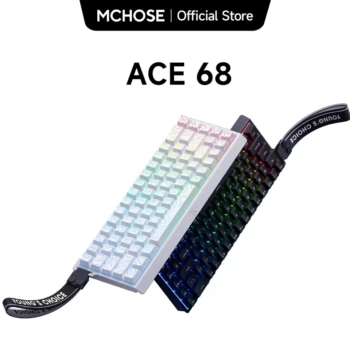

The MCHOSE ACE 68 Magnetic Gaming Keyboard is a compact Hall Effect gaming keyboard designed for players who want adjustable actuation, Rapid Trigger control, high polling performance, advanced key behavior, and a space-saving 68-key layout. Instead of relying on a conventional mechanical switch with one fixed electrical actuation point, the ACE 68 uses magnetic sensing to track key travel and let the user tune how individual keys respond.
For U.S. gamers searching for a Hall Effect keyboard, magnetic gaming keyboard, 8K polling keyboard, Rapid Trigger keyboard, compact esports keyboard, or a customizable FPS keyboard, the ACE 68 brings several enthusiast-level features into a relatively accessible platform. Current official specifications include up to 8000Hz polling, hot-swappable compatible magnetic switches, adjustable actuation, onboard memory, M HUB software, advanced functions such as SOCD and DKS, and multiple switch and color choices.
View MCHOSE ACE 68 Magnetic Gaming Keyboard
The ACE 68 family includes different performance tiers and switch combinations. MCHOSE currently lists standard Esports and Ultra Esports configurations, and the exact performance specification depends on the version selected. The standard tier is listed with 0.005 mm Rapid Trigger accuracy, 0.1 ms advertised latency, and a 128K scan rate, while higher Ultra configurations can reach 0.001 mm RT accuracy, 0.08 ms advertised latency, and a 256K scan rate. Both tiers support an 8K polling rate.
This guide focuses on the current MCHOSE ACE 68 platform and explains what those specifications mean in real use. It also covers Hall Effect sensing, adjustable actuation, Rapid Trigger, switch compatibility, 8K polling, SOCD, RS, DKS, MT, TGL, RGB lighting, M HUB software, onboard profiles, calibration, typing comfort, FPS gaming, installation, cleaning, and the differences buyers should verify before ordering in the United States.

MCHOSE ACE 68 Magnetic Gaming Keyboard Overview
The MCHOSE ACE 68 Magnetic Gaming Keyboard is a wired USB keyboard built around a 68-key compact layout. Official specifications list dimensions of approximately 320.1 × 115.8 × 39.2 mm and a weight of about 773.7 grams. That gives the board enough mass to remain stable on a desk while keeping its footprint noticeably smaller than a full-size keyboard.
MCHOSE equips the keyboard with a custom Hall Effect sensor system, an esports-oriented chipset, south-facing RGB lighting, onboard memory, and software-controlled magnetic switch functions. The current product line is available in several colors, including White, Black, Rose Red, Black Topographic, and White Topographic, although seller inventory can vary.
MCHOSE ACE 68 Core Specifications
| Specification | ACE 68 Details |
|---|---|
| Layout | 68-key compact layout |
| Switch Technology | Hall Effect magnetic switches |
| Connection | Wired USB-C |
| Polling Rate | Up to 8000Hz |
| Scan Rate | 128K or 256K depending on tier |
| Advertised Latency | 0.1 ms or 0.08 ms depending on tier |
| RT Accuracy | 0.005 mm or 0.001 mm depending on tier |
| Actuation Range | 0.1–3.4 mm |
| Rapid Trigger Range | Down to 0.005 mm or 0.001 mm depending on tier |
| Lighting | South-facing RGB |
| Software | MCHOSE M HUB web and desktop driver |
| Onboard Memory | Supported |
| Dimensions | 320.1 × 115.8 × 39.2 mm |
| Weight | Approximately 773.7 g |
MCHOSE ACE 68 Specifications Depend on the Selected Variant
The product name alone does not tell you which performance tier or switch is installed. Current official switch choices include Ice Blue Magnetic Switch, Ice Rhino Magnetic Switch, KTEK Magnetic Switch, TTC Uranus Magnetic Switch Standard, TTC Uranus Magnetic Switch eSports, and TTC Dragon Lord Magnetic Switch. Before purchasing, verify the exact switch and performance tier shown in the selected variation rather than assuming every ACE 68 has identical latency or RT precision.

MCHOSE ACE 68 Hall Effect Magnetic Switch Technology
Hall Effect sensing is the main technology behind the ACE 68. Traditional mechanical switches normally register through physical electrical contacts. A Hall Effect switch instead uses a magnet and sensor to determine how far the stem has traveled. Because the sensing system can measure movement rather than waiting for one fixed electrical contact, software can decide when the key should activate and reset.
This is why magnetic gaming keyboards have become popular among competitive players. The keyboard can be configured for extremely shallow movement keys while other keys can require a deeper press. One physical keyboard can therefore behave differently for gaming, typing, editing, and general productivity.
MCHOSE ACE 68 Adjustable Actuation
MCHOSE lists an actuation range of 0.1 to 3.4 mm. A 0.1 mm actuation setting activates very early in the key’s travel, while a setting closer to 3.4 mm requires the user to press much deeper. This range allows different keys to be tuned for different tasks.
For example, a competitive FPS player may use a shallow actuation point for W, A, S, and D while setting reload, inventory, or utility keys deeper to reduce accidental input. A user who types extensively may prefer deeper actuation on most keys because extremely sensitive settings can produce unwanted letters from light finger contact.
MCHOSE ACE 68 Minimum Values Are Not Automatically Best
Marketing specifications naturally highlight extremely small numbers, but the most sensitive setting is not always the most comfortable or reliable for every player. The ideal configuration is one that feels consistent and predictable. Start with moderate values, test them in actual games, and reduce actuation gradually instead of setting every key to the minimum immediately.

MCHOSE ACE 68 Rapid Trigger for Competitive Gaming
Rapid Trigger is one of the most important reasons to choose the MCHOSE ACE 68 Magnetic Gaming Keyboard over a conventional mechanical board. With a normal switch, activation and reset occur at fixed points. Rapid Trigger instead responds dynamically to the direction and distance of key movement.
When the player starts releasing a key, the keyboard can reset quickly rather than waiting for the key to return to a traditional fixed reset height. When the player presses again, the input can react quickly based on the configured Rapid Trigger settings. This is useful for movement-heavy games where repeated direction changes matter.
MCHOSE ACE 68 RT Accuracy
The standard Esports tier is listed at 0.005 mm RT accuracy, while the Ultra Esports tier can reach 0.001 mm. Those numbers describe the sensing and configuration granularity of the keyboard rather than a guaranteed improvement in a player’s reaction time.
MCHOSE ACE 68 Rapid Trigger Is Especially Relevant to FPS Movement
In tactical and arena shooters, quickly releasing one movement direction and activating another can affect counter-strafing and positioning. Rapid Trigger reduces dependence on a fixed reset point, giving the user more control over how quickly a movement key becomes inactive and ready for the next press.

MCHOSE ACE 68 8000Hz Polling Rate Explained
The ACE 68 supports up to an 8000Hz polling rate. Polling rate describes how frequently the keyboard can report information to the computer through USB. A conventional 1000Hz gaming keyboard reports at intervals of roughly one millisecond, while an 8000Hz device can theoretically report at much shorter intervals.
The practical benefit depends on the rest of the gaming system. A high-refresh-rate monitor, powerful CPU, stable USB implementation, high frame rate, and responsive game engine make it easier to benefit from reduced device-side latency. On an ordinary office PC or a game running at low frame rates, the difference between 1K and 8K may be difficult to perceive.
MCHOSE ACE 68 8K Polling for High-Refresh-Rate PCs
Players using 240Hz, 360Hz, 480Hz, or other high-refresh displays are more likely to care about minimizing every stage of the input chain. The ACE 68 gives those users an 8K option without requiring a separate performance mode or special hardware accessory.
MCHOSE ACE 68 Can Be Run at Lower Polling Rates
M HUB provides performance controls, and users do not have to run the maximum rate for every workload. Lower settings can be useful when troubleshooting USB compatibility, reducing system overhead, or using the keyboard on an older computer.

MCHOSE ACE 68 Scan Rate and Advertised Latency
Polling rate and scan rate are related but not identical. Polling rate describes communication between the keyboard and PC. Scan rate describes how frequently the keyboard checks its switch state internally. MCHOSE lists 128K scanning for the standard Esports tier and 256K for Ultra Esports versions.
MCHOSE ACE 68 Esports Performance Tier
The standard tier is listed with 0.005 mm RT accuracy, 0.1 ms advertised latency, 128K scanning, and an 8K polling rate. These are already high-end specifications for a compact Hall Effect gaming keyboard.
MCHOSE ACE 68 Ultra Esports Performance Tier
The Ultra tier raises the specification to 0.001 mm RT accuracy, 0.08 ms advertised latency, and a 256K scan rate. MCHOSE also lists additional high-end features on Ultra configurations, including RT Smart support and WASD direct connection.
MCHOSE ACE 68 Keyboard Latency Is Only Part of Total Gaming Latency
Even a very low-latency keyboard cannot control the full input-to-display chain. CPU scheduling, USB processing, the game engine, frame rate, GPU rendering, display refresh, and monitor response all contribute to what the user finally sees. The ACE 68 is designed to reduce the keyboard portion of that chain.

MCHOSE ACE 68 Advanced Key Functions
Magnetic switch sensing allows the ACE 68 to support functions that go beyond ordinary key remapping. M HUB includes SOCD, RS, DKS, MT, TGL, key macros, configurable trigger travel, and per-key Rapid Trigger behavior.
MCHOSE ACE 68 SOCD
SOCD stands for Simultaneous Opposing Cardinal Directions. It defines what should happen when two opposite directional keys, such as A and D, are pressed together. MCHOSE provides multiple conflict-resolution behaviors, including last-input priority, key priority, and cancel-style behavior.
This can make movement logic more configurable, but tournament and game rules may restrict some advanced input functions. Competitive players should check the rules of the specific game, league, anti-cheat environment, or event before relying on SOCD behavior.
MCHOSE ACE 68 DKS
Dynamic Keystroke allows different actions to be associated with different parts of a key press. Because the Hall Effect sensor can detect travel depth, one physical key can potentially perform more than a simple on/off action when properly configured.
MCHOSE ACE 68 RS
RS can use press depth or configured priority logic to determine which action should take precedence when paired inputs interact. This is particularly relevant to movement-oriented profiles.
MCHOSE ACE 68 MT and TGL
MT can assign different behavior to tapping and holding, while TGL provides toggle-style operation for configured commands. These functions can help compensate for the reduced number of dedicated keys on a compact board.
MCHOSE ACE 68 Advanced Functions Should Be Used Deliberately
Complex profiles are powerful but can become confusing. It is often better to build separate profiles for FPS gaming, general gaming, productivity, and experimentation instead of loading every advanced function into one configuration.

MCHOSE ACE 68 M HUB Software
M HUB is the official MCHOSE configuration platform used by the ACE 68. It is available through both a desktop driver and a web driver, making it possible to configure the keyboard without depending exclusively on a permanently installed desktop application.
The web version works through supported browsers such as Chrome or Edge and requires permission to access the keyboard as an HID device. Users can adjust trigger parameters, key remapping, advanced key behavior, performance settings, lighting, firmware, onboard profiles, and other functions.
MCHOSE ACE 68 Trigger Configuration
M HUB allows trigger travel and Rapid Trigger values to be adjusted globally or for selected individual keys. This is especially useful for creating a sensitive WASD cluster while retaining more conventional settings elsewhere.
MCHOSE ACE 68 Key Remapping and Macros
Keys can be reassigned to other commands, functions, layers, or macros. This helps the compact 68-key layout perform tasks normally associated with larger keyboards.
MCHOSE ACE 68 Lighting Controls
M HUB also manages RGB effects. The ACE 68 uses south-facing RGB LEDs and supports lighting customization, including effects tied to the keyboard’s broader visual design.
MCHOSE ACE 68 Onboard Memory Saves Profiles
Onboard memory allows settings to remain stored in the keyboard. This can be useful when moving the board between systems because essential settings do not necessarily need to be recreated from the beginning.

MCHOSE ACE 68 Adaptive Dynamic Calibration
Accurate magnetic sensing depends on the keyboard understanding the behavior and travel of each installed switch. MCHOSE uses Adaptive Dynamic Calibration 2.0 on current ACE 68 configurations to help maintain consistent sensing.
MCHOSE ACE 68 Calibration After Switch Changes
If you replace magnetic switches, use the appropriate switch profile and calibration options in M HUB. Different magnetic switches can have different magnet strength and travel characteristics, so the keyboard should not simply be treated like an ordinary MX hot-swap board.
MCHOSE ACE 68 Calibration Helps Prevent Unstable Trigger Behavior
When a magnetic keyboard is configured incorrectly, keys can feel inconsistent or excessively sensitive. Correct switch selection and calibration are especially important when using very small Rapid Trigger values.
MCHOSE ACE 68 Hot-Swappable Magnetic Switches
The MCHOSE ACE 68 Magnetic Gaming Keyboard supports hot-swappable magnetic switches. The feature allows compatible switches to be removed and replaced without soldering, making it easier to experiment with switch feel or replace a damaged switch.
However, Hall Effect hot-swap is not identical to conventional mechanical hot-swap. A normal MX mechanical switch closes electrical contacts. A magnetic switch interacts with a Hall sensor, so compatibility depends on magnet orientation, strength, travel, housing dimensions, and firmware support.
MCHOSE ACE 68 Current Switch Choices
MCHOSE currently lists several options: Ice Blue Magnetic Switch, Ice Rhino Magnetic Switch, KTEK Magnetic Switch, TTC Uranus Magnetic Switch Standard, TTC Uranus Magnetic Switch eSports, and TTC Dragon Lord Magnetic Switch. Availability can change by color and performance tier.
MCHOSE ACE 68 Mixed Switch Configuration
MCHOSE promotes customizable switch mixing, allowing supported switches to be used selectively. A user might prefer one magnetic switch on movement keys and another on typing or utility keys. Any mixed setup should still use supported switch profiles and calibration.

MCHOSE ACE 68 RGB Lighting and Visual Design
The ACE 68 uses south-facing RGB LEDs. South-facing lighting positions the LEDs toward the user side of the switch, a layout often favored for compatibility with certain keycap profiles and for reducing interference with some switch housings.
MCHOSE ACE 68 Keycap Lighting Varies by Switch Configuration
The official comparison shows that some ACE 68 variants use non-backlit keycaps while others include backlit keycaps. Therefore, buyers who want illuminated legends should not assume every color and switch combination provides the same keycap transparency.
MCHOSE ACE 68 RGB Can Be Disabled
Users who prefer a clean desktop can turn the lighting off. MCHOSE’s official quick-start documentation identifies Fn + T as a backlight toggle, while additional effects are available inside M HUB.
MCHOSE ACE 68 Internal Construction and Typing Sound
MCHOSE uses an aluminum alloy positioning plate and several dampening layers inside the ACE 68. The exact internal stack differs between standard and Ultra configurations, but current specifications list silicone sandwich material and silicone gasket elements, with higher-tier versions adding layers such as switch pad, PET film, and bottom cotton.
MCHOSE ACE 68 Gasket and Dampening Structure
The purpose of these materials is to manage vibration, reduce hollow resonance, and create a more controlled key sound. Competitive keyboards have traditionally prioritized speed over acoustics, but modern Hall Effect boards increasingly attempt to provide both responsive performance and pleasant everyday typing.
MCHOSE ACE 68 Sound Depends on the Selected Switch
Switch choice, keycap type, desk surface, desk mat, typing force, and room acoustics can all affect the final sound. Two ACE 68 units using different magnetic switches may not sound identical even if their cases are the same.

MCHOSE ACE 68 Compact Layout for FPS Gaming
The 68-key layout is well suited to players who want more mouse space. Full-size keyboards include a dedicated number pad and additional navigation keys, which can push the mouse farther to the right. Low-sensitivity FPS players often need wide mouse movement, so a narrower keyboard can improve desk ergonomics.
MCHOSE ACE 68 for Counter-Strafing and Movement
Rapid Trigger and adjustable actuation are especially relevant to movement-heavy games. A shallow WASD configuration can help reduce the distance required to activate and release directional inputs.
MCHOSE ACE 68 Cannot Replace Practice
The keyboard can reduce hardware-side limitations, but it cannot create aim, game sense, positioning, or movement knowledge. Its value is in making input behavior more configurable so skilled users can tune the device around their preferences.
MCHOSE ACE 68 for Other Competitive Games
Hall Effect input can also be useful outside traditional shooters. Rhythm games, movement-heavy action titles, and other fast games can benefit from quick repeated activation. Macros and layered functions can also make the compact layout more flexible.
MCHOSE ACE 68 Profiles for Different Games
Instead of forcing one configuration across every game, create separate profiles. A tactical shooter may need extremely responsive movement keys, while an action game may work better with moderate sensitivity to reduce accidental commands.
MCHOSE ACE 68 Tournament Rules Should Be Checked
Some games and tournament organizers restrict advanced directional logic, macro behavior, or other automation. The keyboard itself may support a feature that is not permitted in a particular competitive environment. Always use a rules-compliant profile for organized events.

MCHOSE ACE 68 for Everyday Typing and Work
Despite its esports focus, the ACE 68 can still function as a normal everyday keyboard. The key is to avoid using extremely sensitive gaming settings for every task. A separate typing profile with deeper actuation can reduce accidental characters and make the board feel more conventional.
MCHOSE ACE 68 for School and Office Tasks
The keyboard can handle web browsing, email, writing, coding, communication, and other normal PC tasks. Its compact footprint is useful on small desks and in gaming-bedroom setups where one keyboard serves both work and entertainment.
MCHOSE ACE 68 Has No Dedicated Number Pad
Users who regularly work with spreadsheets, accounting software, or numeric data entry may prefer a full-size keyboard or an external numpad. The ACE 68 prioritizes gaming desk space over maximum dedicated key count.
MCHOSE ACE 68 Wired USB-C Connectivity
The ACE 68 is a wired keyboard. It does not provide Bluetooth or 2.4GHz wireless connectivity. MCHOSE recommends connecting it directly to a computer, especially during initial setup, firmware updates, and high-polling-rate use.
MCHOSE ACE 68 Direct USB Connection
A direct connection can reduce detection problems caused by some docks, low-quality hubs, or adapters. If M HUB does not detect the keyboard, connect the supplied cable directly to the PC and try again before troubleshooting more complex causes.
MCHOSE ACE 68 Wired Design Fits Its Esports Purpose
Wireless convenience is useful for portable setups, but the ACE 68 is clearly designed around stable wired gaming. Buyers who require Bluetooth for tablets, phones, or multiple wireless devices should choose a different model.

MCHOSE ACE 68 Windows and macOS Support
MCHOSE’s current setup documentation provides Windows and macOS keyboard modes. This helps the modifier keys behave appropriately when the keyboard is moved between operating systems.
MCHOSE ACE 68 Windows Mode
Fn + O switches the board to Windows mode according to the official quick-start guide.
MCHOSE ACE 68 macOS Mode
Fn + P switches the keyboard to macOS mode. If the Win, Alt, Command, or Option keys appear swapped, checking the active OS mode is a useful first troubleshooting step.
MCHOSE ACE 68 Win Key Lock
The board also provides gaming-oriented shortcut behavior such as Windows-key locking, helping reduce the chance of accidentally opening the Start menu during a match.
MCHOSE ACE 68 Initial Setup
Setting up the keyboard is straightforward. Connect the USB-C end of the supplied cable to the ACE 68 and the USB-A end to the computer. Wait for the indicator or backlight to confirm power and detection.
MCHOSE ACE 68 M HUB Setup
Open the M HUB desktop driver or supported web driver. When using the web version, a Chromium-based browser such as Chrome or Edge is recommended. Grant HID access when prompted so the site can communicate with the keyboard.
MCHOSE ACE 68 Performance Setup
Choose the correct magnetic switch profile, confirm calibration, select a polling rate, and create a custom actuation configuration. Test the keyboard in a key tester before immediately entering a competitive match.
MCHOSE ACE 68 Factory Reset
MCHOSE’s official guide says holding Fn + Esc for approximately five seconds restores factory settings. This can be helpful if remapping, trigger values, or lighting settings become confusing. Remember that custom settings may need to be recreated afterward.

MCHOSE ACE 68 Esports vs Ultra Esports
| Feature | Esports | Ultra Esports |
|---|---|---|
| RT Accuracy | 0.005 mm | 0.001 mm |
| RT Range | 0.005–3.4 mm | 0.001–3.4 mm |
| Actuation Range | 0.1–3.4 mm | 0.1–3.4 mm |
| Advertised Latency | 0.1 ms | 0.08 ms |
| Scan Rate | 128K | 256K |
| Polling Rate | 8K | 8K |
| RT Smart | Not listed | Supported |
| Direct Connection | Standard design | WASD direct connection listed |
| Connectivity | Wired | Wired |
MCHOSE ACE 68 Esports Is the Practical Performance Choice
The standard Esports tier already includes Hall Effect sensing, Rapid Trigger, 8K polling, hot-swappable magnetic switches, advanced key functions, onboard memory, and M HUB. Those are the features that create the largest practical difference compared with a conventional mechanical keyboard.
MCHOSE ACE 68 Ultra Esports Is for Specification-Focused Buyers
The Ultra tier is aimed at users who specifically want the highest listed scan rate and RT precision. Whether a given player can perceive the difference between 0.005 and 0.001 mm settings will depend on personal sensitivity, game, switch setup, and configuration.
MCHOSE ACE 68 Variant Selection Should Be Verified Before Checkout
Because multiple switches and colors can appear on one listing, confirm the exact performance tier associated with your selected switch. Do not rely on the best specification shown anywhere on the page as if it automatically applies to every option.

MCHOSE ACE 68 Color and Style Options
Current official color choices include White, Black, Rose Red, Black Topographic, and White Topographic. These options allow the board to fit dark gaming setups, minimalist white desks, or more expressive RGB builds.
MCHOSE ACE 68 White and White Topographic
White versions work well with light-colored mice, desk mats, and PC cases. The topographic design adds more visual detail for users who find a plain white chassis too simple.
MCHOSE ACE 68 Black and Black Topographic
Black options create a traditional esports look and can make RGB lighting stand out strongly in darker rooms.
MCHOSE ACE 68 Rose Red
Rose Red provides a more distinctive aesthetic for users who want the keyboard itself to become a visual feature of the setup.
MCHOSE ACE 68 Keycap Type Can Vary with the Selected Switch
Some official variants use backlit keycaps and others use non-backlit keycaps. If illuminated legends matter to you, confirm the exact keycap specification for the switch and color combination being purchased.
MCHOSE ACE 68 Package Contents
MCHOSE’s current official package list includes the ACE 68 keyboard, user guide, USB Type-C cable, keycap or switch puller, two spare switches, a dust cover, and the branded strip or strap accessory listed with the model.
MCHOSE ACE 68 Spare Switches and Puller
The included puller and spare magnetic switches are useful for maintenance. If one switch develops an issue, a compatible replacement can be installed without soldering.
MCHOSE ACE 68 Seller Packages Can Differ
Marketplace bundles can vary by region or seller. Compare the included-accessory list on the exact OnlineDaraz product variation before ordering if a dust cover, spare switches, or another accessory is important to you.

MCHOSE ACE 68 Cleaning and Maintenance
Gaming keyboards accumulate dust, skin oil, hair, and debris over time. Disconnect the ACE 68 before cleaning. Use a soft brush, clean microfiber cloth, or carefully controlled compressed air around the keycaps and plate.
MCHOSE ACE 68 Keycap Removal
Use the supplied puller and lift keycaps carefully. Avoid forcing them sideways because this can stress switch stems or keycap mounts.
MCHOSE ACE 68 Magnetic Switch Replacement
When replacing a switch, use a supported magnetic model and make sure it is correctly seated. Then verify the switch type in M HUB and recalibrate if required.
MCHOSE ACE 68 Liquid Spills Should Be Avoided
The ACE 68 is an electronic peripheral and should not be treated as waterproof. Keep drinks away from the board when possible. If a spill occurs, disconnect power immediately and follow appropriate electronics-drying and service procedures rather than continuing to use the device while wet.
MCHOSE ACE 68 Advantages
- Compact 68-key layout for increased mouse space.
- Hall Effect magnetic switch sensing.
- Adjustable 0.1–3.4 mm actuation range.
- Rapid Trigger support.
- Up to 8K polling.
- 128K or 256K scan rate depending on version.
- 0.005 mm or 0.001 mm RT accuracy depending on version.
- Hot-swappable compatible magnetic switches.
- Multiple official magnetic switch choices.
- SOCD, RS, DKS, MT, TGL, and macro functions.
- South-facing RGB lighting.
- M HUB web and desktop customization.
- Adaptive Dynamic Calibration.
- Onboard memory.
- Multiple dampening layers.
- Multiple case and color styles.
- Wired connection designed for stable high-performance gaming.
MCHOSE ACE 68 Considerations Before Buying
- It is wired only and does not include Bluetooth or 2.4GHz connectivity.
- There is no dedicated number pad.
- Different switch choices can belong to different performance tiers.
- Not every version has the same backlit keycap design.
- Very sensitive Rapid Trigger settings can cause accidental inputs.
- Magnetic hot-swap compatibility is more specialized than ordinary MX hot-swap.
- Advanced SOCD or macro behavior may be restricted by some games or tournaments.
- 8K polling may offer limited practical benefit on older or lower-performance PCs.
- The compact layout requires some use of Fn shortcuts.
MCHOSE ACE 68 Frequently Asked Questions
Is the MCHOSE ACE 68 a Hall Effect keyboard?
Yes. The ACE 68 uses magnetic Hall Effect sensing and supports adjustable actuation and Rapid Trigger behavior.
How many keys does the MCHOSE ACE 68 have?
It uses a compact 68-key layout.
Does the MCHOSE ACE 68 support 8000Hz polling?
Yes. MCHOSE officially lists an 8K polling rate for the ACE 68.
Is the MCHOSE ACE 68 wireless?
No. The current ACE 68 supports wired connection only.
Does the MCHOSE ACE 68 have Bluetooth?
No. Bluetooth is not included on the current ACE 68.
Does the MCHOSE ACE 68 use USB-C?
Yes. The keyboard connects through USB Type-C and includes a cable in the official package.
What is the ACE 68 actuation range?
The official adjustable actuation range is 0.1–3.4 mm.
What is the ACE 68 Rapid Trigger range?
The standard tier is listed down to 0.005 mm, while Ultra Esports configurations can reach 0.001 mm.
What is the ACE 68 polling rate?
Both standard Esports and Ultra Esports tiers are listed with up to 8K polling.
What is the ACE 68 scan rate?
Standard Esports versions are listed at 128K, while Ultra Esports configurations are listed at 256K.
What is the ACE 68 latency?
MCHOSE advertises approximately 0.1 ms for standard Esports and up to 0.08 ms for Ultra Esports configurations. These are keyboard-side advertised values, not total end-to-end gaming latency.
Does the ACE 68 support Rapid Trigger?
Yes. Rapid Trigger is a core feature of the magnetic switch platform.
Does the ACE 68 support SOCD?
Yes. It supports SOCD together with RS, DKS, MT, TGL, and macros.
Can the ACE 68 switches be changed?
Yes. The keyboard supports hot-swappable compatible magnetic switches.
Can I use any normal mechanical switch?
No assumption should be made that ordinary MX mechanical switches will work. Use magnetic switches supported by the ACE 68 platform and M HUB.
Does the ACE 68 have RGB lighting?
Yes. MCHOSE lists south-facing RGB LEDs.
Does the ACE 68 have onboard memory?
Yes. Onboard memory is supported for storing configured settings.
What software does the ACE 68 use?
The keyboard uses MCHOSE M HUB, available through desktop and supported web-driver access.
Can I customize actuation per key?
Yes. Trigger parameters can be applied globally or adjusted for selected individual keys.
Can the ACE 68 work with macOS?
Yes. MCHOSE provides a macOS mode, with Fn + P listed as the mode shortcut.
How do I return the ACE 68 to Windows mode?
Press Fn + O according to the official quick-start documentation.
How do I factory reset the ACE 68?
Hold Fn + Esc for about five seconds. Custom remapping, trigger settings, and lighting may need to be configured again.
What are the ACE 68 dimensions?
The official size is approximately 320.1 × 115.8 × 39.2 mm.
How much does the ACE 68 weigh?
MCHOSE lists the keyboard at approximately 773.7 grams.
Is the ACE 68 good for FPS gaming?
Yes. Its compact layout, adjustable Hall Effect actuation, Rapid Trigger, high polling rate, and advanced movement functions make FPS gaming one of its primary use cases.
Is the ACE 68 good for typing?
It can be. Users can create a deeper typing profile to reduce accidental presses and switch back to a more sensitive profile for gaming.
Is the ACE 68 good for competitive esports?
The hardware is clearly esports focused, but advanced features such as SOCD and macros should only be used when they comply with the rules of the specific game or event.
Is the MCHOSE ACE 68 worth buying?
It can be a strong option for users who specifically want Hall Effect switches, Rapid Trigger, 8K polling, a compact 68-key layout, hot-swappable magnetic switches, and deep software configuration without needing wireless connectivity.

MCHOSE ACE 68 Final Buying Verdict
The MCHOSE ACE 68 Magnetic Gaming Keyboard brings together the main technologies that define modern competitive Hall Effect keyboards. Adjustable actuation changes when a key activates. Rapid Trigger changes how quickly a key can reset. An 8K polling rate reduces the interval between USB reports, while advanced functions such as SOCD, DKS, RS, MT, and TGL give users considerably more control than a conventional keyboard can provide.
Its 68-key form factor is particularly useful for PC gamers with limited desk space or low mouse sensitivity. The narrower board leaves more room for wide mouse movement without reducing the keyboard to an extremely minimal layout. For FPS players, that combination of physical space and configurable movement inputs is likely to be one of the strongest reasons to consider the ACE 68.
The standard Esports tier already provides most of the important functionality: Hall Effect sensing, 0.005 mm RT accuracy, 128K scanning, an advertised 0.1 ms latency specification, 8K polling, hot-swappable magnetic switches, M HUB, onboard memory, RGB lighting, and advanced key functions. For many gamers, this is the practical performance option.
Ultra Esports configurations are aimed at buyers who want the highest official specification. The 0.001 mm RT accuracy, 256K scan rate, 0.08 ms advertised latency, RT Smart support, and WASD direct connection are attractive to enthusiasts who want to minimize every hardware-side variable.
The switch selection is another major advantage. Current official choices span several magnetic switch families, including Ice Blue, Ice Rhino, KTEK, TTC Uranus, and TTC Dragon Lord variants. This gives buyers more choice than a Hall Effect board sold with only one fixed switch type.
Hot-swappable magnetic switches also make the board easier to maintain, but compatibility should be handled carefully. A Hall Effect switch system is not interchangeable with every ordinary mechanical switch. Use supported magnetic switches, select the correct profile in M HUB, and recalibrate when necessary.
M HUB is important to the overall experience because many of the keyboard’s best features depend on software configuration. It provides control over actuation, Rapid Trigger, dead zones, remapping, macros, advanced functions, RGB, performance settings, firmware, and profiles. Users who never explore the software will not get the full value from a magnetic keyboard.
The keyboard’s construction also attempts to balance competitive performance with everyday sound and feel. The aluminum positioning plate, silicone elements, gasket structure, and additional dampening in higher-tier versions help reduce the hollow acoustic character sometimes associated with performance-first gaming boards.
The main limitation is wireless connectivity. The ACE 68 is intentionally wired. That is reasonable for an esports-focused device, but users who move frequently between a PC, laptop, tablet, and phone may prefer a tri-mode keyboard instead.
The compact layout is another consideration. It saves mouse space but removes the dedicated number pad and requires secondary shortcuts for some commands. This is ideal for many gamers but less convenient for users who spend hours entering numerical data.
Advanced movement and macro functions also need responsible configuration. The presence of SOCD or macro capability does not mean every use is permitted in every competitive environment. Game publishers and tournament organizers can establish their own rules, so serious competitors should maintain a compliant tournament profile.
For U.S. shoppers searching for a MCHOSE ACE 68 magnetic gaming keyboard, Hall Effect gaming keyboard, Rapid Trigger keyboard, 8K polling keyboard, 68 key gaming keyboard, magnetic switch keyboard, compact esports keyboard, or adjustable actuation keyboard, the ACE 68 is a compelling option to compare.
The best buyer is someone who understands why adjustable magnetic input matters and intends to use it. Competitive FPS players, rhythm-game enthusiasts, high-refresh-rate PC gamers, and keyboard hobbyists are more likely to benefit from its feature set than someone who only needs a basic office keyboard.
Before ordering, verify the exact switch, color, keycap style, Esports or Ultra Esports tier, RT precision, scan rate, and package contents shown for the selected OnlineDaraz variation. Marketplace listings may combine several configurations on one page, so the strongest specification displayed on the page may not apply to every option.
If the chosen version matches your gaming priorities, the ACE 68 offers a strong balance of speed, magnetic-switch customization, compact size, switch flexibility, and software control for modern competitive PC gaming.
MCHOSE ACE 68 Shop and Compare
Check the selected switch and performance tier carefully before checkout, especially if you specifically want the 0.001 mm Ultra Esports configuration rather than the standard 0.005 mm Esports version.