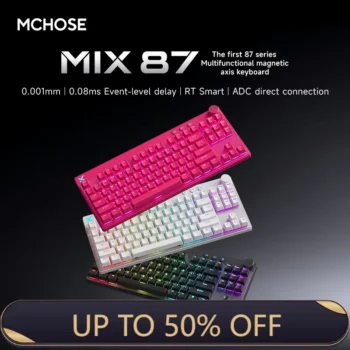

The MCHOSE MIX 87 Magnetic Gaming Keyboard is an 87-key Hall Effect gaming keyboard designed for players who want the precision and Rapid Trigger behavior of magnetic switches without giving up the convenience of a larger tenkeyless-style layout. Instead of using a conventional mechanical switch with one fixed electrical actuation point, the MIX 87 measures switch travel magnetically and allows the user to customize when individual keys activate and reset.
View MCHOSE MIX 87 Magnetic Gaming Keyboard
For U.S. buyers searching for an 87-key Hall Effect keyboard, magnetic gaming keyboard, Rapid Trigger keyboard, 8K polling keyboard, TKL gaming keyboard, low-latency esports keyboard, or gaming keyboard with a volume knob, the MIX 87 is positioned as a practical alternative to much smaller 60% and 65% Hall Effect boards. It keeps dedicated function keys, arrow keys, navigation keys, media-friendly controls, and a knob while still delivering adjustable actuation and high-performance magnetic sensing.
MCHOSE currently separates the MIX 87 family into performance tiers. The Advanced tier is listed with 0.005 mm accuracy, 0.125 ms advertised latency, and a 128K scan rate. The E-Sports tier reaches 0.001 mm accuracy, 0.08 ms advertised latency, and a 256K scan rate. Both support up to an 8000Hz polling rate and a 0.1–3.4 mm adjustable actuation range. Because switch choices and colors vary by version, buyers should verify the exact configuration selected before checkout.
This complete guide explains the MCHOSE MIX 87 platform for a U.S. audience, including Hall Effect sensing, Rapid Trigger, the 8K polling rate, scan rate, latency, magnetic switch options, hot-swap compatibility, M HUB software, advanced functions such as SOCD and DKS, RGB lighting, onboard memory, five-layer dampening, keycap design, the smart function area, gaming use, typing use, setup, maintenance, and the differences between Advanced and E-Sports configurations.

MCHOSE MIX 87 Magnetic Gaming Keyboard Product Overview
The MCHOSE MIX 87 Magnetic Gaming Keyboard uses an 80% 87-key layout that is close to the familiar tenkeyless format. It removes the dedicated numeric keypad found on a full-size keyboard but retains the function row, navigation cluster, arrow keys, and more dedicated controls than compact 60% or 65% gaming boards. For many players, this creates a useful balance between desk space and everyday convenience.
Official specifications list dimensions of approximately 358.9 × 151.9 × 37.1 mm and a weight of about 992 grams, with some product descriptions listing a tolerance of approximately ±30 grams. The keyboard uses wired USB connectivity, north-facing RGB LEDs, Cherry-profile PBT shine-through keycaps, and MCHOSE M HUB software for trigger, lighting, performance, profile, and firmware management.
MCHOSE MIX 87 Core Specifications
| Specification | MCHOSE MIX 87 Details |
|---|---|
| Layout | 80% / 87-key layout |
| Switch Technology | Hall Effect magnetic switches |
| Switch Choices | Lightning, Apollo, and Mount Tai Magnetic Switch GT options |
| Connection | Wired USB |
| Polling Rate | Up to 8000Hz |
| Scan Rate | 128K or 256K depending on performance tier |
| Advertised Latency | 0.125 ms or 0.08 ms depending on tier |
| Accuracy | 0.005 mm or 0.001 mm depending on tier |
| Actuation Range | 0.1–3.4 mm |
| Advanced Functions | SOCD, RS, DKS, MT, TGL, macros |
| Lighting | North-facing RGB / ARGB-style effects |
| Keycaps | Cherry-profile PBT shine-through keycaps |
| Software | MCHOSE M HUB web and desktop driver |
| Onboard Memory | Supported |
| Dimensions | 358.9 × 151.9 × 37.1 mm |
| Weight | Approximately 992 g |
MCHOSE MIX 87 Specifications Vary by Performance Tier
The strongest figures shown for the MIX 87 should not automatically be applied to every version. MCHOSE lists an Advanced performance tier and an E-Sports tier. The Advanced configuration uses lower maximum precision and scan-rate specifications than the E-Sports configuration, while both retain the same fundamental Hall Effect platform, 8K polling capability, adjustable actuation, M HUB customization, and advanced key functions. Buyers should verify the exact switch and product variation they select.
MCHOSE MIX 87 Hall Effect Magnetic Switch Technology
Hall Effect sensing is the central technology behind the MIX 87. Traditional mechanical switches normally register a press when physical electrical contacts meet. A Hall Effect switch instead uses a magnet and sensor to measure movement, allowing the keyboard to estimate where the switch is throughout its travel.
This makes the actuation point programmable. A gaming key can be configured to respond with very little movement, while another key can require a deeper press. The user is no longer limited to a single fixed switch actuation point chosen by the switch manufacturer.
MCHOSE MIX 87 Adjustable Actuation
MCHOSE lists an adjustable actuation range from 0.1 to 3.4 mm. A shallow setting can make movement keys respond quickly, while a deeper setting can help reduce accidental input. This flexibility is useful for players who want one keyboard to serve gaming, writing, coding, media control, and normal desktop work.
For example, W, A, S, and D can be configured at shallow values for movement, while Enter, Escape, number keys, or utility commands can use deeper actuation. This lets the board behave differently by key rather than forcing one sensitivity across the entire layout.
MCHOSE MIX 87 Sensitive Settings Should Match the User
The smallest actuation number is not automatically the best real-world setting. Extremely sensitive keys can react to light finger contact, especially during long gaming sessions. A moderate starting value is usually easier to control. The user can then lower the actuation point gradually and keep only the keys that genuinely benefit from maximum sensitivity at aggressive settings.

MCHOSE MIX 87 Rapid Trigger for Competitive Gaming
Rapid Trigger is one of the most important advantages of a modern magnetic gaming keyboard. A conventional mechanical switch typically activates and resets around fixed points. Hall Effect sensing allows the MIX 87 to change that behavior by tracking movement dynamically.
When a key begins moving upward, Rapid Trigger can release the input quickly instead of waiting for the switch to pass a traditional reset height. When the player presses again, the key can react according to the configured Rapid Trigger sensitivity. This can reduce unnecessary key travel in games that require repeated taps or rapid direction changes.
MCHOSE MIX 87 Rapid Trigger Accuracy
The Advanced MIX 87 is listed at 0.005 mm accuracy, while the E-Sports tier can reach 0.001 mm. M HUB also offers a performance mode that can expose very small RT steps when supported by the selected configuration. These values describe the precision of sensing and configuration rather than guaranteeing a directly perceivable improvement for every player.
MCHOSE MIX 87 Rapid Trigger and Counter-Strafing
FPS players may find Rapid Trigger especially relevant for counter-strafing and movement correction. Releasing one direction quickly and activating another can feel more immediate when the keyboard does not depend on a long fixed reset distance. The actual benefit still depends on player technique, game mechanics, frame rate, and the chosen trigger settings.
MCHOSE MIX 87 8000Hz Polling Rate
The MIX 87 supports polling rates of 1K, 2K, 4K, and 8K through M HUB. Polling rate describes how often the keyboard can report information to the computer over USB. An 8000Hz setting provides a much shorter theoretical reporting interval than the common 1000Hz standard.
Higher polling is most relevant on fast gaming systems where the rest of the input and display chain is already optimized. Players using high-refresh-rate monitors and high frame rates are more likely to care about reducing device-side delay than users working on an ordinary office PC.
MCHOSE MIX 87 8K Polling for High-Refresh Displays
For competitive setups using 240Hz, 360Hz, 480Hz, or similarly fast displays, an 8K keyboard can complement other low-latency peripherals. It helps ensure that keyboard USB reporting is not the slowest part of the hardware chain.
MCHOSE MIX 87 Does Not Need 8K for Every Workload
Ordinary typing, browsing, office work, and media control do not require maximum polling. M HUB lets the user choose lower settings when preferred. If a particular PC experiences instability or unnecessary overhead at 8K, testing 4K or 2K can be a practical troubleshooting step without losing the keyboard’s Hall Effect advantages.
MCHOSE MIX 87 Scan Rate and Advertised Latency
Polling rate and scan rate describe different stages of keyboard operation. Polling rate refers to USB communication with the computer, while scan rate refers to how frequently the keyboard checks switch states internally. The MIX 87 Advanced tier is listed at 128K scanning, while the E-Sports tier can reach 256K.
MCHOSE MIX 87 Advanced Tier Performance
The Advanced version is listed with 0.005 mm accuracy, 0.125 ms advertised latency, 128K scan rate, and 8K polling. These specifications are still highly performance oriented and provide the core magnetic gaming features, including adjustable actuation, Rapid Trigger, M HUB support, RGB lighting, advanced key behavior, and hot-swappable compatible magnetic switches.
MCHOSE MIX 87 E-Sports Tier Performance
The E-Sports tier raises the specification to 0.001 mm accuracy, 0.08 ms advertised latency, and a 256K scan rate. MCHOSE also lists RT Smart support and direct WASD connection to the ADC path for the higher-performance configuration.
MCHOSE MIX 87 Advertised Latency Is Not Total System Latency
Keyboard latency is only one part of the complete input-to-display process. USB processing, operating-system scheduling, game-engine timing, CPU performance, GPU rendering, frame pacing, display refresh rate, and monitor response all contribute. The MIX 87 aims to minimize keyboard-side delay, but the advertised keyboard number should not be interpreted as the total latency a player experiences.

MCHOSE MIX 87 Advanced vs E-Sports Versions
| Feature | MIX 87 Advanced | MIX 87 E-Sports |
|---|---|---|
| Accuracy | 0.005 mm | 0.001 mm |
| Advertised Latency | 0.125 ms | 0.08 ms |
| Scan Rate | 128K | 256K |
| Polling Rate | Up to 8K | Up to 8K |
| Actuation Range | 0.1–3.4 mm | 0.1–3.4 mm |
| RT Smart | Not listed | Supported |
| WASD Direct Connection | Not listed | Listed for E-Sports tier |
| Driver | M HUB | M HUB |
| Connectivity | Wired | Wired |
MCHOSE MIX 87 Advanced Is the Practical Entry to the Platform
The Advanced version retains the main reasons to buy a magnetic keyboard. It supports adjustable actuation, Rapid Trigger, 8K polling, advanced key functions, hot-swappable compatible magnetic switches, lighting control, onboard profiles, macros, and M HUB configuration.
MCHOSE MIX 87 E-Sports Targets Specification-Focused Players
The E-Sports version is aimed at buyers who want the strongest available precision, scan rate, and advertised latency. Competitive FPS enthusiasts using high-refresh gaming PCs are more likely to value these differences than ordinary users.
MCHOSE MIX 87 Buyers Should Verify the Selected Switch
Current official options include Lightning Magnetic Switch, Apollo Magnetic Switch, and Mount Tai Magnetic Switch GT. Exact switch availability varies by color and performance tier. Because marketplace listings may place several versions on one page, the safest approach is to verify the selected switch and performance specification directly in the variation field before ordering.
MCHOSE MIX 87 Magnetic Switch Options
MCHOSE currently offers multiple magnetic switch choices across the MIX 87 family. The product page lists Lightning Magnetic Switch, Apollo Magnetic Switch, and Mount Tai Magnetic Switch GT configurations. These are Hall Effect switches rather than conventional electrical-contact mechanical switches.
MCHOSE MIX 87 Mixed Magnetic Switch Support
MCHOSE also promotes mixed magnetic-switch support. Compatible magnetic switches can be used selectively so that different keys can have different feel or response characteristics. This can be useful for players who want movement keys configured differently from the rest of the board.
MCHOSE MIX 87 Requires Compatible Magnetic Switches
Hot-swappable does not mean every standard MX mechanical switch will work. MCHOSE’s compatibility guidance states that its magnetic keyboards require compatible two-pin magnetic switches with the correct magnet orientation. Incompatible switches can cause abnormal triggering, calibration problems, or complete failure to register.
MCHOSE MIX 87 Hot-Swappable Design
The MIX 87 supports hot-swappable compatible magnetic switches, allowing supported switches to be replaced without soldering. This is useful for maintenance because a faulty switch can be swapped individually rather than requiring replacement of the entire board.
MCHOSE MIX 87 Spare Switches
MCHOSE includes two spare switches in the official package. If a particular key behaves abnormally, the company’s troubleshooting guidance recommends checking firmware and calibration first, then testing with a spare switch when appropriate.
MCHOSE MIX 87 Calibration Matters After Switch Replacement
After changing a magnetic switch, the keyboard may need calibration or confirmation of the correct switch profile. Hall Effect sensing depends on magnetic position, so replacement should be followed by testing in M HUB rather than assuming every new switch will behave identically without adjustment.
MCHOSE MIX 87 Magnetic Switch Algorithm 3.0
MCHOSE markets the MIX 87 with Magnetic Switch Algorithm 3.0, an updated processing system intended to improve signal handling, actuation stability, and real-time recalibration. The goal is to make very sensitive magnetic settings more consistent during repeated gaming input.
MCHOSE MIX 87 Adaptive Dynamic Calibration 2.0
Adaptive Dynamic Calibration 2.0 automatically recalibrates during normal key presses when enabled. MCHOSE recommends leaving adaptive calibration active because repeated key use can help the keyboard maintain accurate switch sensing over time.
MCHOSE MIX 87 Stability Mode for Extreme Settings
M HUB also includes a stability mode intended for cases where extremely sensitive parameters create unstable triggering. If a player experiences unexpected key activation at aggressive settings, using stability optimization or slightly increasing trigger distance can provide a more reliable result.
MCHOSE MIX 87 M HUB Software
M HUB is the main configuration platform for the MIX 87. MCHOSE provides both a desktop driver and a browser-based web driver. The web version works through a supported Chromium-based browser such as Chrome or Edge and requires permission to communicate with the keyboard as an HID device.
MCHOSE MIX 87 Trigger Settings in M HUB
Users can adjust actuation, Rapid Trigger, and dead-zone parameters globally or on selected individual keys. This is one of the most important parts of the software because it allows movement keys to be highly sensitive while ordinary typing keys remain more deliberate.
MCHOSE MIX 87 Performance Settings
M HUB provides 1K, 2K, 4K, and 8K polling choices. It also includes performance-related options such as Rampage Mode, adaptive calibration, Windows-key lock, and stability optimization when supported by the current firmware and keyboard configuration.
MCHOSE MIX 87 Key Remapping and Layers
The larger 87-key layout already provides more dedicated controls than a 65% board, but users can still remap keys and configure keyboard layers. This helps the board adapt to different games, productivity tools, streaming workflows, or personal shortcut preferences.
MCHOSE MIX 87 M HUB Desktop and Web Drivers
The desktop version is useful for routine configuration and firmware updates, while the web driver provides browser-based access without a traditional installation. MCHOSE recommends connecting the keyboard directly to the computer rather than through an external expansion dock during configuration and troubleshooting.

MCHOSE MIX 87 SOCD, RS, DKS, MT, and TGL
The MIX 87 supports several advanced magnetic-key functions that go beyond ordinary remapping. These include SOCD, RS, DKS, MT, TGL, and macros. They can be useful for sophisticated gaming profiles, although some competitive environments may restrict certain input behaviors.
MCHOSE MIX 87 SOCD
SOCD controls how two opposing directional keys behave when pressed together. M HUB provides options such as last-input priority, Key 1 priority, Key 2 priority, or canceling both inputs. This can change the behavior of paired movement keys such as A and D.
MCHOSE MIX 87 RS
RS can determine which key becomes active based on travel depth when two configured keys are pressed. Because the Hall Effect sensor can measure how deeply each switch is moving, the keyboard can use that information to apply priority rules.
MCHOSE MIX 87 DKS
Dynamic Keystroke allows one physical key to perform multiple actions across different travel zones. MCHOSE documentation states that up to four functions can be assigned to a key through DKS configuration. This can create advanced game controls or workflow shortcuts.
MCHOSE MIX 87 MT and TGL
MT lets a key perform different functions for a tap and a hold, while TGL enables toggle-style continuous triggering for a configured action. These tools can reduce the number of physical keys needed for certain commands.
MCHOSE MIX 87 Competitive Players Should Check Game Rules
A keyboard feature being technically available does not mean it is permitted in every game, tournament, league, or anti-cheat environment. Players should review current rules for advanced directional behavior and macros before enabling them in ranked or organized competition.
MCHOSE MIX 87 Smart Function Area and Volume Knob
One of the main differences between the MIX 87 and smaller magnetic keyboards is the dedicated control area at the top of the board. MCHOSE includes a logo light, G1 key, RT key, Sun key, and a multifunction volume knob.
MCHOSE MIX 87 G1 Key
The G1 key is customizable. Its default function returns the user to the desktop, giving quick access to a frequently used system action while still allowing the command to be changed through customization.
MCHOSE MIX 87 RT Key
The RT key provides one-click switching of onboard configuration. This is useful when moving between a gaming profile and a typing or productivity profile without opening M HUB every time.
MCHOSE MIX 87 Sun Key
The Sun key provides quick control over keyboard backlight brightness. This dedicated control is useful in a larger layout because common lighting adjustments do not need to be hidden behind a complicated Fn combination.
MCHOSE MIX 87 Volume Knob
The knob rotates to adjust computer volume and can be pressed to mute or unmute audio. For gaming, streaming, video playback, or music, this provides faster media control than opening a system volume panel.
MCHOSE MIX 87 Is Designed for Gaming and Daily Desktop Use
These dedicated controls are part of what makes the MIX 87 different from smaller esports boards. It aims to provide Hall Effect gaming performance without forcing users to sacrifice the controls that make a keyboard convenient for work, media, and general desktop use.
MCHOSE MIX 87 North-Facing RGB Lighting
The MIX 87 uses north-facing RGB LEDs with MCHOSE SOFTLIGHT lighting technology. The official product page describes approximately 16 million customizable colors and supports multiple effects, brightness settings, animation controls, music rhythm effects, and custom visual behavior.
MCHOSE MIX 87 Music Rhythms 2.0
Music-reactive lighting is designed to synchronize visual effects with audio activity. This is primarily an aesthetic feature, but it can help the MIX 87 fit into RGB-focused gaming setups where the keyboard is part of the overall visual design.
MCHOSE MIX 87 Custom GIF Effects
MCHOSE also lists custom GIF effects among the MIX 87 feature set. This gives users more visual personalization than a basic static RGB keyboard and complements the dedicated logo-light area.
MCHOSE MIX 87 RGB Can Be Disabled
Users who prefer a simple work setup can turn off the lighting through M HUB or use the keyboard shortcut Fn + T. Brightness and other effects can also be adjusted without keeping maximum illumination active at all times.

MCHOSE MIX 87 Cherry-Profile PBT Shine-Through Keycaps
MCHOSE equips the MIX 87 with Cherry-profile PBT shine-through keycaps. PBT plastic is widely valued for resistance to the smooth, oily shine that can develop on lower-cost keycaps after extended use.
MCHOSE MIX 87 Front-Facing Shine-Through Legends
The floating keycap design uses front-facing shine-through legends so the lighting remains visible while giving the board a distinctive visual style. The floating design can also make routine surface cleaning easier because more of the area around the switches is exposed.
MCHOSE MIX 87 Keycap Feel Is Part of Daily Usability
For a keyboard intended to serve both gaming and work, keycap material matters. The PBT keycaps and familiar sculpted profile help the board remain practical for longer typing sessions instead of focusing only on competitive specifications.
MCHOSE MIX 87 Five-Layer Dampening
MCHOSE uses a five-layer internal dampening system to control keyboard acoustics. The E-Sports configuration is described with silicone sandwich material, a fiber switch pad, PET film, bottom cotton, and a silicone gasket, while the Advanced configuration uses a related multilayer stack.
MCHOSE MIX 87 Gasket and Dampening Structure
The purpose of the internal materials is to reduce hollow resonance and create a more controlled typing sound. Hall Effect gaming keyboards are often judged mainly by speed, but the MIX 87 also addresses everyday sound and feel.
MCHOSE MIX 87 Sound Depends on Switch and Desk Conditions
Actual keyboard sound varies with the selected magnetic switch, keycap set, desk mat, typing force, desk material, and room acoustics. Internal dampening helps manage resonance, but it cannot make every configuration sound identical.
MCHOSE MIX 87 Onboard Memory
Onboard memory lets personalized settings remain stored on the keyboard. M HUB can save items such as trigger travel, key mapping, macros, and lighting effects into onboard configurations.
MCHOSE MIX 87 Profile Switching
After profiles are stored, the user can switch between them without rebuilding settings from the beginning. This is especially useful for someone who wants one sensitive FPS profile, one general-gaming profile, and a deeper typing profile.
MCHOSE MIX 87 Configuration Import and Export
M HUB supports exporting and importing same-model configuration files and generating configuration codes. This can help users back up a carefully tuned setup or move settings between browsers and supported computers more efficiently.
MCHOSE MIX 87 for FPS Gaming
The MIX 87 is larger than a 60% or 65% esports board, but it still offers several features that matter to FPS players. Rapid Trigger, shallow adjustable actuation, 8K polling, high scan rates, SOCD options, and per-key tuning all focus on movement responsiveness.
MCHOSE MIX 87 for Counter-Strafing and Direction Changes
Players can configure movement keys separately from the rest of the board. A shallow actuation point combined with Rapid Trigger can reduce the travel needed to start, stop, and repeat directional input.
MCHOSE MIX 87 Offers More Controls Than Compact FPS Boards
The tradeoff is desk width. A smaller 60% keyboard leaves more mouse area, while the MIX 87 provides a function row, navigation keys, dedicated arrows, and smart media controls. Gamers should decide whether maximum mouse space or greater keyboard convenience matters more for their setup.
MCHOSE MIX 87 for MOBA, Action, and Rhythm Games
Hall Effect sensing is not limited to first-person shooters. Games that involve frequent key repetition, rapid ability sequences, or timing-sensitive input can also benefit from customizable trigger behavior.
MCHOSE MIX 87 Game-Specific Profiles
A MOBA profile may prioritize ability keys, while a rhythm-game profile may use sensitive actuation across a smaller group of keys. A productivity profile can use deeper actuation. Onboard profiles make it easier to maintain these different behaviors on one keyboard.
MCHOSE MIX 87 Advanced Features Should Be Used Intentionally
Overcomplicating every key can make a keyboard difficult to use. Most players will get better results by customizing the small number of keys that actually benefit from special behavior and leaving the rest closer to normal settings.
MCHOSE MIX 87 for Typing, Coding, and Productivity
The 87-key layout makes the MIX 87 especially attractive for users who want one keyboard for gaming and work. Dedicated function keys, arrows, navigation controls, and a volume knob reduce reliance on Fn layers compared with compact 60% and 65% boards.
MCHOSE MIX 87 Typing Profile
If an esports profile feels too sensitive for writing, increase the actuation distance and reduce Rapid Trigger sensitivity on normal typing keys. Magnetic switches make it possible to change the behavior through software rather than replacing the keyboard.
MCHOSE MIX 87 for Coding and Office Work
The function row and navigation cluster can be useful for development tools, text editing, spreadsheets, browser shortcuts, and other desktop tasks. The board still lacks a dedicated numeric keypad, but it provides substantially more direct control than many smaller Hall Effect gaming keyboards.
MCHOSE MIX 87 Is a Good Middle Ground for Gaming and Daily Use
Users who find 60% boards too restrictive but do not need a full-size numpad may appreciate the MIX 87 format. It keeps competitive magnetic-switch technology while preserving the familiar controls many people expect from a TKL-style keyboard.
MCHOSE MIX 87 Wired USB Connectivity
The MIX 87 is a wired keyboard. It does not rely on Bluetooth or 2.4GHz wireless connectivity. The wired design is consistent with its high polling-rate gaming focus and removes the need to manage battery charge during long sessions.
MCHOSE MIX 87 Direct USB Connection Is Recommended
MCHOSE recommends connecting the keyboard directly to a computer USB port, preferably a stable motherboard-connected port, rather than using an external expansion dock. This is particularly important when troubleshooting disconnects, firmware updates, or unstable high-performance settings.
MCHOSE MIX 87 Is Not the Best Choice for Wireless Multi-Device Users
If Bluetooth switching between a desktop, laptop, tablet, and phone is a priority, another keyboard will be more suitable. The MIX 87 prioritizes wired Hall Effect performance over multi-device wireless convenience.
MCHOSE MIX 87 Setup and Calibration
Initial setup is simple: connect the keyboard directly to the computer using the included Type-C cable and confirm that the board powers on. M HUB can then be opened through the desktop client or supported web driver for deeper configuration.
MCHOSE MIX 87 Beginner Setup Strategy
New Hall Effect users should begin with one of the available preset configurations or moderate trigger values. Adjust WASD first, test the results, and then change other keys only when there is a clear reason.
MCHOSE MIX 87 Key Testing
M HUB provides access to a key-testing tool so users can confirm whether individual keys and advanced functions are registering correctly. This is helpful after remapping, switch replacement, calibration, or firmware updates.
MCHOSE MIX 87 Factory Reset
MCHOSE’s troubleshooting documentation states that holding Fn + Esc for about five seconds can restore the MIX 87 to factory settings. M HUB also provides a reset option. Resetting removes customized trigger, remapping, macro, and other settings, so important profiles should be backed up when possible.
MCHOSE MIX 87 Colors and Appearance
Current official color choices include Black, White, and Rose Red. Exact switch availability varies by color. The larger chassis, floating keycap style, RGB lighting, logo light, dedicated control keys, and volume knob give the MIX 87 a more feature-rich appearance than minimalist compact esports keyboards.
MCHOSE MIX 87 Black
Black fits conventional gaming setups and provides strong contrast for RGB effects and shine-through legends.
MCHOSE MIX 87 White
White is suitable for brighter desktop builds and can pair naturally with white mice, PC cases, speakers, and desk accessories.
MCHOSE MIX 87 Rose Red
Rose Red is the more distinctive option for users who want the keyboard itself to become a visual part of the gaming setup.
MCHOSE MIX 87 Availability Can Change
Not every color is necessarily available with every switch or performance tier. Buyers should treat the current seller variation as the final source for the exact combination being ordered.

MCHOSE MIX 87 Package Contents
The official package includes one MIX 87 keyboard, one user guide, one Type-C cable, one keycap or switch puller, two spare switches, and one dust cover. Package contents are useful for basic maintenance because the spare switches and puller allow supported magnetic switches to be tested or replaced.
MCHOSE MIX 87 Dust Cover
The included dust cover can help keep debris from settling between the keys when the keyboard is not in use. This can be especially useful in rooms with open windows, pets, or high dust levels.
MCHOSE MIX 87 Marketplace Packages May Vary
Seller bundles can change by region or listing. Buyers should compare the exact OnlineDaraz variation and seller description with the official package list if a particular accessory is important.
MCHOSE MIX 87 Cleaning and Maintenance
Disconnect the keyboard before cleaning. A soft microfiber cloth can be used on the case and keycaps, while a soft brush or carefully controlled compressed air can remove loose debris around the floating keycap area.
MCHOSE MIX 87 Switch Maintenance
If one key begins behaving abnormally, first check trigger settings, calibration, firmware, USB stability, and the switch itself. The included spare switches make it possible to test whether the problem follows a particular switch.
MCHOSE MIX 87 Should Be Kept Away from Liquid
The keyboard should not be treated as waterproof. Keep drinks away from it where possible. If a spill occurs, disconnect power immediately and avoid continuing to use the keyboard while moisture may remain inside.
MCHOSE MIX 87 Advantages for U.S. Gamers
- 87-key 80% layout with more dedicated controls than 60% and 65% boards.
- Hall Effect magnetic switch sensing.
- Adjustable 0.1–3.4 mm actuation.
- Rapid Trigger support.
- Up to 8K polling.
- 128K or 256K scan rate depending on tier.
- 0.005 mm or 0.001 mm accuracy depending on tier.
- 0.125 ms or 0.08 ms advertised device latency depending on tier.
- Compatible magnetic switch hot-swap support.
- Lightning, Apollo, and Mount Tai GT switch options.
- SOCD, RS, DKS, MT, TGL, and macro functions.
- M HUB desktop and web drivers.
- Adaptive Dynamic Calibration 2.0.
- Onboard memory and profile switching.
- Dedicated G1, RT, and lighting-control keys.
- Integrated volume knob with mute control.
- North-facing customizable RGB lighting.
- Cherry-profile PBT shine-through keycaps.
- Five-layer internal dampening.
- Included spare switches, puller, and dust cover.
MCHOSE MIX 87 Considerations Before Buying
- The keyboard is wired only and does not provide Bluetooth or 2.4GHz wireless mode.
- The 87-key layout takes more desk space than a compact 60% or 65% esports keyboard.
- There is no dedicated numeric keypad.
- Advanced and E-Sports versions have different precision, latency, and scan-rate specifications.
- Switch availability can vary by color and version.
- Hot-swap compatibility is limited to supported magnetic switches.
- Extremely sensitive actuation or Rapid Trigger settings can cause accidental input if poorly tuned.
- Advanced SOCD and macro behavior may be restricted in some games or tournaments.
- The practical advantage of 8K polling depends on the rest of the gaming PC and display setup.
- Users who prioritize maximum mouse space may prefer a smaller Hall Effect keyboard.
MCHOSE MIX 87 Frequently Asked Questions
Is the MCHOSE MIX 87 a Hall Effect keyboard?
Yes. The MIX 87 uses Hall Effect magnetic switch sensing with adjustable actuation and Rapid Trigger support.
How many keys does the MCHOSE MIX 87 have?
It uses an 87-key 80% layout that is similar to a tenkeyless keyboard.
Does the MCHOSE MIX 87 support 8K polling?
Yes. M HUB provides polling settings up to 8000Hz.
What is the MIX 87 scan rate?
The Advanced tier is listed at 128K, while the E-Sports tier can reach 256K.
What is the MIX 87 accuracy?
The Advanced configuration is listed at 0.005 mm, while the E-Sports tier can reach 0.001 mm.
What is the MIX 87 latency?
MCHOSE lists 0.125 ms advertised latency for the Advanced tier and 0.08 ms for the higher E-Sports tier. These values describe keyboard-side performance, not complete PC-to-display latency.
What is the MIX 87 actuation range?
The official adjustable actuation range is 0.1–3.4 mm.
Does the MIX 87 support Rapid Trigger?
Yes. Rapid Trigger is a core part of the MIX 87 Hall Effect feature set.
Does the MIX 87 support SOCD?
Yes. M HUB supports SOCD together with RS, DKS, MT, TGL, and macros.
Does the MIX 87 have hot-swappable switches?
Yes, but it requires compatible magnetic switches rather than ordinary conventional mechanical switches.
Which switches are available for the MIX 87?
Current official options include Lightning Magnetic Switch, Apollo Magnetic Switch, and Mount Tai Magnetic Switch GT, with availability depending on color and configuration.
Can the MIX 87 use standard 3-pin or 5-pin mechanical switches?
No. MCHOSE states that its magnetic switch keyboards require compatible two-pin magnetic switches with the correct magnetic orientation.
Does the MIX 87 have RGB lighting?
Yes. It uses north-facing RGB LEDs and supports customizable effects, brightness, colors, music rhythm behavior, and related lighting controls.
What keycaps does the MIX 87 use?
MCHOSE lists Cherry-profile PBT shine-through keycaps.
Does the MIX 87 have a volume knob?
Yes. Rotating the knob adjusts system volume, and pressing it mutes or unmutes audio.
What does the MIX 87 RT key do?
The dedicated RT key provides one-click switching of onboard configuration.
What does the MIX 87 G1 key do?
The G1 key is customizable and defaults to returning the user to the desktop.
What does the Sun key do?
It provides quick keyboard-backlight brightness control.
Does the MIX 87 have onboard memory?
Yes. Personalized trigger, mapping, macro, lighting, and related settings can be stored in onboard configurations.
What software does the MIX 87 use?
It uses MCHOSE M HUB, available as a desktop driver and a browser-based web driver.
Can I customize individual keys?
Yes. Actuation and Rapid Trigger settings can be adjusted globally or on selected keys.
Is the MCHOSE MIX 87 wireless?
No. The current MIX 87 is a wired keyboard.
Does the MIX 87 have Bluetooth?
No. Bluetooth is not part of the current MIX 87 connectivity specification.
What are the MIX 87 dimensions?
The official dimensions are approximately 358.9 × 151.9 × 37.1 mm.
How much does the MIX 87 weigh?
MCHOSE lists the board at approximately 992 grams, with some specifications showing a tolerance of about ±30 grams.
How do I reset the MIX 87?
MCHOSE troubleshooting guidance lists holding Fn + Esc for approximately five seconds as a factory-reset method. M HUB also provides a reset option.
Is the MIX 87 good for FPS gaming?
Yes. Rapid Trigger, adjustable actuation, high polling, high scan-rate options, and advanced movement features make it suitable for FPS gaming, although its 87-key layout is wider than compact esports boards.
Is the MIX 87 good for typing and work?
Yes. The larger layout, function row, arrow keys, navigation controls, PBT keycaps, volume knob, and adjustable actuation make it more productivity-friendly than many compact Hall Effect keyboards.
Is the MCHOSE MIX 87 worth buying?
It can be a strong choice for users who want Hall Effect gaming performance but prefer a larger 87-key layout with dedicated controls and a volume knob instead of a minimal 60% or 65% board.
MCHOSE MIX 87 Final Buying Verdict
The MCHOSE MIX 87 Magnetic Gaming Keyboard is designed for users who want the speed and customization of a Hall Effect keyboard without giving up the convenience of a larger keyboard layout. It sits between compact esports boards and full-size productivity keyboards, making it particularly attractive for people who game and work at the same desk.
The magnetic switch platform is the biggest technical advantage. Adjustable actuation lets each key be tuned to the user’s preferences, while Rapid Trigger reduces dependence on fixed reset points. This gives competitive players much more control over movement input than a conventional mechanical keyboard with fixed switch behavior.
The performance ceiling is also strong. Both major tiers support 8K polling, while the E-Sports version reaches a 256K scan rate, 0.001 mm precision, and 0.08 ms advertised device latency. The Advanced version reduces those headline specifications to 128K scanning, 0.005 mm precision, and 0.125 ms advertised latency but retains the core Hall Effect experience.
For many players, the practical difference between the two versions will be smaller than the difference between either MIX 87 and a conventional fixed-actuation office keyboard. Buyers who want the highest measurable specification can target the E-Sports tier, while users focused on overall features may find the Advanced version sufficient.
The 87-key format is a major reason to consider the MIX 87. Smaller Hall Effect keyboards maximize mouse space but often remove the function row and dedicated navigation controls. The MIX 87 keeps those keys, adds a volume knob, and provides dedicated smart controls for desktop access, onboard configuration switching, and lighting brightness.
This makes the board easier to use outside gaming. Writers, coders, students, remote workers, and content creators can use a deeper typing profile while retaining quick access to normal desktop keys. Gamers can then switch to a more sensitive profile for FPS or action games.
M HUB adds substantial flexibility. Users can manage actuation, Rapid Trigger, dead zones, polling rate, calibration, remapping, macros, RGB effects, onboard configurations, firmware, and advanced functions. Presets can provide an easier starting point, while experienced users can tune individual keys more aggressively.
Advanced functions such as SOCD, RS, DKS, MT, and TGL expand what the keyboard can do, but they should be used deliberately. Competitive rules vary, so players should maintain profiles that comply with the specific games and tournaments they enter.
The switch ecosystem is another advantage. MCHOSE currently offers Lightning, Apollo, and Mount Tai Magnetic Switch GT options across the MIX 87 range. Compatible magnetic switches can also be replaced without soldering, making maintenance easier. Buyers should remember that magnetic hot-swap is not the same as standard mechanical hot-swap and ordinary 3-pin or 5-pin switches are not supported.
Adaptive Dynamic Calibration 2.0 and the current magnetic-switch processing algorithm are intended to maintain stable sensing as the keyboard is used. This becomes increasingly important when users experiment with extremely small trigger distances. If a key behaves unpredictably, calibration and sensible trigger values should be checked before assuming the keyboard has failed.
The five-layer internal dampening also helps the MIX 87 feel less like a purely performance-focused gaming product. The combination of internal pads, PET material, bottom cushioning, and gasket elements is intended to reduce hollow resonance and improve typing sound.
Cherry-profile PBT shine-through keycaps add another everyday-use benefit. PBT material is generally a sensible choice for a keyboard expected to handle long gaming and typing sessions, while the shine-through design complements the north-facing RGB system.
RGB lighting is extensive but optional. Users can configure colors, effects, brightness, music-responsive behavior, and other visual features through M HUB. Those who prefer a restrained office setup can simply reduce or disable the lighting.
The main compromise is size compared with compact esports boards. An 87-key keyboard uses more horizontal desk space than a 60% or 65% board. Players with very low mouse sensitivity and extremely large mouse swipes may still prefer a smaller keyboard. On the other hand, users who dislike relying on Fn layers will likely find the MIX 87 far more convenient.
The second major compromise is the wired-only design. It fits the board’s performance focus but will not satisfy users who want Bluetooth or 2.4GHz multi-device switching. The MIX 87 is intended primarily for a fixed PC gaming or desktop setup.
For U.S. shoppers searching for a MCHOSE MIX 87 magnetic gaming keyboard, 87 key Hall Effect keyboard, 8K polling gaming keyboard, Rapid Trigger keyboard, TKL magnetic keyboard, low latency gaming keyboard, gaming keyboard with volume knob, or Hall Effect keyboard for FPS gaming, the MIX 87 is a compelling option to compare.
The ideal buyer is someone who wants competitive magnetic-switch technology but finds very small layouts inconvenient. It is especially suitable for gamers who also type, work, study, edit, stream, or use media controls regularly and want one keyboard to handle both performance and daily desktop tasks.
Before ordering, confirm the selected switch, performance tier, color, accuracy specification, scan rate, and package contents. Marketplace listings can combine several configurations on one page, so the highest specification shown anywhere on the listing may not apply to the exact variation in the cart.
If the selected version matches your priorities, the MCHOSE MIX 87 offers a strong blend of Hall Effect responsiveness, 8K polling, advanced key control, larger-layout convenience, RGB customization, media controls, and everyday usability.
MCHOSE MIX 87 Shop and Compare
Compare the exact switch and performance tier before checkout, especially if you specifically want the 0.001 mm, 0.08 ms, 256K E-Sports configuration rather than the 0.005 mm, 0.125 ms, 128K Advanced version.