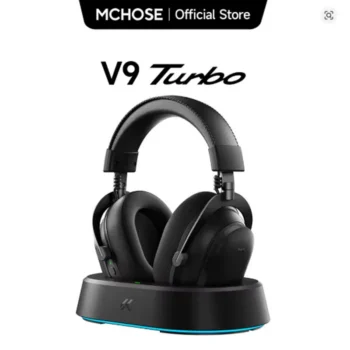

The MCHOSE V9 Turbo Magnetic Wireless Gaming Headset RGB is designed for gamers who want powerful 60 mm audio drivers, low-latency wireless gaming, Bluetooth flexibility, wired connectivity, a detachable microphone, long-session comfort, RGB styling, and extensive PC audio customization. Built around MCHOSE TOPSPEED wireless technology and a substantial 2000 mAh battery, the V9 Turbo series targets PC, PlayStation, Nintendo Switch, mobile, and multi-device users who want one gaming headset for both competitive play and everyday entertainment.
View MCHOSE V9 Turbo Wireless Gaming Headset
For U.S. shoppers searching for a wireless gaming headset, RGB gaming headset, low latency gaming headset, 2.4GHz gaming headset, gaming headset with microphone, or a wireless headset for PC and PS5, the MCHOSE V9 Turbo combines several features normally associated with premium gaming audio products in one over-ear design.
The headset uses large 60 mm composite diaphragm drivers, a detachable AI noise-canceling microphone with 360-degree voice pickup, an aluminum frame, 90-degree swivel earcups, ice-cooling protein-leather cushions, and multiple listening modes. MCHOSE M HUB software expands PC customization with features such as custom EQ, microphone monitoring, virtual 7.1 surround sound, and selectable gaming or music profiles.
This comprehensive guide explores the MCHOSE V9 Turbo’s audio hardware, wireless modes, microphone, comfort, battery, magnetic charging options, RGB design, software, virtual surround sound, gaming performance, platform compatibility, music playback, communication features, and the important details U.S. buyers should verify before ordering.

What Is the MCHOSE V9 Turbo Wireless Gaming Headset?
The MCHOSE V9 Turbo is an over-ear gaming headset developed for gaming, voice communication, media playback, and everyday PC use. It supports multiple connection methods so users are not limited to one device type or one wireless standard.
Depending on the exact version and package selected, the V9 Turbo family can also be associated with MCHOSE’s RGB magnetic charging base system. Buyers should verify the package contents of the specific variation they order because charging-base inclusion can differ between V9 Turbo and V9 Turbo+ packages or between different sellers.
Core MCHOSE V9 Turbo Features
- Driver: 60 mm composite diaphragm dynamic driver
- Frequency response: approximately 20 Hz–28,000 Hz
- Connection: 2.4 GHz wireless, Bluetooth, USB-C/wired modes
- Battery: 2000 mAh
- Frame: Aluminum construction
- Design: Multi-position 90-degree swivel earcups
- Ear cushions: Ice-cooling protein-leather style cushions
- Microphone: Detachable AI noise-canceling omnidirectional microphone
- Weight: Approximately 320 g without microphone on current Turbo+ specifications
- Software: MCHOSE M HUB desktop software
- Audio features: Virtual 7.1 surround, EQ customization, microphone monitoring
- Modes: Game Mode 1, Game Mode 2, Music Mode
- Platforms: PC, laptop, PS5, PS4, Nintendo Switch, mobile, tablet
Why the V9 Turbo Is More Than a Basic Wireless Headset
The V9 Turbo combines gaming-specific wireless communication with software audio processing and a more substantial physical design than simple Bluetooth headphones. This makes it suitable for users who move between competitive gaming, Discord or team chat, video, music, and general desktop use.
60 mm Composite Diaphragm Drivers
The V9 Turbo uses large 60 mm dynamic drivers. Driver size alone does not determine sound quality, but it influences how a headset is engineered and can provide substantial diaphragm area for reproducing bass, midrange, and high-frequency content.
Why Large Drivers Appeal to Gamers
Gaming soundtracks often combine deep explosions, ambient effects, dialogue, weapon sounds, footsteps, vehicles, and environmental detail simultaneously. A well-tuned driver must reproduce these layers without making important positional information difficult to hear.
Frequency Response for Games and Entertainment
Current V9 Turbo+ specifications list a frequency response from approximately 20 Hz to 28,000 Hz. This covers the conventional audible range and extends beyond it at the upper end.
Gaming Audio Is About Tuning, Not Only Driver Size
A 60 mm driver does not automatically outperform a smaller high-quality driver. Enclosure design, damping, digital processing, EQ, amplifier performance, ear-pad seal, and tuning all contribute to the final sound.
Use EQ to Match the Game
The MCHOSE M HUB system allows PC users to adjust equalization. Players can create a more balanced profile for music and another profile that emphasizes useful game details.

2.4 GHz Wireless for Competitive Gaming
For performance-focused gaming, the dedicated 2.4 GHz wireless connection is generally the most important wireless mode on the V9 Turbo.
Why 2.4 GHz Is Preferred for Gaming
A dedicated gaming receiver is designed to prioritize responsiveness and stable audio transmission. This makes 2.4 GHz more suitable than ordinary Bluetooth for competitive shooters and other games where audio timing matters.
MCHOSE TOPSPEED Wireless Technology
MCHOSE identifies its low-latency wireless platform as TOPSPEED Wireless Technology. The goal is to maintain a responsive connection for gaming while allowing users to play without a headset cable crossing the desk.
Wireless Range
Official V9 Turbo specifications list approximately 15 meters of transmission distance for the 2.4 GHz mode under suitable conditions.
Actual range can vary according to walls, interference, receiver placement, nearby wireless devices, and the physical environment.
Keep the Receiver Close for Competitive Play
Even when a headset supports a longer theoretical range, competitive gamers generally benefit from keeping the wireless receiver relatively close to the gaming position and away from heavy interference.
Bluetooth Connectivity for Everyday Devices
Bluetooth adds flexibility beyond the primary gaming computer or console.
Connect to Phones and Tablets
Bluetooth makes it practical to use the headset with smartphones and tablets for music, video, calls, and casual gaming.
Use Bluetooth With a Laptop
Users working on a laptop can connect without occupying a USB port with a dedicated receiver when low-latency gaming performance is not the priority.
Longer Transmission Range
MCHOSE lists Bluetooth transmission distance at up to approximately 40 meters under favorable conditions, although walls and interference can significantly reduce real-world range.
Use 2.4 GHz Instead for Competitive Games
Bluetooth is convenient, but a dedicated 2.4 GHz connection is generally the better choice when low latency and synchronized game audio are more important than device convenience.
Wired and USB-C Connection Options
Multi-mode connectivity means users are not forced to rely entirely on wireless operation.
Wired Gaming
A wired connection can be helpful when the battery is low or when users prefer a direct connection.
USB-C Flexibility
USB-C also provides a modern connection and charging method for compatible devices and accessories.
Useful for Troubleshooting
If wireless pairing or interference occurs, a wired connection can help determine whether the issue comes from the wireless environment or the headset itself.
One Headset for Multiple Connection Styles
The combination of 2.4 GHz, Bluetooth, Type-C, and wired use is particularly valuable for people who use several devices throughout the day.

2000 mAh Battery for Long Wireless Sessions
The V9 Turbo platform uses a large 2000 mAh battery. This is a substantial capacity for a wireless gaming headset and is intended to reduce how frequently players need to stop and recharge.
Battery Life Depends on Configuration
Actual runtime can change according to volume, wireless mode, RGB behavior, microphone usage, software features, battery age, and other factors.
Independent testing and product materials have reported very long endurance from the V9 Turbo family, but real-world users should treat maximum battery-life figures as estimates rather than guaranteed continuous runtime.
Long Battery Life Helps Competitive Players
Long sessions become easier when users do not need to monitor battery level every few hours. This is particularly useful for weekend gaming, streaming, long Discord calls, and extended work sessions.
Battery Level Monitoring
M HUB includes battery-level information so compatible PC users can monitor remaining charge rather than guessing.
Recharge Before Important Gaming Sessions
Even with a large battery, charging before tournaments, ranked sessions, travel, or extended online events is a useful habit.
Magnetic Charging Base and RGB Dock
One of the most visually distinctive features associated with the V9 Turbo+ package is the RGB magnetic charging base station.
Easy Drop-In Charging
The charging system is designed so the headset can be placed onto the magnetic base rather than requiring the user to connect a charging cable after every session.
Desktop Storage and Charging in One Place
A charging stand can help reduce desk clutter because the headset has a dedicated storage position when it is not being worn.
RGB Styling
The illuminated base can coordinate visually with an RGB keyboard, mouse, desktop case, monitor backlight, or other gaming accessories.
Verify That the Base Is Included
U.S. buyers should check the exact package selected. Current official listings distinguish package contents between versions, and some seller listings may offer the headset with or without the magnetic charging station.
AI Noise-Canceling Detachable Microphone
Voice communication is essential in multiplayer gaming, and the V9 Turbo uses a detachable microphone designed around AI-assisted noise reduction.
360-Degree Voice Pickup
The microphone uses an omnidirectional pickup design, allowing voice to be captured from multiple directions around the microphone capsule.
Noise Reduction for Team Chat
Noise-reduction processing is intended to reduce distracting environmental sounds so teammates can hear speech more clearly.
Detachable Design
The microphone can be removed when users are listening to music, watching movies, traveling, or simply do not need voice communication.
Microphone Frequency Range
Current specifications list the microphone response at approximately 100 Hz to 8,000 Hz, a range focused primarily on voice communication rather than studio vocal recording.
Gaming Microphone Versus Professional Recording Microphone
The V9 Turbo microphone is designed for game chat, calls, Discord, and related communication. Users producing professional voiceovers, podcasts, or studio recordings may still prefer a dedicated USB or XLR microphone.

Microphone Monitoring for Better Voice Control
Microphone monitoring allows users to hear some of their own voice through the headset while speaking.
Why Sidetone Can Help
Closed-back gaming headphones can make users speak more loudly than necessary because their own voice sounds quieter. Monitoring can make speaking volume easier to judge.
Useful for Discord and Team Communication
Players can communicate more naturally without constantly wondering whether they are shouting.
Adjust Monitoring to a Comfortable Level
Too much sidetone can become distracting, while too little may be difficult to notice. Use the software controls to find a practical balance.
Virtual 7.1 Surround Sound
The V9 Turbo supports virtual 7.1 surround processing through its software environment.
What Virtual 7.1 Means
The headset still uses conventional left and right physical drivers. Virtual surround processing manipulates audio signals to simulate a broader multi-directional sound field.
Potential Gaming Benefits
Some players enjoy virtual surround for cinematic games, open-world environments, racing, action titles, and movies.
Stereo Can Still Be Better for Some FPS Players
Competitive shooters often have sophisticated built-in spatial audio. Some players prefer clean stereo rather than additional virtual-surround processing.
Test Both Modes
There is no universal best setting. Compare stereo and virtual 7.1 with the same game and choose the configuration that makes positional information easiest for you to interpret.
Custom EQ Through MCHOSE M HUB
One of the most useful PC features of the V9 Turbo is MCHOSE M HUB support.
Adjust Bass
Players who enjoy cinematic explosions, music, and action games can create a bass-forward profile.
Emphasize Midrange and Detail
Competitive players may prefer a profile that reduces excessive low-frequency energy and makes certain environmental details easier to distinguish.
Create a Music Profile
A separate balanced EQ can be saved for music playback and entertainment.
Cloud EQ Sharing
Supported M HUB functions can provide EQ-sharing features that make it easier to experiment with different configurations.
Do Not Assume One EQ Works for Every Game
A tuning that works well for a tactical shooter may sound thin in a story-driven game or music playlist. Multiple profiles are more practical than one extreme setting.

Game Mode 1, Game Mode 2, and Music Mode
The V9 Turbo includes several selectable audio modes designed for different listening priorities.
Game Mode 1
One gaming profile can be used for general gaming where immersive effects and balanced presentation matter.
Game Mode 2
A second gaming mode provides another tuning option that users can compare with the first depending on the title being played.
Music Mode
Music Mode provides an alternative listening profile for songs, videos, streaming content, and other non-gaming audio.
Use Presets as Starting Points
Presets are convenient, but PC users can go further by adjusting custom EQ through M HUB.
MCHOSE V9 Turbo for FPS Gaming
Competitive shooters place special demands on gaming headsets because players need to identify sound direction while communicating with teammates.
Footstep Awareness
Games such as Counter-Strike 2, VALORANT, Call of Duty, Rainbow Six Siege, and Apex Legends rely heavily on environmental sound cues.
2.4 GHz Wireless for Low-Latency Audio
The dedicated wireless receiver should be the preferred connection for competitive PC gaming rather than Bluetooth.
Custom EQ for Competitive Audio
Players can experiment with reducing overwhelming bass and emphasizing useful midrange or upper-frequency details.
Game Audio Engines Are Different
An EQ optimized for one game may not produce identical benefits in another. Tune settings according to the specific game rather than relying on a universal “footstep” profile.
MCHOSE V9 Turbo for VALORANT and Counter-Strike 2
Tactical shooters make positional audio particularly important because a single sound can reveal an opponent’s movement or position.
Use 2.4 GHz Instead of Bluetooth
This helps prioritize responsive wireless communication between the headset and gaming system.
Compare Stereo and Virtual Surround
Both VALORANT and Counter-Strike provide their own spatial-audio processing approaches. Players should compare clean stereo against virtual 7.1 instead of assuming surround processing will always improve positional accuracy.
Keep Volume at a Safe Level
Increasing volume excessively does not necessarily make positional cues easier to understand and can create listening fatigue.
Consistency Improves Audio Learning
Using the same EQ and volume settings for several sessions can help players learn how different surfaces, distances, and locations sound within a game.
MCHOSE V9 Turbo for Call of Duty and Battle Royale Games
Call of Duty, Warzone, Fortnite, PUBG, and Apex Legends combine positional audio with large dynamic effects.
Large Drivers for Cinematic Impact
60 mm drivers can support substantial low-frequency output for explosions, vehicles, and environmental effects when appropriately tuned.
Communication During Squad Play
The detachable microphone helps keep team communication available during multiplayer sessions.
Long Battery Capacity for Extended Matches
A 2000 mAh battery reduces the need to stop and recharge during long gaming days.
Create a Balanced Competitive Profile
Too much bass can sometimes mask quieter information. A carefully adjusted EQ can balance cinematic impact with useful environmental detail.

90-Degree Swivel Earcup Design
The V9 Turbo uses multi-position 90-degree swivel earcups.
Adaptive Fit
Swivel movement allows the earcups to align more naturally with different head shapes.
Comfort When Resting Around the Neck
Rotating earcups can sit flatter when the headset is temporarily removed and placed around the neck.
Easier Storage
A flatter orientation can also make the headset easier to place on a desk or compatible charging stand.
Fit Remains Personal
Head shape, ear size, glasses, hairstyle, and clamp preference can all change how comfortable an over-ear headset feels.
Aluminum Frame Construction
MCHOSE uses an aluminum frame in the V9 Turbo design.
Why Aluminum Is Useful
Metal can provide additional structural rigidity while allowing parts of the headset to remain relatively slim.
Premium Feel
An aluminum headband can also make the headset feel more substantial than an all-plastic construction.
Weight Still Matters
At approximately 320 grams without the microphone on current specifications, the V9 Turbo is not an ultra-light headset. Comfort therefore depends heavily on weight distribution, ear-pad design, and headband pressure.
Ice-Cooling Protein Leather Ear Cushions
The V9 Turbo uses what MCHOSE describes as ice-cooling protein-leather ear cushions.
Soft Surface Contact
Protein-leather style surfaces are designed to feel smooth against the skin and help create an over-ear seal.
Seal Affects Sound
A secure cushion seal influences bass response and passive isolation. Glasses, hair, and head shape can change that seal.
Heat Management Matters During Long Sessions
Over-ear synthetic-leather cushions can feel warmer than open fabric materials for some users. Replacement or alternate ear pads included with certain packages can provide another comfort option.
Verify Included Ear Pads
Package contents can vary between V9 Turbo and Turbo+ versions, so confirm whether replacement breathable ear cushions are included with the exact variation being purchased.

Approximate 320-Gram Weight and Long-Session Comfort
Current V9 Turbo+ specifications list the headset at approximately 320 grams without the microphone.
Weight Distribution Matters More Than the Number Alone
A well-balanced 320-gram headset can sometimes feel more comfortable than a poorly balanced lighter headset.
Headband Pressure
A secure fit helps prevent movement, but excessive clamping pressure can become uncomfortable over long sessions.
Take Listening Breaks
Even a comfortable headset can produce heat and pressure during multi-hour gaming. Short breaks can improve comfort and reduce listening fatigue.
Glasses Wearers Should Evaluate Cushion Pressure
Eyeglass frames can create additional pressure between the ear cushions and the sides of the head. Fit can therefore differ significantly between users.
MCHOSE V9 Turbo for PS5 and PS4
MCHOSE lists the V9 Turbo platform as compatible with PlayStation 5 and PlayStation 4.
Wireless Console Gaming
The supported wireless receiver provides a convenient way to use the headset without a long cable across the gaming area.
Microphone for Multiplayer Chat
The detachable microphone supports online team communication in compatible games and system configurations.
Software Features May Be PC-Focused
M HUB is a desktop software environment, so console users should not assume every PC-only EQ or driver feature can be adjusted directly from the PlayStation console.
Configure on PC When Appropriate
If settings can be stored or carried over by the headset, PC configuration may be useful before returning to console use. Available behavior can depend on firmware and mode.
MCHOSE V9 Turbo for Nintendo Switch
The headset is also listed as compatible with Nintendo Switch.
Useful for Docked Gaming
A supported USB receiver can make the headset practical for playing from a television without running a cable across the room.
Portable Bluetooth Use
Bluetooth can also provide flexibility for compatible portable-device configurations.
Check Individual Game Voice-Chat Requirements
Nintendo games can handle voice communication differently, so headset compatibility does not guarantee identical microphone functionality in every title.
Using the V9 Turbo With Smartphones and Tablets
Bluetooth makes the headset useful outside a conventional gaming desk.
Music and Streaming
Users can listen to music, YouTube, movies, podcasts, and streaming platforms from a phone or tablet.
Mobile Gaming
The over-ear design can provide a more immersive experience than phone speakers or basic earbuds.
Voice Calls
The microphone and wireless connection can also support suitable communication applications.
Bluetooth Latency Can Vary
For games where audio timing is critical, a dedicated low-latency wireless connection remains preferable whenever the device supports it.

Using the V9 Turbo for Music and Movies
The V9 Turbo is not limited to competitive gaming.
Music Playback
Custom EQ allows listeners to adjust bass, vocals, and high-frequency presentation according to personal preference.
Movie Watching
Large drivers and optional virtual surround can provide an immersive presentation for action movies and cinematic content.
YouTube and Streaming
Wireless freedom makes it easier to move around while continuing to listen to long videos, podcasts, or streams.
Create Separate Gaming and Entertainment EQ Profiles
A competitive FPS profile may emphasize different frequencies than a music or movie configuration. Saving separate profiles prevents unnecessary compromise.
Closed-Back Over-Ear Design
The V9 Turbo uses a closed-back over-ear design.
Passive Isolation
Closed earcups can reduce some environmental noise by physically surrounding the ears.
Stronger Bass Seal
A good ear-pad seal can support consistent low-frequency response.
No Active Noise Cancellation
The headset should not be confused with ANC travel headphones. Current specifications and independent testing identify it as a gaming headset without active noise cancellation.
Environmental Awareness Is Reduced
Because over-ear closed-back headphones reduce some outside sound, users should remain aware of their surroundings where necessary.
On-Headset Controls
Gaming headsets are easier to use when essential functions are available physically rather than requiring software every time.
Volume Control
On-headset volume adjustment allows quick changes during games.
Power Controls
Physical power management simplifies switching the headset on or off.
Microphone Mute
A dedicated mute function can be important during multiplayer communication and calls.
Quick Switching
Available controls can help users change modes or connection behavior without leaving the game.
Learn Controls Before Competitive Play
Knowing the location of mute and volume controls prevents users from searching for buttons in the middle of a match.
How to Set Up the MCHOSE V9 Turbo for PC Gaming
Step 1: Charge the Headset
Begin with sufficient battery capacity before configuring wireless settings.
Step 2: Connect the 2.4 GHz Receiver
Use the dedicated wireless receiver for performance-focused PC gaming.
Step 3: Select the Headset in Windows
Confirm that the V9 Turbo is selected as both the output and input device where appropriate.
Step 4: Install MCHOSE M HUB
Use the manufacturer’s compatible desktop software to access additional audio and microphone controls.
Step 5: Test the Microphone
Check voice volume and noise reduction before entering multiplayer matches.
Step 6: Compare Audio Modes
Test Game Mode 1, Game Mode 2, Music Mode, stereo, and virtual surround.
Step 7: Build a Custom EQ
Make gradual adjustments and compare them in the same game environment.
Change One Audio Setting at a Time
Changing EQ, surround, game mode, microphone processing, and system audio simultaneously makes it difficult to determine which change improved the sound.
How to Create an FPS Audio Profile
Begin With a Neutral Baseline
Listen to the game using default or relatively balanced settings before making large changes.
Reduce Excessive Bass if Necessary
Explosions and effects can become dominant in some games. Moderating low frequencies may help quieter details remain easier to distinguish.
Adjust Midrange and Treble Gradually
Environmental cues often occupy a broad frequency range, so extreme treble boosting is not automatically better.
Compare With Real Gameplay
Test footsteps, reloads, doors, environmental movement, vertical positioning, and team communication.
Protect Your Hearing
Do not compensate for poor positional clarity by simply raising overall volume excessively. Comfortable listening levels are more sustainable for long gaming sessions.

How to Maintain the V9 Turbo Gaming Headset
Clean the Ear Cushions
Wipe the surfaces periodically with a soft cloth appropriate for the material. Sweat and skin oils can accumulate after long gaming sessions.
Keep the Microphone Connector Clean
If the detachable microphone is removed frequently, avoid allowing dust to collect around the connection point.
Protect the USB Receiver
Small wireless receivers are easy to misplace. Store the receiver safely when traveling.
Keep Firmware and M HUB Updated
Software updates can improve compatibility, stability, and available functionality.
Store the Headset Properly
Use the charging stand when included or place the headset in a location where the earcups and microphone will not be crushed.
Avoid Extreme Heat and Moisture
Wireless headsets contain batteries and electronic components. Do not leave the headset in excessively hot vehicles, wet environments, or other damaging storage conditions.
MCHOSE V9 Turbo Versus a Basic Bluetooth Headset
Gaming-Focused 2.4 GHz Wireless
A basic Bluetooth headset may be sufficient for music and calls, while the V9 Turbo provides a dedicated wireless mode intended for gaming responsiveness.
M HUB Software
Custom EQ, virtual surround, microphone monitoring, and gaming modes provide significantly more control than simple Bluetooth headphones typically offer.
Detachable Gaming Microphone
The boom microphone is designed specifically around voice communication rather than relying only on small built-in phone-call microphones.
Multi-Platform Compatibility
PC, console, mobile, and tablet support makes the headset more versatile for mixed-device gaming setups.
Bluetooth Headphones May Still Be Better for Travel
Users who prioritize active noise cancellation, extremely compact folding designs, or commuter features may prefer dedicated travel headphones instead.
MCHOSE V9 Turbo Versus Wired Gaming Headsets
Wireless Freedom
The most obvious advantage is the ability to move without a cable connected to the gaming PC.
Battery Management
Unlike a passive wired headset, wireless models need charging.
Charging Base Convenience
When included, the magnetic base can make battery management substantially easier because the headset has a natural charging location after every session.
Wired Mode Provides a Backup
The availability of wired connectivity reduces the disadvantage of depending entirely on battery power.
Who Should Consider the MCHOSE V9 Turbo?
Competitive PC Gamers
Low-latency 2.4 GHz wireless, EQ controls, microphone communication, and virtual surround options make it relevant to competitive setups.
Players Who Want Long Wireless Endurance
The large 2000 mAh battery is especially appealing to gamers who dislike frequent charging.
Multi-Platform Gamers
Users who play on PC, PS5, PS4, Nintendo Switch, and mobile devices can benefit from broad connectivity.
Discord and Multiplayer Users
The detachable AI noise-canceling microphone and microphone-monitoring features are useful for regular voice communication.
RGB Setup Enthusiasts
The magnetic RGB charging station available with applicable packages fits naturally into coordinated gaming desktops.
Users Who Want Music and Gaming From One Headset
Custom EQ and multiple listening modes allow the headset to move beyond games.
Who May Prefer Another Headset?
Users who need active noise cancellation, extremely lightweight travel headphones, audiophile open-back presentation, or a professional broadcast microphone may prefer a more specialized product.

What U.S. Buyers Should Check Before Ordering
Confirm Whether You Are Buying V9 Turbo or V9 Turbo+
MCHOSE documentation references both V9 Turbo and V9 Turbo+ versions. Their package contents and certain specifications can differ.
Confirm the Magnetic Charging Base
If the RGB magnetic charging station is an important reason for buying the headset, verify explicitly that it is included in the selected package.
Check Included Ear Cushions
Replacement breathable ear pads are included with some current packages but should not be assumed for every seller variation.
Check the 2.4 GHz Receiver
Confirm that the wireless receiver needed for low-latency gaming is included.
Review Available Colors
Current official listings include colorways such as Steel Black, Black Gold, Icy White, Berry Red, White Gold, and other options depending on availability.
Check Console Compatibility
Confirm that the exact connection method you intend to use is supported by your PC, PlayStation, Switch, phone, or tablet.
Review U.S. Shipping Terms
International shoppers should review delivery estimates, tracking, taxes, seller policies, warranty information, and return conditions before checkout.
Keep the Original Packaging Until Testing Is Complete
Test the 2.4 GHz receiver, Bluetooth, microphone, earcups, controls, M HUB connection, charging system, and wired mode before discarding the box and accessories.
Frequently Asked Questions About the MCHOSE V9 Turbo
What size drivers does the MCHOSE V9 Turbo use?
The V9 Turbo platform uses 60 mm dynamic composite-diaphragm drivers.
Is the MCHOSE V9 Turbo wireless?
Yes. It supports low-latency 2.4 GHz wireless and Bluetooth in addition to wired connection options.
Does it have Bluetooth?
Yes. Bluetooth provides convenient connectivity for laptops, phones, tablets, and other compatible devices.
Does it work with PC?
Yes. PC is one of the primary supported platforms, and MCHOSE M HUB provides additional PC customization.
Does it work with PS5?
Yes. MCHOSE lists PlayStation 5 among the supported platforms.
Does it work with PS4?
Yes. PS4 is also listed among compatible gaming platforms.
Does it support Nintendo Switch?
Yes. The headset is listed as compatible with Nintendo Switch.
Can it be used with phones?
Yes. Bluetooth makes the headset suitable for compatible smartphones and tablets.
What is the battery capacity?
The V9 Turbo+ platform uses a 2000 mAh battery.
How heavy is the headset?
Current V9 Turbo+ specifications list approximately 320 grams without the detachable microphone.
Does it have active noise cancellation?
No. It uses a closed-back design and microphone noise-reduction processing, but it should not be confused with ANC headphones.
Does the microphone have noise cancellation?
MCHOSE describes the detachable microphone as an AI noise-canceling microphone with 360-degree voice pickup.
Is the microphone removable?
Yes. The boom microphone is detachable.
Does it support 7.1 surround sound?
Yes. MCHOSE M HUB supports virtual 7.1 surround processing.
Can I change the EQ?
Yes. Custom EQ is available through MCHOSE M HUB on supported systems.
Does it have microphone monitoring?
Yes. Microphone monitoring is included among the supported software features.
What is the 2.4 GHz wireless range?
MCHOSE lists up to approximately 15 meters under suitable conditions.
What is the Bluetooth range?
The listed Bluetooth transmission distance is up to approximately 40 meters under favorable conditions.
Do the earcups rotate?
Yes. The V9 Turbo uses multi-position 90-degree swivel earcups.
Does the headset have an aluminum frame?
Yes. The headband structure uses aluminum.
Does the magnetic charging dock come with every V9 Turbo?
Buyers should not assume so. Package contents vary between V9 Turbo, V9 Turbo+, and seller bundles. Confirm the exact selected package before ordering.
Is 2.4 GHz better than Bluetooth for gaming?
For performance-focused gaming, the dedicated 2.4 GHz connection is generally the preferred option because it is designed to provide lower-latency communication than conventional Bluetooth.
Why the V9 Turbo Fits Modern Gaming Setups
Modern gamers increasingly use one desk for several activities. A PC may be used for competitive gaming in the evening, Discord calls with friends, remote work during the day, streaming media, music, and console gaming from the same monitor.
The MCHOSE V9 Turbo is designed around that type of flexible environment.
One Headset for Gaming and Communication
The detachable microphone means the headset can function as a gaming communication device when needed and a cleaner entertainment headset when the microphone is removed.
One Headset for Multiple Devices
The combination of 2.4 GHz, Bluetooth, Type-C, and wired connectivity reduces the need to maintain separate headphones for every device.
Software for PC Enthusiasts
M HUB provides additional control for people who enjoy customizing their peripherals.
Charging Convenience
When the RGB magnetic charging base is included, storage and charging become part of the same daily routine.
Balance Features With Actual Needs
Buyers should still consider which features they will genuinely use. A competitive PC gamer may prioritize the 2.4 GHz mode and EQ, while a multi-device user may value Bluetooth and battery life more heavily.

Final Thoughts on the MCHOSE V9 Turbo Wireless Gaming Headset
The MCHOSE V9 Turbo Magnetic Wireless Gaming Headset RGB brings together several features that U.S. PC and console gamers commonly look for in a modern headset: large 60 mm drivers, low-latency 2.4 GHz wireless, Bluetooth convenience, wired connectivity, a detachable communication microphone, virtual surround processing, customizable EQ, a large battery, and a sturdy aluminum frame.
The 60 mm composite-diaphragm drivers provide the acoustic foundation for gaming effects, dialogue, music, and positional cues. With a listed response extending from approximately 20 Hz to 28,000 Hz, the headset is designed to handle both low-frequency impact and detailed higher-frequency content.
For competitive players, the dedicated 2.4 GHz connection is one of the most important features. It provides a gaming-focused wireless mode that should generally be preferred to Bluetooth when audio synchronization and responsiveness are priorities.
Bluetooth remains valuable for other situations. It makes the same headset useful with laptops, phones, and tablets without requiring the gaming receiver. Wired and Type-C options provide further flexibility and a useful backup when wireless operation is not required.
The 2000 mAh battery is another major strength of the platform. Large battery capacity can reduce charging interruptions during extended gaming sessions, while battery monitoring through M HUB helps PC users keep track of remaining power.
Comfort features include 90-degree swivel earcups, an aluminum frame, and ice-cooling protein-leather style cushions. The approximately 320-gram weight is more substantial than ultra-light headsets, so individual comfort will depend on head shape, clamping pressure, ear size, glasses, and preferred cushion material.
The detachable AI noise-canceling microphone is designed for multiplayer communication and includes omnidirectional voice pickup. Microphone monitoring can help users regulate speaking volume during Discord calls and team chat.
MCHOSE M HUB adds another level of flexibility with virtual 7.1 surround, custom EQ, battery information, microphone monitoring, Game Mode 1, Game Mode 2, and Music Mode. These settings make it possible to create different audio profiles for competitive FPS gaming, cinematic titles, movies, and music.
The optional or package-dependent magnetic RGB charging base is one of the most distinctive parts of the V9 Turbo family. When included, it gives the headset a dedicated place to rest while charging and adds coordinated RGB lighting to the gaming desk.
View MCHOSE V9 Turbo Product Details
Before ordering, U.S. buyers should verify whether the selected product is the V9 Turbo or V9 Turbo+, whether the RGB magnetic charging base and replacement ear pads are included, which color has been selected, and which accessories come in the package. Shipping times, warranty terms, and return policies should also be reviewed when purchasing internationally.
For gamers searching for a wireless gaming headset for PC, 2.4GHz gaming headset, RGB gaming headset, gaming headset with AI microphone, or multi-platform wireless headset for PC, PS5, Switch, and mobile devices, the MCHOSE V9 Turbo offers a strong combination of gaming-focused wireless performance, software customization, long-session flexibility, and modern RGB styling.