
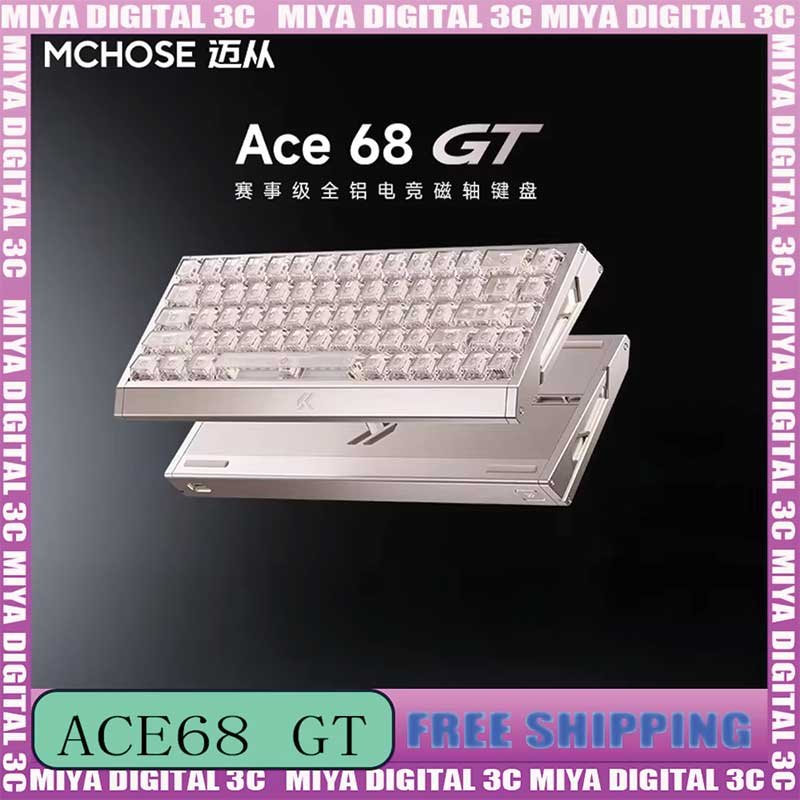
The MCHOSE ACE 68 GT Magnetic Keyboard is a premium 65% Hall Effect gaming keyboard built for players who prioritize extremely fast input, adjustable magnetic actuation, Rapid Trigger performance, compact desk space, and the stability of a full aluminum chassis. Designed primarily for competitive esports and FPS gaming, the ACE 68 GT combines a 68-key layout with advanced magnetic sensing, a 16,000 Hz polling rate, a 256K scan rate, 0.001 mm sensing precision, and claimed latency as low as 0.06 ms.
View MCHOSE ACE 68 GT 16K Gaming Keyboard
For U.S. gamers searching for a 16K gaming keyboard, Hall Effect keyboard, magnetic switch gaming keyboard, Rapid Trigger keyboard, or a compact esports keyboard for VALORANT and Counter-Strike 2, the ACE 68 GT sits at the performance-focused end of MCHOSE’s magnetic keyboard lineup.
The model uses MCHOSE’s Mount Tai Pink Magnetic Switch GT, a new-generation Hall Effect sensor, a dual-core MCU, and a full CNC aluminum body. Its combination of premium construction and high-speed input technology makes it especially interesting for players who want both competitive responsiveness and a substantial enthusiast-style keyboard feel.
This comprehensive guide explains the ACE 68 GT’s Hall Effect technology, 16K polling, Rapid Trigger behavior, adjustable actuation, magnetic switches, aluminum chassis, carbon-fiber plate, RGB lighting, advanced gaming functions, software customization, FPS performance, typing usability, setup process, and important considerations for U.S. buyers.

What Is the MCHOSE ACE 68 GT Magnetic Gaming Keyboard?
The MCHOSE ACE 68 GT is a 68-key, 65% ANSI gaming keyboard designed around Hall Effect magnetic-switch technology. Unlike a traditional mechanical keyboard that relies primarily on fixed physical switch contacts, a Hall Effect keyboard detects key travel magnetically.
This allows the keyboard to measure how far a compatible magnetic switch has moved and lets the user change when a key activates or resets through software.
The result is a keyboard that can be configured much more precisely than a conventional fixed-actuation board.
Built for Competitive FPS Gaming
MCHOSE positions the ACE 68 GT as a flagship model for competitive shooters and fast-paced esports titles. Its compact layout leaves additional mouse space while its magnetic switches allow players to tune movement keys for rapid activation and release.
68-Key 65% Layout
The keyboard removes the dedicated number pad and much of the unused width of a traditional full-size keyboard while retaining arrow keys and useful navigation controls.
This configuration provides a balance between compact gaming dimensions and practical everyday usability.
Compact Size With Premium Construction
Unlike many lightweight esports boards that use mostly plastic housings, the ACE 68 GT combines its compact footprint with a full CNC aluminum chassis for a heavier and more stable desktop feel.
Hall Effect Magnetic Switch Technology Explained
Hall Effect switches operate by measuring changes in a magnetic field as the switch stem moves. This allows the keyboard’s sensor to track key travel continuously instead of waiting only for a conventional mechanical contact point.
Why Magnetic Sensing Matters
A traditional switch usually has a predetermined actuation position. The player cannot significantly change that point without physically replacing the switch.
With the ACE 68 GT, actuation can be adjusted through software. This means movement keys can be configured to activate after very little travel while other keys can require a deeper press.
More Control Over Individual Keys
Not every key needs to use the same trigger setting. A player can make WASD highly responsive while keeping keys such as Escape, Tab, or secondary commands less sensitive.
Hall Effect Is About Control as Much as Speed
The main benefit is not simply making every key activate as early as possible. Magnetic sensing gives the player control over how the keyboard responds to different kinds of key movement.
Mount Tai Pink Magnetic Switch GT
The ACE 68 GT is built around the Mount Tai Pink Magnetic Switch GT configuration. These magnetic switches are designed specifically for Hall Effect sensing and competitive keyboard behavior.
Designed for Adjustable Actuation
Because the keyboard detects switch position magnetically, the activation point can be customized without physically modifying the switch.
Useful for Rapid Trigger
The magnetic switch platform also enables dynamic reset behavior. Instead of relying only on one fixed physical reset position, the keyboard can detect when the key begins moving upward and reset according to configured parameters.
Hot-Swappable Magnetic Design
Compatible magnetic switches can be replaced without traditional soldering, making maintenance and customization easier.
Magnetic Switch Compatibility Is Not Universal
Users should not assume that every mechanical or Hall Effect switch on the market will work correctly. Replacement switches should be verified for physical, magnetic, and firmware compatibility with the ACE 68 GT.

16K Polling Rate for Competitive Gaming
One of the headline specifications of the MCHOSE ACE 68 GT is its support for a polling rate of up to 16,000 Hz.
Polling rate refers to how frequently the keyboard can send input information to the computer. A typical gaming keyboard operating at 1,000 Hz can theoretically send updates once every millisecond.
A 16,000 Hz polling configuration dramatically increases the potential reporting frequency.
Why High Polling Can Matter
Competitive gamers using high-refresh-rate monitors and fast systems often try to minimize delays throughout the complete input pipeline.
A higher keyboard polling rate can reduce the theoretical time between USB input reports.
16K Is Not Required for Every Gamer
Most players can game effectively on a well-designed 1,000 Hz keyboard. The difference becomes more relevant for competitive enthusiasts who use high-refresh displays and are intentionally optimizing peripheral response.
Higher Polling Can Increase System Demand
Very high USB polling rates can require additional CPU processing compared with conventional settings. If a game or system behaves unexpectedly, testing lower polling options can be useful.
Choose the Setting That Performs Best on Your PC
The maximum specification is not automatically the optimal setting for every computer. Stable frame rate and consistent system performance remain more important than simply selecting the largest available number.
256K Scan Rate Explained
The ACE 68 GT is also rated with a 256K internal scan rate. Scan rate and polling rate are related to responsiveness but describe different parts of the keyboard’s input pipeline.
What Scan Rate Means
Scan rate refers to how frequently the keyboard’s electronics check switch states internally.
What Polling Rate Means
Polling rate describes how frequently processed keyboard information is reported to the connected computer.
Why Both Matter
The keyboard first needs to detect the physical switch movement accurately and then communicate that information to the system.
Fast Internal Detection Supports Rapid Input
A high scan rate helps reduce the delay between physical movement and the point at which the keyboard controller recognizes that change.
Claimed 0.06 ms Latency
MCHOSE lists the ACE 68 GT with claimed keyboard latency as low as 0.06 ms under its stated performance conditions.
What Keyboard Latency Represents
Keyboard latency describes a portion of the time between physical input and the keyboard reporting or processing that input.
Total Gaming Latency Is Much Larger
The keyboard is only one part of the complete chain. CPU performance, game processing, graphics rendering, monitor refresh rate, network latency, and other factors contribute to the final experience.
Do Not Interpret 0.06 ms as Total Game Response Time
The figure is a keyboard performance specification, not a guarantee that your entire game system will respond within 0.06 ms.
0.001 mm Magnetic Sensing Precision
The ACE 68 GT’s Hall Effect system is rated for sensing precision down to 0.001 mm.
This extremely fine measurement capability supports advanced trigger tuning and Rapid Trigger behavior.
Why Precision Matters for Rapid Trigger
Rapid Trigger depends on detecting very small changes in switch travel. Higher sensing precision allows the firmware to respond to subtle changes in movement direction.
Precision Does Not Mean You Must Use Extreme Settings
Players do not need to consciously move a key by exactly 0.001 mm. The specification describes the system’s detection capability rather than a recommended human input distance.
Consistency Is More Important Than the Minimum Number
A slightly less sensitive setting that produces predictable movement can be more useful than the smallest available setting if that extreme value causes accidental inputs.

Rapid Trigger on the MCHOSE ACE 68 GT
Rapid Trigger is one of the primary reasons competitive players choose Hall Effect gaming keyboards.
Traditional Reset Behavior
On a conventional mechanical switch, the key typically needs to move back past a predetermined reset point before the next activation can occur.
Dynamic Reset Behavior
Rapid Trigger allows the reset point to respond to the movement of the key itself. When the key begins moving upward, the keyboard can reset the input without waiting for a fixed traditional reset distance.
Why This Helps Movement Keys
Repeated movement commands can feel more immediate because the player does not need to fully release each key before preparing for the next input.
Rapid Trigger Requires Adaptation
Players switching from a conventional keyboard may initially find highly sensitive settings unusual. Allow time for finger control and muscle memory to adapt.
0.001–3.4 mm Rapid Trigger Range
The ACE 68 GT provides a broad Rapid Trigger adjustment range, allowing players to move between extremely sensitive and much more deliberate behavior.
Ultra-Shallow Settings
Very low values can be useful for players who want keys to reset after minimal upward movement.
Moderate Settings
Moderate Rapid Trigger values can provide much of the responsiveness advantage while reducing accidental repeated inputs.
Deeper Settings
Deeper behavior may be more comfortable for users who rest their fingers heavily on the keyboard or who prefer a conventional-feeling response.
Start Moderate and Tune Gradually
New Hall Effect users can often achieve better results by lowering values over several sessions instead of immediately selecting the minimum setting.
Adjustable Actuation for Individual Keys
Actuation determines how far a key needs to travel before its initial press is registered.
Shallow Actuation for WASD
Competitive FPS players may prefer short actuation for movement keys so direction changes begin with minimal finger movement.
Deeper Actuation for Secondary Commands
Keys that should not be triggered accidentally can use deeper settings.
Typing Profiles
For everyday writing, a deeper actuation configuration can reduce unintended keystrokes compared with extreme esports settings.
Separate Profiles Improve Versatility
A dedicated FPS profile, general gaming profile, and typing profile can allow the same keyboard to feel very different depending on the task.
Dual-Core MCU for Advanced Processing
The ACE 68 GT uses a dual-core MCU to handle its high-speed Hall Effect processing and customization functions.
Why the Controller Matters
The microcontroller manages key scanning, magnetic sensor calculations, Rapid Trigger logic, polling, RGB effects, profiles, macros, and USB communication.
Advanced Features Require More Processing
High polling and fine magnetic sensing create a more demanding processing workload than a simple office keyboard with fixed switches.
Hardware and Firmware Work Together
Strong specifications require both capable electronics and well-designed firmware. Keeping keyboard firmware current can therefore be important when MCHOSE publishes compatibility or stability updates.
Full CNC Aluminum Chassis
The ACE 68 GT uses a full CNC-machined aluminum body, giving it significantly more mass and rigidity than many plastic gaming keyboards.
Why Aluminum Feels Different
A metal chassis provides a dense, solid feeling on the desk and can reduce movement during aggressive gaming sessions.
Premium Appearance
Machined aluminum also contributes to a cleaner enthusiast-style appearance that differs from lightweight plastic esports boards.
More Weight Means Less Portability
The tradeoff is obvious: a full-aluminum keyboard is less convenient to carry frequently between locations.
Best Suited to a Dedicated Desktop Setup
Users who primarily game at one desk may appreciate the added stability more than players who travel to LAN events or move peripherals between school, work, and home every day.
Carbon-Fiber Plate for a Premium Internal Structure
MCHOSE pairs the aluminum chassis with a carbon-fiber positioning plate on the ACE 68 GT.
Why the Plate Matters
The plate supports switches and influences how keypresses feel and sound.
Carbon Fiber Changes the Character of the Board
Compared with an all-metal internal structure, carbon fiber can contribute a different balance of rigidity, weight, sound, and key feel.
Keyboard Feel Is Subjective
Some users prefer very firm boards, while others prefer slightly softer or more acoustically controlled designs. The surrounding foam, switches, keycaps, desk surface, and mounting structure also influence the final experience.

Compact 65% Layout Creates More Mouse Space
Competitive FPS players often choose smaller keyboards because they leave more desk area available for mouse movement.
Useful for Low-Sensitivity Players
Low mouse sensitivity can require large arm movements. A narrow keyboard reduces the chance of striking the keyboard during wide flicks.
Easier Angled Positioning
Some esports players rotate their keyboard slightly or significantly. A compact board makes this positioning easier on smaller desks.
Retains Arrow Keys
The 68-key layout preserves arrow keys, giving the ACE 68 GT more everyday practicality than many 60% keyboards.
No Dedicated Number Pad
Users who regularly enter large quantities of numerical data may prefer adding a separate number pad for productivity tasks.
ACE 68 GT for VALORANT
VALORANT is one of the strongest use cases for a Rapid Trigger magnetic keyboard because movement control plays a major role in accurate shooting.
Responsive Direction Changes
Shallow actuation allows movement to begin quickly, while Rapid Trigger can shorten the release movement required before a key resets.
Counter-Movement Practice
The keyboard can make inputs more responsive, but players still need to practice movement timing and shooting mechanics.
More Desk Space for Aim
The 65% design leaves additional room for large mouse pads and low-sensitivity aiming.
Keep Settings Consistent
Constantly changing Rapid Trigger values can interfere with muscle-memory development. Once a comfortable setup is found, use it consistently for several sessions.
ACE 68 GT for Counter-Strike 2
Counter-Strike 2 also benefits from precise directional control and repeated movement inputs.
Fast A-D Transitions
Alternating left and right movement can feel more immediate when activation and reset distances are shortened.
Movement Still Requires Skill
A faster keyboard cannot automatically perform counter-strafing or positioning correctly. It only changes how quickly physical key movement is translated into input.
Check Competitive Rules
Some leagues and games have specific rules regarding advanced directional processing. Players should confirm what is permitted before enabling every software feature.
ACE 68 GT for Fortnite, Apex Legends, and Overwatch 2
Rapid Trigger is also useful outside tactical shooters.
Fortnite
Movement, editing, crouching, building, and repeated command inputs can benefit from customized actuation.
Apex Legends
Fast directional movement, sliding, jumping, and crouching create frequent keyboard activity during fights.
Overwatch 2
Players can configure different key profiles around hero movement and ability usage.
Optimize the Most Important Keys First
There is little need to use extreme settings on every key. Start with movement and frequently used commands before expanding customization.
SOCD and Advanced Directional Input
The ACE 68 GT platform supports advanced key-processing functions such as SOCD.
What SOCD Means
SOCD stands for Simultaneous Opposing Cardinal Directions and describes how the keyboard handles conflicting directional commands.
Why Players Care
Competitive movement can involve very rapid overlap between left and right inputs.
Game Rules Take Priority
Some tournament organizers or game developers may restrict certain forms of directional automation or conflict resolution. Users should always follow current competitive rules.
DKS Dynamic Keystroke Features
Dynamic Keystroke functionality allows different actions to be associated with different stages of key travel.
Multiple Actions From One Key
A shallow press may perform one action while a deeper press can perform another, depending on the software profile.
Useful for Gaming and Productivity
This can reduce the number of separate physical keys needed for certain workflows.
Do Not Overcomplicate Profiles
Too many layered functions can become difficult to remember. Add dynamic behavior only where it provides a clear practical benefit.
MT, TGL, and Macro Support
The ACE 68 GT also supports additional programmable behaviors through MCHOSE HUB.
MT Functions
Multi-function behavior can allow one key to perform different commands based on the way it is pressed.
TGL Toggle Functions
Toggle functions can switch a command on or off without requiring continuous key pressure.
Macros
Macros allow sequences of supported inputs to be recorded or assigned for compatible applications.
Use Macros Responsibly
Competitive games can prohibit automated input sequences. Always follow the rules of the game, league, tournament, or third-party platform.
MCHOSE HUB Customization
MCHOSE HUB provides software control over the keyboard’s magnetic and programmable functions.
Adjust Trigger Travel
Individual key actuation can be configured according to gaming or typing preferences.
Configure Rapid Trigger
Users can tune reset sensitivity for specific keys.
Remap Keys
Button behavior can be rearranged to suit personal layouts.
Customize RGB Lighting
Lighting effects can be adjusted through supported software controls.
Manage Macros
Suitable macro functions can be created and assigned.
Save Useful Settings to Onboard Memory
Onboard configuration can make it easier to move the keyboard between computers while retaining selected settings.
North-Facing ARGB Lighting
The ACE 68 GT includes customizable north-facing ARGB lighting that contributes to the premium gaming aesthetic.
Multiple Color Possibilities
Users can coordinate the keyboard with a gaming mouse, desktop case, monitor backlight, headset stand, or room lighting.
Lighting Is Optional
RGB can be reduced or disabled for players who prefer a more understated setup.
Performance Does Not Depend on RGB
The lighting system is primarily aesthetic and does not need to remain active for the Hall Effect gaming features to function.

Using the ACE 68 GT for Everyday Typing
The ACE 68 GT is designed primarily as a gaming keyboard, but magnetic actuation also gives it flexibility for normal typing.
Create a Deeper Typing Profile
Extremely sensitive esports settings can cause accidental letters when typing. Increasing the actuation distance can make everyday writing more controlled.
Arrow Keys Improve Productivity
Dedicated arrow keys are useful for text editing, spreadsheets, coding, document navigation, and browsing.
Compact Footprint Saves Desk Space
The 65% layout can be useful for small offices, dorm rooms, gaming desks, and multi-device workstations.
Consider a Separate Number Pad
Users who work heavily with numerical data may find the missing integrated number pad inconvenient.
How to Set Up the MCHOSE ACE 68 GT
Step 1: Connect the Keyboard
Use the supplied USB cable to connect the ACE 68 GT directly to the computer.
Step 2: Test Basic Key Input
Before changing advanced parameters, confirm that every key registers normally.
Step 3: Open MCHOSE HUB
Use the supported web or desktop configuration environment.
Step 4: Choose a Polling Rate
Start with a familiar setting if necessary and gradually test higher rates up to 16K according to system stability.
Step 5: Configure WASD Actuation
Movement keys are the easiest place to feel the effect of magnetic actuation adjustment.
Step 6: Configure Rapid Trigger
Start with moderate reset distances before experimenting with highly sensitive values.
Step 7: Save a Profile
Create dedicated configurations for competitive gaming and everyday typing.
Change One Parameter at a Time
Changing polling, actuation, Rapid Trigger, macros, and directional features simultaneously makes troubleshooting much more difficult.
How to Tune Rapid Trigger for Beginners
Begin With a Comfortable Baseline
Do not immediately select the smallest possible trigger values.
Test WASD Movement
Use a practice range or offline game environment to evaluate directional behavior.
Reduce the Distance Gradually
Make small adjustments across several gaming sessions.
Watch for Accidental Inputs
If movement occurs while resting fingers naturally on the keycaps, the setting may be too sensitive.
Your Best Setting Is Personal
Finger strength, hand posture, keypress habits, and game mechanics all affect the ideal configuration.
How to Maintain the ACE 68 GT
Remove Dust Regularly
A soft brush or appropriate air blower can remove debris from between keycaps.
Clean the Aluminum Case Carefully
Use a soft microfiber cloth and avoid harsh chemical cleaners that could affect the surface finish.
Keep Liquids Away
The metal chassis does not make the internal electronics waterproof.
Inspect the Cable
Frequently transported setups should periodically check the USB cable and connector for damage.
Maintain Firmware and Calibration
Keeping the software and firmware current can help preserve compatibility with magnetic trigger functions and profiles.
MCHOSE ACE 68 GT Versus the Standard ACE 68
The ACE 68 GT sits above the standard ACE 68 in MCHOSE’s Hall Effect range.
Higher Polling Rate
The standard ACE 68 is built around up to 8K polling, while the GT reaches up to 16K.
Lower Claimed Latency
The GT targets approximately 0.06 ms latency compared with higher figures on standard variants.
Premium Construction
The GT adds a full CNC aluminum body and carbon-fiber plate for a more enthusiast-oriented physical build.
Standard ACE 68 May Offer Better Value for Some Players
Gamers who do not need a metal chassis or 16K polling may find the standard model more economical while still receiving Hall Effect technology and Rapid Trigger features.
MCHOSE ACE 68 GT Versus ACE 68 Turbo
The ACE 68 GT and ACE 68 Turbo are both high-performance Hall Effect gaming keyboards, but they target slightly different buyers.
GT Focuses on Flagship Specifications and Build
The GT uses the Mount Tai Pink Magnetic Switch GT, full CNC aluminum construction, carbon-fiber plate, dual-core MCU, 16K polling, 256K scanning, and 0.001 mm precision.
Turbo Offers More Variant Flexibility
The ACE 68 Turbo is available with multiple switch and color configurations, including both 8K and 16K versions.
Both Target Competitive FPS Gaming
Both models provide Rapid Trigger, adjustable actuation, high scan rates, and compact 65% layouts.
GT Is the More Flagship-Oriented Choice
Players who prioritize premium build quality and MCHOSE’s flagship FPS configuration are likely to find the ACE 68 GT more appealing.
Who Should Consider the MCHOSE ACE 68 GT?
Competitive FPS Players
Players of VALORANT, CS2, Apex Legends, Fortnite, and similar games are the clearest target audience.
Users Who Want a Premium Aluminum Keyboard
The full CNC body provides a substantially different feel from conventional plastic esports keyboards.
Hall Effect Enthusiasts
Users who enjoy fine-grained actuation and Rapid Trigger tuning have extensive settings to explore.
Low-Sensitivity Mouse Players
The compact 65% layout creates additional physical space for large mouse movements.
Gamers With High-Refresh Monitors
Users running 240 Hz, 360 Hz, 480 Hz, or other high-refresh displays may be particularly interested in the 16K polling option.
Who May Prefer Another Keyboard?
Users who need Bluetooth, 2.4 GHz wireless connectivity, a dedicated number pad, extreme portability, or traditional tactile mechanical switches may be better served by a different model.
What U.S. Buyers Should Check Before Ordering
Confirm the Exact ACE 68 GT Model
MCHOSE sells several ACE 68-series keyboards, including the ACE 68, ACE 68 Air, ACE 68 Turbo, ACE 68 V2, and ACE 68 GT. Their specifications are not identical.
Confirm the Switch Type
The flagship GT configuration uses Mount Tai Pink Magnetic Switch GT switches.
Check the Color Selection
Available finishes can vary by seller and region, including combinations such as Aero Silver, Crystal Pink, Cyber Violet, and Black Gold.
Remember That It Is a Wired Keyboard
The ACE 68 GT prioritizes wired esports performance rather than Bluetooth or 2.4 GHz wireless operation.
Check Included Accessories
Review the exact package contents provided by the seller before checkout.
Review Shipping and Return Policies
American shoppers ordering internationally should check delivery times, tracking, warranty terms, seller conditions, and return requirements.
Keep the Packaging Until Testing Is Complete
Test all keys, Hall Effect sensing, Rapid Trigger, MCHOSE HUB detection, RGB lighting, polling settings, and USB connectivity before discarding the original box.
Frequently Asked Questions About the MCHOSE ACE 68 GT
Is the MCHOSE ACE 68 GT a Hall Effect keyboard?
Yes. It uses Hall Effect magnetic-switch sensing.
How many keys does the ACE 68 GT have?
It uses a compact 68-key, 65% ANSI layout.
Does the ACE 68 GT support 16K polling?
Yes. The flagship GT configuration supports polling rates up to 16,000 Hz.
What is its scan rate?
The ACE 68 GT is rated for a 256K scan rate.
What is the claimed latency?
MCHOSE lists the model with claimed latency as low as approximately 0.06 ms under supported conditions.
What is the magnetic sensing precision?
The GT is rated for precision down to 0.001 mm.
Does it support Rapid Trigger?
Yes. Rapid Trigger is one of its key competitive gaming features.
Can actuation be adjusted?
Yes. Hall Effect sensing allows users to change the trigger point through MCHOSE HUB.
Is the ACE 68 GT full aluminum?
Yes. The keyboard uses a full CNC-machined aluminum body.
Does it use a carbon-fiber plate?
Yes. The flagship GT design incorporates a carbon-fiber plate.
What switches does it use?
The ACE 68 GT uses Mount Tai Pink Magnetic Switch GT switches.
Is the keyboard wireless?
No. It is built around wired USB operation for its competitive gaming focus.
Does it have RGB lighting?
Yes. The keyboard includes customizable ARGB illumination.
Does it support macros?
Yes. Advanced programmable functions are available through MCHOSE HUB.
Does it support SOCD?
Yes, although users should confirm competitive-game rules before enabling advanced directional processing.
Can the switches be replaced?
Compatible magnetic switches can be hot-swapped, but compatibility should be verified before installing replacements.
Is the ACE 68 GT good for VALORANT?
Its Rapid Trigger capability, customizable actuation, 16K polling, compact layout, and high-speed sensing make it particularly suitable for competitive VALORANT players.
Is it good for Counter-Strike 2?
Yes. Its directional responsiveness and compact footprint are relevant to CS2 players using frequent A-D movement and low mouse sensitivity.
Can I use it for everyday typing?
Yes. A separate profile with deeper actuation can provide a more controlled typing experience.
Does it have arrow keys?
Yes. The 68-key layout retains dedicated arrow controls.
Should I use the most sensitive Rapid Trigger setting immediately?
Not necessarily. Extremely sensitive settings can generate accidental inputs. Starting with a moderate configuration and tuning gradually is usually more practical.
Final Thoughts on the MCHOSE ACE 68 GT Magnetic Keyboard
The MCHOSE ACE 68 GT Magnetic Keyboard is built for gamers who want more than the conventional fixed response of a standard mechanical keyboard. Hall Effect sensing gives users the ability to customize actuation and reset behavior, while Rapid Trigger can reduce the amount of physical key travel required between repeated movements.
Its flagship performance platform is particularly notable. Up to 16K polling, a 256K scan rate, claimed 0.06 ms latency, 0.001 mm sensing precision, a dual-core MCU, and Mount Tai Pink Magnetic Switch GT switches place the ACE 68 GT firmly in MCHOSE’s premium esports category.
The compact 65% layout also makes practical sense for competitive FPS players. Removing unnecessary keyboard width creates more room for the mouse, which can be especially valuable for players using low sensitivity and large gaming mouse pads.
Construction is another important part of the GT’s appeal. A full CNC-machined aluminum body and carbon-fiber plate give the keyboard a more premium and substantial feel than many lightweight plastic gaming boards.
Advanced software functions expand its capabilities further. Rapid Trigger, individual actuation adjustment, SOCD, DKS, MT, TGL, macros, key remapping, lighting effects, onboard settings, and detailed performance control give users substantial freedom to tune the keyboard around individual games.
For VALORANT and Counter-Strike 2 players, the combination of rapid directional reset and a compact footprint can be particularly appealing. Fortnite, Apex Legends, Overwatch 2, Call of Duty, Rainbow Six Siege, and other fast-paced games can also benefit from customized magnetic input.
At the same time, maximum sensitivity is not always the best configuration. The greatest advantage of the ACE 68 GT is the ability to tune the board rather than being forced into one trigger style. Players can create highly sensitive esports profiles while maintaining more deliberate settings for typing and general computing.
View MCHOSE ACE 68 GT Product Details
Before ordering, U.S. buyers should confirm the exact ACE 68 GT variation, color, switch configuration, included accessories, shipping terms, and return policy. Because MCHOSE now offers several ACE 68-series Hall Effect keyboards, checking the exact model name is especially important.
For players searching for a 16K Hall Effect gaming keyboard, Rapid Trigger keyboard, full aluminum magnetic keyboard, competitive FPS keyboard, or 68-key esports gaming keyboard, the MCHOSE ACE 68 GT delivers a compelling combination of high-speed input technology, compact desktop efficiency, premium materials, and deep magnetic-switch customization.