
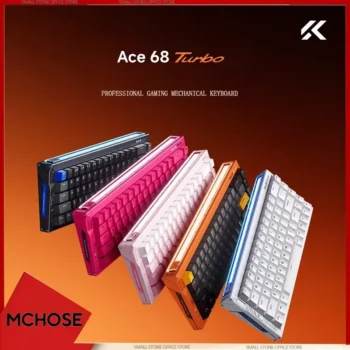

The MCHOSE ACE 68 Turbo Magnetic Gaming Keyboard is built for competitive PC gamers who want Hall Effect magnetic switches, an extremely high polling rate, ultra-fine actuation control, Rapid Trigger technology, and the solid feel of a CNC-machined full-aluminum case. In its Mount Tai Magnetic Switch GT configuration, the ACE 68 Turbo supports up to 16,000 Hz polling, a 256K scan rate, claimed 0.06 ms latency, 0.001 mm sensing precision, and an adjustable actuation range from 0.1 mm to 3.4 mm. These specifications place it firmly in the performance-focused Hall Effect keyboard category.
View MCHOSE ACE 68 Turbo 16K Gaming Keyboard
For U.S. shoppers searching for a 16K gaming keyboard, Hall Effect gaming keyboard, magnetic switch keyboard, Rapid Trigger keyboard, full aluminum gaming keyboard, or compact esports keyboard, the ACE 68 Turbo combines competitive input technology with a premium chassis and a compact 65% ANSI layout.
The keyboard is especially relevant to players of VALORANT, Counter-Strike 2, Fortnite, Apex Legends, Overwatch 2, Call of Duty, Rainbow Six Siege, and other fast-paced games where rapid directional transitions and repeat key inputs are important. At the same time, its onboard profiles, programmable keys, RGB lighting, hot-swappable magnetic switches, MCHOSE HUB software, and compact footprint make it useful for enthusiasts who want more than a basic esports keyboard.
This detailed guide covers the ACE 68 Turbo’s 16K polling capability, Hall Effect switches, 0.001 mm sensing precision, adjustable actuation, Rapid Trigger, 256K scan rate, aluminum construction, advanced gaming functions, RGB system, switch choices, MCHOSE HUB software, typing experience, FPS applications, and important considerations for U.S. buyers.

What Is the MCHOSE ACE 68 Turbo Gaming Keyboard?
The MCHOSE ACE 68 Turbo is a 65% ANSI keyboard with 68 keys and Hall Effect magnetic-switch technology. It uses a wired USB-C connection and is designed around high-speed input processing rather than wireless convenience.
Its full-aluminum housing differentiates it from many lightweight plastic gaming keyboards. The case is CNC machined, while the internal structure includes an aluminum-alloy positioning plate and multiple cushioning and sound-damping layers.
The ACE 68 Turbo is offered in configurations that can differ internally. This is important because buyers should not assume that every switch choice provides identical polling and latency specifications.
Two Major Switch Configurations
The Gateron Magnetic Jade Pro configuration is listed with up to 8K polling and approximately 0.08 ms latency. The Mount Tai Magnetic Switch GT configuration is the higher-performance version associated with up to 16K polling, approximately 0.06 ms latency, a new-generation Hall Effect sensor, a four-layer PCB, and a dual-core MCU.
For shoppers specifically interested in the advertised 16K performance, confirming the Mount Tai Magnetic Switch GT variation is therefore essential.
68-Key 65% ANSI Layout
The 68-key layout removes the number pad and much of the extra width associated with a conventional full-size keyboard. This leaves more physical desk space for mouse movement while retaining dedicated arrow keys and important navigation controls.
Built Specifically Around Competitive Performance
The ACE 68 Turbo goes beyond ordinary mechanical-style key input by providing software-adjustable magnetic sensing, Rapid Trigger, advanced directional-input functions, selectable high polling rates, onboard profiles, and programmable key behavior.
Why Hall Effect Magnetic Switches Are Important
Hall Effect switches detect movement through magnetic sensing rather than depending solely on conventional metal-contact activation. The keyboard can therefore measure how far a compatible magnetic switch has traveled.
This measurement capability makes features such as adjustable actuation and Rapid Trigger possible.
Traditional Fixed Actuation Versus Magnetic Actuation
A conventional mechanical switch generally has a predetermined physical actuation point. The user presses the key until the internal mechanism activates.
A Hall Effect keyboard can instead allow the actuation point to be configured through software. This means the player can choose how deeply a key should be pressed before the system registers the input.
Why Gamers Benefit From Adjustable Actuation
Movement keys can be configured with short actuation distances for rapid response, while keys that should not be pressed accidentally can use deeper settings.
For example, WASD can use a highly responsive configuration while secondary commands can retain a more deliberate activation point.
Customization Matters More Than Extreme Numbers
The most sensitive possible setting is not automatically the best gaming configuration. Extremely shallow actuation can increase accidental presses for users who naturally rest their fingers heavily on the keys. The advantage is having the freedom to find a suitable balance.
0.1–3.4 mm Adjustable Actuation Range
The ACE 68 Turbo supports adjustable actuation from approximately 0.1 mm to 3.4 mm. That range provides substantial flexibility for gaming and typing.
Shallow Actuation for Competitive Movement
A shallow setting means the key can register after very little downward travel. This can make movement commands feel exceptionally immediate.
Competitive FPS players may apply shallow actuation to A, D, W, S, crouch, jump, or other high-frequency movement controls.
Deeper Actuation for Typing
When writing documents or performing general office work, deeper actuation can reduce accidental keystrokes. This is especially useful for users transitioning from a conventional mechanical keyboard.
Different Keys Can Use Different Settings
The keyboard does not require every key to behave identically. This allows the player to build a custom profile according to function rather than forcing one universal actuation value across the board.
Create Separate Gaming and Typing Profiles
A competitive FPS profile can prioritize short movement-key travel, while a general-purpose profile can use deeper activation across most keys for more controlled typing.

Rapid Trigger From 0.001 mm to 3.4 mm
Rapid Trigger is one of the defining technologies of Hall Effect gaming keyboards. Rather than relying on a fixed reset point, Rapid Trigger dynamically responds to key movement.
How Rapid Trigger Works
With a traditional switch, the key typically needs to move back past a predetermined reset position before it can activate again.
Rapid Trigger can reset the input as the key begins moving upward. This can shorten the physical distance required between repeated activations.
Why Rapid Trigger Matters for FPS Games
Competitive shooters often require rapid transitions between directional inputs. Players may alternate A and D, make quick counter-movements, repeatedly crouch, or execute short movement taps.
A shorter reset distance can make these commands feel more responsive when the feature is configured correctly.
Ultra-Fine Rapid Trigger Values
The ACE 68 Turbo’s performance configuration supports Rapid Trigger values as low as 0.001 mm in Rampage Mode. That figure represents an extremely fine sensing setting and is primarily intended for users seeking maximum trigger sensitivity.
Begin With Moderate Settings
New magnetic-keyboard users may find more moderate values easier to control. Lower the Rapid Trigger distance gradually as your finger control adapts.
16K Polling Rate for High-End Esports Setups
The Mount Tai Magnetic Switch GT version of the ACE 68 Turbo supports a polling rate of up to 16,000 Hz on Windows.
Polling rate describes how often the keyboard reports input data to the computer. A typical gaming keyboard operating at 1,000 Hz can theoretically report approximately once every millisecond. Higher polling rates shorten that theoretical reporting interval.
Selectable 1K, 2K, 4K, 8K, and 16K Modes
MCHOSE HUB provides multiple polling-rate options rather than forcing every user to operate at maximum speed.
This is useful because not every PC benefits equally from extremely high USB polling.
16K Is for the Mount Tai GT Configuration
This distinction is important for U.S. buyers. The official specifications associate the 16K setting with the Mount Tai Magnetic Switch GT model. The Gateron Magnetic Jade Pro version supports up to 8K.
Windows Versus macOS
The official product information states that 16K polling is available on Windows, while macOS support is limited to up to 8K.
Higher Polling Is Not Automatically Better for Every PC
If a system experiences unusual CPU load or inconsistent game behavior, users can test 8K, 4K, 2K, or 1K. Real-world performance should always take priority over selecting the largest specification number.
256K Scan Rate and Fast Internal Processing
The keyboard is also rated for a 256K scan rate. Scan rate refers to how frequently the keyboard’s internal electronics evaluate switch states.
Polling and Scan Rate Are Different
The scan rate relates to internal switch detection, while polling rate describes communication between the keyboard and computer.
Both contribute to the overall input pipeline, but they represent different stages.
Why a Fast Scan Rate Matters
A fast internal scan system helps the controller detect changes in switch position quickly before those inputs are sent to the PC.
Performance Comes From the Complete Input Chain
Switch sensing, internal scanning, processing, USB polling, game-engine behavior, CPU performance, frame rate, and display refresh rate all influence the complete response experience.
0.001 mm Sensing Precision Explained
MCHOSE lists sensing precision as fine as 0.001 mm for the ACE 68 Turbo platform.
This does not mean players need to consciously move their fingers exactly one thousandth of a millimeter. Instead, the specification describes how finely the system can detect changes in magnetic switch travel under supported conditions.
Why Fine Detection Supports Rapid Trigger
Rapid Trigger depends on detecting small changes in key direction and travel. Greater sensing resolution allows the firmware to respond to smaller movements.
Fine Precision Helps With Customization
Users who enjoy tuning individual key behavior can work with extremely granular trigger parameters.
Practical Control Still Matters Most
Specifications are only useful when they contribute to predictable gameplay. Players should configure values they can control consistently rather than focusing solely on minimum numbers.

0.06 ms Claimed Latency on the 16K Version
The Mount Tai Magnetic Switch GT configuration is officially listed with claimed latency as low as 0.06 ms, while the Gateron Magnetic Jade Pro configuration is listed around 0.08 ms.
What Latency Means
Latency represents delay between an input event and the corresponding stage of processing or reporting measured by the manufacturer.
Keyboard latency is only one part of total system latency. The gaming PC, USB subsystem, software, monitor, rendering pipeline, and network can contribute additional delay.
Why Competitive Gamers Care
Esports players often optimize small sources of latency throughout their setup, including keyboard, mouse, monitor, graphics settings, and networking.
Manufacturer Latency Is Not Your Total Game Latency
A 0.06 ms keyboard specification should not be interpreted as meaning a game will respond in 0.06 ms overall. It refers to the keyboard’s claimed performance under its stated test conditions.
Dual-Core MCU in the 16K Mount Tai GT Version
The higher-performance Mount Tai GT configuration uses MCHOSE’s Tianwen dual-core MCU. Official specifications describe a combined operating frequency of 512 MHz.
Why the MCU Matters
The microcontroller handles keyboard scanning, magnetic sensor processing, trigger calculations, RGB effects, profiles, macros, and USB communication.
More Demanding Features Need Processing Resources
High polling, Rapid Trigger, advanced key functions, and RGB customization place more demands on keyboard firmware than a basic fixed-switch office keyboard.
The Gateron Variant Uses Different Internal Hardware
Because the two ACE 68 Turbo variants differ internally, shoppers should verify the exact switch and configuration rather than assuming every model includes the same MCU, PCB, and polling capabilities.
Full CNC-Machined Aluminum Construction
One of the major physical differences between the ACE 68 Turbo and many mainstream gaming keyboards is its full-aluminum case.
Why Aluminum Changes the Feel
Metal construction adds substantial mass and rigidity. The keyboard is listed at approximately 1,361 grams, or roughly three pounds.
This weight helps the keyboard remain planted on the desk during aggressive gaming.
Premium Desktop Appearance
CNC-machined aluminum also gives the keyboard a more substantial appearance than many thin plastic esports boards.
Surface Finishes Differ by Colorway
Depending on the selected variation, MCHOSE uses processes including electrophoresis and powder coating.
Heavy Construction Is Not Ideal for Everyone
Users who frequently carry a keyboard between school, work, tournaments, and home may prefer something lighter. The ACE 68 Turbo prioritizes a solid desktop feel over portability.
Aluminum Alloy Positioning Plate and Multi-Layer Cushioning
The internal structure uses an aluminum-alloy positioning plate combined with several cushioning and sound-control layers.
The official specification describes a sandwich foam layer, fiber switch pad, PET sound-damping pad, bottom foam, and PET base pad in addition to the metal plate.
Why Internal Dampening Matters
Keyboard sound is influenced by the case, plate, keycaps, switches, internal empty space, and desk surface.
Multiple internal layers can help reduce hollow resonance and create a more controlled acoustic character.
Structural Stability
The combination of the metal chassis and aluminum plate also provides a firm foundation for repeated competitive key presses.
Sound Preference Is Subjective
Some users prefer a dampened, controlled keyboard sound, while others enjoy a brighter or more resonant profile. Online recordings can also sound different depending on microphone and room conditions.

Independent Physical Rapid Trigger Button
The ACE 68 Turbo includes a dedicated physical RT control button with support for three profiles.
Why a Physical Button Is Useful
A physical control provides faster access to preset Rapid Trigger configurations without requiring the software interface every time.
Three Profile Options
Different profiles can be prepared for competitive gaming, general gaming, and everyday typing.
Create Profiles With Clearly Different Purposes
Instead of making three nearly identical configurations, users can create distinct presets so switching profiles produces an obvious practical benefit.
Advanced SOCD and RS Functions
The ACE 68 Turbo supports advanced directional-input processing such as SOCD and RS.
What SOCD Means
SOCD refers to Simultaneous Opposing Cardinal Directions. It determines how the keyboard handles opposing inputs such as left and right being pressed at the same time.
Why Competitive Players Care About Directional Processing
Fast FPS movement frequently involves overlapping directional presses. Advanced processing can change how those inputs are interpreted.
Check Game and Tournament Rules
Some competitive platforms restrict certain automated or directional-input behaviors. Before using SOCD or similar features in ranked competition or tournaments, confirm that they comply with the applicable rules.
Dynamic Keystroke DKS Functions
DKS allows multiple actions to be associated with different stages of one key’s travel.
One Key Can Perform Multiple Functions
A shallow press can potentially trigger one action while a deeper press triggers another, depending on how the profile is configured.
Useful Beyond Gaming
Dynamic keystrokes can also be useful in specialized productivity workflows where different levels of key travel need different commands.
Complex Profiles Require Practice
Using too many multi-stage actions can become difficult to remember. Begin with a small number of meaningful assignments.
MT, TGL, and Key Macro Support
The ACE 68 Turbo also supports additional programmable functions including MT, TGL, and macros.
MT Functions
MT allows multiple functions to be associated with a key depending on how that key is operated.
TGL Toggle Functions
TGL behavior can toggle a function on and off rather than requiring the key to remain physically held.
Macro Functions
Macros allow sequences of inputs to be programmed for compatible applications.
Use Automation Only Where Permitted
Some multiplayer games prohibit particular macros or automated input sequences. Always follow game, league, tournament, and platform rules.
MCHOSE HUB Web and Desktop Software
The ACE 68 Turbo works with MCHOSE HUB through web and desktop interfaces.
Adjust Actuation
Users can customize when individual magnetic keys activate.
Configure Rapid Trigger
Rapid Trigger distances and advanced performance modes can be tuned through HUB.
Change Polling Rate
The software offers 1K, 2K, 4K, 8K, and compatible 16K configurations.
Remap Keys
Key functions can be reassigned based on gaming or productivity needs.
Create Macros
Supported input sequences can be configured through the software.
Onboard Memory Preserves Useful Profiles
Onboard memory support can help retain selected keyboard configurations without requiring users to rebuild them every time they reconnect the board.
Adaptive Dynamic Calibration 2.0
Magnetic switches depend on accurate sensor readings. MCHOSE includes Adaptive Dynamic Calibration 2.0 to help maintain precise key detection.
Automatic Calibration During Use
The manufacturer’s software documentation recommends keeping adaptive calibration enabled because key presses can continually contribute to calibration accuracy.
Why Calibration Is Important
Magnetic sensing relies on accurately relating switch movement to sensor readings. Poor calibration could affect actuation consistency.
Switch Changes May Require Additional Attention
If compatible switches are changed, users should verify calibration and keyboard behavior before returning to competitive play.
Hot-Swappable Magnetic Switch Support
The ACE 68 Turbo supports compatible hot-swappable magnetic switches.
No Traditional Soldering Required for Compatible Replacements
Hot-swap support makes it easier to replace switches or experiment with compatible alternatives.
Mixed Magnetic Switch Support
The official specification indicates support for mixed compatible switches, adding customization flexibility.
Not Every Mechanical Switch Will Work
Hall Effect switch compatibility is not universal. Conventional MX-style mechanical switches should not automatically be assumed compatible simply because they look similar from above.
South-Facing RGB and 16 Million Colors
The keyboard uses south-facing RGB LEDs and supports extensive color customization.
Why South-Facing LEDs Matter
South-facing positioning can improve compatibility with some keycap profiles and create a different lighting presentation from north-facing designs.
16M ARGB Customization
Users can select colors and lighting effects through MCHOSE HUB.
Music Rhythm 2.0
Supported lighting functions can react dynamically to music or audio behavior.
RGB Can Be Disabled
Players who prefer a clean esports setup can reduce brightness or turn lighting off completely.

MCHOSE ACE 68 Turbo for VALORANT
VALORANT is one of the most relevant use cases for a Rapid Trigger Hall Effect keyboard because controlled movement and directional timing are central to gunplay.
Responsive WASD Inputs
Shallow actuation can make movement begin with minimal key travel.
Rapid Release Behavior
Rapid Trigger can allow a movement key to reset quickly as the player’s finger begins to release it.
More Room for Low-Sensitivity Mouse Movement
The 65% keyboard width leaves additional desk space for large mouse movements often used by competitive tactical-shooter players.
Practice Movement Timing After Changing Settings
Changing from a conventional mechanical keyboard to very sensitive magnetic settings may initially affect muscle memory. Practice before entering important ranked matches.
MCHOSE ACE 68 Turbo for Counter-Strike 2
Counter-Strike 2 also places considerable emphasis on precise directional movement.
Fast A and D Transitions
Rapid Trigger and shallow actuation can make alternating left and right movement feel immediate.
Compact Layout for Large Mouse Pads
Many CS2 players use low sensitivity and large arm movements. A smaller keyboard helps prevent the mouse from colliding with the keyboard edge.
Competitive Input Rules Can Change
Advanced directional features should be used only when permitted by Valve, tournament organizers, matchmaking services, and third-party competitive platforms.
ACE 68 Turbo for Fortnite, Apex Legends, and Overwatch 2
The benefits of adjustable magnetic switches are not limited to tactical shooters.
Fortnite
Rapid movement, editing, crouching, building, and repeated commands can benefit from carefully tuned actuation.
Apex Legends
Frequent directional movement, crouching, jumping, and interaction inputs make responsive keys useful during fast fights.
Overwatch 2
Hero movement and ability-heavy gameplay can benefit from custom profiles tailored to specific controls.
Customize High-Frequency Keys First
Instead of modifying every key immediately, begin with WASD and the commands you use most often.
Using the ACE 68 Turbo for Everyday Typing
Despite its esports focus, the keyboard can also handle writing, coding, studying, browsing, and general office work.
Use Deeper Actuation for Typing
A typing profile with deeper actuation can reduce unintended keystrokes compared with extremely sensitive gaming settings.
Dedicated Arrow Keys Improve Practicality
The 68-key layout keeps arrow keys available for documents, coding, spreadsheets, and navigation.
Solid Aluminum Construction Feels Stable
The approximately 1.36 kg chassis remains firmly planted during extended typing sessions.
The Missing Number Pad May Matter for Some Users
Accountants, data-entry users, and spreadsheet professionals who frequently type numbers may want a separate external number pad.
Windows and macOS Compatibility
The ACE 68 Turbo can switch between Windows and macOS keyboard modes.
Windows Mode
Windows is the default environment and supports the full 16K polling capability on compatible Mount Tai GT configurations.
macOS Mode
The keyboard also supports macOS key mapping, although official specifications limit polling to up to 8K on Mac.
Check Software Features on Your Platform
Some advanced driver functions may vary by operating system, browser, firmware version, or model configuration.
How to Set Up the MCHOSE ACE 68 Turbo
Step 1: Connect the Keyboard
Connect the USB-C end of the supplied cable to the keyboard and the USB-A side to the gaming PC.
Step 2: Confirm Basic Operation
Test normal key input before changing advanced configuration.
Step 3: Open MCHOSE HUB
Use the supported desktop or web driver.
Step 4: Select Polling Rate
Start with 1K or 4K if you want a conservative baseline, then test 8K or 16K if your model and PC support it.
Step 5: Configure Actuation
Tune WASD and frequently used gaming keys before modifying the entire keyboard.
Step 6: Enable Rapid Trigger
Use moderate values initially, then lower them gradually as you become comfortable.
Step 7: Save a Profile
Create a dedicated gaming profile so your preferred values are easy to restore.
Change One Parameter at a Time
Changing polling rate, actuation, Rapid Trigger, SOCD, key mapping, and macros simultaneously makes troubleshooting much more difficult.
How to Tune the ACE 68 Turbo for Beginners
New Hall Effect keyboard owners sometimes immediately select the smallest possible actuation and Rapid Trigger settings because those numbers appear fastest.
Start With Control
Choose values that allow you to rest your fingers naturally without generating accidental movement.
Reduce Actuation Gradually
Move toward more sensitive settings over several gaming sessions rather than making one extreme adjustment.
Practice With Movement Keys
WASD provides a useful testing environment because the effect of actuation changes is easy to notice.
Consistency Is More Valuable Than Maximum Sensitivity
A slightly slower configuration you can control reliably is usually better than an ultra-sensitive configuration that produces mistakes.
How to Maintain the Full-Aluminum Keyboard
Remove Surface Dust Regularly
A soft brush or suitable air blower can help remove loose particles from around keycaps and switches.
Clean the Aluminum Case Carefully
Use a soft microfiber cloth and avoid harsh chemicals that could affect the surface coating.
Keep Liquids Away From the Keyboard
The premium metal construction does not make the internal electronics waterproof.
Inspect the USB Cable
Repeated transport or sharp cable bends can eventually place stress on connectors.
Keep the Dust Cover
The supplied dust cover can help protect the keyboard when it is not being used.

MCHOSE ACE 68 Turbo Versus a Standard Mechanical Keyboard
Magnetic Sensing Versus Fixed Contacts
The ACE 68 Turbo detects key travel magnetically, while many conventional keyboards rely on a fixed physical switch-contact point.
Adjustable Actuation
Traditional switches usually provide one inherent actuation characteristic. Hall Effect technology allows the trigger position to be changed through software.
Rapid Trigger
Dynamic reset behavior can register repeated movement with less required physical key travel than traditional fixed-reset mechanisms.
High Polling Rate
The 16K Mount Tai GT model operates far beyond the standard 1K polling specification used by many conventional gaming keyboards.
Full Aluminum Chassis
The CNC-machined metal case also creates a heavier, more premium physical platform than typical plastic gaming keyboards.
A Traditional Mechanical Keyboard Can Still Be Better for Some Users
People who prioritize wireless connectivity, classic tactile switches, broad mechanical-switch compatibility, portability, or simpler software may still prefer a conventional mechanical keyboard.
Who Should Consider the MCHOSE ACE 68 Turbo?
Competitive FPS Gamers
Rapid Trigger, fine actuation adjustment, high polling, compact dimensions, and advanced input processing are directly relevant to competitive shooters.
Hall Effect Keyboard Enthusiasts
Users who enjoy extensive trigger customization have a wide range of settings to explore.
Players Who Want a Premium Aluminum Build
The ACE 68 Turbo combines esports electronics with the solid construction more commonly associated with enthusiast keyboards.
Low-Sensitivity Mouse Users
The compact 65% width provides more room for wide mouse movement.
Users Who Prefer Wired Reliability
A wired connection eliminates battery charging and wireless-mode management.
Who May Prefer a Different Keyboard?
Users who need Bluetooth, 2.4 GHz wireless connectivity, a full number pad, very lightweight portability, or conventional tactile mechanical switches may be better served by another model.
What U.S. Buyers Should Check Before Ordering
Confirm the Switch Variant
This is the most important detail. Buyers seeking the advertised 16K polling and 0.06 ms specification should confirm that the selected variation uses the Mount Tai Magnetic Switch GT configuration.
Do Not Assume the Gateron Version Is Also 16K
The Gateron Magnetic Jade Pro version is officially listed at up to 8K with approximately 0.08 ms latency.
Check the Selected Color
Available colors include options such as Cyber Black, Nova White, Galaxy Orange, Peachy Pink, and Berry Red depending on switch and regional availability.
Check Keycap Lighting Style
Some variants use shine-through keycaps while others use non-shine-through designs.
Remember That the Keyboard Is Wired
The ACE 68 Turbo does not provide Bluetooth or 2.4 GHz wireless connectivity.
Review Shipping and Return Terms
U.S. buyers purchasing internationally should review delivery estimates, tracking availability, taxes, seller terms, warranty conditions, and return policies before checkout.
Keep the Box Until You Complete Testing
Test every key, magnetic sensing, MCHOSE HUB detection, RGB lighting, Rapid Trigger, switch calibration, and USB connectivity before discarding the packaging.
Frequently Asked Questions About the MCHOSE ACE 68 Turbo
Is the MCHOSE ACE 68 Turbo a Hall Effect keyboard?
Yes. It uses Hall Effect magnetic-switch sensing.
How many keys does it have?
The ACE 68 Turbo uses a 65% ANSI layout with 68 keys.
Does the ACE 68 Turbo support 16K polling?
Yes, the Mount Tai Magnetic Switch GT configuration supports polling rates up to 16K on Windows.
Does every ACE 68 Turbo version support 16K?
No. The Gateron Magnetic Jade Pro configuration is listed with up to 8K polling, while the Mount Tai Magnetic Switch GT configuration provides the 16K capability.
What is the claimed latency?
The Mount Tai GT configuration is listed at approximately 0.06 ms, while the Gateron Jade Pro version is listed at approximately 0.08 ms.
What is the scan rate?
The keyboard is listed with a 256K scan rate.
What is the sensing precision?
The ACE 68 Turbo is rated for magnetic sensing precision down to 0.001 mm in supported modes.
What is the actuation range?
Users can adjust actuation from approximately 0.1 mm to 3.4 mm.
Does it support Rapid Trigger?
Yes. Rapid Trigger adjustment is one of its primary competitive-gaming features.
Is the ACE 68 Turbo wireless?
No. It uses wired USB-C connectivity.
Is the keyboard full aluminum?
Yes. The case is described as CNC-machined full aluminum.
How heavy is the ACE 68 Turbo?
Official specifications list a weight of approximately 1,361 grams, with small manufacturing variation possible.
What are its dimensions?
The keyboard measures approximately 324 × 119 × 38 mm.
Does it have RGB lighting?
Yes. It uses south-facing RGB LEDs with extensive ARGB customization.
Does it support macros?
Yes. MCHOSE HUB provides macro and advanced key-function support.
Does it support SOCD?
Yes, although competitive users should verify whether such functions are permitted in their chosen game or tournament.
Can the switches be replaced?
Yes. The keyboard supports hot-swappable compatible magnetic switches.
Can I use the keyboard on macOS?
Yes. It includes a macOS mode, although 16K polling is officially specified for Windows while Mac supports up to 8K.
Is it suitable for VALORANT?
Its Rapid Trigger, adjustable actuation, compact layout, and fast input processing make it particularly relevant to VALORANT players.
Is it suitable for Counter-Strike 2?
Yes. Directional movement and rapid key reset are especially relevant to tactical shooters such as CS2.
Should I immediately use 0.001 mm Rapid Trigger?
Not necessarily. Extremely sensitive settings can create accidental inputs. Many players will achieve more consistent control by starting with moderate settings and reducing them gradually.
Final Thoughts on the MCHOSE ACE 68 Turbo 16K Gaming Keyboard
The MCHOSE ACE 68 Turbo Magnetic Gaming Keyboard combines high-end Hall Effect gaming technology with a premium full-aluminum chassis. Its 65% 68-key layout saves desk space, while its heavy CNC-machined case provides a very different physical experience from lightweight plastic esports keyboards.
The Mount Tai Magnetic Switch GT configuration is the version to focus on if your priority is the headline 16K specification. It is listed with up to 16,000 Hz polling on Windows, approximately 0.06 ms latency, a dual-core MCU, new-generation Hall Effect sensing, a four-layer PCB, 256K scanning, and 0.001 mm detection precision.
Users choosing the Gateron Magnetic Jade Pro version should understand that its specifications differ. That model is listed at up to 8K polling and approximately 0.08 ms latency. Both remain performance-focused Hall Effect options, but they should not be treated as identical variants.
Adjustable actuation from 0.1 mm to 3.4 mm allows players to customize the physical trigger depth of keys, while Rapid Trigger can reduce the required release distance for repeated inputs. Advanced options including SOCD, RS, DKS, MT, TGL, macros, onboard memory, adaptive calibration, and customizable profiles expand the keyboard well beyond traditional fixed-switch behavior.
The physical build is another major selling point. A CNC-machined aluminum case, aluminum-alloy plate, multiple internal dampening layers, approximately 1.36 kg weight, and south-facing RGB lighting give the ACE 68 Turbo a premium enthusiast-style construction while maintaining its competitive gaming focus.
MCHOSE HUB provides the control center for polling rates, actuation, Rapid Trigger, key remapping, macros, RGB effects, performance settings, and profile management. The independent physical RT button also gives users fast access to three stored Rapid Trigger profiles.
View MCHOSE ACE 68 Turbo Product Details
Before ordering, U.S. shoppers should carefully confirm the switch variation, polling-rate capability, keycap option, color, included cable, shipping terms, and return policy. The Mount Tai Magnetic Switch GT configuration should be selected when 16K polling is specifically required.
For gamers searching for a 16K Hall Effect keyboard, Rapid Trigger gaming keyboard, full aluminum gaming keyboard, magnetic switch esports keyboard, or compact 68-key gaming keyboard, the MCHOSE ACE 68 Turbo offers a performance-focused combination of advanced input customization, extremely high polling capability, premium construction, and compact desktop efficiency.