
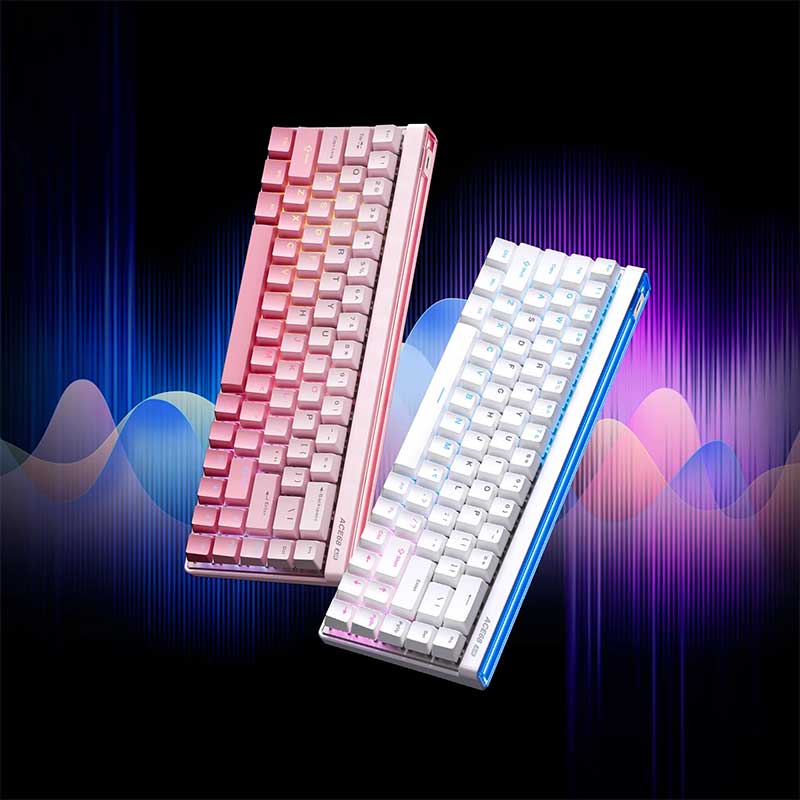
The MCHOSE ACE 68 Air Magnetic Switch Gaming Keyboard is designed for gamers who want the speed and customization of Hall Effect magnetic switches in a compact 68-key layout. With adjustable actuation, Rapid Trigger technology, high polling-rate support, advanced dynamic keystroke functions, RGB lighting, hot-swappable magnetic switches, and MCHOSE M HUB customization, the ACE 68 Air is positioned as a performance-focused keyboard for competitive PC gaming.
View MCHOSE ACE 68 Air Gaming Keyboard
For gamers in the United States searching for a magnetic switch gaming keyboard, Hall Effect gaming keyboard, Rapid Trigger keyboard, 8K polling gaming keyboard, or compact keyboard for FPS gaming, the MCHOSE ACE 68 Air offers a modern feature set in a space-saving design.
The keyboard is particularly relevant to players of competitive titles such as VALORANT, Counter-Strike 2, Fortnite, Apex Legends, Call of Duty, Overwatch 2, Rainbow Six Siege, and other games where movement timing and rapid key reset can matter. At the same time, its programmable functions, RGB system, compact layout, and adjustable key behavior make it useful beyond pure esports.
This complete guide explores the ACE 68 Air’s magnetic switches, adjustable actuation, Rapid Trigger system, polling rate, scan performance, 68-key layout, RGB lighting, M HUB software, gaming features, switch customization, typing experience, FPS applications, and factors U.S. shoppers should review before purchasing.
What Is the MCHOSE ACE 68 Air Magnetic Switch Gaming Keyboard?
The MCHOSE ACE 68 Air is a compact wired gaming keyboard based on Hall Effect magnetic-switch technology. Instead of relying only on the traditional physical electrical contact used by many mechanical switches, Hall Effect switches detect movement through changes in a magnetic field.
This allows compatible keyboards to determine how far a key has traveled and to let the user customize the point at which that key activates or resets.
For gaming, this opens the door to features such as adjustable actuation and Rapid Trigger. Instead of every key having one permanently fixed actuation point, players can tune the keyboard to suit different games, keys, and personal preferences.
ACE 68 Air Is a Wired Gaming Keyboard
The ACE 68 Air uses a wired USB connection. It is not a Bluetooth or 2.4 GHz wireless gaming keyboard. For competitive users, a wired-only design can be appealing because there is no battery to monitor or wireless connection mode to manage.
Compact 68-Key Layout
The ACE 68 Air uses a compact 68-key layout. It removes much of the unused space found on a traditional full-size keyboard while retaining frequently used navigation and directional functions.
For gamers using low mouse sensitivity, reducing keyboard width can create more room for wide mouse movements.
Compact Does Not Mean Basic
Although the physical footprint is smaller than that of a full-size keyboard, the ACE 68 Air includes performance-oriented software features, programmable functions, advanced trigger controls, RGB lighting, and customizable magnetic-switch behavior.
Why Hall Effect Magnetic Switches Matter for Gaming
Hall Effect keyboards have become increasingly popular among competitive gamers because magnetic sensing allows the keyboard to measure switch travel continuously.
Traditional mechanical switches normally activate when internal contacts meet at a predetermined point. A magnetic switch can instead let compatible electronics determine the activation point dynamically.
Adjustable Actuation Explained
Actuation is the point during a key press where the keyboard registers an input.
A shallow actuation point can allow a key to trigger after only a small amount of movement. A deeper setting requires the key to travel farther before registering.
This matters because different keys can benefit from different settings. A player may want extremely sensitive WASD movement keys but prefer deeper activation for keys that should not be triggered accidentally.
Why Adjustable Actuation Helps FPS Players
Competitive FPS games often require frequent alternating movement inputs. Small changes in how quickly movement keys activate and reset can affect how responsive keyboard control feels.
The ability to customize trigger behavior gives players more control than a conventional fixed-actuation keyboard.
Sensitivity Should Be Tuned Carefully
The shallowest possible actuation is not automatically the best setting for everyone. Extremely sensitive keys can also register unintended inputs if the user rests heavily on the keycaps. A practical setup balances responsiveness with control.

Rapid Trigger Technology on the MCHOSE ACE 68 Air
Rapid Trigger is one of the most important features of a modern Hall Effect gaming keyboard.
On a traditional mechanical keyboard, the key normally needs to pass a fixed reset point before another input can be registered. Rapid Trigger changes this behavior by allowing the reset point to respond dynamically to key movement.
How Rapid Trigger Works
When Rapid Trigger is enabled, a key can reset as the user begins releasing it rather than waiting for it to travel back to a conventional fixed reset position.
That can make repeated directional inputs feel faster because the key does not necessarily need to complete a large release movement before becoming ready for another activation.
Rapid Trigger for Counter-Strafing
Games such as Counter-Strike 2 and VALORANT place strong emphasis on movement control. Players often release one movement direction and transition immediately into another input.
Rapid Trigger can make this type of alternating key movement feel more immediate when properly configured.
Rapid Trigger for Repeated Movement Inputs
The feature can also help in games where players repeatedly tap movement, crouch, jump, lean, or other commands.
Rapid Trigger Still Requires Practice
A faster keyboard does not automatically create better movement mechanics. Players still need to learn timing, positioning, counter-strafing, peeking, and game-specific movement technique.
Adjustable Trigger Settings Through MCHOSE M HUB
MCHOSE provides M HUB for configuring the ACE 68 Air. The platform allows gamers to customize magnetic-switch behavior and other keyboard settings.
Adjust Individual Keys
One major advantage of magnetic keyboards is that every key does not need to use exactly the same actuation behavior.
For example, a gamer could make WASD highly responsive while keeping keys such as Escape or other secondary controls at a deeper activation point.
Official Gaming Presets
MCHOSE provides configuration presets intended to simplify setup. These can give new users a starting point before they begin building their own custom profiles.
Custom Profiles
Players who want more control can create custom configurations and tune trigger travel, Rapid Trigger, and other parameters according to personal preference.
Start Conservatively Before Using Extreme Settings
If this is your first magnetic gaming keyboard, begin with moderate actuation and Rapid Trigger values. Extremely sensitive settings can feel impressive but may require more careful finger control.
Up to 8K Polling Rate
The MCHOSE ACE 68 Air supports selectable polling rates up to 8,000 Hz.
Polling rate describes how frequently the keyboard can report information to the computer. A conventional gaming keyboard commonly operates at 1,000 Hz.
What 8K Polling Means
An 8,000 Hz polling configuration allows the keyboard to communicate input information to the system more frequently than a standard 1,000 Hz configuration.
This can reduce the theoretical interval between reports.
Available Polling Options
MCHOSE’s software supports selectable polling-rate levels including 1K, 2K, 4K, and 8K on compatible ACE 68 and ACE 68 Air configurations.
Do You Need 8K Polling?
Most gamers can play effectively at 1,000 Hz. Higher polling rates are primarily aimed at competitive enthusiasts who want to minimize input intervals and who use high-refresh-rate gaming systems.
Higher Polling Can Increase System Demand
Extremely high input polling can create more USB and CPU processing activity. If a game behaves unexpectedly, testing 1K, 2K, or 4K can help determine whether the highest setting is actually beneficial on your system.
Low-Latency Performance for Competitive Games
The ACE 68 Air is designed around competitive gaming responsiveness. Low-latency input, high polling, adjustable actuation, and Rapid Trigger work together rather than functioning as isolated features.
Latency Is More Than One Specification
Overall input response depends on multiple elements, including switch sensing, keyboard processing, USB communication, game engine behavior, frame rate, display refresh rate, and computer performance.
High-Refresh Gaming Setups
Gamers using 144 Hz, 240 Hz, 360 Hz, or higher-refresh monitors may be especially interested in reducing peripheral input delay wherever practical.
Keyboard Speed Cannot Replace System Performance
A fast keyboard cannot compensate for severe frame-rate instability, network latency, or an underperforming PC. Competitive performance comes from the complete system.

SOCD Support and Advanced Movement Control
SOCD stands for Simultaneous Opposing Cardinal Directions. It refers to how a keyboard handles situations where opposing directional keys are pressed at the same time.
This is one of several advanced functions available through the ACE 68 Air platform.
Why SOCD Attracts Competitive Players
Movement-heavy games can involve rapid transitions between left and right inputs. SOCD behavior can influence how the keyboard interprets overlapping commands.
Rules Can Vary by Game
Some games, tournaments, or competitive platforms may restrict particular input-processing behaviors. Players should check the rules of the game and competitive environment they participate in before enabling advanced input functions.
Use Advanced Features Responsibly
A feature being available in keyboard software does not automatically mean it is permitted in every tournament or competitive game.
DKS Dynamic Keystroke Functions
DKS allows different actions to be associated with different points of a single key’s travel.
This can make one physical key perform more than one function depending on how deeply it is pressed or released.
Why Dynamic Keystrokes Are Interesting
Instead of thinking of a key as simply “pressed” or “not pressed,” magnetic sensing can interpret different stages of movement.
This opens possibilities for advanced gaming profiles and productivity shortcuts.
Use DKS Carefully in Competitive Games
Complex key behavior can be useful, but it can also become confusing if too many functions are layered onto the same controls.
Build Profiles Around Actual Needs
Start with a small number of meaningful customizations rather than programming every key with advanced behavior.
MT, TGL, and Macro Functions
The ACE 68 Air also supports other programmable keyboard functions through M HUB.
MT Functions
Multi-function or multi-tap style behavior can allow more than one command structure to be associated with a key depending on how it is used.
TGL Functions
Toggle behavior can allow a key to switch a function between states without requiring the user to hold it continuously.
Key Macros
Macro recording can automate sequences of inputs for suitable games, applications, or productivity workflows.
Check Game Rules Before Using Macros
Competitive titles can restrict automation. Use macro functions only where they are permitted by the relevant game, tournament, or platform rules.
Compact 68-Key Layout for Gaming Desks
A compact keyboard can provide a meaningful physical advantage even before considering switch technology.
More Mouse Space
Full-size keyboards occupy substantial desk width because of the number pad and additional navigation area.
Removing unnecessary width allows the mouse to move through a larger area without colliding with the keyboard.
Useful for Low-Sensitivity FPS Players
Gamers who use low mouse sensitivity may perform large sweeping arm movements. A narrow keyboard helps leave more room on the mouse side of the desk.
Easier Keyboard Positioning
Some players angle their keyboard while gaming. A compact model provides more flexibility for doing this without taking over the entire desk.
Consider Whether You Need a Number Pad
If your daily work involves frequent numerical data entry, accounting, or spreadsheets, the lack of a dedicated number pad may be inconvenient. A separate external number pad can be added when necessary.
68 Keys Retain Important Everyday Functions
The ACE 68 Air is compact without stripping the keyboard down to the most minimal possible layout.
Dedicated Arrow Keys
Arrow keys are useful for text editing, spreadsheets, navigation, coding, and many games. Their presence can make a 68-key keyboard more practical for everyday use than some ultra-minimal layouts.
Function Layers
Secondary functions can be accessed through keyboard shortcuts and layers, allowing the compact board to perform many commands that would otherwise require extra physical keys.
There Is a Short Learning Curve
Users coming from a full-size keyboard may need some time to learn shortcut combinations for less frequently used keys.
PBT Keycaps for Everyday Durability
ACE 68 Air configurations are commonly equipped with PBT keycaps.
PBT is widely used on enthusiast and gaming keyboards because it tends to resist the shiny appearance that can develop on heavily used ABS keycaps.
Why Keycap Material Matters
WASD, Space, Shift, Control, and other frequently used gaming keys receive thousands of repeated touches.
A durable keycap material can help the keyboard maintain its texture and appearance over time.
Keycap Feel Affects Typing Experience
Keycaps influence more than appearance. Their material, thickness, profile, texture, and legends all contribute to how the keyboard feels under the fingers.
Keycap Compatibility Should Be Checked Before Replacement
If you plan to customize the board with aftermarket keycaps, confirm stem and layout compatibility before purchasing a replacement set.

RGB Lighting on the ACE 68 Air
RGB lighting adds visual customization to the keyboard and can help coordinate the ACE 68 Air with the rest of a gaming setup.
Multiple Lighting Effects
M HUB allows supported lighting effects to be customized according to user preference.
Brightness and Effect Control
Users can adjust lighting behavior through software and keyboard shortcuts depending on the active configuration.
Match the Rest of Your Setup
RGB can help coordinate the keyboard with a gaming mouse, desktop case, headset stand, LED strips, monitor lighting, or other peripherals.
Lighting Can Be Disabled
Players who prefer a cleaner desktop can turn the backlight off rather than using RGB continuously.
Hot-Swappable Magnetic Switch Design
The ACE 68 Air supports compatible hot-swappable magnetic switches.
Why Hot-Swap Capability Matters
A hot-swappable design can make it easier to replace a compatible switch without soldering.
This is useful if one switch becomes damaged or if the user wants to experiment with compatible magnetic switch options.
Magnetic Switch Compatibility Is Not Universal
Hall Effect keyboards are not automatically compatible with every mechanical or magnetic switch on the market.
Users should verify whether a replacement switch is supported by the keyboard’s sensor, firmware, and physical design.
Recalibration May Be Needed After Switch Changes
If switches are replaced, the keyboard may need calibration or updated switch configuration through M HUB to maintain accurate sensing.
Adaptive Dynamic Calibration
MCHOSE provides adaptive dynamic calibration for the ACE 68 platform.
The goal is to maintain accurate magnetic sensing as the keyboard is used.
Why Calibration Matters
Hall Effect switches depend on precise measurements of magnetic position. Calibration helps the keyboard understand the relationship between switch movement and sensor readings.
Automatic Calibration Simplifies Setup
Adaptive calibration can reduce the amount of manual adjustment required during normal use.
Use Manual Calibration When Necessary
If switches are replaced or key behavior becomes abnormal, checking calibration and firmware settings can be a useful troubleshooting step.
MCHOSE M HUB Software
M HUB is central to unlocking the advanced features of the ACE 68 Air.
Web Driver and Desktop Driver
MCHOSE offers both web-based and desktop versions of M HUB for compatible devices.
Trigger Customization
Users can adjust actuation behavior and Rapid Trigger settings for selected keys.
Key Remapping
Individual keys can be reassigned according to gaming or productivity requirements.
RGB Customization
Lighting effects and backlight behavior can be changed through the software.
Firmware Updates
M HUB can also be used to manage supported firmware updates and keyboard configuration.
Use Chrome or Edge for the Web Driver
When using the browser-based M HUB interface, a compatible Chromium browser such as Chrome or Edge may provide better HID device support.
Onboard Profiles and Saved Settings
Onboard profile support can make it easier to preserve keyboard settings without rebuilding the configuration every time the keyboard is connected.
Create a General Gaming Profile
A balanced profile can use moderate actuation and Rapid Trigger values for everyday gaming.
Create an FPS Profile
WASD and other movement keys can use more sensitive trigger settings while secondary keys remain deeper.
Create a Typing Profile
For office work or writing, deeper actuation can reduce accidental key presses.
Different Tasks Benefit From Different Settings
The ability to change profiles is one of the practical advantages of an adjustable magnetic keyboard.
ACE 68 Air for VALORANT
VALORANT is one of the games where Rapid Trigger keyboards receive the most attention because movement accuracy and timing are important.
Responsive WASD Movement
Shallow actuation can make movement keys feel immediate.
Rapid Release
Rapid Trigger can reduce the physical release distance required before a key is ready to activate again.
Counter-Strafing Practice
Players can use practice modes to tune trigger settings while learning how different values affect movement feel.
Do Not Change Settings Constantly
Once you find a configuration that feels predictable, use it consistently so your finger timing can adapt.
ACE 68 Air for Counter-Strike 2
Counter-Strike 2 players also rely heavily on movement precision, strafing, and rapid transitions between directional inputs.
Fast Direction Changes
Adjustable trigger behavior can reduce unnecessary key travel during repeated A and D movements.
Compact Desk Footprint
Low-sensitivity CS2 players often use large mouse pads, making the compact keyboard width particularly valuable.
Competitive Rules Matter
Always make sure advanced keyboard functions comply with the rules of the game mode, tournament, league, or third-party competitive platform you use.
ACE 68 Air for Fortnite and Apex Legends
Fast keyboard response can also be relevant in games requiring rapid movement combinations and repeated ability inputs.
Fortnite Movement and Building
Custom actuation can make frequently used movement and build keys feel more responsive.
Apex Legends Movement
Players repeatedly use directional, crouch, jump, and interaction inputs during fast fights.
Optimize Only the Keys That Matter
You do not need extreme actuation settings on every key. Focus first on movement and high-frequency controls.
Using the ACE 68 Air for Typing and Everyday Work
Despite its gaming focus, the keyboard can also be used for writing, studying, coding, browsing, and office work.
Adjust Actuation for Typing
Extremely sensitive gaming settings can increase accidental typing inputs. Creating a separate profile with deeper actuation can improve everyday typing comfort.
Arrow Keys Improve Productivity
The 68-key layout retains arrow keys, which are useful for documents, coding, spreadsheets, and navigation.
Compact Size Saves Desk Space
Users with small desks can benefit from the reduced footprint even when they are not gaming.
Consider a Separate Number Pad if Needed
Users who frequently enter numerical data may want an external number pad alongside the keyboard.

How to Set Up the MCHOSE ACE 68 Air
Step 1: Connect the USB Cable
Connect the keyboard directly to a stable USB port on your gaming PC or laptop.
Step 2: Confirm the Keyboard Is Recognized
Test basic typing and key functionality before changing advanced settings.
Step 3: Open M HUB
Use the supported MCHOSE web or desktop driver to configure the keyboard.
Step 4: Select a Starting Profile
Beginners can start with a balanced preset before creating a custom configuration.
Step 5: Adjust WASD Actuation
Experiment with movement-key sensitivity while keeping secondary keys less sensitive.
Step 6: Configure Rapid Trigger
Enable Rapid Trigger on keys where rapid reset can benefit your gaming style.
Step 7: Select Polling Rate
Start at 1K if you are unsure, then test 2K, 4K, or 8K depending on your system.
Step 8: Customize RGB
Select a lighting effect or disable the lighting according to your preference.
Change One Setting at a Time
Changing actuation, Rapid Trigger, polling rate, key mapping, and other values simultaneously can make it difficult to understand which change improved or reduced your control.
How to Tune Rapid Trigger for Beginners
New Hall Effect keyboard users sometimes assume that every value should immediately be set to the minimum.
That is not always the most practical approach.
Begin With Moderate Sensitivity
Use a setting that feels noticeably responsive but still allows you to rest your fingers comfortably on the keycaps.
Lower the Value Gradually
Reduce actuation or reset distance over several gaming sessions rather than moving immediately to the most extreme setting.
Focus on WASD First
Movement keys provide the clearest place to evaluate Rapid Trigger behavior.
Comfort and Consistency Matter More Than Minimum Numbers
The fastest theoretical configuration is not necessarily the one that produces your best real-world gameplay.
How to Maintain the ACE 68 Air
Keep Dust Away From the Key Area
Use a soft brush or appropriate compressed-air technique to remove loose debris from around the switches and keycaps.
Clean Keycaps Carefully
A slightly damp microfiber cloth can be useful for general exterior cleaning. Avoid allowing liquid to enter the keyboard.
Keep the USB Connection Stable
Inspect the cable and connector periodically if the keyboard is frequently transported.
Update Firmware Carefully
Use official MCHOSE software and avoid disconnecting the keyboard during a firmware update.
Reset the Keyboard if Configuration Problems Occur
The ACE 68/Air supports factory reset procedures, but remember that resetting can remove custom trigger settings, remaps, lighting configurations, and other personalized options.
MCHOSE ACE 68 Air Versus a Traditional Mechanical Keyboard
Adjustable Versus Fixed Actuation
Most traditional mechanical switches use fixed physical activation characteristics. The Hall Effect system allows software-controlled trigger adjustment.
Rapid Trigger
Dynamic reset behavior provides functionality that conventional fixed-contact switches generally cannot reproduce in the same way.
Advanced Input Functions
SOCD, DKS, MT, TGL, and similar functions expand the keyboard beyond basic one-key, one-action behavior.
Hot-Swappable Magnetic Switches
Compatible magnetic switches can be replaced without conventional soldering.
Traditional Mechanical Keyboards Still Have Advantages
Some users prefer the tactile character, switch variety, wireless connectivity, or simplicity of a conventional mechanical keyboard. Magnetic technology is an alternative rather than a universal replacement.
Who Should Consider the MCHOSE ACE 68 Air?
Competitive FPS Players
Rapid Trigger, adjustable actuation, high polling, and a compact footprint make the ACE 68 Air particularly relevant to FPS gaming.
Players With Large Mouse Pads
The compact layout creates additional space for wide mouse movements.
Users Who Like Keyboard Customization
M HUB provides substantial control over trigger settings, remapping, lighting, performance, and profiles.
Gamers Interested in Hall Effect Technology
The ACE 68 Air provides the type of adjustable magnetic behavior that has become increasingly popular in enthusiast gaming keyboards.
Students and Home Users With Small Desks
The compact design can make better use of limited desktop space.
Who May Prefer Another Keyboard?
Users who specifically need wireless connectivity, a dedicated number pad, a full-size layout, extensive physical media controls, or a traditional tactile mechanical switch experience may prefer a different keyboard category.
What USA Buyers Should Check Before Ordering
MCHOSE sells multiple ACE 68-series keyboards, so buyers should pay attention to the exact product variation.
Confirm the ACE 68 Air Model
Do not assume that every ACE 68, ACE 68 V2, ACE 68 GT, ACE 68 Turbo, and ACE 68 Air listing has exactly the same specifications.
Confirm the Magnetic Switch Option
Different versions can use different compatible magnetic switches. Check the selected switch option before ordering.
Check Keycap Color and Design
Colorways and keycap designs can vary between regional listings and product variants.
Remember That It Is Wired
The ACE 68 Air uses wired USB connectivity. Buyers specifically looking for Bluetooth or 2.4 GHz wireless operation should consider another model.
Review Shipping and Return Policies
U.S. shoppers ordering internationally should review delivery estimates, tracking, seller terms, and return conditions.
Keep Packaging Until the Keyboard Is Fully Tested
Test all keys, RGB lighting, M HUB detection, switch behavior, and USB connectivity before discarding the original packaging.
Frequently Asked Questions About the MCHOSE ACE 68 Air
Is the MCHOSE ACE 68 Air a magnetic keyboard?
Yes. It uses Hall Effect magnetic-switch technology.
How many keys does the ACE 68 Air have?
The ACE 68 Air uses a compact 68-key layout.
Is the ACE 68 Air wireless?
No. The ACE 68 Air is designed for wired USB operation.
Does the ACE 68 Air support Rapid Trigger?
Yes. Rapid Trigger is one of the keyboard’s primary gaming features.
Can actuation be customized?
Yes. Magnetic sensing allows actuation behavior to be adjusted through M HUB.
Does it support 8K polling?
Yes. The ACE 68/Air platform supports selectable polling rates up to 8K in supported configurations.
Can I use 1K instead of 8K?
Yes. MCHOSE provides lower polling options as well, making it possible to choose the setting that works best with your PC.
Does the keyboard support SOCD?
Yes. SOCD is one of the advanced dynamic keyboard functions available through the platform.
Does it support DKS?
Yes. Dynamic keystroke functionality is supported.
Does it support macros?
Yes. M HUB includes macro-related configuration options.
Can the switches be replaced?
The ACE 68 Air supports hot-swappable compatible magnetic switches. Always verify compatibility before installing a replacement.
Does it have RGB?
Yes. The keyboard includes customizable multicolor RGB lighting.
Can I turn the RGB off?
Yes. Lighting can be disabled through keyboard controls or M HUB settings.
Is the ACE 68 Air good for VALORANT?
Its Rapid Trigger, adjustable actuation, compact layout, and high polling-rate support make it particularly relevant to VALORANT players.
Is it good for Counter-Strike 2?
Yes. The same features that benefit rapid movement and directional input can make it suitable for CS2.
Can I use it for typing?
Yes. Creating a less sensitive typing profile can make the magnetic switches more comfortable for everyday writing and productivity.
Does the ACE 68 Air have arrow keys?
Yes. Its compact 68-key layout retains dedicated arrow controls.
Should beginners use the minimum Rapid Trigger setting?
Not necessarily. New users may get better results by starting with moderate sensitivity and gradually reducing trigger distances as they become comfortable with the keyboard.
Final Thoughts on the MCHOSE ACE 68 Air Magnetic Switch Gaming Keyboard
The MCHOSE ACE 68 Air Magnetic Switch Gaming Keyboard combines several features that competitive gamers increasingly look for in modern keyboards: Hall Effect magnetic sensing, adjustable actuation, Rapid Trigger, high polling-rate support, programmable dynamic functions, hot-swappable magnetic switches, RGB lighting, and a compact desk-friendly layout.
Its magnetic-switch technology is the foundation of the experience. Instead of forcing every user to accept one fixed activation point, the ACE 68 Air lets players customize how far selected keys need to move before registering.
Rapid Trigger takes this flexibility further by allowing key reset behavior to respond dynamically to movement. This can be particularly useful for games where players repeatedly change direction or rapidly tap movement commands.
The 68-key layout is another practical advantage. It leaves substantially more room for mouse movement than a traditional full-size keyboard while retaining dedicated arrow keys and important everyday functionality.
High polling-rate support up to 8K targets competitive users who want to minimize theoretical input-report intervals. MCHOSE also provides 1K, 2K, and 4K settings, allowing gamers to choose a configuration appropriate for their system rather than being forced to use the maximum rate.
M HUB expands the customization possibilities with individual trigger control, Rapid Trigger configuration, remapping, RGB effects, performance adjustments, macros, advanced dynamic key functions, firmware management, and onboard profiles.
The keyboard’s advanced features can be especially attractive to players of VALORANT, Counter-Strike 2, Fortnite, Apex Legends, Call of Duty, Overwatch 2, Rainbow Six Siege, and other games where movement input is performed constantly.
However, buyers should remember that the ACE 68 Air is a wired keyboard. Users specifically searching for Bluetooth or 2.4 GHz wireless connectivity should consider another keyboard rather than assuming the “Air” name indicates wireless operation.
View MCHOSE ACE 68 Air Product Details
Before purchasing, U.S. shoppers should confirm the exact ACE 68 Air variant, magnetic switch option, keycap design, included accessories, shipping terms, and return policy. Because MCHOSE offers several similarly named ACE 68 models, checking the selected variation is especially important.
For PC gamers searching for a Hall Effect gaming keyboard, Rapid Trigger keyboard, magnetic switch gaming keyboard, 8K polling keyboard, or compact competitive FPS keyboard, the MCHOSE ACE 68 Air offers a strong combination of customizable input technology, space-saving design, and performance-focused features.