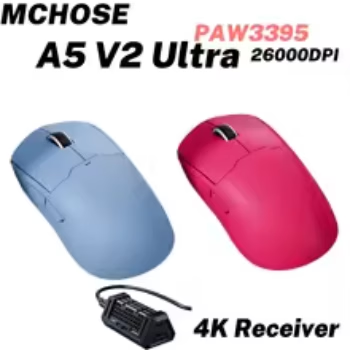

The MCHOSE A5 Ultra Wireless Gaming Mouse is designed for PC gamers who want lightweight handling, a high-performance optical sensor, flexible wireless connectivity, and competitive gaming features without moving into the bulky design of many traditional gaming mice. With its PixArt PAW3395 sensor, up to 26,000 DPI, tri-mode connectivity, lightweight body, high polling-rate support, and responsive switches, the A5 Ultra is particularly relevant to U.S. gamers building setups for FPS, battle royale, MOBA, strategy, casual gaming, and everyday PC use.
View MCHOSE A5 Ultra Wireless Gaming Mouse
For U.S. shoppers searching for a wireless gaming mouse, lightweight gaming mouse, 26,000 DPI gaming mouse, PAW3395 gaming mouse, 4K wireless gaming mouse, or a compact gaming mouse for competitive PC play, the MCHOSE A5 Ultra offers an interesting combination of specifications in a relatively streamlined design.
This complete guide explores the MCHOSE A5 Ultra’s sensor, polling rate, wireless modes, weight, shape, switches, battery capacity, software possibilities, gaming performance, grip suitability, FPS applications, productivity use, and important factors American buyers should consider before purchasing.

What Is the MCHOSE A5 Ultra Wireless Gaming Mouse?
The MCHOSE A5 Ultra is a lightweight gaming mouse built around a symmetrical all-around shape and a performance-focused internal platform. It is part of MCHOSE’s A5 mouse family, which includes several variants with different chips, polling rates, batteries, and connectivity options.
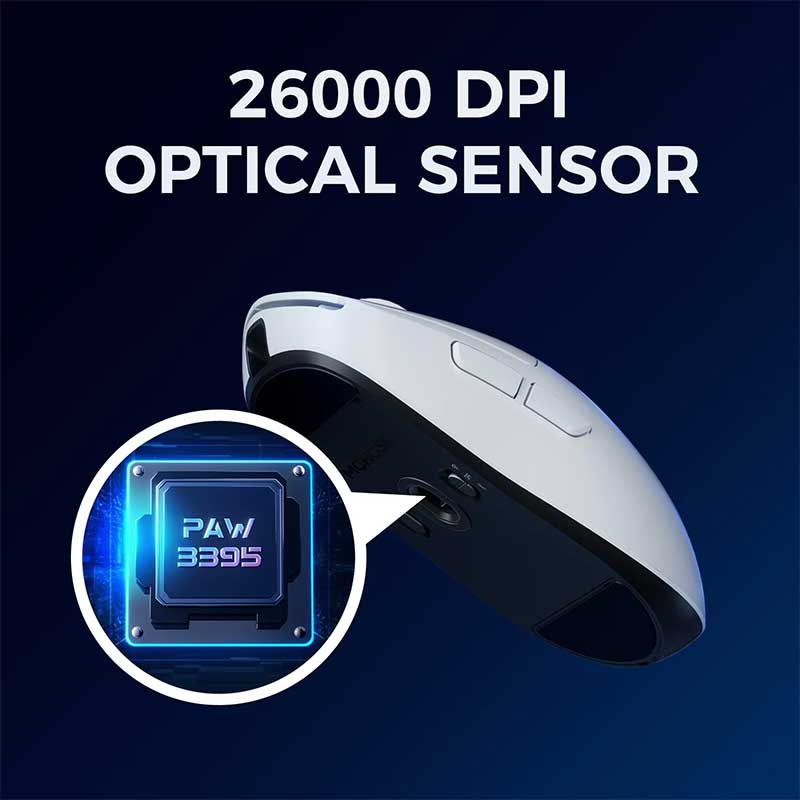
The A5 Ultra version uses a PixArt PAW3395 optical sensor capable of up to 26,000 DPI. It supports wired USB-C operation, 2.4 GHz wireless connectivity, and Bluetooth, giving users three connection methods for gaming and everyday computing.
The mouse weighs approximately 59 grams and measures about 121.6 × 61.5 × 37.7 mm. Those dimensions place it within the lightweight compact-to-medium gaming-mouse category rather than the large ergonomic category.
Key MCHOSE A5 Ultra Specifications
- Model: MCHOSE A5 Ultra
- Sensor: PixArt PAW3395 optical sensor
- Maximum DPI: Up to 26,000 DPI
- Connectivity: Wired USB-C, 2.4 GHz wireless, Bluetooth
- Polling rate: Up to 8K wired and 4K wireless depending on receiver and setup
- Weight: Approximately 59 g
- Dimensions: Approximately 121.6 × 61.5 × 37.7 mm
- Battery: 500 mAh
- Main switches: Omron switches rated for up to 60 million clicks
- Scroll wheel encoder: TTC Gold
- Feet: PTFE glides
- Shape: Symmetrical all-around gaming shape
Why the A5 Ultra Specifications Matter
Gaming-mouse specifications are useful only when they contribute to control, responsiveness, comfort, and reliability. The A5 Ultra combines several features commonly associated with competitive gaming mice without making the mouse excessively heavy or complicated.
PixArt PAW3395 Sensor Performance
The PixArt PAW3395 is one of the most important components of the MCHOSE A5 Ultra. The sensor tracks physical mouse movement and converts it into cursor movement on the screen.
A capable gaming sensor matters because competitive players need consistent tracking during rapid flicks, slow precision movements, recoil control, target switching, and large sweeping motions across a mouse pad.
Up to 26,000 DPI
The A5 Ultra supports sensitivity levels up to 26,000 DPI. DPI determines how far the cursor moves in relation to physical mouse movement.
Most competitive gamers will not actually play at 26,000 DPI. Common gaming sensitivities are typically much lower. However, a high sensor ceiling indicates the broader technical capability of the sensor and allows extensive customization.
Lower DPI for FPS Gaming
Many FPS players prefer relatively low or moderate DPI because it provides greater physical control during aiming. Settings such as 400, 800, or 1600 DPI are frequently used as starting points, with in-game sensitivity adjusted separately.
The ideal setting depends on monitor resolution, mouse-pad size, game sensitivity, grip style, and personal muscle memory.
Higher DPI for Desktop Productivity
Higher DPI values can be convenient for navigating large monitors or multi-monitor workstations because they reduce the amount of physical movement required to move the cursor across the screen.
DPI Alone Does Not Determine Gaming Skill
A very high maximum DPI does not automatically make a gamer more accurate. Consistency, mouse control, practice, sensitivity settings, frame rate, display performance, and personal technique all contribute to aiming performance.

Lightweight 59-Gram Design for Fast Gaming
Weight has become one of the most important considerations in modern gaming mice. The MCHOSE A5 Ultra weighs approximately 59 grams, placing it firmly in the lightweight category.
Why Lightweight Mice Are Popular
A lighter mouse generally requires less force to start, stop, and redirect. This can be beneficial in games where players make rapid repeated aiming adjustments.
For FPS games in particular, lightweight mice can make wide flicks and fast target transitions feel less physically demanding.
Reduced Fatigue During Long Gaming Sessions
Gamers who play for several hours may also appreciate a lighter mouse because less mass needs to be moved repeatedly across the desk.
However, comfort is influenced by more than weight. Shape, hand size, grip style, mouse-pad friction, and desk posture are equally important.
Lightweight Does Not Mean Fragile
A low mouse weight does not necessarily mean the product is designed to feel weak. Modern gaming mice achieve lower weight through efficient internal layouts, optimized shell construction, and compact battery systems.
Players Coming From Heavy Mice May Need Adjustment Time
If you currently use a mouse weighing 90 to 120 grams, a 59-gram model may initially feel unusually fast. Allowing several gaming sessions for adaptation can help develop consistent control.
Tri-Mode Connectivity Gives the A5 Ultra More Flexibility
One of the strongest features of the MCHOSE A5 Ultra is its three connection modes: 2.4 GHz wireless, Bluetooth, and wired USB-C.
2.4 GHz Wireless for Gaming
The 2.4 GHz connection is the primary choice for performance-focused wireless gaming. A dedicated receiver is designed to provide a faster and more responsive connection than conventional Bluetooth.
This mode is particularly relevant for FPS games, battle royale titles, action games, and other applications where input responsiveness matters.
Bluetooth for Everyday Computing
Bluetooth prioritizes convenience. It can be useful with laptops or devices where you want to avoid occupying a USB port with a dedicated wireless receiver.
Bluetooth is generally more appropriate for office work, browsing, travel, and casual computer use than maximum-performance competitive gaming.
USB-C Wired Mode
Wired mode provides a direct connection to the computer and can be useful while charging the mouse or when wireless operation is unnecessary.
The ability to continue using the mouse while connected by cable can reduce downtime when the battery becomes low.
Switch Connection Modes According to the Task
A practical setup could use 2.4 GHz for competitive gaming, Bluetooth for a secondary laptop, and USB-C when charging or troubleshooting connectivity.
High Polling Rate Support for Competitive Gaming
Polling rate describes how frequently a mouse reports its position to the computer. A standard gaming mouse commonly operates at 1000 Hz, meaning it can send movement data roughly 1,000 times per second.
The MCHOSE A5 Ultra supports higher polling-rate configurations, including up to 8K wired and up to 4K wireless with the appropriate receiver and configuration.
What 4K Polling Means
A 4,000 Hz polling rate allows the mouse to report data significantly more frequently than a conventional 1,000 Hz gaming mouse.
On high-refresh-rate monitors and powerful gaming systems, this may contribute to smoother-feeling cursor updates and reduced input intervals.
What 8K Wired Polling Means
An 8,000 Hz polling rate represents an even higher report frequency when operating in supported wired configurations.
Do All Gamers Need 4K or 8K?
No. A well-performing 1000 Hz mouse is already highly responsive for most players. Higher polling rates are most relevant to enthusiasts using high-refresh displays, competitive games, and sufficiently powerful systems.
Higher Polling Rates Can Increase System and Battery Demand
Higher report rates can increase CPU activity and may consume additional battery power in wireless operation. Players should balance maximum specifications against practical battery life and system performance.

Omron Switches and Click Performance
The main buttons of a gaming mouse are among its most heavily used components. Competitive games may require thousands of clicks during repeated sessions.
The MCHOSE A5 Ultra uses Omron main switches rated for up to 60 million clicks.
Why Switch Durability Matters
Mouse buttons experience constant mechanical stress. A higher rated click lifespan provides useful durability information, although actual lifespan can vary according to usage and manufacturing tolerances.
Click Feel Matters Too
Durability is only one aspect of a mouse switch. Gamers also care about actuation force, sound, tactile response, pre-travel, post-travel, and button-shell design.
Gaming Applications
Responsive primary buttons are particularly important in shooters, MOBAs, real-time strategy games, and action titles where repeated rapid clicking is common.
60 Million Clicks Is a Rating, Not a Guarantee
Switch-lifespan figures are laboratory ratings. Real-world durability can vary according to usage pattern, environmental conditions, and individual component variation.
TTC Gold Scroll Wheel Encoder
The A5 Ultra uses a TTC Gold wheel encoder. The encoder determines how scrolling movement is registered.
Why Scroll-Wheel Control Matters in Games
Gamers frequently use the scroll wheel for weapon switching, inventory navigation, camera control, ability selection, or custom commands.
Everyday Productivity Benefits
A predictable scroll wheel is equally valuable for browsing websites, navigating spreadsheets, editing timelines, reading long documents, and working through creative applications.
Customize Wheel Functions When Software Allows
Depending on available driver support, users may be able to customize wheel-button behavior and other mouse functions according to individual workflow.
500 mAh Battery for Wireless Gaming
The MCHOSE A5 Ultra incorporates a 500 mAh battery, giving it greater capacity than many extremely lightweight mice that use smaller batteries to reduce weight.
Battery Life Depends on Settings
Wireless battery endurance varies significantly according to polling rate, sleep settings, connection mode, usage intensity, and other configuration factors.
A lower polling rate generally places less demand on the battery than maximum-performance wireless settings.
Charge Through USB-C
USB-C charging makes it convenient to recharge the mouse using a compatible cable while continuing to use wired mode when necessary.
Choose Performance Settings According to Your Routine
Players who prioritize maximum responsiveness can use higher polling rates, while users who value longer intervals between charging sessions can choose more conservative settings.

Symmetrical Shape and Grip Compatibility
Specifications matter, but shape often determines whether a mouse actually feels comfortable. The MCHOSE A5 Ultra uses a symmetrical all-around shape rather than a heavily sculpted right-handed ergonomic design.
Claw Grip
Claw-grip users typically contact the rear portion of the mouse with the palm while keeping the fingers arched over the buttons. A relatively compact symmetrical shape can work well for this style depending on hand dimensions.
Fingertip Grip
Fingertip-grip users control the mouse primarily with the fingers while minimizing palm contact. Lower mouse weight can be especially useful because fingertip movement relies heavily on small, rapid adjustments.
Palm Grip
Palm-grip suitability depends strongly on hand size. Users with smaller hands may find the A5 Ultra more suitable for palm contact than people with very large hands.
Measure Your Current Mouse for Comparison
The A5 Ultra measures approximately 121.6 mm long, 61.5 mm wide, and 37.7 mm tall. Comparing these measurements with a mouse you already find comfortable can provide a better idea of fit than relying only on product photographs.
MCHOSE A5 Ultra for FPS Gaming
The feature combination of the A5 Ultra is particularly relevant to first-person shooters.
Low Weight for Flick Shots
A 59-gram mouse can move quickly across a large gaming mouse pad with relatively little force, making it suitable for players using low in-game sensitivity.
PAW3395 Sensor for Precision Tracking
Consistent sensor tracking supports recoil control, target following, micro-adjustments, and rapid target switching.
High Polling Rate for Responsive Input
Competitive players with high-refresh displays may appreciate the option to experiment with polling rates above 1000 Hz.
PTFE Feet for Smooth Movement
PTFE mouse feet are designed to reduce friction between the mouse and compatible mouse-pad surfaces.
Mouse Pad Choice Still Matters
A control-oriented cloth pad produces a different experience from a fast hard surface or glass mouse pad. The best combination depends on the player’s sensitivity and preferred stopping power.
Popular FPS Games That Fit the A5 Ultra’s Design
The A5 Ultra’s lightweight shape and performance specifications can make it suitable for a broad variety of competitive shooters.
- Counter-Strike 2
- VALORANT
- Call of Duty
- Overwatch 2
- Apex Legends
- Fortnite
- Rainbow Six Siege
- PUBG
- The Finals
- Battlefield
Low-Sensitivity Players
Players using low sensitivity often move the mouse across a large area of the pad. Lightweight construction can make these repeated movements easier.
High-Sensitivity Players
High-sensitivity gamers rely more heavily on small wrist and fingertip adjustments. A compact symmetrical shape can provide useful control for this style as well.
Experiment Rather Than Copying Professional Settings
Professional player settings can provide a useful reference, but sensitivity should ultimately match your own hand control, monitor setup, mouse pad, and comfort.
MCHOSE A5 Ultra for MOBA and Strategy Games
Although much of the marketing around lightweight gaming mice focuses on shooters, the A5 Ultra can also work effectively for MOBA and strategy players.
Rapid Clicking
Games such as League of Legends and Dota 2 can involve frequent movement commands and repeated clicking, making button consistency and lightweight control valuable.
Precise Cursor Movement
Strategy games often require accurate unit selection, map navigation, menu interaction, and precise cursor positioning.
Comfort During Extended Matches
Lower mouse weight may reduce some of the repetitive physical effort associated with extended sessions.
Button Count Is More Minimal Than MMO Mice
Players who require a large number of side buttons for complex MMO command layouts may prefer a specialized MMO mouse. The A5 Ultra follows a more streamlined competitive gaming design.
Using the A5 Ultra for Work and Productivity
A gaming mouse does not need to remain limited to games. Tri-mode connectivity makes the A5 Ultra relevant to mixed gaming and work setups.
Bluetooth for Laptop Work
Bluetooth can be convenient when working from a laptop without wanting to use a USB receiver.
2.4 GHz for a Desktop Gaming PC
The dedicated wireless receiver can remain connected to the gaming desktop while Bluetooth is used with another device.
High DPI for Multiple Monitors
Users working across two or three displays may prefer higher DPI settings because the cursor can travel across large screen areas with less physical mouse movement.
Lightweight Control for Creative Work
Photo editing, graphic design, video editing, CAD navigation, web development, and general office work can all benefit from a responsive mouse.
Create Separate Profiles if Supported
If the available software supports saved configurations, gamers can use one sensitivity profile for competitive play and another for everyday desktop work.
Gaming Mouse Software and Customization
Performance-focused gaming mice often provide software or driver support for adjusting sensitivity, button functions, polling rate, and other settings.
DPI Adjustment
Users can select sensitivity settings suited to individual games and desktop tasks.
Polling Rate Selection
Reducing polling rate can conserve resources and battery life, while higher settings prioritize responsiveness.
Button Assignment
Programmable functions can make side buttons useful for browser navigation, push-to-talk, melee attacks, utility commands, or productivity shortcuts.
Use Official Compatible Software
When downloading mouse drivers or configuration utilities, use the manufacturer’s official or otherwise trusted source appropriate to the exact A5 Ultra variant.
PTFE Mouse Feet and Glide Performance
The A5 Ultra uses PTFE glides, a common material in performance gaming mice because of its low-friction characteristics.
Why Mouse Feet Matter
The sensor determines tracking, but the feet determine how the mouse physically moves across the surface.
Worn, damaged, or dirty feet can change glide characteristics even when the sensor performs perfectly.
Keep the Mouse Pad Clean
Dust, skin oils, food particles, and debris can increase friction and affect both glide and sensor consistency.
Allow New Feet to Break In
Fresh PTFE feet can sometimes feel different during the first several hours of use. Their glide may become more consistent after normal use.

MCHOSE A5 Ultra Product Video
The following product video can help shoppers examine the mouse design, proportions, styling, and other visible details before purchasing.
What to Look for in the Video
Pay attention to the shell profile, button placement, side shape, scroll wheel, finish, overall dimensions, and how the mouse compares visually with the user’s hand.
Remember That Hand Size Affects Perceived Scale
A mouse can appear larger or smaller in promotional footage depending on the hand holding it. Always compare the official dimensions with your current mouse when evaluating fit.
MCHOSE A5 Ultra Versus a Standard Office Mouse
The difference between the A5 Ultra and a basic wireless office mouse extends beyond appearance.
Sensor Capability
The PAW3395 gaming sensor offers a much broader performance envelope than sensors typically used in inexpensive office peripherals.
Polling Rate
Standard office mice often use relatively conservative report rates, while the A5 Ultra supports gaming-focused high polling configurations.
Weight
At roughly 59 grams, the A5 Ultra is substantially lighter than many battery-powered general-purpose wireless mice.
Switches
Omron gaming switches are designed around repeated clicking and provide a stated durability rating of up to 60 million clicks.
Office Users May Not Need Maximum Performance Settings
For spreadsheets, browsing, and general work, maximum polling rates and extremely high DPI values are unnecessary. Lower settings may provide a more practical balance.
MCHOSE A5 Ultra Versus Heavier Gaming Mice
Some gamers still prefer heavier mice because added mass can provide a more planted feeling during slower movements.
Advantages of a Lightweight Mouse
- Less force required for rapid movement
- Fast direction changes
- Useful for low-sensitivity FPS gaming
- Potentially less repetitive movement fatigue
- Easy fingertip adjustments
Advantages of a Heavier Mouse
- More planted physical feeling
- Some users find slow movements easier to control
- Can feel more substantial in larger hands
Weight Preference Is Personal
There is no universal ideal mouse weight. Players should consider their current mouse, sensitivity, grip, game selection, and desired movement style.
How to Choose the Right DPI Setting
Finding the correct sensitivity is more important than simply choosing the highest available DPI.
Start at 800 or 1600 DPI
These values provide practical starting points for many PC gamers. Adjust in-game sensitivity afterward until aiming feels controlled and repeatable.
Give Your Settings Time
Changing sensitivity every few minutes can make it difficult to build muscle memory. Once you find a comfortable range, use it consistently for several sessions.
Adjust for Mouse-Pad Size
A large desk mat allows lower sensitivity because the mouse has more physical travel space. A small mouse pad may require higher sensitivity.
Use Consistent Windows Pointer Settings
Competitive players often prefer predictable operating-system pointer behavior so game sensitivity remains easier to manage consistently.
How to Set Up the MCHOSE A5 Ultra for Competitive Gaming
Step 1: Charge the Mouse
Begin with sufficient battery capacity so performance testing is not interrupted.
Step 2: Connect Through 2.4 GHz Wireless
For competitive wireless gaming, use the dedicated receiver rather than Bluetooth.
Step 3: Install Compatible Software
Use the appropriate MCHOSE driver or configuration utility for the exact variant.
Step 4: Select DPI
Choose a comfortable sensitivity rather than maximizing the 26,000 DPI capability.
Step 5: Select Polling Rate
Begin at 1000 Hz if you are unsure, then test higher rates if your system and receiver configuration support them.
Step 6: Configure Side Buttons
Assign functions according to your main game or productivity workflow.
Step 7: Test the Mouse in Practice Modes
Use aim trainers, practice ranges, bot matches, or casual sessions before making major sensitivity changes during ranked games.
Change One Variable at a Time
If you simultaneously change DPI, polling rate, mouse pad, grip, and game sensitivity, it becomes difficult to determine which adjustment improved or reduced control.
Who Should Consider the MCHOSE A5 Ultra?
Competitive FPS Players
The PAW3395 sensor, lightweight body, high polling-rate capability, and PTFE feet make the A5 Ultra particularly relevant to FPS-focused setups.
Gamers Who Prefer Lightweight Mice
Players transitioning from a heavier gaming mouse may appreciate the approximately 59-gram design.
Users Who Need Multiple Connection Modes
Tri-mode connectivity can be valuable for people switching between a gaming desktop, work laptop, and wired configuration.
Gamers Using High-Refresh Monitors
Users with 144 Hz, 240 Hz, 360 Hz, or faster displays may be particularly interested in experimenting with higher polling rates.
Students and Remote Workers Who Also Game
Bluetooth and wireless connectivity make the A5 Ultra practical beyond gaming, especially for mixed work-and-play setups.
Who May Prefer Another Mouse?
Users who need a large ergonomic right-handed shape, many MMO side buttons, an extremely heavy mouse, or a specialized vertical design may be better served by a different category.
What U.S. Buyers Should Check Before Ordering
Gaming mice often have multiple variants with similar names. Reviewing the exact selected model is important before checkout.
Confirm the A5 Ultra Variant
Make sure the selected product is the A5 Ultra rather than the standard A5, A5 Pro, A5 Pro Max, or another A5-series version.
Check Included Receiver Information
High wireless polling rates can depend on the receiver supplied with or selected for the specific package. Confirm what is included with the exact variation you plan to buy.
Check Color Selection
Different listings may offer black, white, blue, pink, berry red, or other colors depending on availability.
Compare Physical Dimensions
The approximately 121.6 × 61.5 × 37.7 mm dimensions should be compared with a mouse that already fits your hand comfortably.
Review Shipping and Return Policies
American shoppers ordering internationally should review delivery estimates, tracking, return conditions, and applicable seller policies.
Keep Packaging Until You Confirm Fit and Function
Retaining the original box and accessories can simplify returns or exchanges where permitted.
Frequently Asked Questions About the MCHOSE A5 Ultra
What sensor does the MCHOSE A5 Ultra use?
The A5 Ultra uses the PixArt PAW3395 optical gaming sensor.
What is the maximum DPI?
The mouse supports up to 26,000 DPI.
Is the MCHOSE A5 Ultra wireless?
Yes. It supports 2.4 GHz wireless operation as well as Bluetooth and wired USB-C connectivity.
How much does the A5 Ultra weigh?
The A5 Ultra weighs approximately 59 grams, depending on the exact configuration and measurement method.
What is the battery capacity?
The A5 Ultra uses a 500 mAh battery.
Does it support Bluetooth?
Yes. Bluetooth is one of the available connection modes on the A5 Ultra.
Does it support 4K polling?
The A5 Ultra supports high-rate wireless operation up to 4K with the appropriate receiver and configuration.
Does it support 8K?
Specifications for the A5 Ultra list wired polling support up to 8K in compatible configurations.
What switches does the mouse use?
The primary buttons use Omron switches rated for up to 60 million clicks.
What scroll-wheel encoder does it use?
The mouse uses a TTC Gold wheel encoder.
Is the MCHOSE A5 Ultra good for FPS gaming?
Its low weight, PAW3395 sensor, high polling capability, PTFE feet, and symmetrical shape make it particularly relevant to FPS gaming.
Can I use the A5 Ultra for work?
Yes. Bluetooth, 2.4 GHz wireless, wired operation, adjustable DPI, and a lightweight design make it useful for everyday computing as well.
Can I use it while charging?
Wired USB-C operation provides a practical way to continue using the mouse while connected by cable.
Is 26,000 DPI necessary?
Most gamers will use much lower sensitivity. The high maximum value represents sensor capability rather than a recommended everyday gaming setting.
Should I use 4K polling all the time?
Not necessarily. Higher polling can be valuable for competitive gaming but may increase battery and system demand. A 1000 Hz setting remains highly responsive for most games.
Final Thoughts on the MCHOSE A5 Ultra Wireless Gaming Mouse
The MCHOSE A5 Ultra Wireless Gaming Mouse brings together several features that modern PC gamers frequently look for: low weight, a capable optical sensor, multi-mode connectivity, high polling-rate support, durable switches, PTFE feet, and a rechargeable battery.
The PixArt PAW3395 sensor provides a strong technical foundation with sensitivity support up to 26,000 DPI. While most players will use a much lower setting, the sensor’s broad performance range gives users flexibility across competitive games and desktop applications.
The approximately 59-gram body is one of the A5 Ultra’s most significant advantages. Competitive FPS players who use low sensitivity often perform repeated large mouse movements, and reducing mouse mass can make those motions feel faster and less demanding.
Tri-mode connectivity adds versatility. A gamer can use 2.4 GHz wireless for performance-focused play, Bluetooth with a laptop or secondary computer, and wired USB-C when charging or when a direct cable connection is preferred.
The high polling-rate capabilities also make the A5 Ultra attractive to enthusiasts. Up to 4K wireless and 8K wired configurations provide options beyond the conventional 1000 Hz standard, particularly for players using high-refresh-rate gaming monitors.
Omron switches rated for up to 60 million clicks, a TTC Gold scroll-wheel encoder, PTFE glides, and a 500 mAh battery round out the performance-focused package.
View MCHOSE A5 Ultra Product Details
Before purchasing, U.S. buyers should verify the exact A5 Ultra variation, receiver included in the package, available polling-rate support, selected color, shipping terms, and return policy. Comparing the 121.6 × 61.5 × 37.7 mm dimensions with a mouse you already find comfortable can also help determine whether the shape is suitable for your hand and grip.
For gamers searching for a lightweight wireless gaming mouse, PAW3395 gaming mouse, 26,000 DPI gaming mouse, or 4K wireless gaming mouse, the MCHOSE A5 Ultra offers a competitive combination of performance-focused specifications and practical everyday flexibility for modern PC setups.